MagicMirror Forum
    • Recent
    • Tags
    • Unsolved
    • Solved
    • MagicMirror² Repository
    • Documentation
    • 3rd-Party-Modules
    • Donate
    • Discord
    • Register
    • Login
    A New Chapter for MagicMirror: The Community Takes the Lead
    Read the statement by Michael Teeuw here.

    Pi Zero

    Scheduled Pinned Locked Moved Hardware
    pizero
    37 Posts 10 Posters 55.0k Views 12 Watching
    Loading More Posts
    • Oldest to Newest
    • Newest to Oldest
    • Most Votes
    Reply
    • Reply as topic
    Log in to reply
    This topic has been deleted. Only users with topic management privileges can see it.
    • N Offline
      Neokamikaze
      last edited by

      Ok thanks

      1 Reply Last reply Reply Quote 0
      • N Offline
        Neokamikaze
        last edited by

        Now is ok for the Pi0. But just for install Kweb.
        i use this commands:

        wget http://steinerdatenbank.de/software/kweb-1.7.3.tar.gz
        tar -xzf kweb-1.7.3.tar.gz
        cd kweb-1.7.3
        ./debinstall
        1 Reply Last reply Reply Quote 0
        • N Offline
          nigel-daniels
          last edited by

          I’ve just tried out running MM2 on a Pi0. It all seems to load up using the server only but when I fire up kweb I just end up with a blank screen. This was a new install so I used the basic config file and added my own data (e.g. weather app key, etc.). I’m new to using MM2 as well so I was not sure if I should be seeing lines like:

          No helper found for module: nnnn

          As far as I can tell the calendar and newsfeed have started, but nothing is displayed :(

          Any recommendations on the diagnostic steps I need to take?

          1 Reply Last reply Reply Quote 0
          • KirAsh4K Offline
            KirAsh4 Moderator
            last edited by

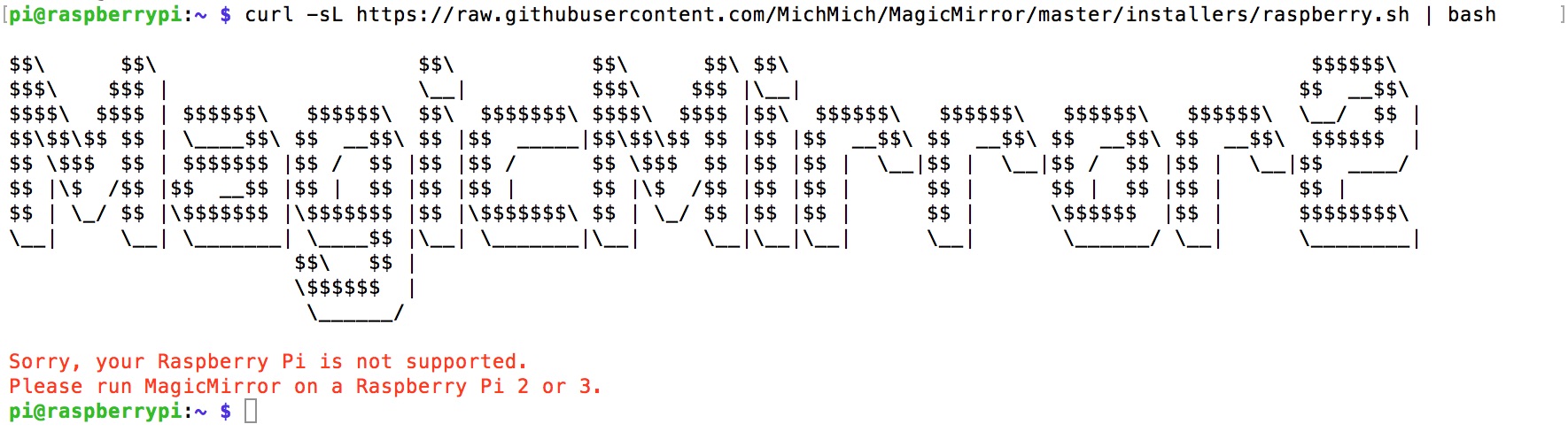
            Hopefully the community can help you out here as the Pi0 is not supported. Some people may have gotten it to work though …

            A Life? Cool! Where can I download one of those from?

            N 1 Reply Last reply Reply Quote 0
            • MitchfarinoM Offline
              Mitchfarino Module Developer
              last edited by

              @evos I’ve only just seen this. Awesome work! I’ll check it out!

              This means I can free up my Pi3 for something else

              1 Reply Last reply Reply Quote 0
              • N Offline
                Neokamikaze
                last edited by

                Hi All,

                MM2 works on Pi0. If you want install MM2 on Pi0 use the @evos process or use my install file.
                MagicMirrorInstallPi0.sh

                N 2 Replies Last reply Reply Quote 1
                • N Offline
                  nigel-daniels @Neokamikaze
                  last edited by

                  @Neokamikaze thanks, I’d manually got to the same sort of place the script would have got me to… It would have got me there faster ;) Further testing has shown it was my set up of kweb that was at fault not MM2 (the page loaded correctly with firefox). I was testing the page in regular browser mode before using kiosk mode so I can perfect my own config.sh. It turned out I had jScript and cookies off, with these enabled fixed the issue I was seeing.

                  Thanks for all your great work on getting MM2 working on the Pi0!

                  1 Reply Last reply Reply Quote 0
                  • N Offline
                    nigel-daniels @KirAsh4
                    last edited by

                    @KirAsh4 it may be worth getting the support statement updated to the same level as using the Pi1, the Pi0 will run MM2 quite happily using ‘node serveronly’… in my case it turn out you just need to be sure kweb is set up correctly if that is the browser of choice ;)

                    1 Reply Last reply Reply Quote 0
                    • D Offline
                      darkeagl105
                      last edited by

                      I can confirm. It is working with pi 1 in server only mode and kweb. Just some modules don’t show like mmm-sonos. If you connect with anotrr machine with chrome it works normally so it is a browser problem :( and I couldn’t find a solution for that till now

                      N 1 Reply Last reply Reply Quote 0
                      • N Offline
                        nigel-daniels @darkeagl105
                        last edited by

                        @darkeagl105 I found out with kweb you must enable cookies and Java Script for anything to work. So far I’ve only tested with the default modules, if I find out more about the non-default modules I’ll post here. Kweb is nice and light, I tried firefox but the Pi0 struggles to run it.

                        D 1 Reply Last reply Reply Quote 0
                        • D Offline
                          darkeagl105 @nigel-daniels
                          last edited by

                          @nigel-daniels I know tried it with all kind of browser and stick with kweb. Will try this weekend with my settings and a pi0 to confirm it as well. I was using a Pi1 B+

                          1 Reply Last reply Reply Quote 0
                          • N Offline
                            nigel-daniels
                            last edited by

                            Has anyone encountered the following issue with kweb. I got everything up and running on the Pi0 and used the platform to develop a new module MMM-FAA-Delay. I then stopped VNC from auto starting, set the boot to console with pi logged in, reinstated the autostart MM2 and kweb script. However this time I also set the screen rotation in config.txt. Everything works fine but it looks like kweb is still using the previous screen ratio even though it’s rotated. i.e. it only fills the top third or so of the screen and the left hand side is ‘off screen’.

                            Any thoughts?

                            N 1 Reply Last reply Reply Quote 0
                            • N Offline
                              nigel-daniels @nigel-daniels
                              last edited by

                              @nigel-daniels Follow up I just did a full reinstall, Kweb now seems to get the screen width of the rotated screen but still only uses the upper third portion of the screen :( Any thoughts on how I tell it the screen height.

                              N 1 Reply Last reply Reply Quote 0
                              • N Offline
                                nigel-daniels @nigel-daniels
                                last edited by

                                @nigel-daniels Ok deeper digging into the kweb code has revealed that the ratio options are hard coded :( I’ve put a request to the Kweb authors for this to be an option. As a short term hack you can install kweb as per @Neokamikaze suggested, then:

                                git clone https://github.com/ekapujiw2002/kweb
                                sudo apt-get install webkitgtk-3.0

                                Then open up kweb.c and change one of the parameter settings to be the ratio you need, for example I set 8 to be 1080x1920. Then make the kweb code and replace /usr/bin/kweb with your custom binary. Now alter the start.sh to use the number you chose for your custom ratio.

                                1 Reply Last reply Reply Quote 0
                                • N Offline
                                  nigel-daniels @Neokamikaze
                                  last edited by

                                  @Neokamikaze hi, what did you do to stop the screen from blanking? Having got the kweb and MM running perfectly I set this up to run without screen blanking an got the mirror in position… but it still blanks after about 10 mins+. The steps I took were:

                                  Turn off the monitors energy saving mode.

                                  I then edited ~/.config/lxsession/LXDE-pi/autostart and /etc/xdg/lxsession/LXDE-pi/autostart commented out the screensaver line and added:

                                  @xset s off
                                  @xset -dpms
                                  @xset s noblank

                                  Finally in /etc/kbd/config I set the following to:

                                  BLANK_TIME=0
                                  BLANK_DPMS=off
                                  POWERDOWN_TIME=0

                                  What am I missing here?

                                  1 Reply Last reply Reply Quote 0
                                  • N Offline
                                    Neokamikaze
                                    last edited by

                                    Hi @nigel-daniels, i don’t touch kweb configuration. I just add on “~/.config/lxsession/LXDE-pi/autostart” file this:

                                    @lxpanel --profile LXDE-pi
                                    @pcmanfm --desktop --profile LXDE-pi
                                    @xscreensaver -no-splash
                                    

                                    and in “/etc/xdg/lxsession/LXDE-pi/autostart” this:

                                    @lxpanel --profile LXDE-pi
                                    @pcmanfm --desktop --profile LXDE-pi
                                    @xscreensaver -no-splash
                                    @xset s noblank
                                    @xset s off
                                    @xset -dpms
                                    

                                    After for configure my display i change the configuration in “/boot/config.txt”.

                                    N 1 Reply Last reply Reply Quote 0
                                    • N Offline
                                      nigel-daniels @Neokamikaze
                                      last edited by

                                      @Neokamikaze HI thanks for the suggestion, I’ve ensured both my versions of these files match yours, but somewhere DPMS is being enabled… 10 mins in the screen blanks. I can see in the file /var/log/Xorg.0.log the following lines:

                                      [ 81.864] (II) FBTURBO(0): enabled fbdev copyarea acceleration
                                      [ 81.865] (==) FBTURBO(0): Backing store enabled
                                      [ 81.875] (==) FBTURBO(0): DPMS enabled
                                      [ 81.875] (II) FBTURBO(0): failed to enable hardware cursor

                                      Something somewhere is setting DPMS up and for some reason the xset -dpms command is being skipped. I’ll try adding the set command to the start.sh and see if that forces the issue.

                                      1 Reply Last reply Reply Quote 0
                                      • N Offline
                                        Neokamikaze
                                        last edited by

                                        Hi @nigel-daniels, if you use jessie i think there is a problem with DPMS. There is a GUI package for configure this. If you want test install “xscreensaver” package

                                        N 1 Reply Last reply Reply Quote 0
                                        • N Offline
                                          nigel-daniels @Neokamikaze
                                          last edited by

                                          @Neokamikaze Thanks I’ll give that a shot. This is Jessy, and it sounds like the sort of problem I’m seeing.

                                          Me thinks it will need to be in the morning now… gone midnight in my TZ so I’ll get screensaver on board and deal with pulling the mirror apart to get the minikbd plugged back in till then.

                                          I’ll let you know how it works out.

                                          N 1 Reply Last reply Reply Quote 0
                                          • N Offline
                                            nigel-daniels @nigel-daniels
                                            last edited by

                                            @nigel-daniels sigh ok tried that rebooted into the GUI and used the screensaver config to switch off the screensaver. Then reconfigured the system to log into the CLI and use the start.sh to kick of X/Kweb… 10 mins later a black screen. I’m running out of locations to try using the set commends, I even added them to the start.sh.

                                            1 Reply Last reply Reply Quote 0

                                            Hello! It looks like you're interested in this conversation, but you don't have an account yet.

                                            Getting fed up of having to scroll through the same posts each visit? When you register for an account, you'll always come back to exactly where you were before, and choose to be notified of new replies (either via email, or push notification). You'll also be able to save bookmarks and upvote posts to show your appreciation to other community members.

                                            With your input, this post could be even better 💗

                                            Register Login

                                            • 1
                                            • 2
                                            • 1 / 2
                                            • First post
                                              Last post
                                            Enjoying MagicMirror? Please consider a donation!
                                            MagicMirror created by Michael Teeuw.
                                            Forum managed by Sam, technical setup by Karsten.
                                            This forum is using NodeBB as its core | Contributors
                                            Contact | Privacy Policy