Read the statement by Michael Teeuw here.
MMM-AI
-
Hello guys,
This is my first module !
Well I give most of the credit to @sean who created the code as i’m not a dev at all .What I did is taking MMM-TriggerNotification and MMM-HTMLBox, and merge those 2 modules in one to create mine based on the idea I had.
https://github.com/ejay-ibm/MMM-AI
MMM-AI
MMM-AI is a simple module based on a mix of MMM-NotificationTrigger & MMM-HTMLBOX from eouia that allow to have animation of ‘AI’ kind when the assistant ( Alexa / MMM-Mk2assistant ) is in standby mode ( waiting for user instruction) or talking mode ( when assistant is replying ) triggered by Notification sent by these modules.
Screenshot
Standby animation Talking animation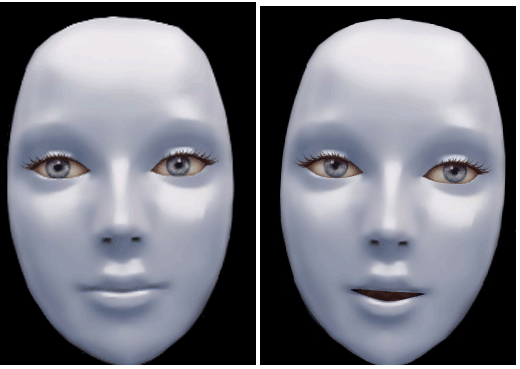
Full gif here :
https://github.com/ejay-ibm/MMM-AI/blob/master/jarvis-standby2.gif
https://github.com/ejay-ibm/MMM-AI/blob/master/jarvis-talk2.gif
Installation
In the MagicMirror/modules directory run :
git clone https://github.com/ejay-ibm/MMM-AI.gitConfiguration Sample
{
      module: "MMM-AI",
      position: "top_center",
      config: {
        width: "300px",
        height: "300px",
        refresh_interval_sec: 0, // you should not refresh, because content will be back to default value.
        content: `<img id="MY_ANIMATION" src="modules/MMM-AI/jarvis-standby2.gif"/>`,
        triggers: [
          {
            trigger: "HOTWORD_RESUME", // HOTWORD_LISTENING if you use MMM-HOTWORD  or HOTWORD_RESUME if you use MMM-AssistantMk2
            fires: [
              {
                fire: "standby_Image",
                payload: payload => {
                  var img = document.getElementById("MY_ANIMATION");
                  img.src = "modules/MMM-AI/jarvis-standby2.gif";
                  return payload;
                }
              }
            ]
          },
		{
            trigger: "ASSISTANT_UNDERSTOOD", // HOTWORD_SLEEPING if you use MMM-HOTWORD  or HOTWORD_PAUSE if you use MMM-AssistantMk2
            fires: [
              {
                fire: "Talk_Image",
                payload: payload => {
                  var img = document.getElementById("MY_ANIMATION");
                  img.src = "modules/MMM-AI/jarvis-talk2.gif";
                  return payload;
                }
              }
            ]
          }
        ]
      }
    },
Additional Info
please make sure you are up to date on the Mk2 assistant module for this module to work as expected
All other configuration sample from https://github.com/eouia/MMM-HTMLBOX & https://github.com/eouia/MMM-NotificationTrigger are applicable to this module.Thanks again to Sean : https://github.com/eouia/ who have created this code that I have merged for this module purpose.
Animated images are created by me using crazy talk and Photoshop I will work to create additional ones. -
If you have any idea on standby/talk animation I can create for this module feel free to propose them !
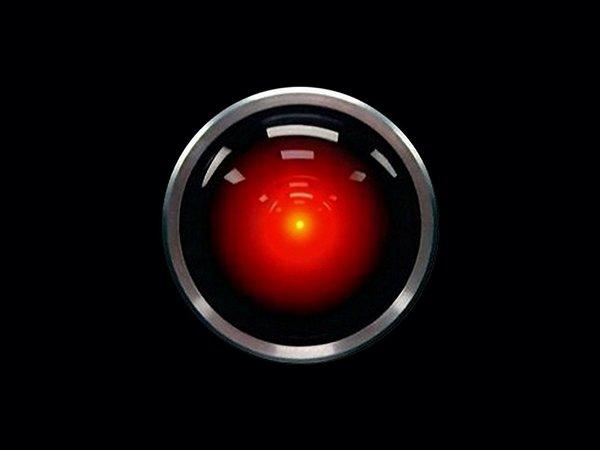
I’m planning to make an ‘HAL’ one
based on this image :
Ejay
-
@ejay-ibm great job. its working with GA on my mirror.
waiting to hear if you get it updated to start moving only on response. -
@teitlebot Hey the feature has been implemented,
Sorry i’m crawling under work and forgot to update ( I’ll update my repo in the week . )
You just need to update your Mk2 assisant ( Git Pull from MMM-Assistant folder)
@Sean the developer gently added new notification called ASSISTANT_UNDERSTOOD . Use that one to trigger the talking effect .That is my config.js sample :
module: "MMM-AI",
      position: "top_center",
      config: {
        width: "300px",
        height: "400px",
        refresh_interval_sec: 0, // you should not refresh, because content will be back to default value.
        content: `<img id="MY_ANIMATION" src="modules/MMM-AI/jarvis-standby2.gif"/>`,
        triggers: [
          {
            trigger: "HOTWORD_RESUME",
            fires: [
              {
                fire: "standby_Image",
                payload: payload => {
                  var img = document.getElementById("MY_ANIMATION");
                  img.src = "modules/MMM-AI/jarvis-standby2.gif";
                  return payload;
                }
              }
            ]

          },
                   {
            trigger: "HOTWORD_PAUSE",
            fires: [
              {
                fire: "VOLUME_STORE",
                //fire: "VOLUME_MUTE",
                exec: "amixer set Master 10% -q"
              }

            ]

          },

        {
            trigger: "ASSISTANT_UNDERSTOOD",
            fires: [
              {
                fire: "VOLUME_RESTORE",
                payload: payload => {
                  var img = document.getElementById("MY_ANIMATION");
                  img.src = "modules/MMM-AI/jarvis-talk2.gif";
                  return payload;
                }
              }
            ]
          }
        ]
      }
    },
Ejay
-
Would it be possible for the user to change the avatar to their personal likeness?
For example, be able to use a family member’s face, or an actor/actress, a cartoon character, etc. ?
Or like the HAL2000, maybe the Alexa bar or circle animations?
-
I would be interested in Max Headroom, with his tourette-style glitches included!!!
-
You might be interested in the following links:
https://avatarsdk.com/?_ga=2.125796682.1526809898.1553040863-987282811.1553040863
“Life’s Too Short To Dance With Ugly People”
Jim Hallock - 1995 -
@justjim1220
Yes everything is possible .
It’s just different gif ani .
So you can make gif with your family members from a video and convert it to gif .I’m using crazy head to transform a static picture into a moving / talking avatar .
Then some photoshop to finalize the gif.Ejay
-
@ejay-ibm Thanks
I would like to implement it a bit different.
I would like no image unless the mirror is called.
I found a trigger “ASSISTANT_RESPONSE_END : this notification will be bursted when Assistant’s voice responsing is ended.”
I just dont know what code I need to put to make the image not appear other than putting a blank gif file. I assume there is a proper code. -
@justjim1220 This is amazing
I was able to use the sample and also make an account but I cant figure how to get a gif from it to use in Magic Mirror. Any ideas? -
@teitlebot You need to export as a movie, Then make an import as frame in photoshop
This will give you an idea
https://graphicdesign.stackexchange.com/questions/46656/how-to-convert-a-video-file-into-an-animated-gif-in-photoshopEjay
-
@teitlebot I would use a black pixel image as no image
you can find all you need here
https://github.com/aureooms/pixelsEjay
-
@ejay-ibm thanks. I figured there was a proper way to code a picture to be gone but this will work I guess. Thanks
-
@teitlebot @Sean Any idea how I can get it to fade the face on and off from the black pixel?
-
@teitlebot Hi would do it from photophop as part of the animation . But their’s maybe a way to do it in javascript but that would need some additional implementation in the modules .
Working with the gif is more flexible in my taste .
Ejay
-
update to Sean,
Hi @Sean , Hi @ejay-ibm y sorry for the possible stupid question but it’s not clear to me what i should put in config file esp. in both trigger lines.
I am using both Mk2 AND hotword together… so a bit confusion here…trigger: "HOTWORD_RESUME", // HOTWORD_LISTENING if you use MMM-HOTWORD or HOTWORD_RESUME if you use MMM-AssistantMk2trigger: "ASSISTANT_UNDERSTOOD", // HOTWORD_SLEEPING if you use MMM-HOTWORD or HOTWORD_PAUSE if you use MMM-AssistantMk2Also the i am not able to make the jarvis-talk2.gif “talk”
thx for your clarification -
@bibi
This is my code, it workes welltriggers: [ { trigger: "ASSISTANT_RESPONSE_END", fires: [ { fire: "standby_Image", payload: payload => { var img = document.getElementById("MY_ANIMATION"); img.src = "modules/MMM-AI/jarvis-standby2.gif"; return payload; } } ] }, { trigger: "ASSISTANT_UNDERSTOOD", fires: [ { fire: "talk Image", payload: payload => { var img = document.getElementById("MY_ANIMATION"); img.src = "modules/MMM-AI/jarvis-talk2.gif"; return payload; } } ] } ] -
sorry,
it happens to me that the trigger does not work, ie the jarvis-standbye2.gif image always remains even when the assistant speaks.
I use both MMM-Hotword (2.1.0) and MMM-AssistentMk2 (3.1.1-1).
could someone help me?
my config is:{ module: "MMM-AI", position: "top_center", config: { width: "300px", height: "300px", refresh_interval_sec: 0, // you should not refresh, because content will be back to default value. content: `<img id="MY_ANIMATION" src="modules/MMM-AI/jarvis-standby2.gif"/>`, triggers: [ { trigger: "ASSISTANT_RESPONSE_END", fires: [ { fire: "standby_Image", payload: payload => { var img = document.getElementById("MY_ANIMATION"); img.src = "modules/MMM-AI/jarvis-standby2.gif"; return payload; } } ] }, { trigger: "ASSISTANT_UNDERSTOOD", fires: [ { fire: "talk Image", payload: payload => { var img = document.getElementById("MY_ANIMATION"); img.src = "modules/MMM-AI/jarvis-talk2.gif"; return payload; } } ] } ] } }, -
Hi,
How do you use this module? Do you need Alexa?
What changes are required to make it work?Thank you,
JM


Hello! It looks like you're interested in this conversation, but you don't have an account yet.
Getting fed up of having to scroll through the same posts each visit? When you register for an account, you'll always come back to exactly where you were before, and choose to be notified of new replies (either via email, or push notification). You'll also be able to save bookmarks and upvote posts to show your appreciation to other community members.
With your input, this post could be even better 💗
Register Login