MagicMirror Forum
    • Recent
    • Tags
    • Unsolved
    • Solved
    • MagicMirror² Repository
    • Documentation
    • 3rd-Party-Modules
    • Donate
    • Discord
    • Register
    • Login
    1. Home
    2. Bangee
    3. Posts
    A New Chapter for MagicMirror: The Community Takes the Lead
    Read the statement by Michael Teeuw here.
    Offline
    • Profile
    • Following 1
    • Followers 3
    • Topics 12
    • Posts 122
    • Groups 1

    Posts

    Recent Best Controversial
    • RE: PIR-Sensor - put your mirror to sleep if not used

      This is all 10 seconds. But there is noone in front of the mirror… :-(

      meteoblueForecast received a module notification: USER_PRESENCE from sender: MMM-PIR-Sensor
      logger.js (Zeile 20)
      newsfeed received a module notification: USER_PRESENCE from sender: MMM-PIR-Sensor
      logger.js (Zeile 20)
      clock received a module notification: USER_PRESENCE from sender: MMM-PIR-Sensor
      logger.js (Zeile 20)
      calendar received a module notification: USER_PRESENCE from sender: MMM-PIR-Sensor
      logger.js (Zeile 20)
      swisstransport received a module notification: USER_PRESENCE from sender: MMM-PIR-Sensor
      logger.js (Zeile 20)
      ....
      
      posted in Troubleshooting
      BangeeB
      Bangee
    • RE: PIR-Sensor - put your mirror to sleep if not used

      This PDF shows how to adjust your PIR Sensor.

      https://cdn.openimpulse.com/blog/wp-content/uploads/wpsc/downloadables/DYP-ME003_PIR_Sensor_Module_Datasheet.pdf

      Today, i don’t know why but after a few minutes the monitor turns off, but then it reactivates again without any motion in front of the mirror. Any sugestions?

      posted in Troubleshooting
      BangeeB
      Bangee
    • RE: PIR-Sensor - put your mirror to sleep if not used

      I’ve tried to use PIN 26. In my electron errorlog, there was this msg:

      [Error: digitalRead: IsInt32(arguments['pin']) === false]
      

      So I went back to PIN 22 and now my mirror starts again. :-)

      EDIT:

      New idea -> Try without ’ ';

      {
      module: 'MMM-PIR-Sensor’,
      config: {
      sensorPIN: 2 ,
      }
      }
      
      posted in Troubleshooting
      BangeeB
      Bangee
    • RE: Whitescreen after Reboot

      Thx, i got it.

      This module was using the log.log function

      https://github.com/SamLewis0602/MMM-Traffic?files=1

      posted in Troubleshooting
      BangeeB
      Bangee
    • Whitescreen after Reboot

      After rebooting my R PI 3 i got a whitescreen and a problem with electron:

      Error log:

      pi@raspberrypi:~/MagicMirror $ tail -f  /home/pi/.pm2/logs/mm-error-0.log
      npm verb cli [ '/usr/local/bin/node', '/usr/local/bin/npm', 'start' ]
      npm info using npm@3.8.3
      npm info using node@v5.10.1
      npm verb run-script [ 'prestart', 'start', 'poststart' ]
      npm info lifecycle magicmirror@2.0.0~prestart: magicmirror@2.0.0
      npm sill lifecycle magicmirror@2.0.0~prestart: no script for prestart, continuing
      npm info lifecycle magicmirror@2.0.0~start: magicmirror@2.0.0
      WARNING! Could not find config. Please create one.
      App threw an error when running [ReferenceError: Log is not defined]
      [ReferenceError: Log is not defined]
      

      Note from admin: Please use Markdown for your code/shell snippets so it is easier to read!

      posted in Troubleshooting
      BangeeB
      Bangee
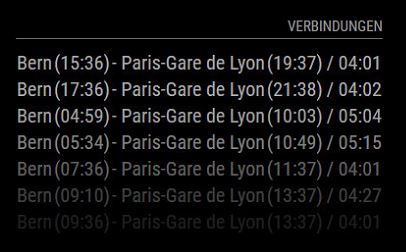
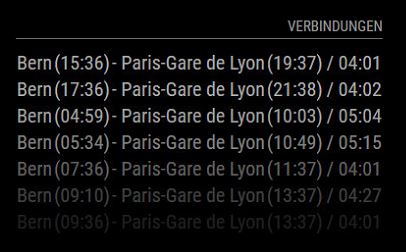
    • MMM-TrainConnections

      https://github.com/Bangee44/MMM-TrainConnections

      With this Module you’ll be able to display next trainconnections from your favorite departure station to an other in Europe.
      The API Base is https://transport.opendata.ch/

      0_1462363248494_MM_ST.JPG

      posted in Transport transportation
      BangeeB
      Bangee
    • RE: Where to buy good two way mirrors ?

      https://www.glastroesch.ch/glas/82-spionspiegel.html

      This is an adress for Switzerland, where I’ll buy my mirror.

      posted in Hardware
      BangeeB
      Bangee
    • RE: What Monitor did you use?

      I use this monitor:

      https://www.digitec.ch/de/s1/product/samsung-s24e650pl-24-60cm-250cdm-1920-x-1080-pixel-schwarz-monitor-5647268

      posted in Hardware
      BangeeB
      Bangee
    • RE: MMM-SwissTransport

      https://github.com/Bangee44/MMM-TrainConnections

      I’ve modified my script. Check out this one.

      0_1462282072441_MM_ST.JPG

      posted in Transport
      BangeeB
      Bangee
    • Meteoblue Current Weather Module

      I have modified the orignial CurrentWeather Module to use it with weatherinformations from www.meteoblue.com.

      [card:Bangee44/MMM-meteoblueCurrent]

      Please feel free to use it.

      Bangee

      posted in Utilities weather
      BangeeB
      Bangee
    • 1 / 1