@thgmirror - Thank you, but I am aware of this. I’m trying to help @PHAGE-GOV with his issue so I used your config. What I really need is for him to respond with with more details on his problem.
A New Chapter for MagicMirror: The Community Takes the Lead
Read the statement by Michael Teeuw here.
Read the statement by Michael Teeuw here.
 Offline
Posts
-
RE: MoonRise Help
-
RE: Backing up via GitHub repo
@arnedebeer - If you must. I make it a practice that I back up the
config.jsjust before I modify it. That way I don’t have a dozen identical copies of the file sitting around. It also lets me easily see when was the last time I changed the mirror.BitVise is good for this, as it will open a terminal window and an SCP window, which serves as a good reminder to copy the config file down before I do anything.
-
RE: MoonRise Help
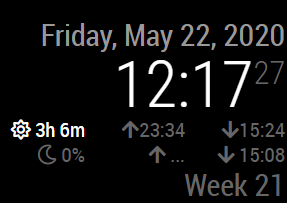
@thgmirror - Okay, so what is the clock module doing? Is it not showing you the sunrise/moonrise times? Is it showing anything at all?
I plugged your configuration into my mirror and got this:
-
RE: MoonRise Help
@PHAGE-GOV - Please provide a bit more detail. Is the module showing up at all? Are any modules showing up at all? Are you seeing incorrect information? Is the data loading but never completes?
Please post the relevant section of your
config.jsfile and we’ll look for obvious errors. Remember to use the markdown features of the forum. The relevant section is the{bracket just beforemodule: "clock"all the way through to the complimentary}, -
RE: Transparent glass in front of Acrylic Sheet to hold it together ?
Be sure to add a little room in your frame for wood expansion. Changes in humidity (and the fact that you’ve cut the wood into pieces) will make it expand slightly. If you don’t account for this, the wood will push on the sides of your acrylic, warping it.
It shouldn’t take much to give it enough slack. Maybe half a centimeter all around.
-
RE: Film vs Acrylic
My first mirror was with two-way acrylic and I would recommend glass instead. After I assembled my frame, the wood expanded in the humidity and pushed the acrylic on the sides, giving it a slight funhouse mirror effect.
-
RE: Backing up via GitHub repo
In all honesty I don’t think it’s necessary to back up your entire Magic Mirror. If you back up the
config.jsfile, you can rebuild your mirror pretty quickly. It will contain all of your API keys and a list of the modules you have installed. The hard part will be locating the Github repos to clone the repositories.And you did star all of the module repositories you need, right? That would put them all on a very convenient web page.
-
RE: ASUS Router App Info
@Deckard99 - Hopefully, ASUS has enabled an API on their products and not just a mobile CSS for their usual administration interface. I couldn’t find a developer link on their website but I’m sure a little searching around should let you know if they allow/encourage integration with their products.
If they just have a mobile skin on their UI, then you’ll probably have to handle authentication with the router and then scrape the status page to determine the information that you’re looking for.
-
RE: MM keeps freezing
@requiemmg IIRC, the lightning bolt went away with Raspbian Buster.
-
RE: MM keeps freezing
@requiemmg - I have some general troubleshooting suggestions, but unfortunately nothing approaching a solution.
For starters, you can examine the system log at
/var/log/syslogwhich may give you some insight to system-level events. My gut tells me it’s a power problem, but my gut is notoriously bad at debugging.Since you have two mirrors, I would back up your
config.jsfile on one and sacrifice it to the troubleshooting effort. Reflash the SD card, format the USB and reinstall Raspbian. Perform a barebones Mirror installation on it using @sdetweil’s script. Do not install anything other than the OS and Magic Mirror framework. Then wait and see if the freeze behavior affects the slicked mirror.If the rebuild mirror stays up, start adding things one at a time. I would start with the Lights-Out client as it is unknown to me and I am inherently suspicious of it.
-
RE: Backing up via GitHub repo
Have you considered forking the entire Magic Mirror repository? You could then adjust the gitignore file appropriately and have the entire thing available for you.
-
RE: MagicMirror Authenticator
Hmm. Interesting idea.
Work has given me an RSA security fob which provides a 2FA code all the time. For my personal use, I use the Yubico Authenticator both on PC and mobile, but I’ve used Google’s and Microsoft’s mobile app before.
There’s not really a practical difference between displaying the rolling code on a mirror and having the app taking up space on my desktop. I know nothing about how the 2FA apps are implemented so I don’t know where to begin on making a module for it.
Sounds like a neat project.
-
RE: Cronjob doesn't work with my MM
Allow me to deliver a gentle reminder to use the markdown features of the forum when posting code and logs.
-
RE: Motion detection: PIR sensor vs picamera
@elleclouds - If I understand you properly, then this is what you’re looking for: Motion Detection with RaspiCam Non-Module Version
-
RE: MMM-WiFiPassword module doesn't show up
Glad you got it working! We’ve all made those simple-but-frustrating mistakes before. Don’t hesitate to ask for help when you’re stuck.
-
RE: Config
@sdmydbr - I’m not sure I understand what problem you’re having. You say your mirror works fine, but you’re having problems. You say your config.js is jacked up, but that looks like a valid config file.
What are you trying to do and what behavior of the Pi is stopping you?
-
RE: Internet Monitor
Okay, I have completed my first pass at fixing the WiFi symbol. It works for me, so let’s see how it goes for you.
If you’re not using my repository, you’ll have to switch by deleting your
modules/internet-monitorfolder, cloning from my repository athttps://github.com/BrianHepler/internet-monitorand then installing like normal. You’ll have tocd internet-monitorand thennpm install.If you’re already using my repository, just
cd MagicMirror/modules/internet-monitorandgit pull. It will probably tell you that you need to stashpackage-lock.json. Just delete that file and try again.Warning: The custom WiFi icon doesn’t work yet. I got the default one to show up, but I’m still working on the one with the custom colors. But right now I want to verify that you guys can at least see the WiFi icon.
-
RE: MMM-WiFiPassword module doesn't show up
@aurely89 - At this point, I would check the logs and see if they tell you anything. Either run the mirror with
npm start devto see the logs on your mirror, or connect to your mirror with a web browser and then hitF12to bring up the developer console.