MagicMirror Forum
    • Recent
    • Tags
    • Unsolved
    • Solved
    • MagicMirror² Repository
    • Documentation
    • 3rd-Party-Modules
    • Donate
    • Discord
    • Register
    • Login
    1. Home
    2. bhepler
    3. Posts
    A New Chapter for MagicMirror: The Community Takes the Lead
    Read the statement by Michael Teeuw here.
    Offline
    • Profile
    • Following 2
    • Followers 9
    • Topics 21
    • Posts 1,117
    • Groups 2

    Posts

    Recent Best Controversial
    • First Mirror - Wedding Present

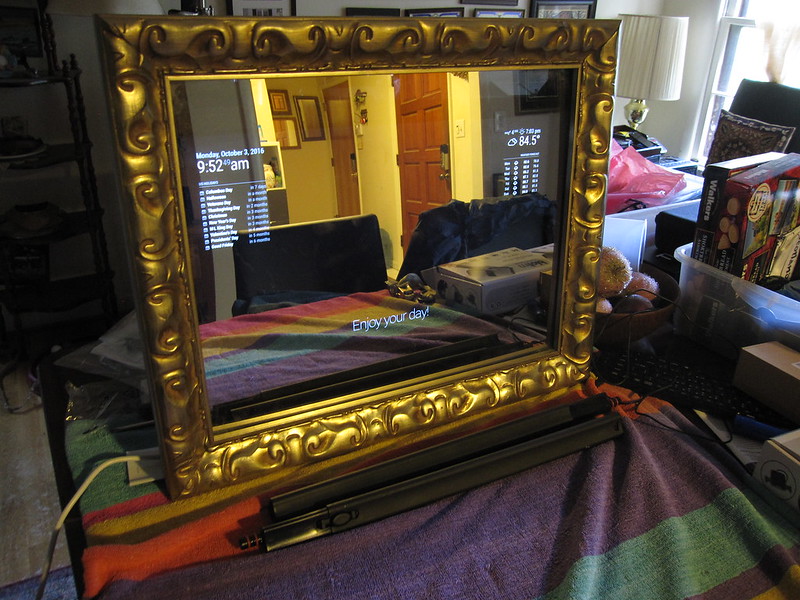
      The upcoming wedding of a friend was the excuse I needed to build a mirror. Their decorating tastes are a bit more frilly than most, so I went with a different look than most mirror builders.
      All done

      The UI is a bit plain, but because it’s a gift I don’t have access to schedule feeds, Instagram accounts, commutes, etc. After the wedding, I’ll talk to them and see if they want changes.

      posted in Show your Mirror
      bheplerB
      bhepler
    • RE: Can the usb port from a monitor power the rpi3?

      I looked into this as well and came to much the same conclusion as @KirAsh4. USB ports on the monitors added a significant expense and couldn’t provide the power for the Pi.

      If you were going to power another accessory from the monitor’s USB, it might make sense. I believe one mirror builder is running external speakers from his monitor’s USB jack. You could probably run an LED strip for accent lighting from it.

      posted in Hardware
      bheplerB
      bhepler
    • RE: Monitor with case or without case

      There’s nothing technically stopping you from leaving the monitor in its bezel. There are a couple mirrors that have done so. There are some additional downsides of which you should be aware:

      • The bezel will push the monitor away from your glass, slightly. In my first mirror, this distance is noticeable but not a deal breaker.

      • Any lights on the front of the bezel will have to be covered so as not to project.

      • Getting to the monitor controls may be an issue. In my case, I was able to move the switches to the outside of the box after I removed the bezel.

      • You may run into space complications, depending on the thickness of your box. Removing the case for the monitor will free up some room.

      These are, truth be told, minor considerations. If you’re willing to deal with these issues, there’s nothing stopping you.

      posted in Hardware
      bheplerB
      bhepler
    • Remote Administration & Updates

      Greetings! My first mirror project is destined to be a wedding present for a friend of my wife. It’s been a steep learning curve, but I’m happy with the result. However, this situation presents a challenge for me, the Linux novice.

      I would like to be able to get the mirror to update without VPN access to the mirror itself. I’m not sure of their wireless network, but I don’t think I can reliably find its IP address and it’s unknown whether or not their home network will allow VPN connections anyway. So my thought was I could create a Git repository that would represent the installation of the mirror on their RPI. As I push code to master, I would like the Pi to update itself and install new modules, upgrade code and so forth.

      I think this will do the trick, but Git and I have a mutually hostile relationship. If I fork Mich’s code to my own account, I can update it without interfering with the rest of you guys. If I then fork every module that I wish to install and clone from these forks, I can update any module in my repository. I am just now investigating submodules in Git and this may be the way to go. But I’m not sure.

      Keeping the modules updated would be a simple cron job that I would run at 2 AM every day. It would do a pull from my forks and update to new code whenever I pushed to my fork.

      Am I missing anything? Is there an easier solution? Is this actually a solution? Can anyone explain submodules to me in a way that 1) I can understand, and 2) I can implement?

      Thanks!
      posted in Development
      bheplerB
      bhepler
    • RE: Attach the monitor with glue to the mirror?

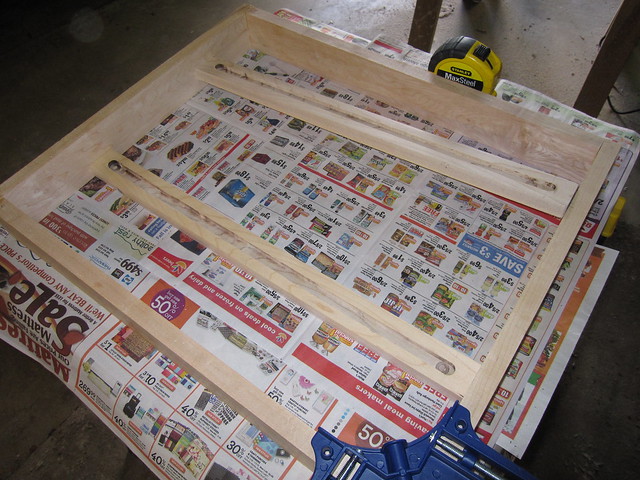
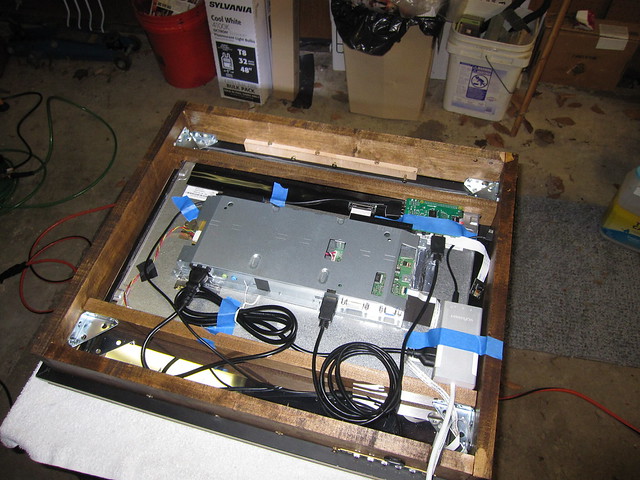
      I completed my box construction yesterday. My solution to the monitor-is-smaller-than-box problem was to build an internal bracing system using a couple of channels for the edge of the monitor. It sounds more complicated than it is.

      Monitor braces:
      Monitor braces

      Everything in place:
      Assembled

      posted in Hardware
      bheplerB
      bhepler
    • RE: Twitter feed

      Sorry for the delay. Here’s the relevant portion of my config:

      {
           module: 'twitControl',
           position: 'middle_left',
                config: {
                     maxNumTweets: 3,
                     consumer_key: '[redacted]',
                     consumer_secret: '[redacted]',
                     access_token_key: '[redacted]',
                     access_token_secret: '[redacted]'
                     }
      },
      
      posted in Troubleshooting
      bheplerB
      bhepler
    • RE: Just installed magic mirror, now how do I change some things?

      @Crookedsoul The modules that come with the Magic Mirror software can be found in ~/MagicMirror/modules/default/[name of module] (assuming you ran through the tutorial and didn’t change anything).

      Any of the modules that you download from the community (Weatherbug, Instagram, Tides, etc.) need to be installed in their own folder in the modules folder. The positioning of any module is handled by the config.js script located at ~/MagicMirror/config/config.js. In addition to location information, you’ll also define most of the module’s configuration there as well. Think of it as configuration parameters that you’re passing into the module code, so you need to specify those parameters while you’re telling the Magic Mirror system to load up the module.

      posted in Troubleshooting
      bheplerB
      bhepler
    • RE: Trividar's MagicMirror

      That has to be the cleanest, most organized back of a magic mirror here. Looks great.

      posted in Show your Mirror
      bheplerB
      bhepler
    • RE: Blank Screen on Pi 1 after successful Install

      @chase Yes. The sample config file should at least show you the clock and the basic compliments. If you update it with your openweathermap key it should show you weather. Curious.

      Also, yes the URL should contain the 8080 port.

      MichMich usually recommends this tutorial: Complete Setup Tutorial

      posted in Troubleshooting
      bheplerB
      bhepler
    • RE: Twitter feed

      @deadherring I have not. But I do want to report that I am having the same issue.

      posted in Troubleshooting
      bheplerB
      bhepler
    • RE: Halloween mirror ghouls anyone?

      Do we have a generic video file playing module?

      posted in General Discussion
      bheplerB
      bhepler
    • RE: Cato's mirror

      Indeed. I got a couple ideas from reading his blog.

      posted in Show your Mirror
      bheplerB
      bhepler
    • RE: Halloween mirror ghouls anyone?

      I like this idea! It would be pretty simple to buy one of those DVDs, rip the video you want and then load it onto your mirror. Play the image in a module, possibly with some basic timer & looping controls.

      I would think some of the ghostly apparition ones would work best. Just have something staring at you out of the mirror for a bit and then fade away.

      posted in General Discussion
      bheplerB
      bhepler
    • RE: My Setup (or: How crazy I am)

      I just wanted to chime in and say this post also helped me get started. Thank you for the general setup points.

      The last issue I had was that when the mirror was doing its thing and displaying content to the monitor, I couldn’t use a browser from my development machine to see the output. And SSH into the Pi wasn’t allowing me to start the mirror service. The browser and Pi just weren’t communicating.

      My solution was to run node serveronly. This allows me to hit the mirror’s ip address and for my browser to render the mirror content. A quick reboot of the mirror will pop it back into display mode.

      posted in Development
      bheplerB
      bhepler
    • RE: npm start dev

      @shavesophere Thank you. This at least got me to the point where I can show the display on a monitor. Now I just have to walk to the other room to see my changes. :/

      posted in Troubleshooting
      bheplerB
      bhepler
    • RE: Monitor Overheated

      @RHeniz How was your support box constructed? Perhaps some ventilation slits in the top & bottom to let hot air escape. Did you seal the back of the box with plywood or just push it up against the wall?

      If you really wanted to be paranoid about it, you could add a small computer case fan to the top of your box and power it off the Pi. If you really wanted to be high speed/low drag about it, you could write a module to display fan RPM and case temperature on the mirror. :)

      posted in Hardware
      bheplerB
      bhepler
    • RE: Attach the monitor with glue to the mirror?

      I picked up a heavy duty mirror mount from Home Depot for attaching everything to the wall. It’s rated for 100 lbs., which should be more than enough. A quick google search for “French cleat” should give you plenty of options.

      I’m building this mirror as a gift and unlike most of the examples online, it needs to look… well, frilly. Otherwise it won’t go with the rest of the decor. I picked up a backless frame from a hobby store. There’s a groove for the glass, but nothing immediately obvious for the monitor (which is significantly smaller than the glass).

      I’ll let you know what I come up with. I suspect the others here have the right of it: support the monitor and use something clever to hang the glass & frame off the monitor.

      posted in Hardware
      bheplerB
      bhepler
    • 1 / 1