@JamesMM ok thx! i don’t really get where exactly your code above should be placed :( can you give me a hint pls?
B
Offline
A New Chapter for MagicMirror: The Community Takes the Lead
Read the statement by Michael Teeuw here.
Read the statement by Michael Teeuw here.
Posts
-
RE: MMM-PIR - off delay
-
RE: Cowboysdude's Mirror
@cowboysdude Apperently i could get ride off this xset message now the monitor is turning on but the screen stays black… screensaver issue maybe.
-
RE: Cowboysdude's Mirror
@cowboysdude that’s exactly what i did all 3 files are located in Pi home directory as well as wiringPi.
sudo chmod there too & crontab too…
but not working… there should be something else.
i try to run your .sh file so the outcome is that monitor_off file works well but the monitor_on file displays the following message:

would you mind to share with me YOUR following files plssssss =>

thx you! -
RE: Cowboysdude's Mirror
@cowboysdude oh that’s really really awesome!
so what i have done is git Pir-Sensor & wiringPi into root? =>

edit with nano pir.py =>
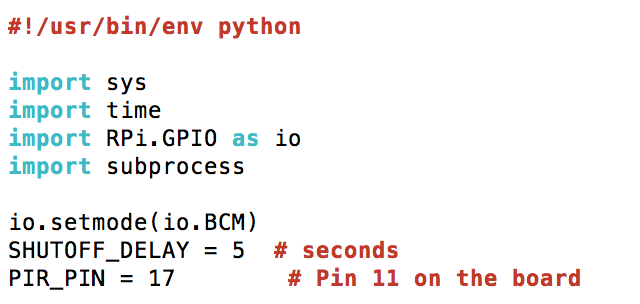
chmod all 3 files at pi@raspberrypi:~ $
and crontab also at pi@raspberrypi:~ $
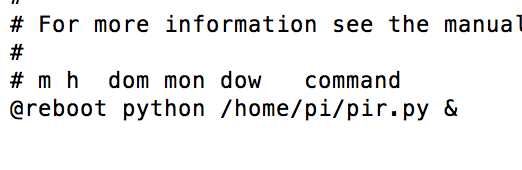
the jumper on PIR sensor in on H and the knobs are both set at minimum level
-
RE: Cowboysdude's Mirror
@cowboysdude Hi! would you mind helping me to install/debug your module please? i am not able to make it work even tho i followed your instructions :( thx if you can do this favor.
let me know what should i share (command to run etc) to make it easy to “debug” -
RE: MMM-PIR - off delay
@JamesMM hi! i also have pain to setup the PIR in hardware way and i would prefer your way. Is the code stated above working? thx
-
RE: Motion Detector
@cowboysdude 1st thx for taking time to reply. much appriciated! the PIR is ok but as it needs to get hidden somewhere, etc it’s less convinent. Yes you are right, the solution depends on my personnal need… i just need a way to switch on MM when i am in front of it BUT also completly switch off the monitor when nothing detected and not only the MM.
oh great, i will check @strawberry-3-141 module for sure!
@IngmarSwart also designed a solution with motion detection with a Picam behind the glass which seems to be nice to. i let you check it if interest…by the way, do i have to remove Paviro module to install your one?
i couldn’t find @strawberry-3-141 module… can you pls forward me the link? -
RE: PIR-Sensor - put your mirror to sleep if not used
@IngmarSwart I see i am still getting everything but in meantime i am working on the software side. You solution is nice and i will try to implement it i think… with my noob skills :)))
-
RE: PIR-Sensor - put your mirror to sleep if not used
@IngmarSwart ohh ok now it’s clear! thx alot for your reply.
your hack is working perfectly so far? -
RE: PIR-Sensor - put your mirror to sleep if not used
Since IngmarSwart didn’t connect since few months, maybe someone can just explain me the reason why a PIR sensor is still needed in his config? i don’t get the role of the PIR since there is already a cam to detect the move…? if anyone… thx guys!
-
RE: Motion Detector
hello! as understood there are 2 topics ongoing here "PIR module of @cowboysdude " and "motiondetector of @alexyak ". I will not ask which is the best module, you both did a great job, thx!
don’t take it bad but i just wanted to have opinions and feedback on which one is running currently without any, less issues please? (i am starting my mirror and don’t want to be too much demanding on the forum if not working - wise ;-))@cowboysdude : i have already implemented Paviro’s module to test and i wanted to know if i should remove it before installing your one?
Thx in advance for your relpies and have a good day/eve :)
-
RE: MMM-PIR-Sensor - White Screen
Ok the problem it’s solved! except the screen is turning on and off in a very strange way… have to figure out why.
For those you would get the same issue as me, what i did after fixing my config file was:
- sudo apt-get update & upgrade & reboot,
- go in MMM-PIR-Sensor folder in modules folder and run npm install there
3.sudo reboot
cheers
-
RE: MMM-PIR-Sensor - White Screen
@strawberry-3.141 yeah! thx a lot. at least i can see this white screen now :p :))) have to figure out how to solve this… Only if it’s realllllly really obvious for you/someone, i post my log file. (sorry to ask so much) otherwise not prob, i will reinstall the PIR module…
[TAILING] Tailing last 10 lines for [mm] process (change the value with --lines option) /home/pi/.pm2/logs/mm-error-0.log last 10 lines: 0|mm | at Error (native) 0|mm | at process.module.(anonymous function) [as dlopen] (ELECTRON_ASAR.js:168:20) 0|mm | at Object.Module._extensions..node (module.js:583:18) 0|mm | at Object.module.(anonymous function) [as .node] (ELECTRON_ASAR.js:168:20) 0|mm | at Module.load (module.js:473:32) 0|mm | at tryModuleLoad (module.js:432:12) 0|mm | at Function.Module._load (module.js:424:3) 0|mm | at Module.require (module.js:483:17) 0|mm | at require (internal/module.js:20:19) 0|mm | at bindings (/home/pi/MagicMirror/modules/MMM-PIR-Sensor/node_modules/bindings/bindings.js:76:44) /home/pi/.pm2/logs/mm-out-0.log last 10 lines: 0|mm | No helper found for module: clock. 0|mm | Initializing new module helper ... 0|mm | No helper found for module: compliments. 0|mm | No helper found for module: currentweather. 0|mm | No helper found for module: weatherforecast. 0|mm | Initializing new module helper ... 0|mm | Whoops! There was an uncaught exception... 0|mm | MagicMirror will not quit, but it might be a good idea to check why this happened. Maybe no internet connection? 0|mm | If you think this really is an issue, please open an issue on GitHub: https://github.com/MichMich/MagicMirror/issues 0|mm | Launching application. -
RE: MMM-PIR-Sensor - White Screen
@strawberry-3.141 here you go and many thx in advance - i struggling with this now (sorry i don’t know why only few parts of the code is with the color background)
/* Magic Mirror Config Sample
 *
 * By Michael Teeuw http://michaelteeuw.nl
 * MIT Licensed.
 */
var config = {
        port: 8080,

        language: 'en',
        timeFormat: 24,
        units: 'metric',

        modules: [
                {
                        module: 'alert',
                },
                {
                        module: 'clock',
                        position: 'top_left'
                },
                {
                        module: 'calendar',

                        header: 'US Holidays',
                        position: 'top_left',
                        config: {
                                calendars: [
                                        {
                                                symbol: 'calendar-check-o ',
                                                url: 'webcal://www.calendarlabs.com/templates/ical/US-Holidays.ics'
                                        }
                                ]
                        }
                },
                {
                        module: 'compliments',
                        position: 'lower_third'
                },
                {
                        module: 'currentweather',
                        header: 'xxx',
                        position: 'top_right',
                        config: {
                                location: 'xxx,xxx',
                                locationID: 'xxx',  //ID from http://www.openweathermap.org
                                appid: 'xxx'
                        }
                },
                {
                        module: 'newsfeed',
                        position: 'bottom_bar',
                        config: {
                                feeds: [
                                        {
                                                title: "New York Times",
                                                url: "http://www.nytimes.com/services/xml/rss/nyt/HomePage.xml"
                                        },

                                ],
                                showSourceTitle: true,
                                showPublishDate: true
                },
                {
                        module: 'MMM-PIR-Sensor',
                        config: {
                                sensorPIN: 22,
                                powerSaving: true
                        }
                },
        ]
};

/*************** DO NOT EDIT THE LINE BELOW ***************/
if (typeof module !== 'undefined') {module.exports = config;}
Note from admin: Please use Markdown on code snippets for easier reading!
-
RE: MMM-PIR-Sensor - White Screen
@strawberry-3.141 right was a typo but still the config file is “not created” :((
-
RE: MMM-PIR-Sensor - White Screen
@Bangee so as expected the pm2 log mm just show that the file has syntax error… here is my config file, i put the module at the end…
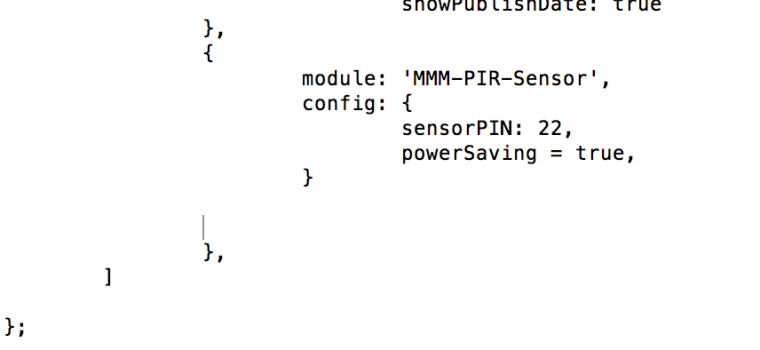
thx again :) -
RE: MMM-PIR-Sensor - White Screen
@Bangee yes i follow his and yours… quite the same… regarding this npm warning I do nothing then as understood?
I will send you the log later when I’m home
Thx bangee! Appreciated! -
RE: MMM-PIR-Sensor - White Screen
@Bangee hi ! thx for your nice tuto, i have proceed with it but i got a warning as below:
pi@raspberrypi:~/MagicMirror/modules/MMM-PIR-Sensor $ npm install
npm WARN prefer global npm@3.10.9 should be installed with –g
do i have to do smt specific or it’s just ok to leave it without any action?
ps: my config file is also not working with PIR module implemented… maybe that is the reason? thx you very much for any feedabck guys!!