Read the statement by Michael Teeuw here.
MMM-PIR-Sensor - White Screen
-
If you use pin 7 in your config its nr 4
You have to use the gpio nr.
-
Thank you it works fine !!
-
@Bangee I tried everything regarding the white screen issues. I’m a noob. was able to get magic mirror installed, I also installed the PIR motion detection and can confirm motion is detected.
Downgraded Node JS
Installed the electron
made sure module was added in config.jsI am using the Raspberry PI 3 mode b.
Can somebody confirm this module is working with Raspberry Pi 3.
Any help would be greatly appreciative…
Thanks. -
can you restart the magicmirror an check what errormessage you have:
pm2 logs mm -
@Bangee Thank you so much for responding. I removed magic mirror completely reinstalled… then installed the module.
All is well now… Thank you so much!
-
@Bangee hi ! thx for your nice tuto, i have proceed with it but i got a warning as below:
pi@raspberrypi:~/MagicMirror/modules/MMM-PIR-Sensor $ npm install
npm WARN prefer global npm@3.10.9 should be installed with –g
do i have to do smt specific or it’s just ok to leave it without any action?
ps: my config file is also not working with PIR module implemented… maybe that is the reason? thx you very much for any feedabck guys!! -
@bibi did you try it with the instructions from paviro:
https://github.com/paviro/MMM-PIR-SensorI don’t think that this warn is your problem. I have so many times these warnings :-D
You sould send us whats in yourpm2 logs mm -
@Bangee yes i follow his and yours… quite the same… regarding this npm warning I do nothing then as understood?
I will send you the log later when I’m home
Thx bangee! Appreciated! -
@Bangee so as expected the pm2 log mm just show that the file has syntax error… here is my config file, i put the module at the end…
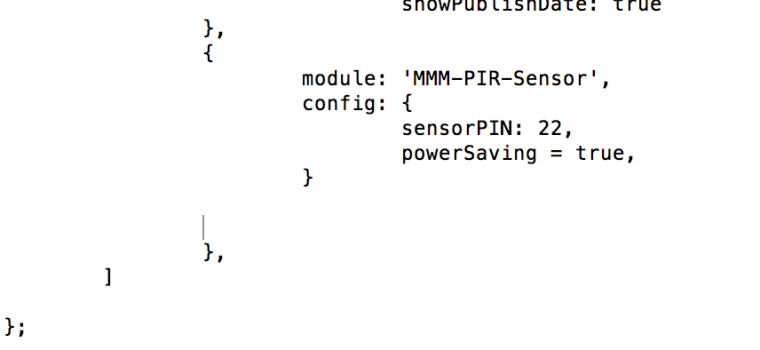
thx again :) -
@bibi
powerSaving: true -
@strawberry-3.141 right was a typo but still the config file is “not created” :((
-
@bibi can you post your whole config file?
-
@strawberry-3.141 here you go and many thx in advance - i struggling with this now (sorry i don’t know why only few parts of the code is with the color background)
/* Magic Mirror Config Sample
 *
 * By Michael Teeuw http://michaelteeuw.nl
 * MIT Licensed.
 */
var config = {
        port: 8080,

        language: 'en',
        timeFormat: 24,
        units: 'metric',

        modules: [
                {
                        module: 'alert',
                },
                {
                        module: 'clock',
                        position: 'top_left'
                },
                {
                        module: 'calendar',

                        header: 'US Holidays',
                        position: 'top_left',
                        config: {
                                calendars: [
                                        {
                                                symbol: 'calendar-check-o ',
                                                url: 'webcal://www.calendarlabs.com/templates/ical/US-Holidays.ics'
                                        }
                                ]
                        }
                },
                {
                        module: 'compliments',
                        position: 'lower_third'
                },
                {
                        module: 'currentweather',
                        header: 'xxx',
                        position: 'top_right',
                        config: {
                                location: 'xxx,xxx',
                                locationID: 'xxx',  //ID from http://www.openweathermap.org
                                appid: 'xxx'
                        }
                },
                {
                        module: 'newsfeed',
                        position: 'bottom_bar',
                        config: {
                                feeds: [
                                        {
                                                title: "New York Times",
                                                url: "http://www.nytimes.com/services/xml/rss/nyt/HomePage.xml"
                                        },

                                ],
                                showSourceTitle: true,
                                showPublishDate: true
                },
                {
                        module: 'MMM-PIR-Sensor',
                        config: {
                                sensorPIN: 22,
                                powerSaving: true
                        }
                },
        ]
};

/*************** DO NOT EDIT THE LINE BELOW ***************/
if (typeof module !== 'undefined') {module.exports = config;}
Note from admin: Please use Markdown on code snippets for easier reading!
-
Everything with at least one tab indent is treated as code and highlighted. ;)
-
@yawns thx! :))
-
@bibi you forgot to close the config section in the newsfeed module, add
}aftershowPublishDate: trueand you should be fine -
@strawberry-3.141 yeah! thx a lot. at least i can see this white screen now :p :))) have to figure out how to solve this… Only if it’s realllllly really obvious for you/someone, i post my log file. (sorry to ask so much) otherwise not prob, i will reinstall the PIR module…
[TAILING] Tailing last 10 lines for [mm] process (change the value with --lines option) /home/pi/.pm2/logs/mm-error-0.log last 10 lines: 0|mm | at Error (native) 0|mm | at process.module.(anonymous function) [as dlopen] (ELECTRON_ASAR.js:168:20) 0|mm | at Object.Module._extensions..node (module.js:583:18) 0|mm | at Object.module.(anonymous function) [as .node] (ELECTRON_ASAR.js:168:20) 0|mm | at Module.load (module.js:473:32) 0|mm | at tryModuleLoad (module.js:432:12) 0|mm | at Function.Module._load (module.js:424:3) 0|mm | at Module.require (module.js:483:17) 0|mm | at require (internal/module.js:20:19) 0|mm | at bindings (/home/pi/MagicMirror/modules/MMM-PIR-Sensor/node_modules/bindings/bindings.js:76:44) /home/pi/.pm2/logs/mm-out-0.log last 10 lines: 0|mm | No helper found for module: clock. 0|mm | Initializing new module helper ... 0|mm | No helper found for module: compliments. 0|mm | No helper found for module: currentweather. 0|mm | No helper found for module: weatherforecast. 0|mm | Initializing new module helper ... 0|mm | Whoops! There was an uncaught exception... 0|mm | MagicMirror will not quit, but it might be a good idea to check why this happened. Maybe no internet connection? 0|mm | If you think this really is an issue, please open an issue on GitHub: https://github.com/MichMich/MagicMirror/issues 0|mm | Launching application. -
Ok the problem it’s solved! except the screen is turning on and off in a very strange way… have to figure out why.
For those you would get the same issue as me, what i did after fixing my config file was:
- sudo apt-get update & upgrade & reboot,
- go in MMM-PIR-Sensor folder in modules folder and run npm install there
3.sudo reboot
cheers
-
Also had the “white screen” problem. I installed a complete new Raspian (with PIXEL), a new MagicMirror - including node.js in version 7.3.0
As soon as i tried to get the MMM-Pir-Sensor working, it failed (with an white screen). Heres, how i solved my problem.At first: Theres no need to downgrade the node (i tried this too, and had no luck)
I figured out, that my problem was an MMM-PIR-Sensor installation error i did not recognized at the beginning. When i tried “npm install” i got something like this (an error):
"gyp WARN EACCES user “root” does not have permission to access the dev dir “/root/.node-gyp/5.12.0”
I figured out, that there are two ways of solving this:
- CHOWN the directory the install procedure tries to install
- use “npm install --unsafe-perm”
Im aware that option two is not the “elegant” way, but it solved my problem (and i did not have to change directory permissions).
I removed all files and git the files again (like described some lines above from banglee) and then just use “npm install --unsafe-perm”
The “–unsafe-perm” option was the key to my problem…
-
Hi @Medo ,
I have gotten the white screen problem as well and my raspberry pi configuration is similar to yours ( running on PIXEL with the latest nodejs).However, upon using option 2 from your solution. I have obtained this error :
npm ERR! Linux 4.4.38-v7+
npm ERR! argv "/usr/bin/nodejs" "/usr/bin/npm" "install" "--unsafe-perm"
npm ERR! node v7.3.0
npm ERR! npm  v3.10.10
npm ERR! code ELIFECYCLE
npm ERR! Magic-Mirror-Module-PIR-Sensor@1.1.0 postinstall: `electron-rebuild -e                                                                                                                                                              ../../node_modules/electron-prebuilt`
npm ERR! Exit status 255
npm ERR!
npm ERR! Failed at the Magic-Mirror-Module-PIR-Sensor@1.1.0 postinstall script '                                                                                                                                                             electron-rebuild -e ../../node_modules/electron-prebuilt'.
npm ERR! Make sure you have the latest version of node.js and npm installed.
npm ERR! If you do, this is most likely a problem with the Magic-Mirror-Module-P                                                                                                                                                             IR-Sensor package,
npm ERR! not with npm itself.
npm ERR! Tell the author that this fails on your system:
npm ERR!     electron-rebuild -e ../../node_modules/electron-prebuilt
npm ERR! You can get information on how to open an issue for this project with:
npm ERR!     npm bugs Magic-Mirror-Module-PIR-Sensor
npm ERR! Or if that isn't available, you can get their info via:
npm ERR!     npm owner ls Magic-Mirror-Module-PIR-Sensor
npm ERR! There is likely additional logging output above.

npm ERR! Please include the following file with any support request:
npm ERR!     /home/pi/MagicMirror/modules/MMM-PIR-Sensor/npm-debug.log
Does anyone have solution to this?
Note from admin: Please use Markdown on code snippets for easier reading!

Hello! It looks like you're interested in this conversation, but you don't have an account yet.
Getting fed up of having to scroll through the same posts each visit? When you register for an account, you'll always come back to exactly where you were before, and choose to be notified of new replies (either via email, or push notification). You'll also be able to save bookmarks and upvote posts to show your appreciation to other community members.
With your input, this post could be even better 💗
Register Login