MagicMirror Forum
    • Recent
    • Tags
    • Unsolved
    • Solved
    • MagicMirror² Repository
    • Documentation
    • 3rd-Party-Modules
    • Donate
    • Discord
    • Register
    • Login
    1. Home
    2. binderth
    3. Posts
    A New Chapter for MagicMirror: The Community Takes the Lead
    Read the statement by Michael Teeuw here.
    Offline
    • Profile
    • Following 0
    • Followers 0
    • Topics 18
    • Posts 80
    • Groups 0

    Posts

    Recent Best Controversial
    • RE: MMM-NetworkScanner

      @bminer1 said in MMM-NetworkScanner:

      Does anyone have issues with the “occupied” and “vacant” part working?

      Ah, nice: Is this doing, what I suspect it’s doing? ;)
      occupiedCMD: Notification to be sent when a resident returnes home e.g. {notification: ‘REMOTE_ACTION’, payload: {action: ‘MONITORON’}} would turn the mirror on when a resedent returnes home.

      What does “returnes home” mean: Changing from “offline” to “online”: trigger the action (vice versa for vacantCMD). It does only trigger once? Would it be possible to call an external URL with this? - and then: does it trigger if any resident leaves or can I specify which resident leaves?

      posted in Utilities
      binderthB
      binderth
    • [MMM-NetworkScanner] disable logging

      I’m running MM in pm2 and therefore get mm-out.x.log files. Is there a way to disable the logging for MMM-NetworkScanner? Would be nice to have a trigger for logging.

      as I configured 30sec. interval I get this every 30sec! ;)

      MMM-NetworkScanner received SCAN_NETWORK
      MMM-NetworkScanner is scanning for mac addresses
      MMM-NetworkScanner is scanning for ip addresses [ { ipAddress: '192.168.xx.xx,
          name: 'S.',
          icon: 'mobile',
          online: false },
        { ipAddress: '192.168.xx.xx,
          name: 'A.',
          icon: 'mobile',
          online: false },
        { ipAddress: '192.168.xx.xx,
          name: 'T.',
          icon: 'mobile',
          online: true,
          lastSeen: '2017-02-17T12:44:27.577Z' },
        { ipAddress: '192.168.xx.xx,
          name: 'D.',
          icon: 'mobile',
          online: true,
          lastSeen: '2017-02-17T12:44:27.578Z' } ]
      
      posted in Troubleshooting
      binderthB
      binderth
    • MMM-openhabfloorplan: Updates don't show up

      I’m using @paphko’s MMM-openhabfloorplan, configured it in config.js as described, but the item values don’t update afterwards.
      I just left the floorplan.png as is and changed the item names to match the names in OH2:
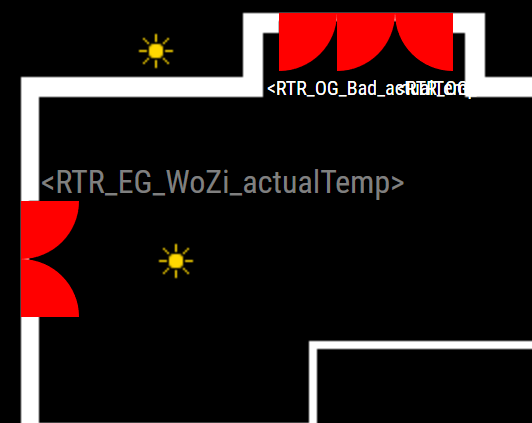
      0_1487154139835_upload-a681fae8-2be2-45e9-9d9f-ede8eff7294b

      If I update the items in MM with http://192.168.xx.xx:8080/openhab/?item=RTR_EG_WoZi_actualTemp&state=24 I get back:
      {"status":"success","payload":{"item":"RTR_EG_WoZi_actualTemp","state":"24","timestamp":"2017-02-15T10:23:17.519Z"}}
      But as you can see in the screenshot, it’s still not updated there. Did I miss something?

      my config.js:

      		{
      			module: 'mmm-openhabfloorplan',
      			position: 'bottom_left', // this can be any of the regions
      			config: {
      				updateInterval: 60 * 60 * 1000, // refreshing all windows / lights / labels once per hour; 0 to disable periodic update
      				draft: true, // if true, all lights, windows, and label names are shown; if false, get states from openhab
      				openhab: {
      					url: "http://192.168.xx.xx:8080", // must not have a trailing slash!
      					// user: "", // only if you have authentication enabled
      					// password: "", // only if you have authentication enabled
      				},
      				floorplan: {
      					image: "floorplan-default.png", // image in subfolder 'images'; change to floorplan.png to avoid git repository changes
      					width: 400, // this must be the width of the image above
      					height: 333, // this must be the height of the image above
      				},
      				// light: { // this part shows default settings for lights; may optionally be overwritten
      				//  image: "light.png", // located in subfolder 'images'
      				//  width: 19, // image width
      				//  height: 19, // image height
      				// },
      				// window: { // this part shows default settings for windows; may optionally be overwritten
      				//  defaultColor: "red", // css format, i.e. color names or color codes
      				// },
      				// label: { // this part shows default settings for labels; may optionally be overwritten
      				//  defaultColor: "grey", // css format
      				//  defaultSize: "medium", // value of font-size style, e.g. xx-small, small, medium, large, x-large, 1.2em, 20px
      				// },
      				lights: { // list all light items to be shown (must be of openhab type Switch or Dimmer)
      					// format: "openhab item (name is case-sensitive!): { left, top }"
      					Light_EG_WoZi_LG1:      { left: 80,  top: 110 },
      					Light_EG_WoZi_LG2:    { left: 80,  top: 240 },
      					Light_EG_WoZi_LG3:      { left: 310, top: 5 },
      					Light_EG_WoZi_LG4:     { left: 70,  top: 5 },
      					Light_EG_Flur_Ceiling:  { left: 238, top: 310 },
      					Light_EG_Windfang_Ceiling:  { left: 40,  top: 310 },
      					Light_EG_WC_Ceiling: { left: 340, top: 310 },
      					Light_EG_Kueche_Ceiling:     { left: 280, top: 110 },
      					Light_EG_WoZi_WandEss:       { left: 210, top: 220 },
      				},
      				windows: { // list all window / door contacts to be shown (must be of openhab type Switch or Contact)
      					// openhab item: left, top, radius (draws quadrant), midPoint, and optionally counterwindow and color
      					Reed_Door:           { left: 232, top: 289, radius: 32, midPoint: "bottom-right", color: "orange" },
      					Reed_Entry:          { left: 188, top: 298, radius: 23, midPoint: "bottom-left" },
      					Reed_Living:         { left: 12,  top: 106, radius: 29, midPoint: "top-left", counterwindow: "vertical" },
      					Reed_Dining_right:   { left: 170, top: 12,  radius: 29, midPoint: "top-left", counterwindow: "horizontal" },
      					Reed_Dining_left:    { left: 141, top: 12,  radius: 29, midPoint: "top-left" },
      					Reed_Kitchen:        { left: 283, top: 44,  radius: 30, midPoint: "top-right", color: "orange" },
      					Reed_Utility:        { left: 359, top: 180, radius: 29, midPoint: "bottom-right" },
      					Reed_Sleeping_right: { left: 12,  top: 231, radius: 30, midPoint: "top-left" },
      					// openhab item: left, top, width, height (draws rectangle), and optionally color
      					Reed_Sleeping_left:  { left: 90,  top: 301, width: 37, height: 20 },
      					Reed_Bath:           { left: 275, top: 301, width: 37, height: 20 },
      				},
      				labels: { // list all strings to be shown (may probably be any openhab type, resonable for String and Number)
      					// openhab item: left, top, and optionally color, font size, prefix, postfix, and number of decimals for floating numbers
      					RTR_EG_WoZi_actualTemp:         { left: 22,  top: 72,  decimals: 1 },
      					RTR_OG_Schlafen_actualTemp:   { left: 200, top: 25,  color: "white", size: "x-small" },
      					RTR_OG_Bad_actualTemp:    { left: 135, top: 25,  color: "white", size: "x-small" },
      					RTR_OG_KiZiOst_actualTemp:        { left: 345, top: 220, color: "green", decimals: 2 },
      					RTR_OG_KiZiWest_actualTemp: { left: 22,  top: 242, prefix: "outside: ", postfix: "°C" },
      				}
      			}
      		},
      
      posted in Troubleshooting
      binderthB
      binderth
    • RE: ALERT: setting the display time individually

      @strawberry-3.141 said in ALERT: setting the display time individually:

      if you want to set the duration you have to use an alert instead of notification:
      this.sendNotification(“SHOW_ALERT”, {timer: 10000, title: “Title”, message: “Message”});

      ok, that did it. The Alerts are now shown as given in the “timer”-argument.
      Nevertheless my usecase would be to have also multiple notifications staying on top like “washing machine ready” and “dryer ready” or something which needs some action done.

      So it would be nice to have either notification also displayed “on event” and not globally or to have notifications smoothed out, if the item action is done. As I can see, the alert-module doesn’t allow fading the notifications on a action?

      posted in Troubleshooting
      binderthB
      binderth
    • Module for Items to update via Websocket

      I’m looking for something like MMM-Syslog, a module, where I can setup items, which can then be updated via Websocket. I’m not a developer, so I can’t make it my own, but it should do something like this:

      1. adding items like Text, Number, Boolean
      2. giving them names and Icons
      3. updating them via Web-URL or whatever: analog to MMM-syslog syntax: http://MIRROR_IP:MIRROR_PORT/syslog?item=ITEM_NAME&value=ITEM_VALUE

      Use Case is to send updates of my smarthome-items to show up in the MagicMirror. I’m thinking of some states (Text), Temperatures (Number) or states of e.g. open Windows or whatever (Boolean).

      posted in Requests
      binderthB
      binderth
    • ALERT: setting the display time individually

      If there’s a alert, I’d like to be able to tell how long the alert should stay. At present I understand this is a global variable in the config.js (display_time). It would be nice, if this global variable could be overwritten, if I call the function.
      I tried:
      this.sendNotification("SHOW_ALERT", {type: "notification", display_time: "10000", title: "Title", message: "Message"});

      But still, the global display_time was used. Did I miss something?

      posted in Troubleshooting
      binderthB
      binderth
    • RE: MMM-Swipe: deprecated WARNINGS plus ERROR

      @mochman ok. thanks for the update.

      Does anyone know: Is there some “newer” gesture-module for the MagicMirror?

      posted in Troubleshooting
      binderthB
      binderth
    • MMM-Swipe: deprecated WARNINGS plus ERROR

      Hi there,

      first of all: Do I understand it correctly, that there’s two HC-SR04 sensors neede? one for left and one for right?
      If so (which I imagine), please make the readme in github a bit more clear on this. Took me a few thoughts on how to figure “right” and “left” pins. If you’re not familiar with those sensors, you’re a bit confused… ;)

      after cloning the repo to modules and npm install I get the following warnings:

      pi@MagicMirror:~/MagicMirror/modules/MMM-Swipe $ npm install
      npm WARN deprecated math-statistics@1.2.0: THIS PROJECT IS NO LONGER MAINTAINED by clebert
      npm WARN deprecated typesystem@5.0.0: THIS PROJECT IS NO LONGER MAINTAINED by clebert
      npm WARN deprecated expressive-assertion@1.5.1: THIS PROJECT IS NO LONGER MAINTAINED by clebert
      

      Don’t know, if that’s the cause for the following errors on startup:

      pi@MagicMirror:~/MagicMirror $ DISPLAY=:0 npm restart &
      [1] 1171
      
      > magicmirror@2.1.0 start /home/pi/MagicMirror
      > electron js/electron.js
      
      Starting MagicMirror: v2.1.0
      Loading config ...
      Loading module helpers ...
      No helper found for module: MMM-Globe.
      Initializing new module helper ...
      WARNING! Could not load config file. Starting with default configuration. Error found: Error: Cannot find module 'mmm-usonic'
      Loading module helpers ...
      No helper found for module: MMM-Globe.
      Initializing new module helper ...
      App threw an error during load
      Error: Cannot find module 'mmm-usonic'
          at Module._resolveFilename (module.js:455:15)
          at Function.Module._resolveFilename (/home/pi/MagicMirror/node_modules/electron/dist/resources/electron.asar/common/reset-search-paths.js:35:12)
          at Function.Module._load (module.js:403:25)
          at Module.require (module.js:483:17)
          at require (internal/module.js:20:19)
          at Object. (/home/pi/MagicMirror/modules/MMM-Swipe/node_helper.js:11:16)
          at Module._compile (module.js:556:32)
          at Object.Module._extensions..js (module.js:565:10)
          at Module.load (module.js:473:32)
          at tryModuleLoad (module.js:432:12)
      Whoops! There was an uncaught exception...
      { Error: Cannot find module 'mmm-usonic'
          at Module._resolveFilename (module.js:455:15)
          at Function.Module._resolveFilename (/home/pi/MagicMirror/node_modules/electron/dist/resources/electron.asar/common/reset-search-paths.js:35:12)
          at Function.Module._load (module.js:403:25)
          at Module.require (module.js:483:17)
          at require (internal/module.js:20:19)
          at Object. (/home/pi/MagicMirror/modules/MMM-Swipe/node_helper.js:11:16)
          at Module._compile (module.js:556:32)
          at Object.Module._extensions..js (module.js:565:10)
          at Module.load (module.js:473:32)
          at tryModuleLoad (module.js:432:12) code: 'MODULE_NOT_FOUND' }
      MagicMirror will not quit, but it might be a good idea to check why this happened. Maybe no internet connection?
      If you think this really is an issue, please open an issue on GitHub: https://github.com/MichMich/MagicMirror/issues
      Launching application.
      

      it seems, the dependency to mmm-usonic wasn’t solved, I don’t see this module anywhere on my pi…

      Thanks for help!
      Thomas.

      posted in Troubleshooting
      binderthB
      binderth
    • RE: Deutsche Bahn Delay

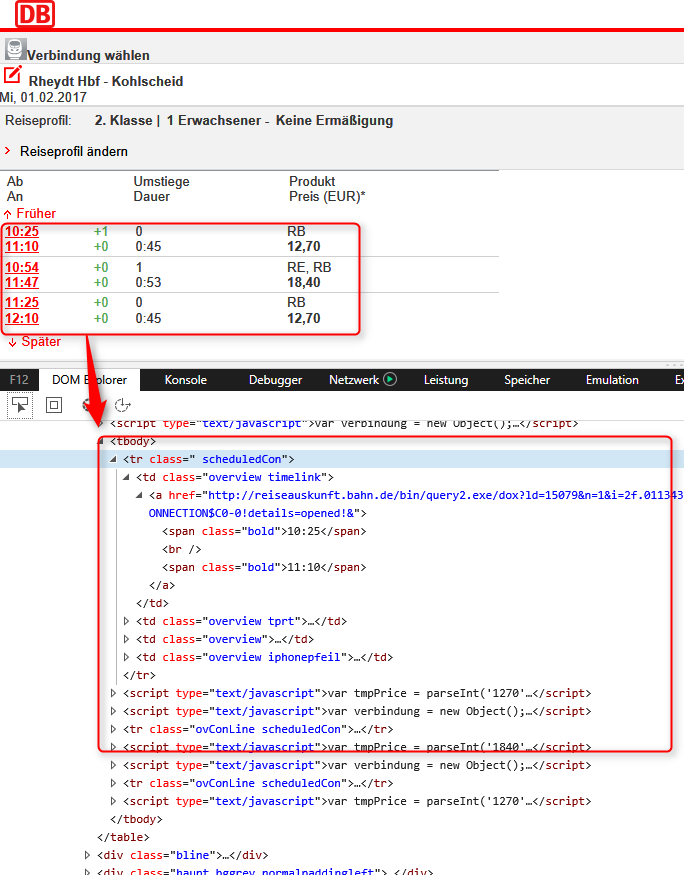
      I also wanted to have a module like this displaying the actual delays for my trains to catch.
      What seems like the only solution would be to scrape the URL from above (http://mobil.bahn.de/bin/query.exe/dox?S=8000318&Z=8003395&start=1&rt=1), but without the time attribut. Just cut out the interesting part and put it in a module.

      0_1485940466832_upload-e6483a51-1f22-4011-9157-f23631abd823

      seems doable, but i don’t have the JS-Background, I’m afraid.

      posted in Requests
      binderthB
      binderth
    • RE: MMM-Globe

      @chrisfoerg Looks great! but if I understand it correctly, there’s no live-feed at the moment?

      posted in Utilities
      binderthB
      binderth
    • RE: [ORDER CLOSED] Two way mirror order in Germany

      @ace0024 said in Two way mirror order in Germany:

      Who of you guys has my mirror?
      @tomster?
      @tomster: Where are you from exactly?

      We’re just working this out. I can pickup the mirrors for us all in Ulm from @mantha in any case, perhaps also from Heilbronn, too (if time’s not so much an issue). @tomster is from near Neuried, at least I guess from his earlier post. So, we just Need a way to bring the ones from Munich from my place (Augsburg) over to you guys. Shouldn’t also be that a big Problem! ;)

      …sometimes, the internet is good for one thing at least!

      posted in Hardware
      binderthB
      binderth
    • RE: [ORDER CLOSED] Two way mirror order in Germany

      @Goldjunge_Chriz said in Two way mirror order in Germany:

      If I understand it correctly @binderth fetches the mirrors for him, @fox, @tomster and @ace0024 and takes them with to Augsburg. There, @fox catches up with his mirror and @tomster picks up his two mirrors and @ace0024 mirror. correct?
      That would be really great and a great community performance.

      yes, I could do that. If there’s nobody from that southern group near Heilbronn anyways?
      |switchtogerman| Ich bin mir halt nicht sicher, ob ich sofort nach Heilbronn komm, wenn die Spiegel da sind. Was ich auf jeden Fall machen könnte, die Spiegel von Ulm bei @mantha abholen (falls er mehrere holen könnte), da bin ich ratzfatz und kann das mal am späten nachmittag abholen. Heilbronn ist da halt eine etwas weitere Nummer! ;)

      posted in Hardware
      binderthB
      binderth
    • RE: [ORDER CLOSED] Two way mirror order in Germany

      @Goldjunge_Chriz said in Two way mirror order in Germany:

      Er könnte deinen Spiegel aber bis nach Augsburg mitnehmen, wo du ihn dann abholen könntest Dann ist es nicht so weit. Vielleicht springen ja @ace0024 und @tomster mit auf. Schreibt euch doch einfach mal zusammen, vielleicht könnt ihr ja etwas organisieren

      yeah, that’s right! Irgendwie kriegen wir das zusammen.

      posted in Hardware
      binderthB
      binderth
    • RE: Problems restarting MagicMirror (Port 8080 in use ...)

      @roramirez said in Problems restarting MagicMirror (Port 8080 in use ...):

      pi@raspberrypi:~/MagicMirror $ pm2 -version
      2.1.5

      Do I need pm2?

      pi@MagicMirror:~ $ pm2 -version
      -bash: pm2: Kommando nicht gefunden.
      

      (translates: command not found)

      posted in Troubleshooting
      binderthB
      binderth
    • RE: Problems restarting MagicMirror (Port 8080 in use ...)

      Same for me, if you mean this Messages (I’m using the main 2.1):

      pi@MagicMirror:~/MagicMirror $ DISPLAY=:0 npm restart &
      [1] 29215
      
      > magicmirror@2.1.0 start /home/pi/MagicMirror
      > electron js/electron.js
      
      Starting MagicMirror: v2.1.0
      Loading config ...
      Loading module helpers ...
      No helper found for module: MMM-Globe.
      Initializing new module helper ...
      No helper found for module: alert.
      No helper found for module: clock.
      Initializing new module helper ...
      Initializing new module helper ...
      No helper found for module: compliments.
      Initializing new module helper ...
      No helper found for module: MMM-Callmonitor-Current-Call.
      No helper found for module: currentweather.
      No helper found for module: weatherforecast.
      Initializing new module helper ...
      Initializing new module helper ...
      Initializing new module helper ...
      All module helpers loaded.
      Starting server op port 8080 ...
      Server started ...
      Connecting socket for: MMM-PIR-Sensor
      Staring module helper: MMM-PIR-Sensor
      Connecting socket for: calendar
      Starting node helper for: calendar
      Connecting socket for: MMM-Wunderlist
      Connecting socket for: MMM-FRITZ-Box-Callmonitor
      Starting module: MMM-FRITZ-Box-Callmonitor
      Connecting socket for: MMM-DWD-WarnWeather
      MMM-DWD-WarnWeather helper started...
      Connecting socket for: MMM-NetworkScanner
      Starting module: MMM-NetworkScanner
      Connecting socket for: newsfeed
      Starting module: newsfeed
      Sockets connected & modules started ...
      Whoops! There was an uncaught exception...
      { Error: listen EADDRINUSE :::8080
          at Object.exports._errnoException (util.js:1026:11)
          at exports._exceptionWithHostPort (util.js:1049:20)
          at Server._listen2 (net.js:1253:14)
          at listen (net.js:1289:10)
          at net.js:1399:9
          at _combinedTickCallback (internal/process/next_tick.js:77:11)
          at process._tickCallback (internal/process/next_tick.js:98:9)
          at Module.runMain (module.js:592:11)
          at run (bootstrap_node.js:402:7)
          at startup (bootstrap_node.js:157:9)
        code: 'EADDRINUSE',
        errno: 'EADDRINUSE',
        syscall: 'listen',
        address: '::',
        port: 8080 }
      MagicMirror will not quit, but it might be a good idea to check why this happened. Maybe no internet connection?
      If you think this really is an issue, please open an issue on GitHub: https://github.com/MichMich/MagicMirror/issues
      Launching application.
      
      posted in Troubleshooting
      binderthB
      binderth
    • RE: [ORDER CLOSED] Two way mirror order in Germany

      I’m jumping also on the train! ;)

      | 35 | binderth | 0.7 * 0.5 | 0.35 (pay 0.4) | Germany, Augsburg | polished edges | pickup in Schweinfurt(?) | ✓ |

      PS:
      wenn jemand rund um Augsburg (Ulm, München, …) dabei ist, können wir uns ja abstimmen wegen Abholung? ;)

      posted in Hardware
      binderthB
      binderth
    • RE: Magic Mirror @ Munich

      @Steff said in Magic Mirror @ Munich:

      There is one thing I am unsure about. I have noticed that the controller unit (inverter/ controller) of the monitor has slightly shifted. Maybe I “pressed” the HDMI cable too much and therefore it got dislocated. You can see this in the last picture.

      Hi all,

      I encountered the same thing with my Viewsonic. It appears, the Controller units arent’t riveted or bolted (or even glued) to the backpanel. They are just taped together with a silverisch tape. My Monitor has a VESA-Mount at the back, so I thought of bolting the wonitor to the wall with a slim VESA-Mount - which worked for 12hours, then the panel fell off - fortunatetly everything is still working.
      So I’m thinking - either you have to tape it more thoroughly or use a two-component metal glue for a stable compound.

      In my case, I’m making a provisionary case with wood also, which holds the Monitor - and I’m not using the VESA-Mount anymore.

      posted in Show your Mirror
      binderthB
      binderth
    • RE: layer definition: here MMM-Globe overlaps left panel

      thanks! Works like a charm now!

      posted in Troubleshooting
      binderthB
      binderth
    • layer definition: here MMM-Globe overlaps left panel

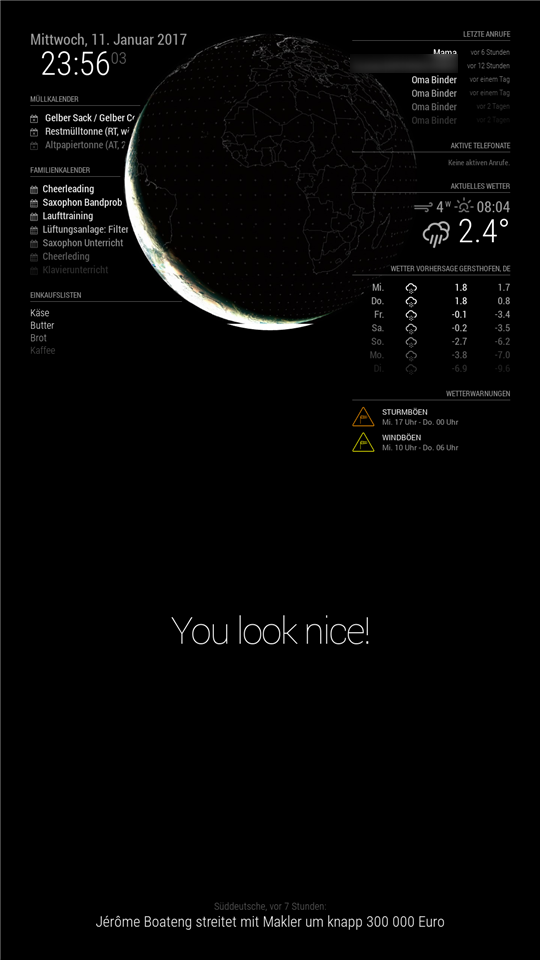
      I tested my Magic Mirror today with a rotated display and found, that the picture of my globe in MMM-Globe overlaps the left panel side. That is also, if I move the MMM-Globe in the config.sys to the top. The right panel side is nicely in the background and above the globe.
      Is there a way to show change the layer visibility?

      0_1484175611136_2017-01-11-235604_1080x1920_scrot.png

      posted in Troubleshooting
      binderthB
      binderth
    • RE: MMM-Globe

      so great coming home from skiing and everything is already fixed and commited! Thanks, guys!
      looks awesome!

      posted in Utilities
      binderthB
      binderth
    • 1
    • 2
    • 3
    • 4
    • 3 / 4