no ideas?
B
Offline
A New Chapter for MagicMirror: The Community Takes the Lead
Read the statement by Michael Teeuw here.
Read the statement by Michael Teeuw here.
Posts
-
RE: MMM-OpenWeatherForecast Language
for the days i have found
label_days: ["So", "Mo", "Di", "Mi", "Do", "Fr", "Sa"]that’s enough!
-
MMM-OpenWeatherForecast Language
Hello,
how can i change the language to german?
module: "MMM-OpenWeatherForecast",
    position: "top_right",
    //header: "Vorhersage",


       language: "de",

       extraCurrentConditions: false,
       showHourlyForecast: false,
       showDailyTableHeaderRow: false,
       showSummary: false,
       forecastHeaderText: "",
        colored: true,
	showCurrentConditions: false,
language: "de"doesn’t work !
-
RE: Parallel operation on TV & PC WEB-Browser
@sdetweil thx a lot. Works fine !
-
Parallel operation on TV & PC WEB-Browser
Question:
MM is currently running on a Pi that is connected directly to the TV. Runs without problems!Can I also call MM up on another computer at the same time in Browser e.g?
If so, how can I do that?
THX
-
RE: Magic(Dashboard)Mirror
@mz-ber Super. Wie hast Du es hinbekommen, dass deine Icons farbig sind und welchen Schrifttyp hast du hierfür verwendet?
How did you get your icons to be colored and what font did you use for them?
-
MMM-WeeklySchedule and module_schedule Problem ?
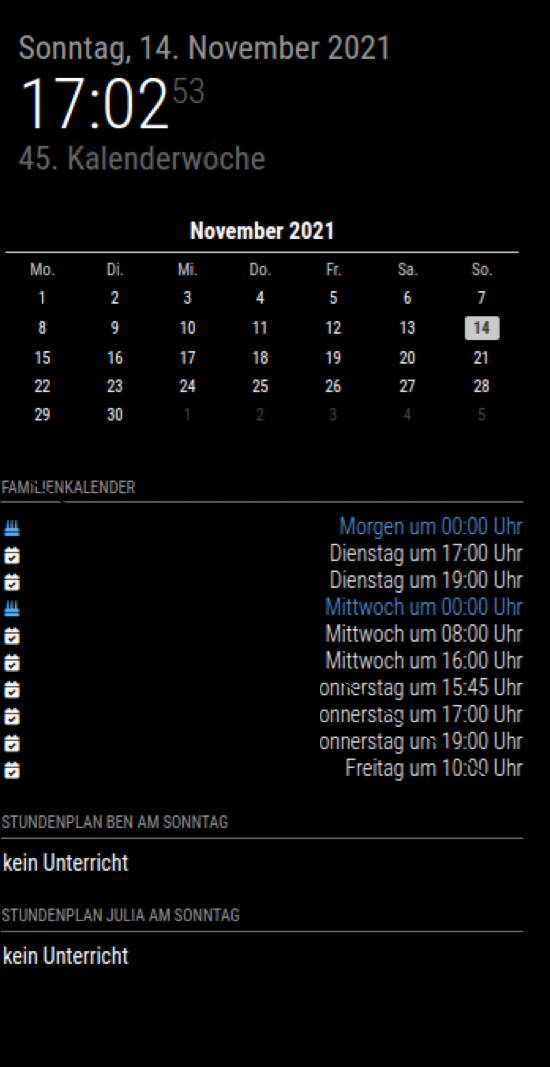
Hello, is there a problem or a connection between the modules MMM-WeeklySchedule and module_schedule? I assumed that the MMM-Weekly-Schedule module would be hidden. Unfortunately it doesn’t. Does anyone have any idea why?
{
    module: "MMM-WeeklySchedule",
    position: "top_left",
    header: "Stundenplan Ben  ",
    config: {
		module_schedule: [
		{from: '00 19 * * SUN', to: '00 15 * * FRI'},
		],
        schedule: {
            timeslots: [ "1.Std. 08:05 - 08:50", "2.Std. 08:50 - 09:35", "3.Std. 10:05 - 10:50", "4.Std. 10:50 - 11:35", "5.Std. 11:55 - 12:40","6.Std. 12:40 - 13:25" ],
            lessons: {
                                [.......C O D E ....],
           }
        },
        updateInterval: 1 * 60 * 45 * 1000, // every hour
        showNextDayAfter: "17:00",
        allowHTML: 'true',
    }
},
-
RE: Just updated to newest MagicMirror and now it won't load.
open another module directory and look for a “node_modules” folder and see if there is a “request” folder there. then copy this to your module where it is missing. that also helped and worked for me. Maybe more are missing. I searched my node_modules folder until I had everything together.
-
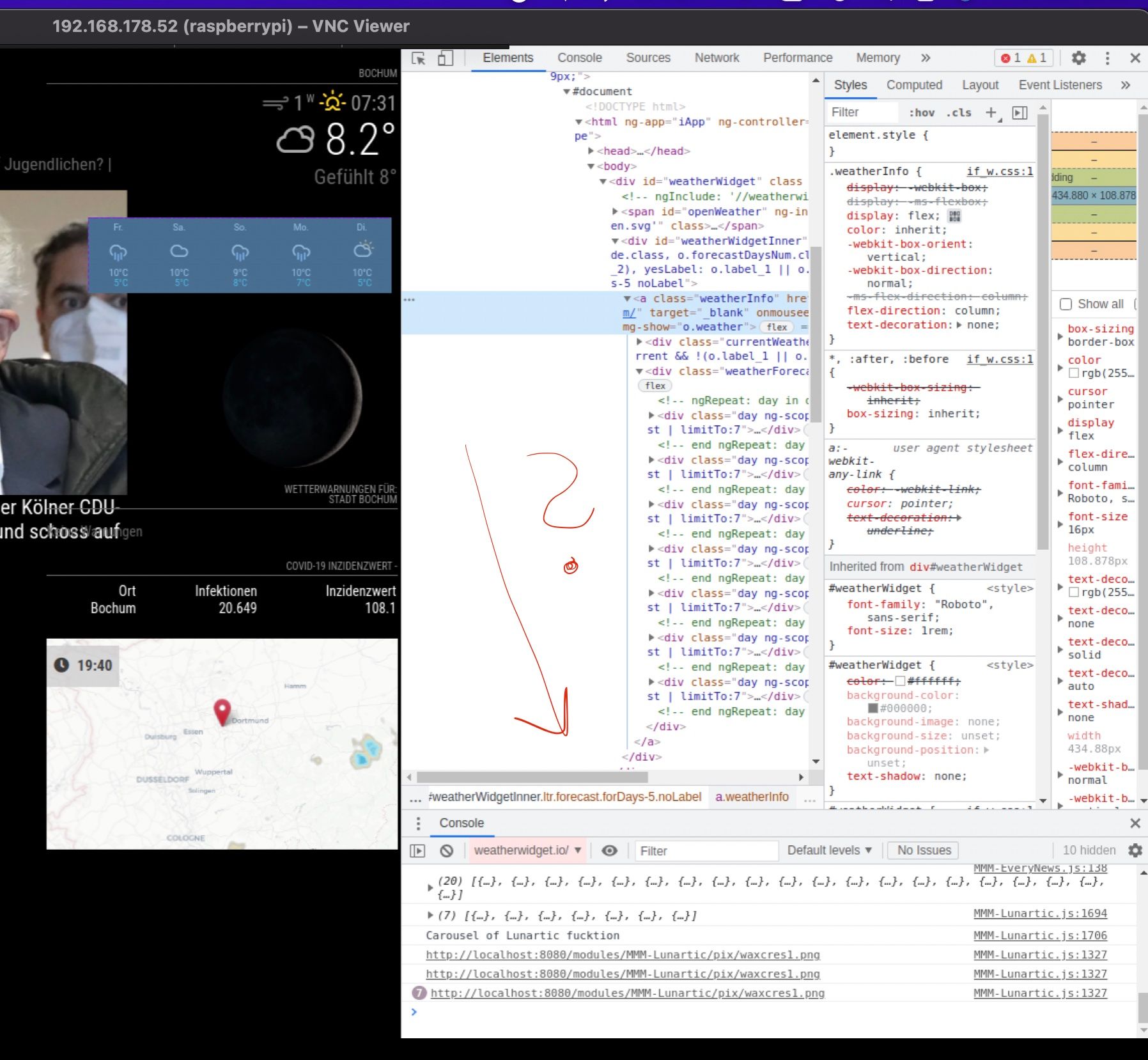
RE: MMM-WeatherOrNot custom.css
@bjoern said in MMM-WeatherOrNot custom.css:
div.weatherWidgetInner.ltrforecast.forDays-5nolabel
i think …
div.weatherWidgetInner.ltrforecast.forDays-5nolabel:disappointed_face: :dizzy_face:
-
RE: MMM-WeatherOrNot custom.css
Thanks for the hint. I was able to change the font size in dev-mode, but I can’t find the right element name
.MMM-WeatherOrNot .weatherWidgetInner  {
    font-size: 2.1em;
}
.MMM-WeatherOrNot div.weatherWidgetInner.ltrforecast.forDays-5nolabel { font-size: 2.1em; }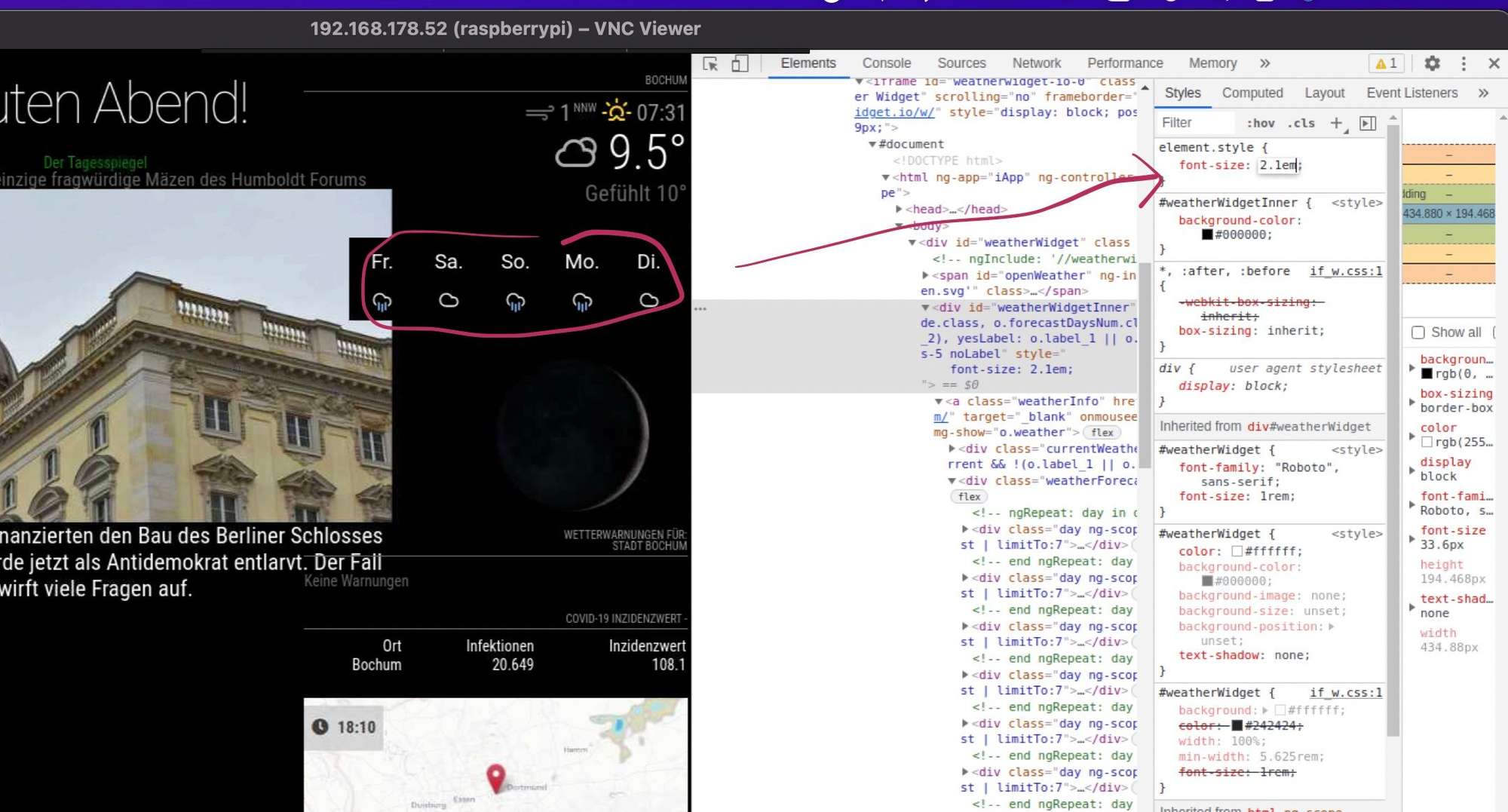
-
MMM-WeatherOrNot custom.css
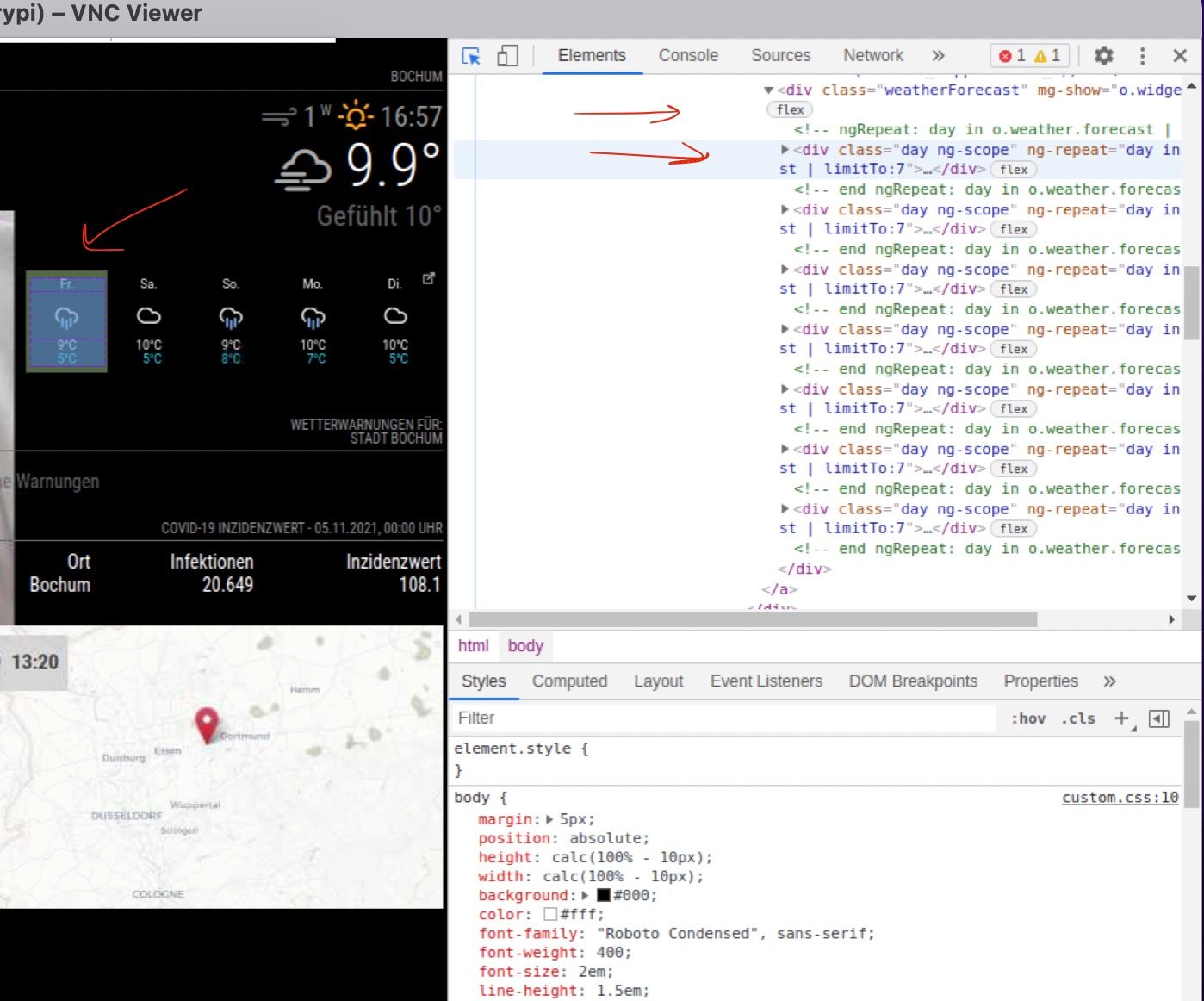
I need help with custom.css. I would like to enlarge the forecast area to about 1.5em. Unfortunately I can’t get any further with my custom.ccs.
.MMM-WeatherOrNot .day ng-scope {
  font-size: 1.5em; */
}
oder
.MMM-WeatherOrNot .weatherForecast{
  font-size: 1.5em;

}
can someone help me please
thx -
RE: MMM-COVID19-AMPEL (focus on Germany)
Kann man sich auch die Werte von Deutschland anzeigen lassen und interessant wäre der Vergleich zum Vortag.
-
RE: Calendar - Wrong times after switching to winter time
@sdetweil , when comes the fix official? and waht do you mean by “Office 365” ? THX
-
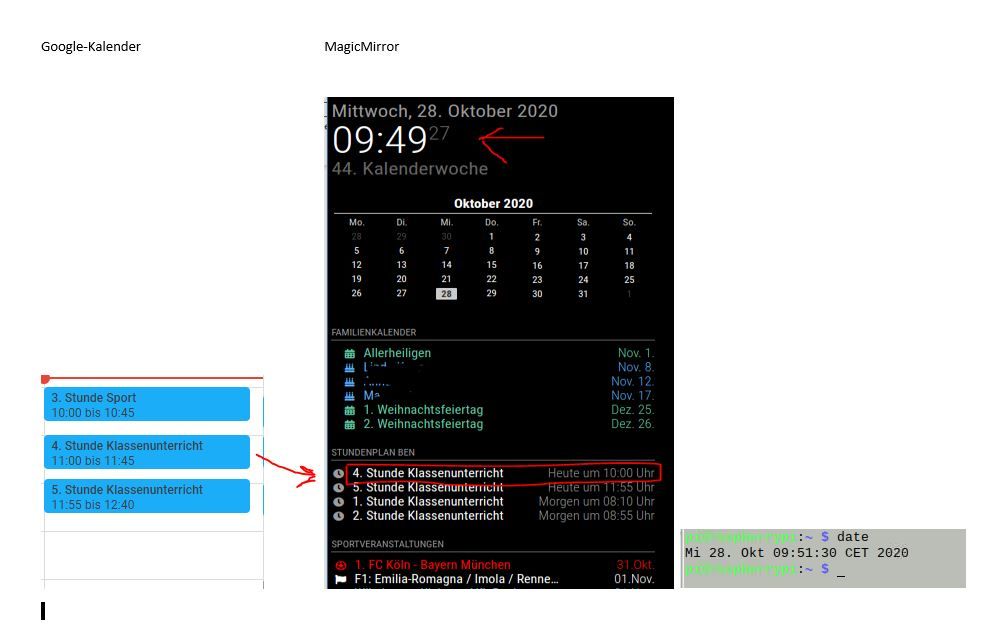
Calendar - Wrong times after switching to winter time
I only noticed today that the calendars are showing the wrong time, even though it is correctly stored on the google calendar. The Raspberry has the right time! Where is the problem? Attached is the excerpt from the config and a hard copy. Thank you
{
			module: "calendar",
			header: "Stundenplan Ben",
			displaySymbol: "true",
			position: "top_left",
			classes: 'scheduler',
			config: {
						module_schedule: [{from: '00 19 * * SUN', to: '00 15 * * FRI'},],
						maxTitleLength: 30,
						maximumEntries: 6,
						fade: false,
						getRelative: 0,
						nextDaysRelative: "true",
						dateFormat: "DD.MMM",
						timeFormat: "absolute",
							urgency: 0,
				calendars: [
				{
							symbol: "clock",
							url: "webcal://calendar.google.com/calendar/ical......../basic.ics",
							},

							],
					}
},
-
RE: MMM-WeatherOrNot - Forecast
@raymondjspigot : thanks a lot. that it’s. works fine!
-
RE: MMM-WeatherOrNot - Forecast
@lavolp3 said in MMM-WeatherOrNot - Forecast:
.MMM-WeatherOrNot .someElement {
display: none;
}Thanks a lot, but it does not work.
.MMM-WeatherOrNot .currentWeather {
  display: none;
}
i don’t know why. it’s the corect element, in my opinion
-
MMM-WeatherOrNot - Forecast
Re: MMM-WeatherOrNot
It’s possible to activate/deactivate the current weather e.g.currentWeather: "true"/"false" ? -
RE: MMM-Lunartic
the secret is custom.css :-D
.MMM-Lunartic img.photo {
/*  display: none;              uncomment if you don't want an image */
  max-width: 100%;
  margin-left: 250px;          /* Precisely align moon picture with these */
  margin-right: 0px;
  margin-top: 0px;         /* -41px for current. -21px for animation or static. */
  margin-bottom: -21px;      /* -51px for current. -21px for animation or static. */
}
by the way. which weatherforecast you have and what is it for a Map? looks nice. thanks