MagicMirror Forum
    • Recent
    • Tags
    • Unsolved
    • Solved
    • MagicMirror² Repository
    • Documentation
    • 3rd-Party-Modules
    • Donate
    • Discord
    • Register
    • Login
    • Profile
    • Following 0
    • Followers 2
    • Topics 68
    • Posts 1,326
    • Groups 1
    BKeyportB Offline
    1. Home
    2. BKeyport
    3. Posts
    A New Chapter for MagicMirror: The Community Takes the Lead
    Read the statement by Michael Teeuw here.

    Posts

    Recent Best Controversial
    • RE: MMM-CalendarExt2

      @shfaxx Check to see if “hideOverflow: false,” in your view section takes out the extra space. It did for me in another view style.

      also, @sean would have the answer on the cutoff, but I suspect it’s something to do with the rotation - I think it’s been covered before, check the main topic at https://forum.magicmirror.builders/topic/9279/

      posted in Troubleshooting
      BKeyportB
      BKeyport
    • RE: MMM-CalendarExt2

      @cskenney Your code almost got it. - had to remove the comma on line 68 there, but it now checks out…

      Just don’t seem to do anything yet. Tweaking some more.

      Actually, it’s doing exactly what it’s designed to do. It shows the icon for the event. I didn’t expect it to leave the title in place too. That’ll do perfect.

      posted in Utilities
      BKeyportB
      BKeyport
    • RE: MMM-CalendarExt2

      @sdetweil - It gets worse.

      65:  transform: (event) => {  
      66:	if (event.title.search("Recycle") > -1) {
      67:	event.icon = "mdi:recycle"
      68: 	},
      69: 	return event
      70: },
      
      Checking file...  /home/pi/MagicMirror/config/config.js
      Line 65 col 46 'arrow function syntax (=>)' is only available in ES6 (use 'esversion: 6').
      Line 67 col 63 Missing semicolon.
      Line 68 col 34 Expected an identifier and instead saw ','.
      Line 68 col 34 Expected an assignment or function call and instead saw an expression.
      Line 68 col 35 Missing semicolon.
      Line 69 col 45 Missing semicolon.
      
      0|mm     | WARNING! Could not validate config file. Starting with default configuration. Please correct syntax errors at or above this line: /home/pi/MagicMirror/config/config.js:68
      0|mm     |                                                              },
      0|mm     |                                                               ^
      0|mm     | SyntaxError: Unexpected token ,
      0|mm     |     at new Script (vm.js:74:7)
      0|mm     |     at createScript (vm.js:246:10)
      0|mm     |     at Object.runInThisContext (vm.js:298:10)
      0|mm     |     at Module._compile (internal/modules/cjs/loader.js:678:28)
      0|mm     |     at Object.Module._extensions..js (internal/modules/cjs/loader.js:722:10)
      0|mm     |     at Module.load (internal/modules/cjs/loader.js:620:32)
      0|mm     |     at tryModuleLoad (internal/modules/cjs/loader.js:559:12)
      0|mm     |     at Function.Module._load (internal/modules/cjs/loader.js:551:3)
      0|mm     |     at Module.require (internal/modules/cjs/loader.js:658:17)
      0|mm     |     at require (internal/modules/cjs/helpers.js:20:18)
      
      posted in Utilities
      BKeyportB
      BKeyport
    • RE: MMM-CalendarExt2

      @Sean - This don’t seem to work. Did I break my code? (line numbers added to show result from error check) - MM won’t start with code enabled - “Please create file”

      65: transform: (event) => {  
      66:	if (event.title.search("Recycle") > -1) {
      67:		event.icon = "mdi:recycle",
      68:	},
      69:	return event
      70: },  
      

      Results in:

      Checking file...  /home/pi/MagicMirror/config/config.js
      Line 65 col 46 'arrow function syntax (=>)' is only available in ES6 (use 'esversion: 6').
      Line 68 col 33 Unexpected '}'.
      Line 67 col 63 Expected an assignment or function call and instead saw an expression.
      Line 67 col 64 Missing semicolon.
      Line 68 col 34 Expected an identifier and instead saw ','.
      Line 68 col 34 Expected an assignment or function call and instead saw an expression.
      Line 68 col 35 Missing semicolon.
      Line 69 col 45 Missing semicolon.
      

      Thanks!

      posted in Utilities
      BKeyportB
      BKeyport
    • RE: MMM.RTSPStream

      I did some checking, and testing and found out a couple of things:

      1. I was on the develop branch, not the master branch.
      2. I’m now on the master branch, which neither VLC or OMXPlayer works, but FFMPeg does.

      So, maybe the solution is to switch to FFMpeg for you, too.

      posted in Troubleshooting
      BKeyportB
      BKeyport
    • RE: MMM.RTSPStream

      FWIW, VLC don’t work for me. I have to use OMX Player or FFMPeg… running on a Pi 4

      posted in Troubleshooting
      BKeyportB
      BKeyport
    • RE: MMM.RTSPStream

      I think at this point, we need to perform some voodoo and call up the author… @shbatm

      Wanna help us out?

      posted in Troubleshooting
      BKeyportB
      BKeyport
    • RE: MMM.RTSPStream

      If you followed the instructions exactly, it should be working… It does look like you did as far as the bash command goes. Did you use the configuration builder tool or build the config manually?

      posted in Troubleshooting
      BKeyportB
      BKeyport
    • RE: MMM.RTSPStream

      Have you tried the other players? OMXPlayer or FFMPeg?

      if you’re using PM2 to launch the mirror - you can run a second terminal window and use the command “PM2 Logs” in that window to catch the logs realtime as well to see any errors you get.

      posted in Troubleshooting
      BKeyportB
      BKeyport
    • RE: Coming Soon: Faster, 100% Backwards-Compatible MagicMirror Alternative

      @joshwilsonvu If it could be done so that the ideas therein could be worked into the MagicMirror project as well - so people have a fair choice, I’m all in.

      posted in General Discussion
      BKeyportB
      BKeyport
    • RE: Autorestart

      Assuming you have PM2 set up per instructions:

      #       min     hour    day     Mon      wkd    command
               15      2       *       *        *      sudo reboot
               13      2       *       *        *      pm2 stop mm
      
      posted in Troubleshooting
      BKeyportB
      BKeyport
    • RE: MMM-CalendarExt2

      @Sean You know, I was just wondering how to get rid of empty days. Thanks!

      posted in Utilities
      BKeyportB
      BKeyport
    • RE: MMM-CalendarExtMinimonth

      For those who run across this and want to do it yourself:

      @Sean said in MMM-CalendarExtMinimonth:

      @mrdenmark
      I think multi-instances are possible, but all the instances will display same result unless you modify the source of each instance.

      This is correct. I’ve got it completely solved. Instructions are written for Raspberry Pi.

      1. Install the module once using original directions.
      2. Change to the modules home directory:
      cd ~/MagicMirror/modules
      
      1. Copy the module from it’s install directory to a new directory, so you have multiple copies (I used MMM-CalendarExtMinimonth2):
      cp -r MMM-CalendarExtMinimonth MMM-CalendarExtMinimonth2
      
      1. Change to new directory:
      cd MMM-CalendarExtMinimonth2
      
      1. Rename files MMM-CalendarExtMinimonth.css and MMM-CalendarExtMinimonth.js to new directory name.
      mv MMM-CalendarExtMinimonth.css MMM-CalendarExtMinimonth2.css
      mv MMM-CalendarExtMinimonth.js MMM-CalendarExtMinimonth2.js
      
      5.  Modify the following lines - // and everything after it is my note: 
      
      ```js
      dom.id = "CXMM" // Change "CXMM" to another id, I used CXMM2
      colors.id = "CXMM_COLOR_TRICK" // Change CXMM to same as dom.id  
      var trick = document.getElementById("CXMM_COLOR_TRICK") // Change CXMM again
      Module.register("MMM-CalendarExtMinimonth", { // Change MMM-CalendarExtMinimonth to name of directory
      return ["MMM-CalendarExtMinimonth.css"] // change to name of CSS file. 
      
      1. Change every instance of ‘moment()’ to ‘moment().add(1, “month”)’ in the file except for the two “Today” calls:

      Example:

      // Change
      
      var startCalDate = moment().locale(locale).startOf('month').startOf('week')
      var endCalDate = moment().locale(locale).endOf('month').endOf('week')
      
      // To: 
      
      var startCalDate = moment().add(1, "month").locale(locale).startOf('month').startOf('week')
      var endCalDate = moment().add(1, "month").locale(locale).endOf('month').endOf('week')
      ```js 
      // DO NOT CHANGE THESE
      // var startToday (If today is the 15th, it'll mark the 15th of next month as today if it's changed)
      // var endToday (If today is the 15th, it'll mark the 15th of next month as today if it's changed)
      // moment. (No "()") - Other function, not using moment library
      //  moment(anything) - special function
      
      1. In the renamed CSS file change all instances of CXMM to new dom.id name - If you don’t do this, you’ll get a string of numbers up the side.

      2. In your config.js file - call it as a separate module:

      {
      module: "MMM-CalendarExtMinimonth2",
      position: "bottom_right",
      refreshInterval: 60*2.5*1000,
      }, 
      {
      module: "MMM-CalendarExtMinimonth",
      position: "bottom_right",
      refreshInterval: 60*2.5*1000,
      }, 
      

      Make other changes to CSS as for default instructions.

      Enjoy!
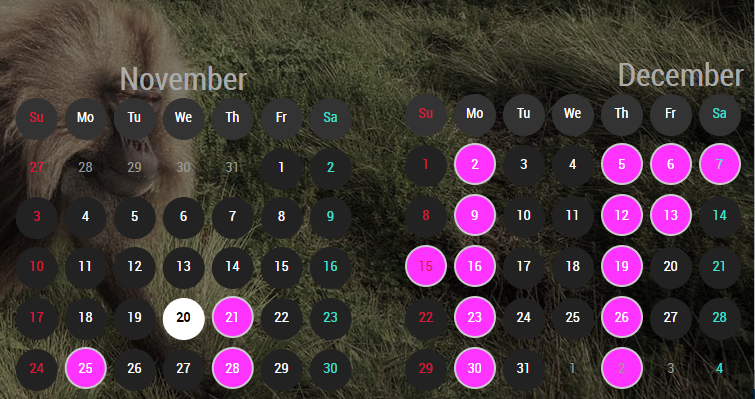
      0_1574317441674_Capture.PNG

      posted in Utilities
      BKeyportB
      BKeyport
    • RE: MMM-CalendarExt2

      @mrmagoo_83 Regex would be “\(” and “\)” to find both.

      posted in Utilities
      BKeyportB
      BKeyport
    • RE: MMM-CalendarExt2

      @Sean Neither of those are what I would want. No matter how many items I have, there is a space there. I want to rid myself of the excess blank space, so that I can fit more real items into the display. When the day is empty there is very little space between days.

      posted in Utilities
      BKeyportB
      BKeyport
    • RE: MMM-CalendarExt2

      Thanks, that fixed it.

      The only thing I can’t figure out then is massive space between the end of the previous day’s activities, and the next day.

      0_1573905177911_Capture.PNG

      Is there a way to solve this? Loving it otherwise.

      posted in Utilities
      BKeyportB
      BKeyport
    • RE: MMM-CalendarExt2

      Hey, Just started using this module, and today’s update blew up everything… It and MMM-CalendarExtMinimonth fails now.

      Am I doing something wrong?

      		{
      			module: 'MMM-CalendarExt2',
      				config: {
      					calendars : [
      						{
      							url: "https://calendar.google.com/calendar/ical/mycalendar/info/basic.ics",
      							name: "Main Calendar", // Optional, Recommended
      							maxItems: 100,
      							scanInterval: 1000*60*1, // 1000*Seconds*minutes
      							beforeDays: 0,
      							afterDays: 999,
      							maxIterations: 100,
      							forceLocalTZ: false,
      						},
      					],
      					views: [
      						{
      							mode: "daily",
      							position: "top_center",
      							slotCount: 20,
      						},
      					],
      					scenes: [
      						{
      							name: "DEFAULT",
      						},
      					],
      				},
      		},
      		{
      			module: "MMM-CalendarExtMinimonth",
      			position: "bottom_right",
      			refreshInterval: 60*2.5*1000,
      		},
      

      Thanks!

      posted in Utilities
      BKeyportB
      BKeyport
    • RE: [MMM-RTSPStream] - Video Streaming from Live Feeds & Security Cameras

      Odd - I’m having no problem moving it around - although, if you’re using OMXPlayer, it’s overlaying on top of the screen, it won’t play nice with other modules in the same position…

      posted in Utilities
      BKeyportB
      BKeyport
    • RE: [SOLVED] Can I display MagicMirror on a TV, with no mirror?

      I’m currently running mirrorless on the system I still have running (office) - and will be running mirrorless on the system I’m gonna rebuild for my house. Both systems are half built, actually, I’m gonna put one behind lightly darkened glass, and the other one was disassembled for a move, and never bothered to put back together, yet.

      posted in General Discussion
      BKeyportB
      BKeyport
    • RE: Need help for last two problems.

      I gave up on the default modules except for the clock - I use MMM-DarkSkyForecast

      This is what I use to maximize the entire display edge to edge. (It works, but it’s technically incorrect)

      Custom.css

      /* maximize screen usage for MagicMirror. */
       body {
        margin: 4px;
        height: calc(100vh - 10px);
        width: calc(100vw - 5px);
      } 
      

      If you want a particular module to take the entire screen, you could use ‘fullscreen_below’ as the position.

      posted in Troubleshooting
      BKeyportB
      BKeyport
    • 1
    • 2
    • 58
    • 59
    • 60
    • 61
    • 62
    • 66
    • 67
    • 60 / 67