A New Chapter for MagicMirror: The Community Takes the Lead
Read the statement by Michael Teeuw here.
Read the statement by Michael Teeuw here.
B
Offline
Posts
-
RE: Weatherunderground - currently - hourly - daily - configurable
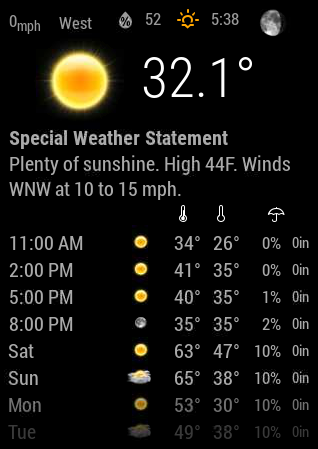
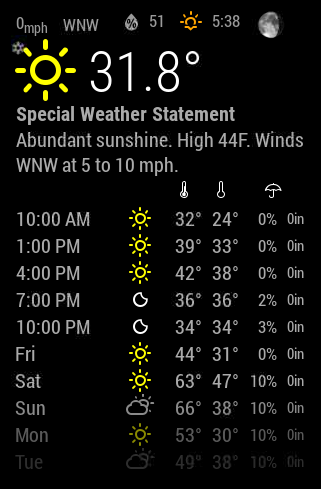
Im still only getting the Icons. How do i get those nicer pictures?
-
RE: MMM-NetworkScanner
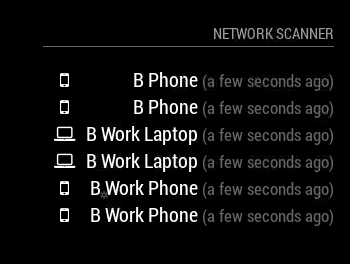
I am also getting duplicates as well. Any help on this?
-
RE: MMM-NetworkScanner
Does anyone have issues with the “occupied” and “vacant” part working? I tried to set it up and test it but i have had no luck. I want the mirror to turn off when i leave and turn back on when i return. I love this idea but need a little help configuring it to work.
My config is below:
{ module: 'MMM-NetworkScanner', position: 'top_right', header: "Network Scanner", config: { devices: [ { macAddress: "lower case", name: "B Phone", icon: "mobile"}, { macAddress: "lower case", name: "B Work Phone", icon: "mobile"}, { macAddress: "lower case", name: "B Work Laptop", icon: "laptop"}, ], showUnknown: false, showOffline: true, keepAlive: 300, updateInterval: 10, showLastSeen: true, residents: "B Phone", occupiedCMD: {notification: 'REMOTE_ACTION', payload: {action: 'MONITORON'}}, vacantCMD : {notification: 'REMOTE_ACTION', payload: {action: 'MONITOROFF'}}, } }, -
RE: Modules not loading - Noob Fail
So i turned my Pi on today and it worked. Not sure what happened. I’m up and running again. Really odd. i didnt change my Config file and if i were to run logs, whats the best way of getting them?
-
Modules not loading - Noob Fail
So, I want to preface this by saying I tried to copy the micro SD card to a second card (a larger card). That was unseccessful. I put the original card back in my pi and none of my modules are loading. I’m conntected via wifi and I can get on the internet but none of my modules will load. The only thing that works is the Clock. Help get my mirror back online!!! I feel like an idiot. Now she’s DEAD!!!
-
RE: Mobile app (bachelor thesis)
Hi Strawberry 3.141, I am still having an issue with using the mobile app.
Below is the steps i took based on the install guide from the git and deleting the folder.Here is the install:
pi@raspberrypi:~/MagicMirror/modules $ git clone https://github.com/fewieden/MMM-Mobile.git
Cloning into ‘MMM-Mobile’…
remote: Counting objects: 84, done.
remote: Compressing objects: 100% (21/21), done.
remote: Total 84 (delta 12), reused 0 (delta 0), pack-reused 63
Unpacking objects: 100% (84/84), done.
Checking connectivity… done.
pi@raspberrypi:~/MagicMirror/modules $Then the Dependencies
pi@raspberrypi:~/MagicMirror/modules/MMM-Mobile $ npm install
mmm-mobile@1.0.0 preinstall /home/pi/MagicMirror/modules/MMM-Mobile
node scripts/preinstall.js
Creating Backup for config.js!
Saving updated config.js!
mmm-mobile@1.0.0 /home/pi/MagicMirror/modules/MMM-Mobile
├─┬ async@2.1.4
│ └── lodash@4.17.4
├── moment@2.17.1
├── qr-image@3.2.0
└── simple-git@1.65.0
pi@raspberrypi:~/MagicMirror/modules/MMM-Mobile $add to config.js file
“modules”: [
{
“module”: “alert”
},
{
module: “MMM-Mobile”
},the QRcode popped up but still would not connect
in the app, i put in my IP address and it said Connected for a milisecond then showed could not connect again -
RE: Mobile app (bachelor thesis)
@strawberry-3.141
Im googling how to remove the module directory but its not really clear. Is it as simple as deleting the module folder or is there more to it? -
RE: Mobile app (bachelor thesis)
@strawberry
I deleted the Module and reinstalled, the QR code is not generating now. I made a mess of this. ugh. -
RE: Mobile app (bachelor thesis)
@strawberry-3.141
I deleted the files and it came back up but the app is still not connecting.defaults: { ip: '192.168.......', qrSize: 300, qrTimer: 60 * 1000 }, -
RE: Mobile app (bachelor thesis)
I cant get the QR Code to come back up. My app is saying “Cannot Establish Connection to MagicMirror”. I didnt have the IP Address in there so i added it and now i cant get the QR code to come back on.
-
RE: MMM-forecast-io -- Localized up to the minute weather
I’m not getting any graph for precipitation. Will it only be there if there is rain/snow in the next x amount of hours?
-
RE: MMM-forecast-io -- Localized up to the minute weather
noob mistake. Installed now. Thanks!!
I feel like an idiot. This machine will not beat me!! -
RE: MMM-forecast-io -- Localized up to the minute weather
Im getting the below when i try to install:
pi@raspberrypi:~/MagicMirror/modules $ git pull https://github.com/dmcinnes/MMM-forecast-io.git
From https://github.com/dmcinnes/MMM-forecast-io
 * branch            HEAD       -> FETCH_HEAD

*** Please tell me who you are.

Run

  git config --global user.email "you@example.com"
  git config --global user.name "Your Name"

to set your account's default identity.
Omit --global to set the identity only in this repository.

fatal: empty ident name (for <pi@raspberrypi.(none)>) not allowed
pi@raspberrypi:~/MagicMirror/modules $
How do i fix this in order to install?
Note from admin: Please use Markdown on code snippets for easier reading!
-
RE: Iformation display
This looks great! I will have to look into that Module Scheduler!
Congrats on the build! -
RE: Colors changed
This is amazing! I love a little bit of color.
How do I change my Header colors? -
RE: Family Info Board
@Wedee Thanks!
I can not find where the access token and client ID should go in the config.js file.
Any tips or pointers on where to put this information?modules: [ { module: 'MMM-Wunderlist', position: 'top_right', // This can be any of the regions. Best results in left or right regions. header: 'Wunderlist', // This is optional config: { // See 'Configuration options' for more information. } } ] -
RE: Family Info Board
This is a great idea and I am trying to duplicate it but I’m stuck at the Wunderlist.
Is there a tutorial or walk through on requesting the API?
I am new to all of this and been holding my own for the most part (noob).
Thanks!