MagicMirror Forum
    • Recent
    • Tags
    • Unsolved
    • Solved
    • MagicMirror² Repository
    • Documentation
    • 3rd-Party-Modules
    • Donate
    • Discord
    • Register
    • Login
    1. Home
    2. Bob
    3. Posts
    A New Chapter for MagicMirror: The Community Takes the Lead
    Read the statement by Michael Teeuw here.
    B
    Offline
    • Profile
    • Following 0
    • Followers 0
    • Topics 3
    • Posts 33
    • Groups 0

    Posts

    Recent Best Controversial
    • RE: What can YOUR mirror do?

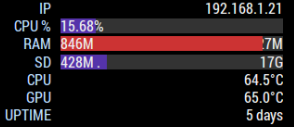
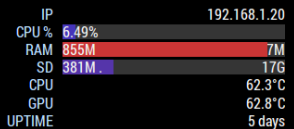
      I don’t have any processor intensive modules installed, but I do have ones that seem to use memory like no tomorrow. I have a dual monitor installation (write up and pics to follow within the next few weeks), and both have over 800Mb used

      MM1
      0_1509374940780_dd73c606-7595-4deb-b9aa-76d31c935db5-image.png

      MM2
      0_1509374958130_daa681d1-5380-4549-baa2-f2f4ae1e564b-image.png

      Is that normal, as when I started out using the mirrors I don’t recall either using that kind of memory ?

      posted in General Discussion
      B
      Bob
    • RE: Third Party Modules Don't Work Please Help

      Ho hum, I got bored, so…

      @zzaidi148 here you go, below is your working code.

      As was said above, you needed to remove the // from var config, and the extra config section at the end. I also tidied up the code (putting spaces between modules to make them easier to read), and added some extra commas (because I tend to anyway) . You just need to replace the API keys with the correct ones and the code below will work.

      var config = {
      
      	address: "localhost", // Address to listen on, can be:
      	                      // - "localhost", "127.0.0.1", "::1" to listen on loopback interface
      	                      // - another specific IPv4/6 to listen on a specific interface
      	                      // - "", "0.0.0.0", "::" to listen on any interface
      	                      // Default, when address config is left out, is "localhost"
      	port: 8080,
      	ipWhitelist: ["127.0.0.1", "::ffff:127.0.0.1", "::1"], // Set [] to allow all IP addresses
      	                                                       // or add a specific IPv4 of 192.168.1.5 :
      	                                                       // ["127.0.0.1", "::ffff:127.0.0.1", "::1", "::ffff:192.168.1.5"],
      	                                                       // or IPv4 range of 192.168.3.0 --> 192.168.3.15 use CIDR format :
      	                                                       // ["127.0.0.1", "::ffff:127.0.0.1", "::1", "::ffff:192.168.3.0/28"],
      
      	language: "en",
      	timeFormat: 12,
      	units: "imperial",
      
      	modules: [
      	
      		{
      			module: "alert",
      		},
      
      		{
      			module: "updatenotification",
      			position: "top_bar",
      		},
      
      		{
      			module: "clock",
      			position: "top_left",
      		},
      
      		{
      			module: "calendar",
      			header: "US Holidays",
      			position: "top_left",
      			config: {
      				calendars: [
      					{
      						symbol: "calendar-check-o",
      						url: "webcal://www.calendarlabs.com/templates/ical/US-Holidays.ics",
      					}
      				]
      			}
      		},
      		
      		{
      			module: "compliments",
      			position: "lower_third",
      		},
      		
      		{
      			module: "currentweather",
      			position: "top_right",
      			config: {
      				location: "Dallas",
      				locationID: "4684888",  //ID from http://www.openweathermap.org/help/city_list.txt
      				appid: "private",
      			}
      		},
      		
      		{
      			module: "weatherforecast",
      			position: "top_right",
      			header: "Weather Forecast",
      			config: {
      				location: "Dallas",
      				locationID: "4684888",  //ID from http://www.openweathermap.org/help/city_list.txt
      				appid: "private",
      			}
      		},
      		
      		{
      			module: "newsfeed",
      			position: "bottom_bar",
      			config: {
      				feeds: [
      					{
      						title: "New York Times",
      						url: "http://www.nytimes.com/services/xml/rss/nyt/HomePage.xml"
      					}
      				],
      				showSourceTitle: true,
      				showPublishDate: true
      			}
      		},
              
              {
                  module: 'MMM-GoogleMapsTraffic',
                  config: {
                      key: 'YOUR_KEY',
                      lat: 37.8262306,
                      lng: -122.2920096,
                      height: '300px',
                      width: '300px',
                  },
              },
      
      	]
      };
      
      /*************** DO NOT EDIT THE LINE BELOW ***************/
      if (typeof module !== "undefined") {module.exports = config;}
      
      posted in Troubleshooting
      B
      Bob
    • RE: Who can help me to find my PIR Sensor problem

      @hmoed No problem, glad you got it working.

      posted in Troubleshooting
      B
      Bob
    • RE: Third Party Modules Don't Work Please Help

      remove the second instance of

      var config = (
      module : [

      ]
      }

      at the bottom of the file

      posted in Troubleshooting
      B
      Bob
    • RE: Versioning/maintaining changes?

      If you’re customising look/feel, then edit custom.css, as that won’t be overwritten by a “git pull”. Also, for some modules you can add config or customisations outside of the modules directory, which will preserve the settings on a pull.

      Any changes you make to a modules actual code will get overwritten by an upgrade. You could avoid that if you create your own fork of a module (as some developers here have done).

      If upgrading MM itself, then you should always backup your config.js

      posted in Troubleshooting
      B
      Bob
    • RE: Who can help me to find my PIR Sensor problem

      Have you tested the PIR independently of the mirror ? (ie, does it work the way you want it to ?). This is a good guide to setting them up and testing they work.

      https://www.raspberrypi-spy.co.uk/2013/01/cheap-pir-sensors-and-the-raspberry-pi-part-1/

      I had issues with the same MM module, and chose to use this solution instead, which works perfectly and has the added advantage of working regardless of whether MM is running.

      https://github.com/deg0nz/MagicMirror-Display-Controller

      posted in Troubleshooting
      B
      Bob
    • RE: 2 problems with MMM-MyCommute module

      @j.e.f.f Thanks Jeff, problem solved, and everything now works. Typical that Google allows you to use the API without a valid key, and doesn’t error out to say it’s not a valid entry :(

      Oh for the good old days of 2 word *nix error messages that required a manual the size of war and peace to troubleshoot…but at least you knew there was an error ! :)

      posted in Troubleshooting
      B
      Bob
    • RE: 2 problems with MMM-MyCommute module

      I’m guessing no-one has any other ideas ? I wondered if there was a conflict with any other modules, so I’ve done a full rebuild of the RPi, stripped the config to just this module, and it still doesn’t work properly.

      Ho hum

      posted in Troubleshooting
      B
      Bob
    • RE: 2 problems with MMM-MyCommute module

      @strawberry-3-141 I saw that, and fixed it (just not in my post)

      @yawns I cut and pasted your code (adjusted the API key and the postal codes), and still get the same error (as per previous screenshot)

      posted in Troubleshooting
      B
      Bob
    • RE: 2 problems with MMM-MyCommute module

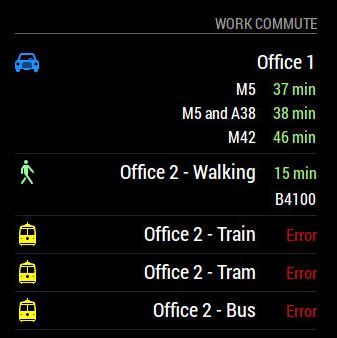
      This is what I get using the code above.

      0_1504002124877_MyCommute error.JPG

      posted in Troubleshooting
      B
      Bob
    • RE: 2 problems with MMM-MyCommute module

      @strawberry-3-141 Where are there quotes missing ? I could only see a couple (which I’ve corrected in my first post). I edited the code to remove identifying info, so it should be ok now. Normally when there is a code error due to syntax (such as quotes), MM won’t even run.

      In this instance, I simply get a line error for the specific mode of transport.

      posted in Troubleshooting
      B
      Bob
    • 2 problems with MMM-MyCommute module

      Brief bit of background.

      I have 2 offices that I go to. One is about a mile from where I live and I have 4 ways to get to there (walking, tram, train or bus). The other is about 30 miles away with a couple of alternative driving routes. Depending on which office I’m going to (and whether I want to walk or take public transport), I want the module to show me what is likely to be the best option to get to each of the specific offices.

      This is where I have 2 problems I’m trying to resolve and could do with some help.

      1. For driving, I never have anything but a “green” commuting time (ie, it never goes yellow or red for delays, even when adjusted to 1% and 5% delay thresholds)

      2. For the closer office I can’t get the alternative transit modes to work (ie, train, tram, bus etc). If I specify anything within the transitMode option, I get Error displayed in the module. If I just use transit (with no transitmode) it works fine, although I can’t then pick which mode of transit to use.

      My code is below (API is edited out, as are home & work postal codes - the rest is cut and paste)

      {
      	module: 'MMM-MyCommute',
      	header: "Work Commute",
      	position: 'bottom_right',
      	config: {
      		api_key: 'xxxxxxxxxxxxxxxxxxxxxxxxxxx',
      		origin: 'Home Postal Code',
      		showSummary: true,
      		startTime: '00:00',
      		endTime: '23:59',
      		colorCodeTravelTime: true,
      		moderateTimeThreshold: 1.01,
      		poorTimeThreshold: 1.05,
      		destinations: [
      			{
      			destination: 'Work  1 Postal Code', // Farther office, by car, alternatives on
      			label: 'Office 1',
      			color: '#1E90FF', //Blue
      			alternatives: true,
      			},
      			{
      			destination: 'Work  2 Postal Code', // Closer office, walking, alternatives off
      			label: 'Office 2 - Walking',
      			mode: 'walking',
      			color: '#98FB98', // Green
      			alternatives: false,
      			},
      			{
      			destination: 'Work 2 Postal Code',
      			label: 'Office 2 - Train',
      			mode: 'transit',
      			transitMode: 'train',
      			showNextVehicleDeparture: true,
      			color: '#ffff00', //Yellow
      			alternatives: false,
      			},
      			{
      			destination: 'Work 2 Postal Code,
      			label: 'Office 2 - Tram',
      			mode: 'transit',
      			transitMode: 'tram',
      			showNextVehicleDeparture: true,
      			color: '#ffff00', //Yellow
      			alternatives: false,
      			},
      			{
      			destination: 'Work 2 Postal Code,
      			label: 'Office 2 - Bus',
      			mode: 'transit',
      			transitMode: 'bus',
      			showNextVehicleDeparture: true,
      			color: '#ffff00', //Yellow
      			alternatives: false,
      			},
      			]
      	},
      },
      

      I’ve tried all sorts of editing, using both single and double quotes, and am using Geany to check the syntax (which I believe is correct)

      Any ideas ?

      posted in Troubleshooting
      B
      Bob
    • RE: Is there a solution to sunlight overpowering the display?

      Have you tried an anti-glare filter like you’d see on PC’s in offices? 3M do a range of filters that might help.

      posted in Hardware
      B
      Bob
    • 1 / 1