@Fonfon yes, if you put in the ical adress of your google calendar or ios calendar it will.
A New Chapter for MagicMirror: The Community Takes the Lead
Read the statement by Michael Teeuw here.
Read the statement by Michael Teeuw here.
 Offline
Posts
-
RE: try to find module
-
RE: Layout problem
Do what strawberry wrote, it will give you more space on the screen.
also
This should change the size of the fonts in the top two modules only
.currentweather { font-size: 50%; } .clock { font-size: 50%; } -
RE: try to find module
@Fonfon how do you set appointments in your phone? In the calendar app? Then use the default calendar module.
-
RE: Layout problem
@fiskaren no, if they are in the same region they will always stock on top of each other.
use top_left for clock and top_right for weather and then place the other modules in the upper/lower third regions and bottom regions.
-
RE: Layout problem
@fiskaren in what regions have you placed your modules?
I would suggest regionstop_leftandtop_rightfor the clock and weather.And you probably have to change the font sizes to make it fit.
Add this in to your custom.css file.xsmall { font-size: 15px; line-height: 20px; } .small { font-size: 20px; line-height: 25px; } .medium { font-size: 30px; line-height: 35px; } .large { font-size: 65px; line-height: 65px; } .xlarge { font-size: 75px; line-height: 75px; letter-spacing: -3px; }Then change the font-size until you have the look you want.
-
RE: electron size
@ironman_DK The most used classes for the font sizes are :
.xsmall { font-size: 15px; line-height: 20px; } .small { font-size: 20px; line-height: 25px; } .medium { font-size: 30px; line-height: 35px; } .large { font-size: 65px; line-height: 65px; } .xlarge { font-size: 75px; line-height: 75px; letter-spacing: -3px; }Add these in the custom.css and change the font-size in each to fit your needs.
Everything in custom.css will override the main.css -
RE: Wake up the mirror and put it to sleep?
@wizz set up a chronjob in linux and maybe use MMM-Button for the touch?
-
RE: How do you turn Off/On the monitor if not in use - Be Green
Just a thought, does the PIR cut the power entirely or does it just set the monitor to standby?
I don’t really care about the small amount that electronic devices use in standby, but to be truly green you should really cut the power entirely to the monitor.
-
RE: Different Calendars in different colors
You can alter the styling of each calendar yes if you are running multiple instances of the calendars. By using the custom.css file.
depending on which order you put them in the config they are configured like this :
#module_7_calendar {
color: red}
#module_8_calendar {
color: blue}
#module_9_calendar {
color: pink}
#module_10_calendar {
color: green}
The number of the modules starts with 0 which in most cases are the alert module in the config. (
#module_0_alert) -
RE: Pilkington mirror and Silicone
@johnnyboy the frame is beeing glued to the aluminium right now, used a new glue and it takes for ever to cure.
My plan is to go over the aluminium with some 400-800-1200 wet sanding and then a polish wheel to get it somewhat uniform in surface texture.
It scratches fairly easy, as aluminium does, I’ve managed to make some nicks to it miself during assembly.
-
RE: MMM-doomsDay - The countdown module,
@Snille There is already a text being displayed once the day has passed, not configurable, but, there is one :D
-
RE: Correct way of deleting a module and its dependencies?
@Mykle1 No, the dependencies are installed in the specific folder you run the install in (if you look in your MMM-NetworkScanner folder you should have a folder that’s called “node_modules” that’s where the dependencies are)
-
RE: Mom's birthday - a way to have an application on magic mirror *question*
?
If so it works with the webservice IFTTT, and IFTTT has at least a notification module already made for the MM called MMM-IFTT
Thread here :
https://forum.magicmirror.builders/topic/673/mmm-ifttt-if-this-then-that-maker-notifications/5Maybe this can get you started?
-
RE: Differences between glass and acrilic T-W Mirror
@arpippone plastic is lighter and usually cheaper to buy. It’s however not as rigid as glass and scratch a lot easier.
-
RE: Bad question
@Fonfon Yes, how to is described in the MM documentation on how to set up your MagicMirror :
https://github.com/MichMich/MagicMirror/wiki/Configuring-the-Raspberry-Pi
-
RE: MMM-doomsDay - The countdown module,
@strawberry-3.141 Yeah I’ve noticed. If this module keeps misbehaving I will look in to the moment.js instead. looka a lot simpler, thanks for the link!
-
RE: dealing with applications via the mirror..
@jujz just to clarify, You want to control other apps from the Magic Mirror?
-
RE: MMM-doomsDay - The countdown module,
@Mykle1 Okay, do a new
git pullnow. I have altered the method of rounding the numbers, which I should have done from the beginning if I knew better :PAnyhow. Try the new version!
-
RE: Pilkington mirror and Silicone
@johnnyboy if you do a good seem on the outside and grind it down flush I think it still would have enough bond left to hold the frame together.
I’m going all epoxy glue and hope it holds, my 120x60cm 6mm mirror also has a bit of weight :D
I went with a 15x40mm aluminium L profile, inside that I’ll glue a wooden mdf frame to the profiles so I’m counting on that the amount of glued surface will make it hold together.
I have the profiles glued to the mirror as of now, and hopefully I will have the mdf frame made and bonded today.
Here is a potato picture of the frame now :
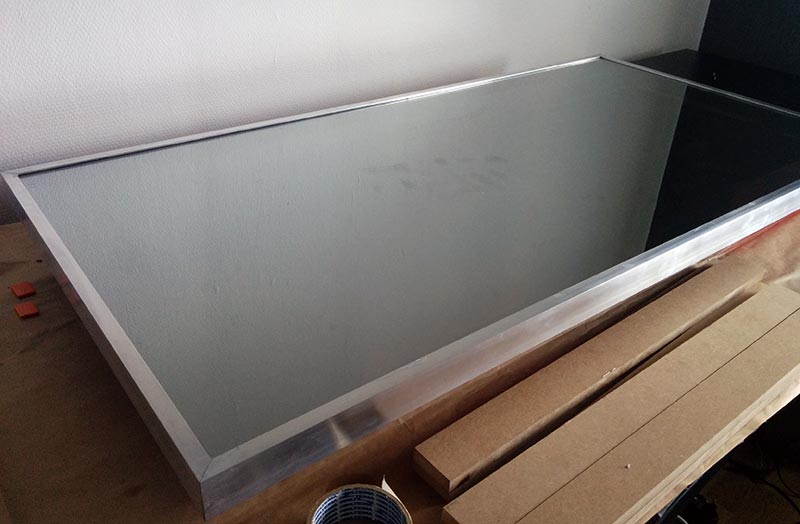
Quick note, I’m not going to apply glue on the side with the coating since I was told by my Glass guy that some coating and some glues doesn’t like each other, didn’t want to risk it. Even if the coated side have slightly better reflection propertys.