Just uploaded a MM module that supports OpenSprinkler. It connects to the demo.opensprinkler.com by default. Still needs lots of enhancements but it works.
C
Offline
A New Chapter for MagicMirror: The Community Takes the Lead
Read the statement by Michael Teeuw here.
Read the statement by Michael Teeuw here.
Posts
-
RE: OpenSprinkler 3.0 irrigation Times on MM
-
RE: MMM-ScreenLogic - see data from your Pentair pool equipment
Re: MMM-ScreenLogic - see data from your Pentair pool equipment
I just reactivated my MM and installed your ScreenLogic Module. I love it and worked out of the box.If I could be so bold to make a few enhancement requests? I dont have a touch screen MM so i dont show controls, its more just a status board for me.
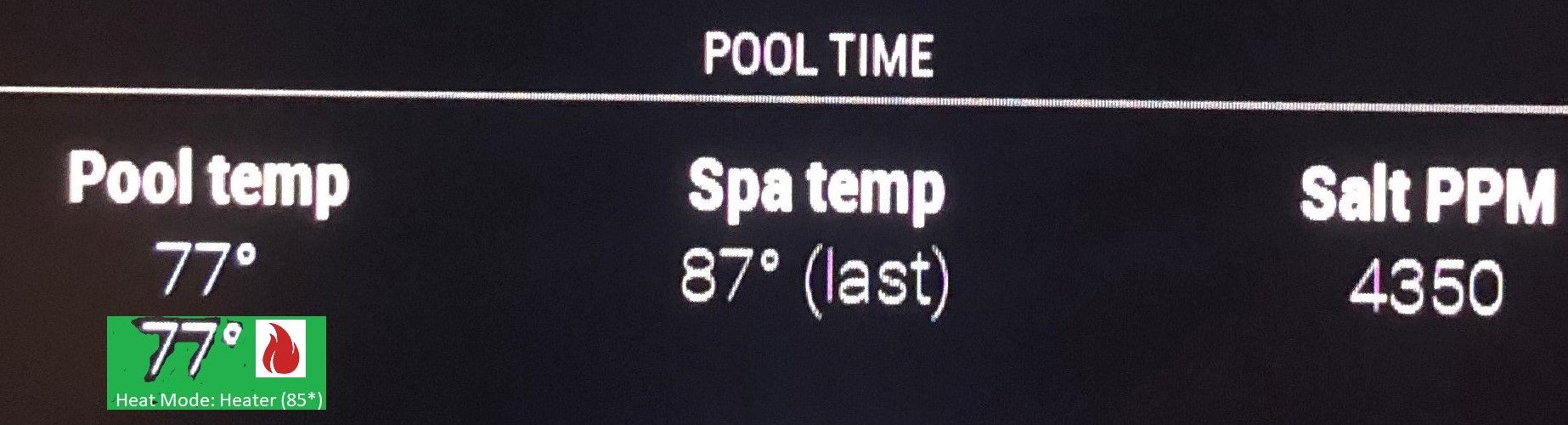
For the Pool Temp and Spa Temp status, perhaps turn the background green when on (Like the Nest turns blue).
Add a little flame to the right of the temp to show heater on.
below temp show: Heat Mode: Heater (85*)
I’ll try to upload a pic but it keeps erroring out.
Anyway love the module and stay safe in this pandemic.
-
GREAT MODULE - works like a charm
Re: MMM-ScreenLogic - see data from your Pentair pool equipment
I just reactivated my MM and installed your ScreenLogic Module. I love it and worked out of the box.If I could be so bold to make a few enhancement requests? I dont have a touch screen MM so i dont show controls, its more just a status board for me.
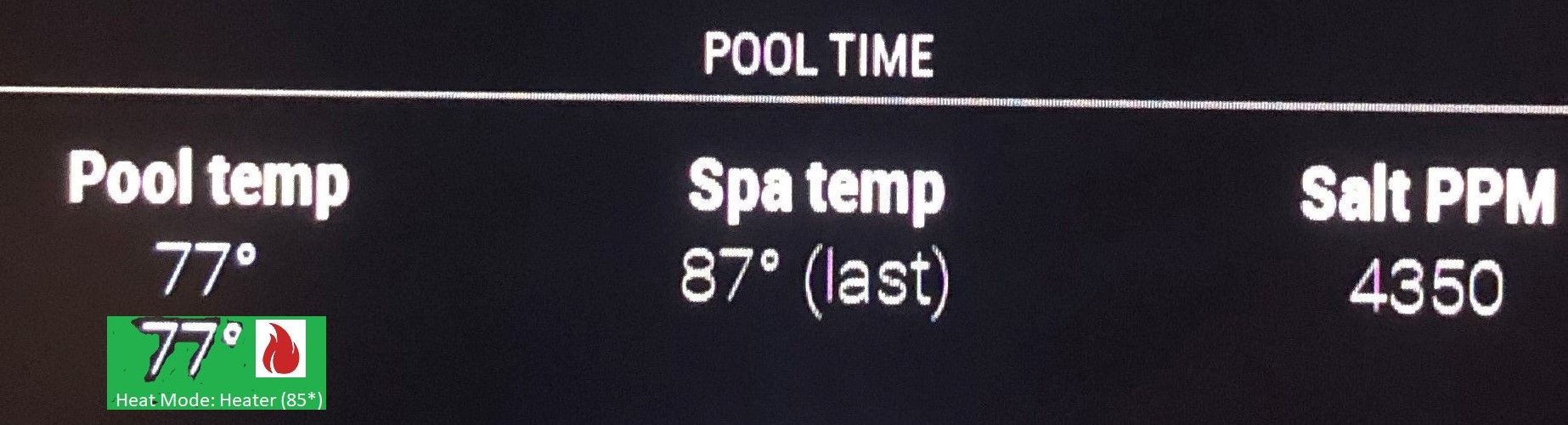
For the Pool Temp and Spa Temp status, perhaps turn the background green when on (Like the Nest turns blue).
Add a little flame to the right of the temp to show heater on.
below temp show: Heat Mode: Heater (85*)
I’ll try to upload a pic but it keeps erroring out.
Anyway love the module and stay safe in this pandemic.
-
RE: My display so far...
@j.e.f.f why not add it to github and make it part of the master so updates won’t overwrite your work.?
-
RE: Calendar module fetchInterval
@Anhalter42 I spend some time going through the calendar module code, i can read it fairly well, for the syntax i dont understand there is always google. After review, I see why there are no separate fetchInterval’s for each calendar. Each calendar’s events are added to an array, then sorted together also the dom (html table) is created from scratch on each interval. Without a tremendous restructuring of code, setting up separate interval timers, persisting the ical events array, etc. the value to adding this is limited.
Your comments help me immensely, thank you. I reviewed the template module, i’l start playing with that and do a Hello World module exercise when i return home at the end of the month.
-
RE: Calendar module fetchInterval
@Anhalter42 Definately, and excellent point about not changing the existing option name. I’m hoping to implement a (swimming) pool module in the next couple of months. I haven’t coded (VB) in over a decade so i am reading up about Github (great concept btw). Not sure if i need to branch or pull request or what just yet. I think i can handle learning JS and use the existing modules to reference. This will be a great exercise for me before i jump into full coding.
-
RE: Calender module - icloud calender?
@strawberry-3.141 Strawberry, your friggin awesome for your involvement here. Unfortunately the ical.js and node-ical.js were not my problem. I did however solve my issue but not sure of the cause.
The icloud calendars urls were no longer valid but still were active in icloud.com. I simply unmarked each calendar as public, clicked save, marked it again as public which generated a new url. A quick copy and paste of each one got the calendar working again. now if i can figure out why the url stopped working in the first place. Hopefully this wont happen again, but we will see.Also if you have a moment, im trying to figure out how to view the start up outputs where i could have seen each calendar trying to load and likely getting an error. is it in a log somewhere or a special way to start the app?
-
RE: Calendar module fetchInterval
@Anhalter42 so should the fetchInterval be moved to the calendar array since some calendars only need to be updated once (holidays) and others more often. just a thought have a defaultFetchInterval at the module level and fetchInterval for calendar level?
-
RE: Calender module - icloud calender?
@cohron
Now it seems the calendar MMM are no longer loading my multiple icloud ics urls. it had been working for a couple of weeks and just stopped. My office365 is loading just fine. I know this is vague just need to figure out where to start looking. -
MMM-Wunderground - Bug? High/Lows Reversed on Hourly
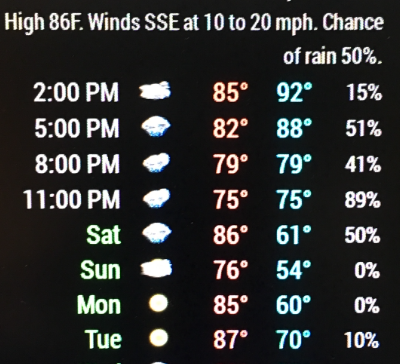
The hi/lo on hourly are reversed, but the daily shows correctly.
-
RE: MM Nightly Reboot Needed, PM2 ?
@Mykle1 curious, did you have the /etc/modprobe.d/8192cu.conf file already or did you create it? i just created it, just in case that does the trick too.
thanks again.
-
RE: MM Nightly Reboot Needed, PM2 ?
@Mykle1 I did but since i didnt have the Edit /etc/modprobe.d/8192cu.conf file, I’m running an rPI3b so I did the wireless-power off step bu it didnt seem to help or the problem is outside the raspberry.
I just found how to do a nightly reboot using crontab.
https://www.raspberrypi.org/forums/viewtopic.php?f=91&t=126106 -
MM Nightly Reboot Needed, PM2 ?
I have a finicky wireless here and need MM to reboot nightly to stay connected, otherwise MM loses the connection and never reconnects.
Can anyone help me set up a scheduled reboot script for my RPI? I have PM2 installed and running for auto-start but I dont see where it can reboot my RPI.Many thanks.
-
RE: 27" custom framed magic mirror - fun to get done
@cohron nevermind im a dummy, copied the custom.css without really reading it:
.region.top.right .MMM-WunderGround table th {
display: none; /* removes icons above max-temp, min-temp and % chance of rain */
} -
RE: MMM-Sonos - To show what your SONOS is playing.
All right, love trial and error. Got it all up and running on my MM rPI!!!
Through ssh pi@192.168.0.207 (my MM ip address)cd ~ //which puts me at /home/pi
pi@magicpi:~ $ git clone https://github.com/jishi/node-sonos-http-api.gitcd node-sonos-http-api
npm install --production
npm startverify, open a browser, point to your MM’s IP like so:
http://192.168.0.207:5005/zones
you should see a page full of sonos related text, if so the hard part is done…create another pm2 script named sonos.sh in ~ directory
cd ~
sonos.sh file contents:
cd ~/node-sonos-http-api
DISPLAY=:0 npm startpm2 start sonos.sh
pm2 start mm
pm2 savenow just do the normal git for the sonos module
pi@magicpi:~/MagicMirror/modules $ git clone https://github.com/Snille/MMM-Sonos.gitfill in your config, this is mine:
{
module: ‘MMM-Sonos’,
header: “Playing on SONOS”,
position: “top_center”, // This can be any of the regions, best results in center regions
classes: “default everyone”,
config: {
// See ‘Configuration options’ for more information.
showStoppedRoom: false,
showAlbumArt: true
}
},I also copied your awsome custom css content!
-
RE: Office 365 calendar issues
@hermpi said in Office 365 calendar issues:
is a problem we/they need to fix in MM
I’m going to guess MM is going to have to fix their parsing, it appears to be a well formed ics file (or at least the portion you and i looked at), I doubt we are going to get Microsoft to change.
-
RE: MMM-Sonos - To show what your SONOS is playing.
Guess I’m total noob but I havent figured out exactly how to install MMM-Sonos.
-
I’m confused on installing and running node-sonos-http-api part. Does it get installed on /usr/local/lib/node_modules (I dont have that folder) but I do have /home/pi/MagicMirror/node_modules.
-
MM is on rPI3b using the default installation from the readme but the the documentation on the api says i should install the latest nodejs. do i need to update/install? I went to https://nodejs.org/download/release/latest/ and it looks like 7.9.0 is the latest. i assume i install this on the MM rPI also. I’ll have to figure out how to git that too if so.
-
I have my mm.sh file that auto-starts MM using pm2. Do I add a line in the mm.sh file to auto run the api on boot?
my mm.sh
cd ~/MagicMirror
DISPLAY=:0 npm start
-
-
RE: 27" custom framed magic mirror - fun to get done
I cant find the little weather icons. Temp hi and lo and the umbrella.
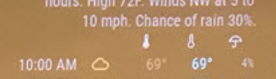
-
RE: Office 365 calendar issues
@hermpi
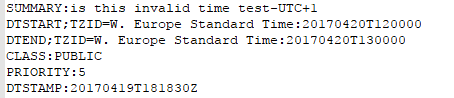
Well i checked my calendar and everything looked fine. I havent been able to get the invalid date to show up again (even with timezones enabled/showing). I’d say open a bug report and send them your ICS file.should be fine really.
-
RE: Office 365 calendar issues
Oh, yes some of my tasks had the invalid date error, only 4 or 5 tasks though. It was only occurring on appointments that had the timezone showing. Unfortunately I already fixed it by removing the (show) timezones and resaving the appointment. Sorry didnt catch that earlier. I set up a test appointment and will look at the MM when I get home. I havent picked apart the Calendar MMM but im guessing you found the same bug i had. Wont know if i recreated the error until i get him and look at MM.
Keep your “bad” ICS file for the programmers (or you) to test, recreate, and fix if you submit a bug report.