MagicMirror Forum
    • Recent
    • Tags
    • Unsolved
    • Solved
    • MagicMirror² Repository
    • Documentation
    • 3rd-Party-Modules
    • Donate
    • Discord
    • Register
    • Login
    1. Home
    2. crazylegs
    3. Posts
    A New Chapter for MagicMirror: The Community Takes the Lead
    Read the statement by Michael Teeuw here.
    Offline
    • Profile
    • Following 0
    • Followers 0
    • Topics 3
    • Posts 20
    • Groups 0

    Posts

    Recent Best Controversial
    • RE: MMM-EnvCanada stopped working ...

      @charlesf I took a quick look at your solution and happy to hear that it works! I agree that being able to preserve all the XML parsing is definitely the way to go. To be honest, I was assuming that your approach (parsing the correct file out of the directory listing) was going to be a massive PITA, but I think you did a very nice job! Congrats!

      And if you don’t mind, I hope to lean on your solution to make updates to the envCanada provider code when I get a chance :)

      To anyone using the envCanada provider in the default Weather module: I’m the original author of the envCanada provider. I have been traveling and unable to make corrections to the code, but I do hope to get it all working sometime in August (the earlier the better).

      posted in Troubleshooting
      crazylegsC
      crazylegs
    • RE: MMM-EnvCanada stopped working ...

      I’m the original author of the envcanada Provider for the default Weather module. Environment Canada has made a significant change to their API and, for some reason, I never saw the notification they sent out a few months ago (I was supposedly on their mailing list). I’ve only taken a very brief look at their changes, so take my assessment with a small grain of salt:

      The change has made it impractical to continue fetching an XML document for whatever location has been configured for weather info. They are, instead, pushing clients to a completely different API that is much more complex to use. The API is basically a pub/sub scheme that is based on the AMPQ protocol. How it all works and whether it will play nice within the MagicMirror ecosystem is still very much TBD.

      Based on what I see, the envcanada Provider and MMM-EnvCanada will pretty much require total rewrites. I can continue poking at this but to be fully transparent, it will be a couple of months before I can give this any significant focused effort.

      posted in Troubleshooting
      crazylegsC
      crazylegs
    • RE: Environment Canada Weather Module

      @charlesf

      Nice job! I wrote the default module code but always wanted to see a dedicated module with a better UI. I like what you’ve done!

      posted in Utilities
      crazylegsC
      crazylegs
    • RE: [Weather - Env Canada] Forcast days name is the reverse order of the data.

      Just a further update… Environment Canada actually got back to me and confirmed that they did have a problem with load balance caching and this has now been resolved. I confirmed with my own MM that the correct data is being returned to the weather module’s envCanada provider.

      posted in Bug Hunt
      crazylegsC
      crazylegs
    • RE: how to hide all modules?

      @oky1029 said in how to hide all modules?:

      Additionally, I use “MMM-Google Assistant” and the extension “EXT-Google Photos”, but the Google logo is always displayed when I hide the calendar. Can this also be hidden?

      If you mean the Google logo that appears in the top left corner of the screen, it is part of the ‘wake-word’ detection module and yes this can be suppressed. In your config.js you need to update the parameters for EXT-Detector. Specifically, you need to include useIcon: false. Here is an example:

      			{
        			module: "EXT-Detector",
        			position: "top_left",
        			configDeepMerge: true,
        			config: {
          				debug: false,
      				useIcon: false,
          				detectors: [
            					{
              				detector: "Snowboy",
              				Model: "jarvis",
            					}
          					]
        				}
      			},
      
      posted in Troubleshooting
      crazylegsC
      crazylegs
    • RE: [Weather - Env Canada] Forcast days name is the reverse order of the data.

      @cedrikl For what it’s worth, I used your weather config parms on my own Mirror and found no issues. That is, I could not reproduce what you are seeing. To be fair, my RaspPi is not as current as yours (I’m running on Buster with MM 2.21.0).

      HOWEVER… I can confirm that Environment Canada backend has been having issues since Fri Feb 3. Every so often it is returning weather data (XML document) for Fri Feb 3, which of course is in the past. I thought I was going crazy because my Mirror was showing bad current and/or forecast data on a random basis.

      I did a bunch of testing (accessing EC URL directly from a browser) to confirm that, yes, this is really happening randomly. So, for example, it would be possible to have Current from today, and Forecast from Feb 3 (on both from Feb or both from today). I’m not saying this is causing your issue, but I wanted to mention that EC data quality is currently a problem.

      My strong suspicion is that there is at least 1 caching server sitting in front of the EC datamart that has not updated its cache since Feb 3, so any HTTP requests directed to that server are getting old/bad data. FWIW I have a sent an email to an EC support address to highlight there is a problem that needs to be fixed.

      posted in Bug Hunt
      crazylegsC
      crazylegs
    • RE: Hello-Lucy + RaspPi Bullseye + MM v2.18 + USB Mic

      @sdetweil Thank you. Yes, I was thinking about the same thing and trying to avoid digging into the pocketsphinx code :) But I think that’s where I will head next.

      posted in Troubleshooting
      crazylegsC
      crazylegs
    • Hello-Lucy + RaspPi Bullseye + MM v2.18 + USB Mic

      Hello Forum… I wonder if someone could smack me in the head to make me see where I am going wrong.

      I have been running MM v2.15 on RaspPi Buster for quite awhile, and part of that build is using Hello-Lucy with a PS Eye USB mic. This works just fine for me.

      I decided to do a full rebuild of my system on RaspPi Bullseye and MM v2.18. Everything on this build works fine except Hello-Lucy. Basically, Hello-Lucy is having trouble opening the PS Eye mic. Here are some details:

      1. I can see the mic device as card 1, device 0:
      pi@InfoWall4:~ $ arecord -l
      **** List of CAPTURE Hardware Devices ****
      card 1: CameraB409241 [USB Camera-B4.09.24.1], device 0: USB Audio [USB Audio]
        Subdevices: 1/1
        Subdevice #0: subdevice #0
      
      1. I can record to a wav and it plays back fine:
      pi@InfoWall4:~ $ arecord --device=plughw:1,0 --format cd --duration 10 --channels 1 testmic.wav
      
      Recording WAVE 'testmic.wav' : Signed 16 bit Little Endian, Rate 44100 Hz, Mono
      
      1. I installed Hello-Lucy as per instructions, with 1 change. In dependcies.sh, I changed python-dev and python-pip references to python3-dev and python3-pip

      2. My config.js file has the following parms:

      {
      			disabled: false,
      			module: "Hello-Lucy",
      			position: "bottom_left",
      			config: {
          				keyword: 'OKAY JARVIS',             // keyword to activate listening for a command/sentence
       				timeout: 10,                        // timeout listening for a command/sentence
      				defaultOnStartup: null,
      				debug: true,
       				standByMethod: 'PI',              // 'DPMS' = anything else than RPi or 'PI'
       				microphone: "1,0",                  // run "arecord -l" card # and device # mine is "0,0"
       				sounds: ["silence.mp3"],      // welcome sound at startup. Add several for a random greetings
        				confirmationSound: "null.mp3",      // name and extension of sound file
      				soundPath: 'modules/Infowall/Sounds',
      				micOn: 'SpeechOn.wav',
      				micOff: 'SpeechOff.wav',
        				startHideAll: true,                 // All modules start as hidden EXCEPT PAGE ONE
      				pageOneModules: ["MMM-BackgroundSlideshow", "weather", "Hello-Lucy"],   // default to show on page1 start
          			}
      		},
      
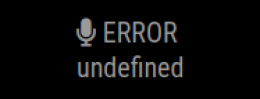
      1. When I start up MM, Hello-Lucy shows:

      a9d7eedb-ef1e-484f-965f-d70633ea0eb1-image.png

      1. There are no issues showing in the PM2 logs. However, the Hello-Lucy error.log shows just 1 while debug.log shows an error:
      Error opening audio device plughw:1,0 for capture: Invalid argument
      FATAL: "continuous.c", line 245: Failed to open audio device
      

      So it seems like Hello-Lucy cannot grab hold of the mic device, even though I can access the mic just find from CMD.

      Any thoughts anyone?? Perhaps referencing python3 in the Hello-Lucy dependencies.sh script is not advisable?

      Thanks…

      posted in Troubleshooting
      crazylegsC
      crazylegs
    • RE: Disney Themed Mirrors

      This is truly fantastic work! It is definitely inspiring me to ‘up’ my Disney MM game. All I have right now is a page that lists all the WDW waittimes (via MMM-DisneyWaitTimes) and a specific ResortTV video loop (via MMM-YouTube). But boy do I ever like what you’ve done!

      posted in Show your Mirror
      crazylegsC
      crazylegs
    • RE: Can I round Precipitation Units

      @amarko87 There’s currently no option to round precipitation amount in the default Weather module, although I think this should be possible. I’m just curious:

      • Which weather provider are you using?

      • Are you looking for rounding in the ‘forecast’ and/or ‘hourly’ feature of the Weather module?

      posted in Troubleshooting
      crazylegsC
      crazylegs
    • RE: a youtube video streaming on my MM

      @rikko14 While it is not being actively supported at the moment, I am currently using MMM-YouTube for this purpose. You can find it here:

      https://github.com/Anonym-tsk/MMM-YouTube

      posted in Troubleshooting
      crazylegsC
      crazylegs
    • RE: Weather not displaying envcanada provider

      @lexcyr

      I notice you have provCode commented out in your config file. The envcanada provider requires that parm, so uncomment and see if your problem is resolved.

      posted in Bug Hunt
      crazylegsC
      crazylegs
    • RE: Introduce yourself!

      Hello! My name is Kevin and I am from London, Ontario, Canada. I’m 58 years old and recently retired after 37 years in the IT profession - started as a software developer and then somehow morphed into a Senior Architect designing various things such contact centres and voice applications. I also very occasionally teach IT courses at our local college. I’ve been married for over 30 years and have 2 grown children.

      I enjoy tinkering (without always knowing what I’m doing), hiking, traveling, and playing hockey because Canada :)

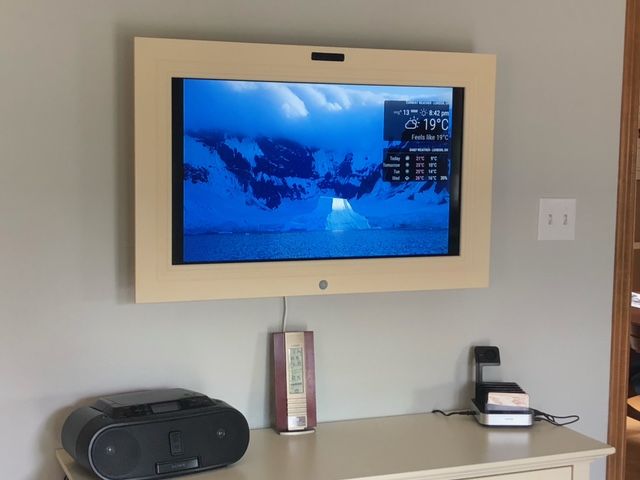
      My COVID project has been to build a ‘family info screen’ using the MM framework. It is hanging in my kitchen and currently doing things such display family photos from a local NAS, show local weather, show local waste collection calendar, etc. all with voice support. I will say that if not for the patience of this community, I would not have been successful with this build! My current project is to create a new provider for the default weather module to pull data from Environment Canada - seen running here on my MM build:

      MM Showoff 1.jpeg

      I look forward to adding more functionality to my display in the future!

      posted in General Discussion
      crazylegsC
      crazylegs
    • RE: MMM-GoogleAssistant : Jarvis don't listen my calls !

      @tom_labhidouille In your micConfig block you have:

      device: “plughw:2”,

      I think you could try this instead:

      device: “plughw:2,0”,

      posted in Troubleshooting
      crazylegsC
      crazylegs
    • RE: GIT and updates to Weather Module

      @sdetweil @karsten13

      Thank you both so much for your guidance! It is much appreciated and I believe I understand what I need to do.

      posted in Development
      crazylegsC
      crazylegs
    • GIT and updates to Weather Module

      Hello! I just need a sanity-check from the smart people on this forum to make sure I understand what I’m doing:

      I’ve built/tested a new Provider for the (new) default weather module. This Provider allows the use of Environment Canada current/forecast weather data on MM. My code also requires a few small tweaks to existing code in the weather module.

      While I’m an (ahem) older Developer, I don’t have a ton of experience with Github, so I just want to make sure I understand the steps to submit my updates to the default weather module. Here’s my understanding of things:

      1. Fork my own copy of the MagicMirror repository into my Github account.

      2. Make my changes - i.e. update the existing modules that need changes plus add my new Provider code

      3. For each module a I change, I need to Commit to the master branch (assuming this is the master for my own forked copy of MM repository)

      4. Once I have made/committed all my changes, I create a Pull Request that outlines what I have done. I assume a single PR will cover all the scripts I am touching?

      5. The PR will be assessed, with maybe questions asked, additional updates requested, whatever. If accepted, my changes in my MM repository will be merged into the main MM repository

      Do I have all this right? Sorry for the newbie questions - just new to this stuff and don’t want to screw up.

      Thanks!

      posted in Development
      crazylegsC
      crazylegs
    • RE: Weather module - creating new Provider

      @karsten13 Thanks for highlighting this! I did a quick-and-dirty test in my code using this proxy and I’m now able to pull back the data from the EnvCanada provider! I will likely need to override the default fetchData function since it expects to JSON.parse the Provider data. This is not quite what I need since EnvCanada just provides an XML document to parse (JSON.parse fails…). But now I can at least start playing around some more.

      posted in Troubleshooting
      crazylegsC
      crazylegs
    • RE: Weather module - creating new Provider

      @ashishtank Yes I agree 100%. The optimal solution is likely to push at least some of the fetchData instance function’s responsibility into node_helper. Assuming this can be done without breaking Promise functionality, it should be invisible to current Providers. I’m going to play around with this a bit and then raise an appropriate request on github. Thanks again for your feedback and guidance!

      posted in Troubleshooting
      crazylegsC
      crazylegs
    • RE: Weather module - creating new Provider

      Thank you so much for the feedback - very much appreciated!

      Your explanation makes a lot of sense and confirms (more clearly) what I’ve been reading in other places. I’ll think a bit about my options, including configuring a proxy to sit in front of the Environment Canada api or even just creating my own module that implements node_helper (although I’d prefer to leverage weather).

      posted in Troubleshooting
      crazylegsC
      crazylegs
    • Weather module - creating new Provider

      Hello! For some time now I’ve been using the (new) weather module with the default Provider (openweathermap) without any issues. I’ve started a little personal project to create a new Provider for Environment Canada - our government weather service here in Canada. They provide a very simple solution to pull an XML document for a Canadian location that contains weather info. My challenge is to create a new Provider to perform a GET against the appropriate URL and then parse out the XML elements required by the weather module.

      I’m using the existing Provider code as a template, and my first task is just to ensure that I can call an Environment Canada URL and get back the XML results. I’m doing this via the fetchData instance method included in the weather module. My testing is using a URL that I know to be valid (I can access via browser and get the XML returned as expected). The URL I’m testing with is here

      When fetchData is fired, I’m getting the following error thrown:

      Access to XMLHttpRequest at ‘https://dd.weather.gc.ca/citypage_weather/xml/ON/s0000326_e.xml’ from origin ‘http://localhost:8080’ has been blocked by CORS policy: No ‘Access-Control-Allow-Origin’ header is present on the requested resource.

      I have a sense of what the error means, but not a good sense of how to fix this. My searches have found others who had a similar issue in their MM development, but any solutions do not seem applicable in this case. I think one possibility might be to configure the header for HTTP request (setRequestHeader) to include Access-Control-Allow-Origin, but I’m only guessing and the weather module Provider design does not really allow for this.

      I will also say that, while I have lots of coding experience, my expertise with Javascript is definitely not extensive.

      Any thoughts or advice?

      posted in Troubleshooting
      crazylegsC
      crazylegs
    • 1 / 1