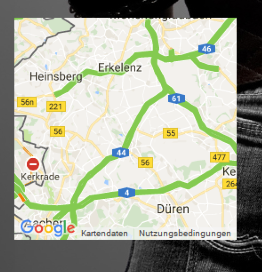
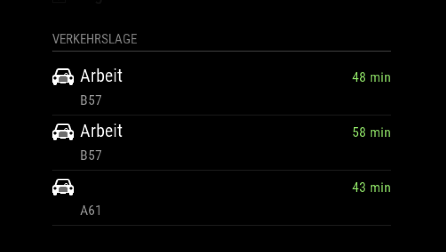
For sure this is no problem. Take as much time as u need for your family. thats much more important!
didn’t find a private message option, just a chat^^ sorry for that. I post my config right here.
just for info: I didn’t touch the MMM-MyCommute.js, so its just this one i need: https://github.com/jclarke0000/MMM-MyCommute/blob/master/MMM-MyCommute.js
So here is my full config:
/* Magic Mirror Config Sample
 *
 * By Michael Teeuw http://michaelteeuw.nl
 * MIT Licensed.
 *
 * For more information how you can configurate this file
 * See https://github.com/MichMich/MagicMirror#configuration
 *
 */

var config = {
	address: "0.0.0.0", // Address to listen on, can be:
	                      // - "localhost", "127.0.0.1", "::1" to listen on loopback interface
	                      // - another specific IPv4/6 to listen on a specific interface
	                      // - "", "0.0.0.0", "::" to listen on any interface
	                      // Default, when address config is left out, is "localhost"
	port: 8080,
	ipWhitelist: ["192.0.0.0/3", "::fff:0.0.0.0/1", "::fff:128.0.0.0/2", "::fff:192.0.0.0/3", "::fff:224.0.0.0/4", "127.0.0.1", "::ffff:127.0.0.1", "::1"], // Set [] to allow all IP addresses
	                                                       // or add a specific IPv4 of 192.168.1.5 :
	                                                       // ["127.0.0.1", "::ffff:127.0.0.1", "::1", "::ffff:192.168.1.5"],
	                                                       // or IPv4 range of 192.168.3.0 --> 192.168.3.15 use CIDR format :
	                                                       // ["127.0.0.1", "::ffff:127.0.0.1", "::1", "::ffff:192.168.3.0/28"],

	language: "de",
	timeFormat: 24,
	units: "metric",

	modules: [
		{
			module: "alert",
		},
		{
        		module: 'MMM-Remote-Control'
        		// uncomment the following line to show the URL of the remote control on the mirror
        		// , position: 'bottom_left'
        		// you can hide this module afterwards from the remote control itself
    		},
		{
		module: 'MMM-SystemStats',
		position: 'top_center', // This can be any of the regions.
		classes: 'small dimmed', // Add your own styling. Optional.
		config: {
			updateInterval: 5000,
			animationSpeed: 0,
			align: 'right', // align labels
			//header: 'System Stats', // This is optional
			},
		},
		{
			module: "updatenotification",
			position: "top_bar"
		},
		{
			module: "clock",
			position: "top_left"
		},
		{
			module: 'calendar',
			header: 'Chris Kalender',
			position: 'top_left',
			config: {
				calendars: [
					{
						symbol: 'calendar-check-o ',
						url: '*private*'
					},
					{
                                                symbol: 'calendar-check-o ',
                                                url: 'http://i.cal.to/ical/61/nrw/feiertage/71e91ccb.83fad41c-d19fda68.ics'
                                        },

				]

			}
		},
		{
			module: 'MMM-MyCommute',
			position: 'top_left',
			header: 'Verkehrslage',
			classes: 'default everyone',
			showSummary: 'true',
			config: {
				apikey: '*private*',
    				origin: '*private*',
				destinations: [
      				{
        				destination: '*private*',
        				label: 'Arbeit',
        				mode: 'driving',
					alternatives: 'true',
					time: null
      				},
      				{
        				destination: '*private*',
        				label: '*private*',
        				mode: 'driving',
        				time: null
      				},
    				]
   			}
  		},
//		{
//			module: "compliments",
//			position: "lower_third"
//		},
//		{
//			module: "currentweather",
//			position: "top_right",
//			config: {
//				location: "New York",
//				locationID: "",  //ID from http://www.openweathermap.org/help/city_list.txt
//				appid: "YOUR_OPENWEATHER_API_KEY"
//			}
//		},
//		{
//			module: "weatherforecast",
//			position: "top_right",
//			header: "Weather Forecast",
//			config: {
//				location: "New York",
//				locationID: "5128581",  //ID from http://www.openweathermap.org/help/city_list.txt
//				appid: "YOUR_OPENWEATHER_API_KEY"
//			}
//		},
		{
			disabled: false,
			module: 'MMM-NOAA',
			position: 'top_right',
			config: {

				apiKey: "*private*",    // https://www.wunderground.com/weather/api  select the middle plan...
				useAir: false,             // set to false if you do not want to use Air Quality Index
				airKey: "*private*",    // IF you want Air Quality Index
				pws: "*private*",         // go here to find your pws: https://www.wunderground.com/wundermap
				showClock: false,           // Hides or shows clock
				dformat: false,             // for M/D/YYYY format, false for D/M/YYYY
				format: "24",              // 12 or 24 hour format.. will default to 12 hour if none selected.
				ampm: false,                // to show AM and PM on Sunrise/Sunset time
				showGreet: false,          // deafult is false - to show greeting under clock and above date
				name: "",                  // Your name
				showWind: false,
				showDate: false,
				showForecast: true,         //show bottom 3 day forecast
				flash: true,                 //Today in forecast flashes halo
				showUV: true,               //show UV index
	      			showBar: true,             // show Barometer
	    			showHum: true,              //show Humidity level
				position: 'top_right',       //whatever you have in above position must also be here
	      			alert: true                //show weather alerts default is true
				}
		},
		{
			module: 'MMM-Globe',
			position: 'top_right',
			config: {
					style: 'natColor',
					imageSize: 200,
					ownImagePath:'',
					updateInterval: 10*60*1000
				}
		},
		{
			module: "newsfeed",
			position: "bottom_bar",
			config: {
				feeds: [
					{
						title: "Tagesschau Themen",
						url: "http://www.tagesschau.de/xml/rss2"
					}
				],
				showSourceTitle: true,
				showPublishDate: true,
				showDescription: true,
				updateInterval: 25000,
			}
		},
	]

};

/*************** DO NOT EDIT THE LINE BELOW ***************/
if (typeof module !== "undefined") {module.exports = config;}
Thank u very much for helping :)