MagicMirror Forum
    • Recent
    • Tags
    • Unsolved
    • Solved
    • MagicMirror² Repository
    • Documentation
    • 3rd-Party-Modules
    • Donate
    • Discord
    • Register
    • Login
    1. Home
    2. Fozi
    3. Posts
    A New Chapter for MagicMirror: The Community Takes the Lead
    Read the statement by Michael Teeuw here.
    Offline
    • Profile
    • Following 0
    • Followers 1
    • Topics 6
    • Posts 326
    • Groups 1

    Posts

    Recent Best Controversial
    • RE: Using an Ultrasonic sensor with MMM-PIR-Sensor power-saving functionality

      Following the description of MMM-NearCompliments, MMM-PIR-Sensor has to be installed, too, if you intend to use the powersaving function. See the options ‘usePIR’ and ‘powerSavingDelay’

      usePIR Should we use PIR sensor to activate only distance measurment when USER_PRESENCE notification is sent by MMM-PIR-Sensor?
      Possible values: boolean
      Default value: false

      powerSavingDelay Power saving delay in seconds defined in MMM-PIR-Sensor. It gets overwritten by MMM-PIR-Sensore module and is only defined for backup purpose.
      Possible values: int
      Default value: 30

      posted in Requests
      FoziF
      Fozi
    • RE: Using an Ultrasonic sensor with MMM-PIR-Sensor power-saving functionality

      @migg although I’m not using an US sensor but a microwave sensor with MMM-PIR-Sensor I read out of curiosity the module description of MMM-Swipe. As I saw, it sends a notification when movement is detected. This notification can be received by MMM-Remote-Control, which can switch the display on. As said, I didn’t dig into this in depth but might be a possibility to achieve what you want.

      posted in Requests
      FoziF
      Fozi
    • RE: UPDATE: Replaced my PIR-Sensor with a Doppler Microwave Sensor.

      @lavolp3 yes, should do equally. I had some leftover of the tape and it was more convenient to apply. I found some post from you a few months ago, when you struggled to make the sensor work. I hope you get some better results now.

      posted in Tutorials
      FoziF
      Fozi
    • RE: UPDATE: Replaced my PIR-Sensor with a Doppler Microwave Sensor.

      @cowboysdude Thanks! I’m looking forward to your experiences with the sensor!

      posted in Tutorials
      FoziF
      Fozi
    • RE: rpi3 freezes every few days .. need help

      Some experiences I made:

      My “productive” MM runs on a RPi 3B+. I have also a normal RPi 3B, which I use as a test bench in the exact same configuration as my MM (I’ve use a cloned SD card).
      Surprisingly, the 3B’s memory is not filling up and stalling like my 3B+.
      God knows why.

      posted in Troubleshooting
      FoziF
      Fozi
    • RE: rpi3 freezes every few days .. need help

      @nagaculun Are you sure that the crontab is really executed? ssh into the RPI, execute ‘htop’ and check the uptime. The uptime should be the difference between the cronjob execution and the actual time.

      For setting up the crontab, that reboots the RPi I needed priviledged rights.

      $ sudo crontab -e
       and then insert, e.g.
      
      15 1,9,17 * * * sudo shutdown -r now >/dev/null 2>&1
      

      This reboots the RPi at 01:15, 9:15 and 17:15 every day (every 8 hrs.).
      Note the two ‘sudo’ for editing the crontab and initiating the shutdown.

      posted in Troubleshooting
      FoziF
      Fozi
    • RE: Black Fabric for magic mirror

      I took the protective packing material which was delivered with my mirror. The mirror was wrapped in several layers of a kind of thin black Polyurethan mats, which were perfect for using them to cover the back.

      posted in General Discussion
      FoziF
      Fozi
    • RE: UPDATE: Replaced my PIR-Sensor with a Doppler Microwave Sensor.

      @lavolp3 Ah…now I got you.
      There are two options to reduce the sensor range:
      Option 1: The aluminum taped “Magic Box” like described here.
      Option 2: Replacing a resistor on the sensor to reduce the sensor range.

      I haven’t yet tried option2, as I’m waiting for some parts to do it. As soon as I got them I’ll test that option and will give feedback. For the time beeing, I just can make a statement for option 1, which requires no additional resistor.

      Maybe there is also an option 3, a combination of option 1 and 2…we’ll see.

      posted in Tutorials
      FoziF
      Fozi
    • RE: UPDATE: Replaced my PIR-Sensor with a Doppler Microwave Sensor.

      @lavolp3 I have placed the sensor inside the box along the center axis, so that there is a gap of ca. 1cm to the front and the back of the box.
      the UN-taped frontside is directly touching the glass. The top, bottom as well as the left and right side are taped, too. Only the front is not taped.
      In the scetch below you can see how I adjusted the sensor inside the box as seen from the side.
      Two reasons why I set the sensor in the middle of the box:

      1. Direct contact with the tape prohibited fully the detection.
      2. The taped top, bottom and lateral sides reduce the detection angle like a funnel compared to having the sensor mounted directly to the untaped front.

      An additional resistor is not necessary, as it goes in high state when motion is detected (just like a PIR).

      Hard to say what the detection range really is after that mod. My bathroom is really small but I would guess that if should be 2m or mor to the front.

      Cross-section through the box:
      ||                                |
      ||               ||               |
      ||  1 cm gap     ||   1cm gap     |
      ||                                |
      taped          sensor         UN-taped 
      backside                      front to the mirror
      
      posted in Tutorials
      FoziF
      Fozi
    • RE: Contribute to a module. Volunteers wanted! Easy!

      @Mykle1 n168, Munich, Germany

      posted in Troubleshooting
      FoziF
      Fozi
    • RE: UPDATE: Replaced my PIR-Sensor with a Doppler Microwave Sensor.

      @Mykle1 thank you so much!

      posted in Tutorials
      FoziF
      Fozi
    • RE: UPDATE: Replaced my PIR-Sensor with a Doppler Microwave Sensor.

      @sdetweil Thanks! It’s fun to contribute to the community and this project.
      If anyone has a better solution for the housing, I’d be happy if you post it here, too.
      I am very sure that there a more creative approaches than mine.

      posted in Tutorials
      FoziF
      Fozi
    • RE: Regions

      @Mykle1 ouh damned…your concerns are absolutely justified. Haven’t hought of that. Thanks for pointing me to that.:thumbs_up_light_skin_tone:

      posted in Core System
      FoziF
      Fozi
    • UPDATE: Replaced my PIR-Sensor with a Doppler Microwave Sensor.

      Preface:
      I’ve already described in detail how to reduce the sensor range of the RCWL-0516 sensor by building it into a cardboard box, which is wrapped in a aluminum foil (Option 1). But I found another more advanced solution (Option 2) by replacing a specific resistor on the sensor with an adjustable trimmer resistor. This option requires some soldering, but thats’s not as difficult as it might appear. I also enhanced this tutorial with your feedback to have everything in one place.

      Disclaimer: I’ll take of course no responsibility or liability, if anything breaks on your sensor, RPi or mirror. But I think this is a self-evident matter.

      Like many of us, I have a PIR-Sensor installed on myMM to switch the display on and off and to save power while it is not in use.
      For my MM i had an AM312 sensor mounted under the lower frame, bar pointing to the ground. That position was not ideal due to the limited viewing angle of 50 deg to the front. So I had to stand rather close to the mirror to switch the display on.
      Further, such a PIR-sensors looks like an wart on the frame, especially when you have no real options to mount it unobstursively and it messes up the hole design.

      While looking for an alternative, I stumbled over the RCWL-0516 microwave sensor, which detects motion via the Doppler principle. This sensor has following characterisics:
      (more details here)

      • it is rather small and thin and can be placed secretly everywhere inside the mirror
      • very cheap (ca. 1-2€)
      • easy to install with 3 pins
      • works without any modifications with MMM-PIR-sensor module
      • works through glass
      • works omni-directional (360 deg)
      • has a typical range of ca. 7m

      But the last two bullets (omni-directional radiation and detection, long sensor range) are two issues you have to be aware of.
      The RCWL-0516 works even through walls and can detect motions in adjacent rooms, which of course produces false positives and switches the display on when not desired.

      So how to limit the range?

      There are posibilities to replace the SMD resistor with a trimmer poti (200 Ohms and less) between GND and antenna as described here, but this requires some soldering skills as the SMD resistor is quite tiny.

      Option1: The “Magic Box”:
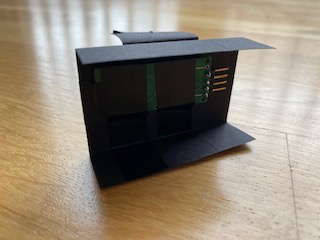
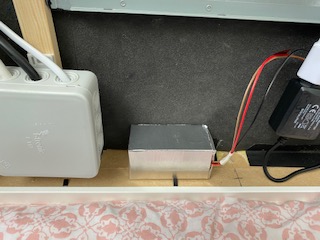
      I went a different way by putting the sensor in a small card box and wrapping some adhesive aluminum tape around it to damp the radiation around the sensor, except the front where the sensor points to the glass.
      I made some test and found out that putting the aluminum tape directly on the sensor (of cours with a thin isolation layer inbetween) reduces the sensitivity of the sensor to about 1-2 cm, which renders the sensor useless.
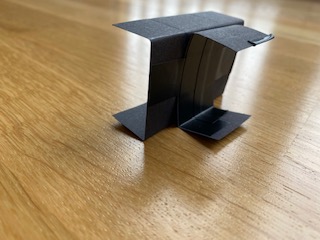
      Thus I figured there must be an air gap between the sensor and the aluminum tape of ca. 1cm. So I made a simple frame of card board, which holds the sensor inside the center of the box to provide enough space. I put the sensor intentionally in the middle of the box instead of directly to the “front” side to reduce the radiation and detection angle a bit more.

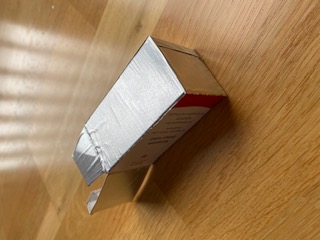
      Here a some pictures of the housing:
      0_1575206304844_IMG_7635.JPG
      You see, the front-side of the box is NOT covered with aluminum tape. This side will be pointing to the mirror glas. All other five surfaces of the box are taped.
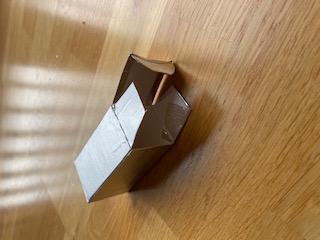
      0_1575206395166_IMG_7636.JPG
      This is the backside.

      0_1575206479416_IMG_7638.JPG 0_1575206490495_IMG_7639.JPG
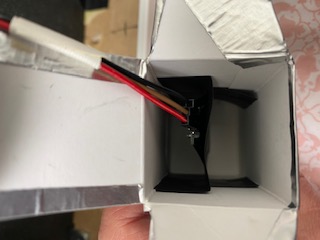
      The simple frame construction which holds the sensor in the center of the box…

      like this…
      0_1575206552938_IMG_7641.JPG

      0_1575206590027_IMG_7642.JPG
      The box is then put inside the frame with the untaped side facing to the glass.

      Cross-section through the box:
      ||                                |
      ||               ||               |
      ||  1 cm gap     ||   1cm gap     |
      ||                                |
      taped          sensor         UN-taped 
      backside                      front to the mirror
      

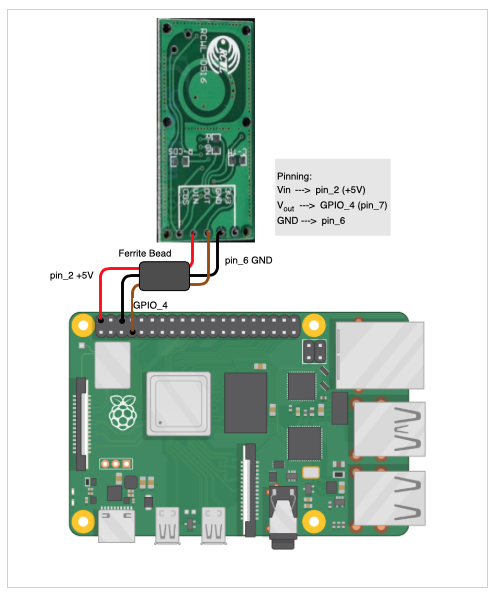
      Wireing of the sensor:
      0_1575815813639_Bildschirmfoto 2019-12-08 um 15.36.12.png
      0_1575817604663_Bildschirmfoto 2019-12-07 um 09.42.07.png

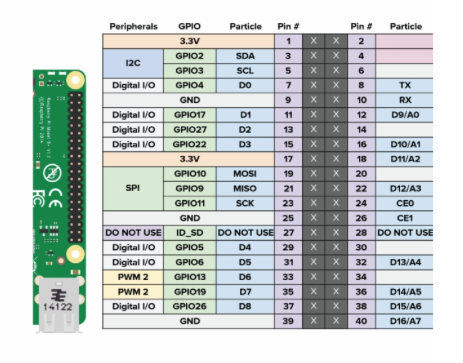
      You only use Vin (5V), Vout and GND. CDS (for applying a photo diode) and 3V3 (delivers 3.3V output) remain unused. For Vout you can use also oher GPIO pins (labeled “Digital I/O” in the 2nd diagram), in case GPIO_4 is already used.

      The ferrite bead is optional. It is a left over from the PIR sensor I had attached. If you may need one, you can dismantle an old VGA cable and use that one.
      And thats it!

      The sensor is wired like any conventional PIR sensor to the the RPi with Vin = 5V, GND and a Vout=I/O-Pin of your choice.
      As mentioned, before you can continue to use your favourite PIR module, like e.g. MMM-PIR-Sensor without any modifications.

      Option 2: Replacing the antenna to GND resistor:

      On the sensor is a tiny SMD resistor soldered, wich is labeled with "221 (=220 Ohm).
      To reduce the sensor range this resistor can be replaced with a smaller resistor value. The smaller the resistor, the shorter the range.
      As the room layouts, characterisics of the walls (dry wall, concrete, stone, wood walls, tiles,….) differ from home to home and individual requirements, we’ll take an adjustable trimmer resistor to find the fitting value.

      What we need:

      • Soldering iron and some soldering braid
      • Trimmer resistor, e.g. 3296 W201 with 200 Ohm (max. resitor value)
      • Multi-meter, which can measure resistors
      • Small screwdriver
      • angled header pins

      First we remove the “221” labeled resistor on the resistor (see red arrow)
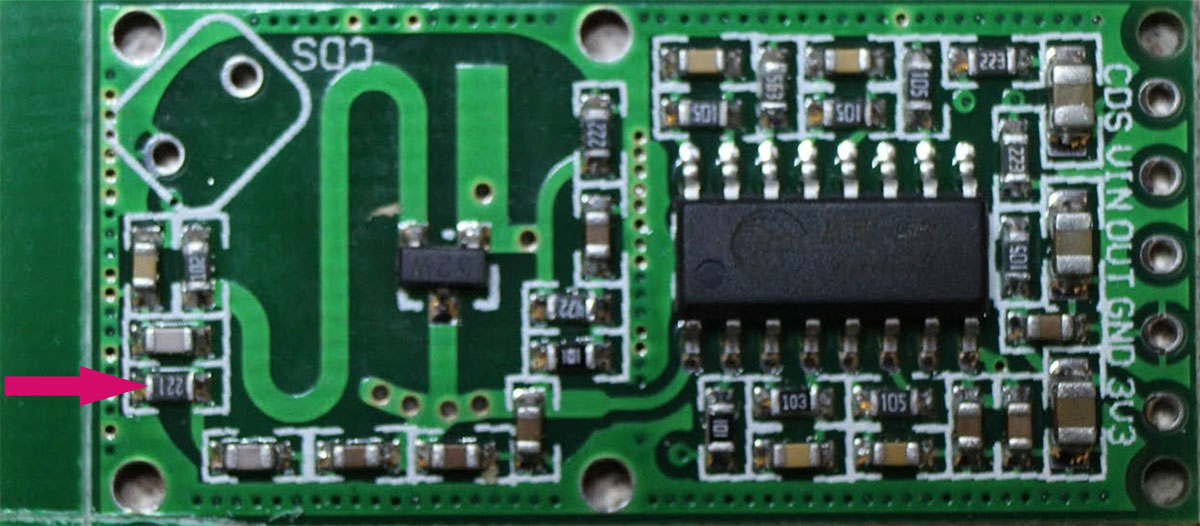
      0_1575816626354_50913813-c91fc400-1467-11e9-91eb-9bc852344a86.jpg

      This requires some soldering skill, but with a little exercise it can be removed very easily. There are hundreds of great tutorials on youtube, which you can follow. I used this simple method:
      https://www.youtube.com/watch?v=NjswgMtwXaw

      Before we solder the trimmer resistor, I’d recommend to adjust roughly the resistor value, as later it might be quite cumbersome. Take a multi-meter, which can measure electric resistors and adjust it to 150 Ohm. This value reduces to sensor range to ca. 1m. From there, you can then in creas or decreace the resistor until it fits you.

      The next step is to solder the trimmer sesistor on the sensor like this. The third pin remains unused an can be clipped away later if desired.
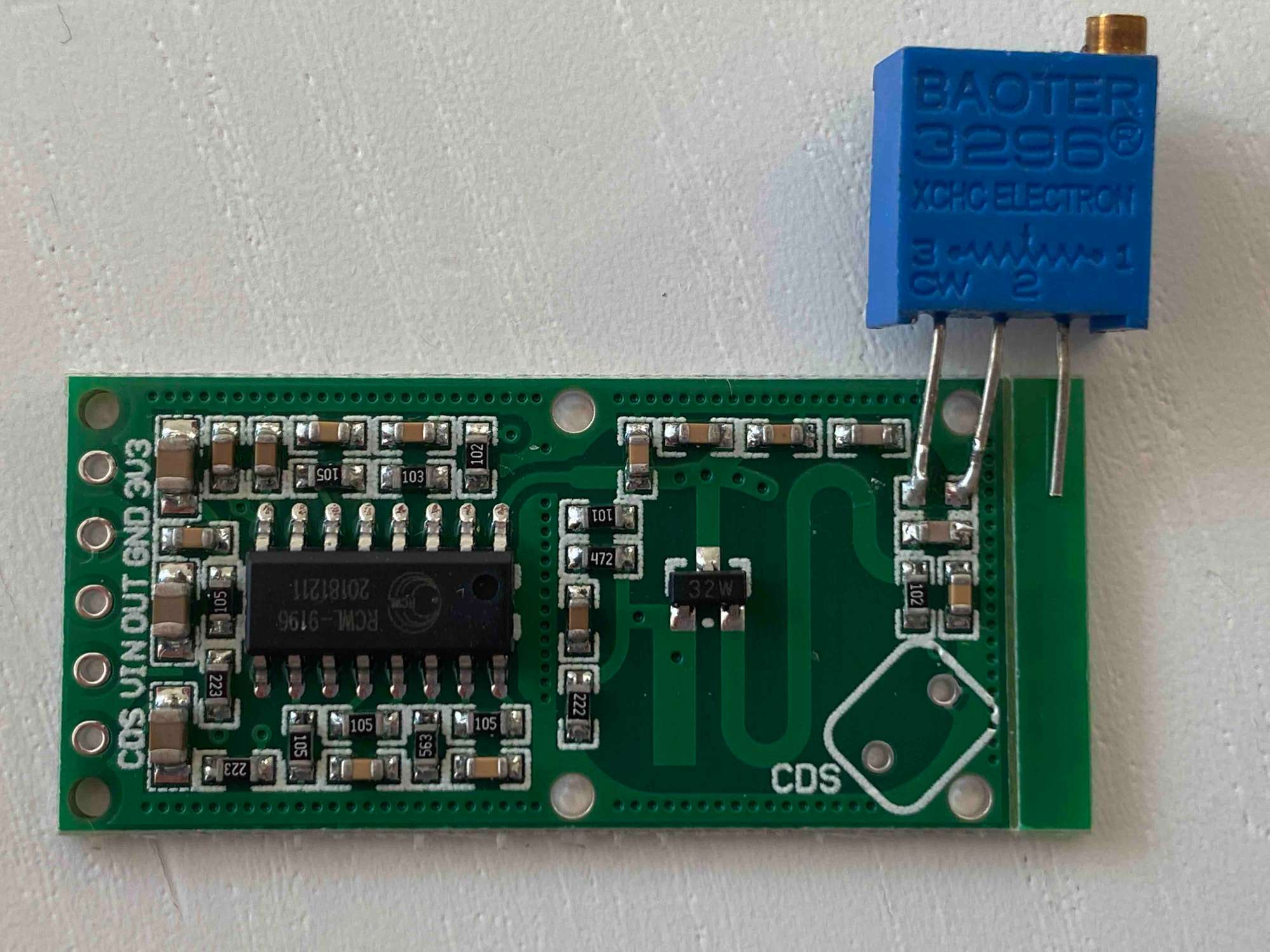
      0_1575816792887_IMG_7653_2.jpg

      Then solder the header pins on the left where you connect the sensor with the GPIO of the Rpi
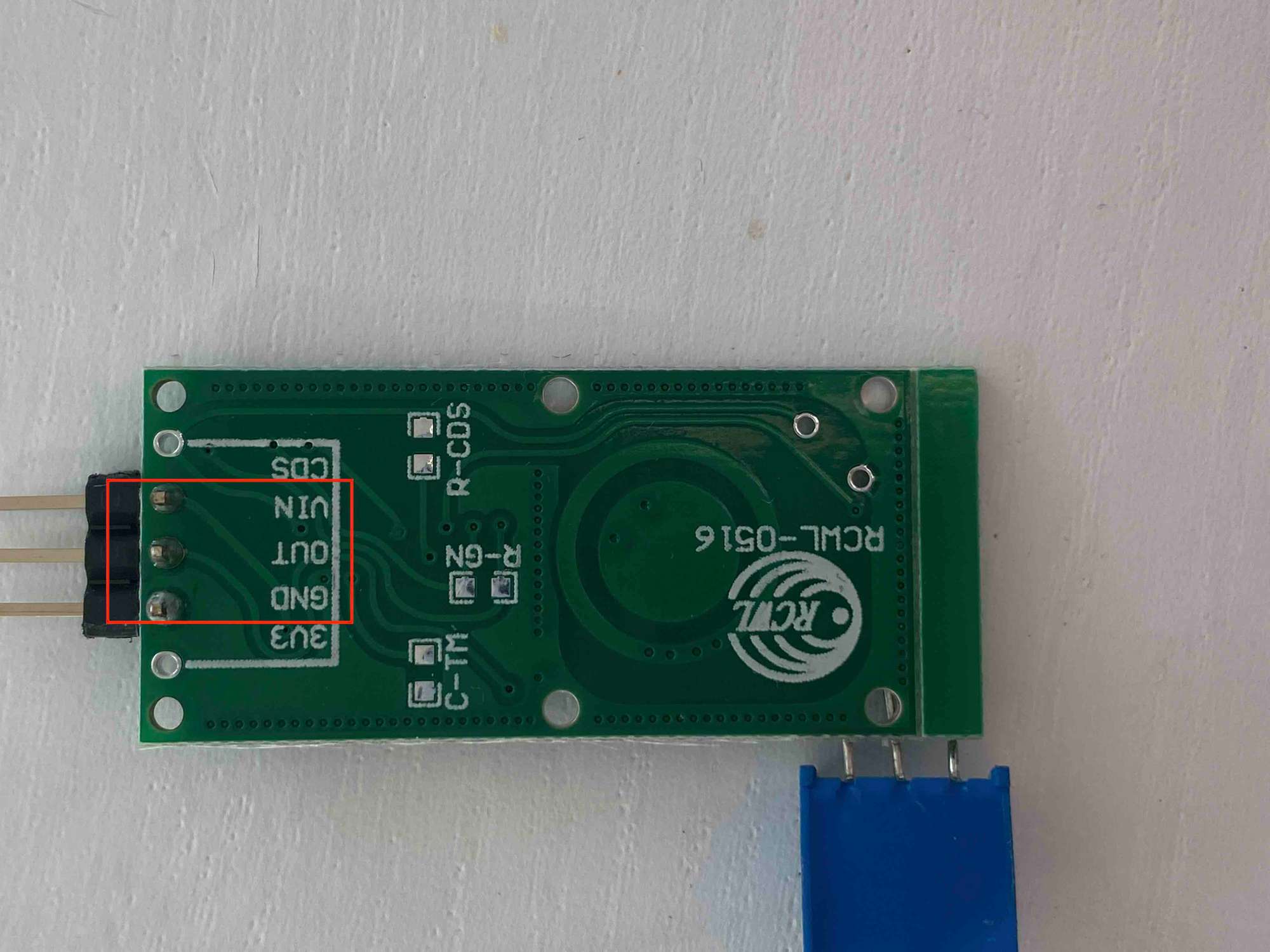
      0_1575817258338_IMG_8448_2.jpg
      The CDS (for applying a photo diode) and 3V3 pin (delivers 3.3V output) remain unused.

      Then connect the sensor to the RPI
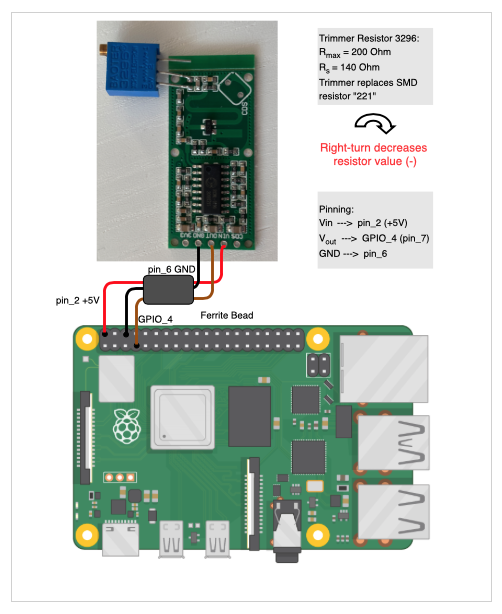
      0_1575817365564_Bildschirmfoto 2019-12-08 um 15.24.21.png

      Again, you only use Vin (5V), Vout and GND. CDS (for applying a photo diode) and 3V3 (delivers 3.3V output) remain unused. For Vout you can use also oher GPIO pins (labeled “Digital I/O” diagram above), in case GPIO_4 is already used.

      The ferrite bead is optional. It is a left over from the PIR sensor I had attached. If you may need one, you can dismantle an old VGA cable and use that one.

      In the last step you mount the sensor in the frame, start MM and adjust the resistor with a small screw driver a few turns to more or less range. Probably you’ll need a second person, which moves outside the room to test if the range is good enough while you adjust the trimmer.

      Conclusion?
      Option 1:
      The sensor inside that box works just as desired for me. I made “exhaustive tests” with my daughters jumping around in the adjacent rooms and floors and had no false positives. This of course applies to the layout of our house and your milage may vary. But I think that this simple approach could be useful for others, too.

      Option 2:
      This a more advanced and sophisicated approach, which works in my setup also as desired. Of course it depends very much on how your rooms are layed out and what characteristic your walls have. And you need a bit excercise in soldering. On the other hand you need no extra space inside the frame for the “Magic Box”.

      Now it’s up to you which option you want to go. Start with Option 1 and see how your results are, and if you wish then go on with Option2.

      posted in Tutorials
      FoziF
      Fozi
    • RE: Hi, there is a new Alexa Module

      @techcoderun Thanks for the video, well done!

      posted in General Discussion
      FoziF
      Fozi
    • RE: Regions

      Im main.css you can change the margin, heightand width under ‚body’ as you need. Here are my values I adjusted. The default values are commented.

      body {
        /* margin: 60px; */
        margin: 5px; 
        position: absolute;
        /*height: calc(100% - 120px);
        width: calc(100% - 120px);*/
        height: calc(100% - 10px);
        width: calc(100% - 10px);
      
      posted in Core System
      FoziF
      Fozi
    • RE: Alexa without speaker or mic

      One option might be the MMM-AlexaControl module

      posted in General Discussion
      FoziF
      Fozi
    • RE: Upgrading Mirror Mark II

      @BD0G thanks for the info, it’s good to know!

      posted in Show your Mirror
      FoziF
      Fozi
    • RE: Hi, there is a new Alexa Module

      @techcoderun
      Suddenly my MM got detected on with my old Echo Dot Gen. 1 and without the installation of the other modules. I can‘t say why. Alexas feedback after scanning for new devices was misleading, too. She answers that no new devices were detected, but I found four new devices in the device list. Anyways, it seems to work and now I‘m thinking about a fitting use case for my needs.

      posted in General Discussion
      FoziF
      Fozi
    • RE: Upgrading Mirror Mark II

      Wow, what a massive piece of mirror! I love the triple display setup. And regarding the reworked cabeling I have now some good inspirations for my own make over. Thanks!
      Btw, which module do you use for the spinning globe?

      posted in Show your Mirror
      FoziF
      Fozi
    • 1 / 1