Isn’t the time at top right the “Sun go up/down” time?
I think you can remove it. Let me get back to you…
EDIT: Im sorry I dont have time right now and Github is down so if someone knows, please reply to Officeglen :)
Isn’t the time at top right the “Sun go up/down” time?
I think you can remove it. Let me get back to you…
EDIT: Im sorry I dont have time right now and Github is down so if someone knows, please reply to Officeglen :)
@Knox I’ve thought about that but just that I’ve tried 3 different converters makes me mad when it doesn’t work for some unknown reason. But maybe I just have to accept it and buy one. :)
@kckndrgn Thanks for replying!
I’ve done a update/upgrade but same resaults, and yes, I’ve reinstalled Jessie on my SD card. But before I reseted my SD-card I tried it in his RPI and it worked. So
My card -> His RPI, WORKS
His cars -> His RPI, WORKS
My C -> my rpi, NO
His C -> ^^^^, NO.
So it’s something with my hardware to do but can’t figure out how and why… It’s not like there is a BIOS reset anywhere either. :(
And the powersupply should be good when I’ve used the same stuff on his RPI when it works. It’s so weird. It’s just a video output.
Update…
Now I know it’s something to do with my RPI… I borrowed a friends RPI (with my screen, SD-card, converter, enverything) it works like a charm. And he got the same RPI model.
Someone know what could fix the problem?
I use a old Asus laptop X53 screen witch I unmounted (read: Destroyd) from the bezel and added direcly on the glas. Then I added a custom LCD Controller from amazon. Not the best light (bleeds abit) but smal and works great!
Hi guys. Im in need of your help.
Since I’ve build my mirror I have used 3 different HDMI -> VGA converters. (I got a http://www.ebay.com/itm/LCD-Controller-Board-DIY-Kit-RTD2270L-Driver-LVDS-Inverter-Turn-LCD-to-Monitor-/110925504614 as a endpoint).
The first converter had a external powersupply. It work… For a day. Then it started blinking/flashing and was unstable pitchure and I saw that my mirror did not enjoy it. Bad power voltage and so on.
Next converter i used is bugged on the RGB scale and shows the green color ALL THE TIME. This means some problems.
Now, now I have bought a legit HDMI>vga converter from “The Pi Hut” or something. Now I only get “NO SIGNAL” on my display. And even on my regular TV-display
I know that the converter works (tried in my computer and PS4) But It’s just my RPI2 that it doesnt work on… I have googled far and beyond with no resualts. I have tried edit the “/boot/config” file but no help…
To the question: Have anyone been in my position? Does anyone know why this happend? RPI power problems? is it the LCD Controllerboard togheter?
Looks really good man! Any thoughts to add any more modules later on or are you happy as it is? :)
@paphko Seems to be working fine now. Thank you for your help!
I guess that if I want 30min refreshrate it should be 60 * 30 * 1000,?
@paphko ¨Perfect! Will pull the latest version when I get home. I’ll get back to you during the evening.
@olliewarren411 Okey. Well it was long ago I did install my rasp. so I’ve might forgot how I did it. But do you have “unclutter” installed?
http://raspberrypi.stackexchange.com/questions/2092/hide-cursor-in-raspbian
@olliewarren411 you sure you have
"@xset s off
@xset -dpms
@xset s noblank
"
in /etc/xdg/lxsession/LXDE-pi ? Mine works just fine with those values
Yea, as I thought. The chart just piles up and doesn’t update. The script however does update.
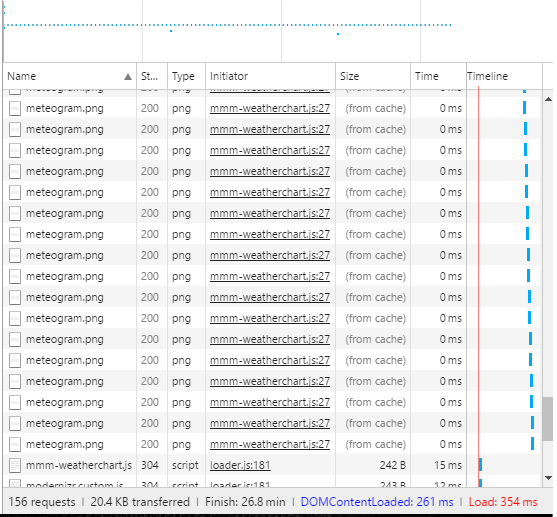
@strawberry-3.141
Im no expert on reading the dev console but it seems to just update from cache after a while?
Name: meteogram.png,
initalator: mmm-weatherchart
Time: 0ms
Size: (From Cache)
and it’s pileing up.
On mmm-weatherchart.js it seems to update, every 15th secound but the chart does not.
Im going to let it stay like this awhile and return.
@paphko I think I got a problem… The map/weatherchart/module doesn’t update itself untill i reboot the whole device. Is this something it’s known for?
As above, is there a one-way mirror at IKEA? I got that place just 2-3km from my house and need it on my next project!
Your mirror looks really cool! How deep is it?
@trividar Hmm… well that makes sense now when you say it. Will try it. Thank you! Hopefully this will save me some time.
Hi. I need some noob help…
I’m changeing the rasp. alot and for everytime I need to make a update I’m restarting the whole rasp.
Is there a way to refresh everything without a whole reboot?
Thanks!
Im trying this one out atm on my mirror. Seems to work pretty good.
Nice work!
@yawns The reason for the red text is that my HDMI->VGA converter is bad and made the whole screen green, So I removed all green colour from the RGB settings and therefore the red texture… x) I am going to buy a better converter. :)
@cowboysdude thanks! Yea I was looking for that slim look and made it seems to be more slim than it really is. :)