@zam many thanks and ramadan mubarak!
Read the statement by Michael Teeuw here.
Posts
-
RE: MMM-MyTraffic
@Caimin I see what you mean. I will take a look at it in a few days. Currently I’m having a short leave with the family.
-
RE: Where are you from?
Eindhoven, Netherlands.
Home town of PSV and Philips. -
RE: Motion Sensor/PIR
@BandNerd1002
If you understand Dutch :winking_face:
I din’t use a MM Module, because that didn’t work for me. I like the mirror to blank even if MM is not running. So I use this alternative Python script. -
MMM-MyTraffic
Description
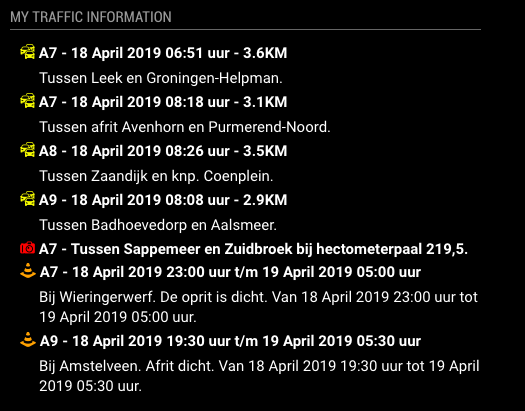
This a module for Magic Mirror². MMM-Mytraffic is a MagicMirror module for DUTCH traffic information, using real-time information from the ANWB.Screenshot


Download
[card:htilburgs/MMM-MyTraffic]Extra
I’m not an experienced programmer and do this for fun. Feel free to suggest any ideas.Version
16-04-2019 - v1.0.0 - Initial Release
17-04-2019 - v1.1.0 - Add preferredRoads Selection
18-04-2019 - v1.2.0 - Select Large or Small icons and information -
RE: Buienradar dont refresh
Module name is MMM-Buienradar.
Just installed it, but see no problem. Tried different zoom levels and they all work.Only thing I can see is an error in the Javascript, but that doesn’t keep the module from working (it’s a bit messy).
-
RE: Sync private iCloud calendar with MagicMirror
You can make a iCloud Family Calendr ‘public’ by following the next steps:
On an iPhone
- Go to Calendar app
- At the bottom you see ‘calendar’
click on it - click on the ‘i’ behind the family calendar
go to the bottom and make sure ‘public calendar’ is selected - select option ‘share’ and then select copy
Now you have the public url and can use
On a Mac
- open calendar app
- select the family calendar on the left
- right click on the ‘wifi’ symbol
- select settings for sharing
- select public calendar and you can copy the url
-
RE: MMM-MyGarbage
@RdP
You can use this module by creating your own Garbage Schedule file with the name garbage_schedule.csv An example file garbage_schedule.csv is added.Create a CSV based on the following template:
WeekStarting,green,gray,blue
03/07/18,1,0,1
03/14/18,1,1,1
03/21/18,1,0,1
03/28/18,1,1,1Default there are 3 bins defined (green, gray and blue) If you need more garbage bins, simply add an extra column in the garbage_schedule.csv file. The name is the color you like the bin to have. In you case ‘yellow’.
Add lines for each garbage pickup date as needed. The date format needs to be specified as MM/DD/YY (e.g.: 05/28/18 for 28-May-2018)
Succes!
-
RE: MMM-MyGarbage
@Chris62 Good to hear it’s fixed.
You can do both- Remove the unused column entirly
- Fill the unused column with zero’s
As of version v1.2.0 you can also use you’re own column names, as long as they are color names. The garbage bin is showed in the color of the name of the column.
example
WeekStarting,Green,Brown
04/15/19,1,1
-
RE: My first Mirror (45cm x 65cm) with 24" monitor (Netherlands)
@Screwyoudriver (Currently) it’s not possible to read ical files. One of the reasons is that every waste company uses it’s own formats / dates / ect. I will gone take a look at that in the near future, but currently I’ve not enought spare time :disappointed_face:
En bedankt! :face_with_stuck-out_tongue_winking_eye:
-
RE: MMM-MyGarbage
On my TEST System, I just did a fresh install of MM2 and after that a fresh install of MMM-MyGarbage. Copy and Paste the configuration as in the README.md into the config.js and no errors. MMM-MyGarbage displays 2 entries with the garbage_schedule.csv that is installed with the git clone…
@Chris62, @werffje, if you still expirience problems, than:
- add config.js into reply
- look at the javascript console if you see any errors in the Console tab
Open Javascript Console:
Press Command+Option+J (Mac) or Control+Shift+J (Windows, Linux, Chrome OS) to open the Console- any other information that maybe relevant
I’ll look at it and try to reproduce and/or correct the issue.
-
RE: MMM-MyGarbage
@werffje I’m sorry to hear that, but if it’a keep saying loading, than there is a configuration error. Can you post your config. js.
Further take a look at the java console in you browser if you can see an error. -
RE: How do I access my Pi from an externel network to install modules and change config.js?
@MWel1977 Or make use of builtin VNC with a VPN, what also can run on the Pi. But Teamviewer would be the most simple to use.
-
RE: How to "halt" autostart for some time...?
I don’t exactly get what you’re saying, but I assume you’re not connecting through SSH with your mirror? Because when you connect through SSH, you come in the RPI shell and can configure your modules.
-
RE: My first Mirror (45cm x 65cm) with 24" monitor (Netherlands)
@jmigoliva, I use a simple python script for the PIR sensor. I’ve used the instructions on https://www.magicmirrorcentral.com/pir-sensor-raspberry-pi-magic-mirror/
This page provided me everything I needed to get the PIR sensor working.