here it is with the New York Times…

 Offline
here it is with the New York Times…
@cyberphox @blueadam @Sean
I see that I didn’t notice the changes that the forums made when I copy/pasted the code.
Apologies!
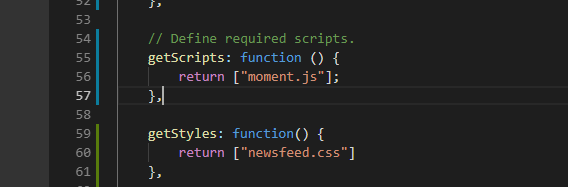
I also missed a step: Need to add getStyles function to the newsfeed.js Pic for placement
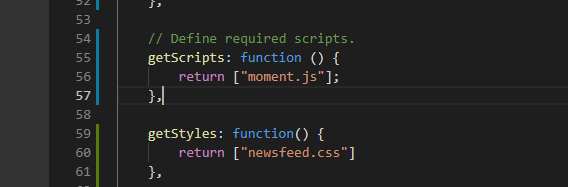
And this is what I tried to post and the forums didn’t like it and cahnged it, This is what you need to get it to work:

I will fix this in my original post.
Again, Apologies!
and this example uses jQuery…
< script>
$(document).ready(function(){
    $("button").click(function(){
        $.get("demo_test.asp", function(data, status){
            alert("Data: " + data + "\nStatus: " + status);
        });
    });
});
< /script>
you would have to download or call jquery…
downloaded and added to your module directory…
getScripts: function() {
    return ["jquery.min.js'];
},
to call for it…
< script src="https://ajax.googleapis.com/ajax/libs/jquery/3.3.1/jquery.min.js">< /script>
this is an example of the XMLHttpRequest mentioned in the previous post…
var xmlHttp = null;

function GetCustomerInfo()
{
    var CustomerNumber = document.getElementById( "TextBoxCustomerNumber" ).value;
    var Url = "GetCustomerInfoAsJson.aspx?number=" + CustomerNumber;

    xmlHttp = new XMLHttpRequest();
    xmlHttp.onreadystatechange = ProcessRequest;
    xmlHttp.open( "GET", Url, true );
    xmlHttp.send( null );
}

function ProcessRequest()
{
    if ( xmlHttp.readyState == 4 && xmlHttp.status == 200 )
    {
        if ( xmlHttp.responseText == "Not found" )
        {
            document.getElementById( "TextBoxCustomerName"    ).value = "Not found";
            document.getElementById( "TextBoxCustomerAddress" ).value = "";
        }
        else
        {
            var info = eval ( "(" + xmlHttp.responseText + ")" );

            // No parsing necessary with JSON!
            document.getElementById( "TextBoxCustomerName"    ).value = info.jsonData[ 0 ].cmname;
            document.getElementById( "TextBoxCustomerAddress" ).value = info.jsonData[ 0 ].cmaddr1;
        }
    }
}
I found this, seems to be what you are looking for…
The new window.fetch API is a cleaner replacement for XMLHttpRequest that makes use of ES6 promises. There’s a nice explanation here, but it boils down to (from the article):
fetch(url).then(function(response) {
  return response.json();
}).then(function(data) {
  console.log(data);
}).catch(function() {
  console.log("Booo");
});
Browser support is now good in the latest releases (works in Chrome, Firefox, Edge (v14), Safari (v10.1), Opera, Safari iOS (v10.3), Android browser, and Chrome for Android), however IE will likely not get official support. GitHub has a polyfill available which is recommended to support older browsers still largely in use (esp versions of Safari pre March 2017 and mobile browsers from the same period).
I guess whether this is more convenient than jQuery or XMLHttpRequest or not depends on the nature of the project.
Here’s a link to the spec https://fetch.spec.whatwg.org/
Now, to figure out how to do it for those who have more than 1 newsfeed!
You’ll have to find the logo for the news feed you are using (Google images)
save it to your newsfeed folder
change the part in the top code (USATodayLogo.jpg) to match your image
Change this section of the newsfeed.js file (copy, paste, overwrite)…

and add a getStyles function to call the newsfeed.css…
Create a newsfeed.css file and put the following in it…
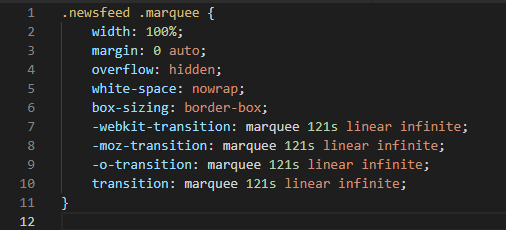
(I think I will post pics instead of code from now on!) :smiling_face_with_sunglasses: :smirking_face: :confused_face:
Enjoy!
I know, the scroll part wasn’t in the request, But, I couldn’t help myself… :smiling_face_with_sunglasses:
I’t takes me a minute to do this stuff!
I will, when I get it done!!! :winking_face:
I can help you. set that up.
I sent you a chat message.
No worries, There are a lot of very helpful people in this forums, feel free to ask for it anytime. We are always happy to help! :smiling_face_with_sunglasses:
post your config, remove any personal info…
the ToughBook is old… the touchpad doesn’t work, and I have no idea what is wrong with the mic…
I have to talk really loud for it to hear me. I tried a USB mic, and it’s the same. So, I’m guessing it has to do with the sound hardware of the laptop. I don’t have any problem with the USB on any of my other devices.
Es geschehen Wunder. Nach einem erneuten Reboot funktioniert jetzt alles. Vielen Dank,
Kein Problem, jederzeit, immer froh zu helfen, wenn ich kann
@sean
kind of…
The major issue I’m having is thae colors of the weekend not being the same as the rest of the calendar…
But, other than that, it looks great!


