@feuerball, I meant, add more IR lights for the camera to “see” better at night.
A New Chapter for MagicMirror: The Community Takes the Lead
Read the statement by Michael Teeuw here.
Read the statement by Michael Teeuw here.
K
Offline
Posts
-
RE: Face Recognition with inferred light
-
RE: Question about the mirror
It’s a warning, sure. And perhaps their product is indeed easily scratched. Ask around, go a different place or vendor, see what kind of response you get.
-
RE: Question about the mirror
Like I mentioned, how you treat your mirror will depend on how long it lasts. Using abrasive cleaners is bad, but a clean, damp, micro fiber cloth goes a long way.
-
RE: Question about the mirror
Acrylic mirrors, sure. Glass mirrors, while you can still scratch them, they do last a lot longer than acrylic ones. ANY mirror is prone to scratches, it’s how you treat it that depends how long it lasts.
-
RE: Releasing stable
We could release v2 (stable), keep v2-beta to continue developing on that release. Or, start a new branch (v2-StuffWeThoughtWorkedButReallyDoesnt)… Or just start with v2.1, v2.2 etc., etc. At least till there’s another major update, or we’ve mucked with it so much that it’s not really a base v2 anymore…
-
RE: Getting started tutorial
Taking this topic back to the storage question above, I did a fresh install on another rPi-3 and captured some info. One a stock Raspbian Jessie, running on an 8G card, with all apps updated, nothing removed, once you have MM up and running, you’re looking at the following for storage:
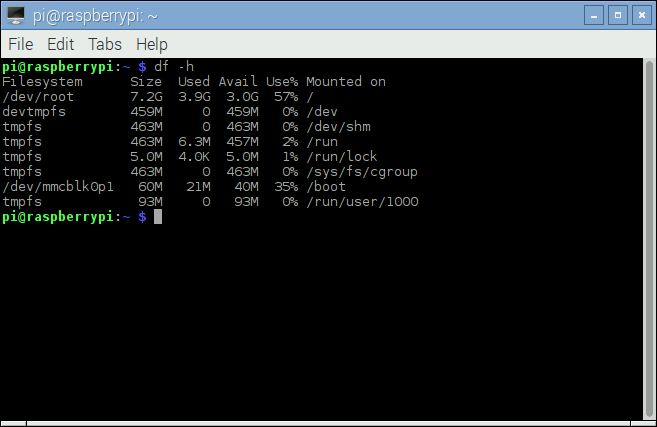
Now, since you’re likely to only use this for MM and nothing else, there’s no sense in leaving all of the other apps on it that are pre-installed. So, I removed some of the big ones:
wolfram-engine
scratch
nu-scratch
sonic-pi
idle3
smartsim
penguinspuzzle
java-common
minecraft-pi
python-minecraftpi
python3-minecraftpi
libreoffice*
And after running
autoremoveas well, which cleared even more space removing other unneeded apps, you’re down to this: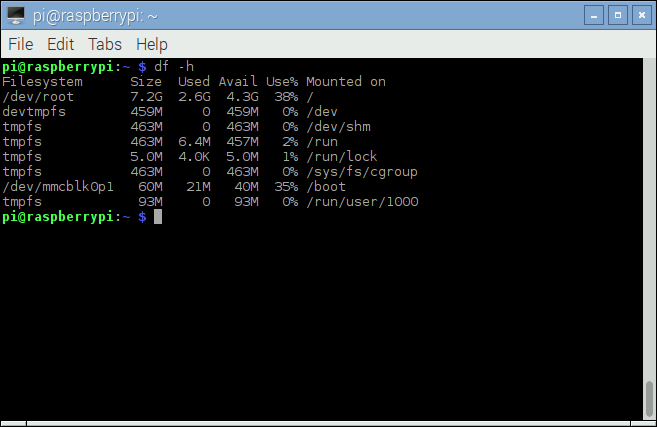
That’s 1.3G worth of storage that I just cleared up. So unless you need a larger SD card for other stuff, an 8G works just fine. Potentially even a 4G. You’ll still have plenty of room left after you clean up the installation.
Another option is to start with Raspbian Jessie-lite on a 4G card, but then you have to install the X server, desktop environment, and a login manager yourself. Assuming you get it all done correctly, you’ll end up with a very light weight installation of the OS, taking up only 53% of storage (remember, 4G card), with MM running lean and clean on top of that. I did try that as well but ran into issues with electron.js and for the time involved, knowing I wasn’t going to run it on there, it wasn’t worth continuing. I will leave that as an exercise to the brave.
-
RE: Getting started tutorial
The config.js.sample file that comes with it gives you all the examples you need. If you rename it to config.js and start your mirror, you will see the modules pop up. Use that as your starting point.
-
RE: Display and Connection to the Pi3
Just entering
'LTN101NT08 display board'and this was the first result:
http://r.ebay.com/IWsZDwVGA, HDMI, looks like composite. Remote control, speakers, buttons panel … All the fixings for a custom built frame.
-
RE: Display and Connection to the Pi3
My knee jerk answer is to find the model of the screen, and search eBay for a driver for it. The driver board will have the ribbon cable you need to connect to that, and the board will have the standard HDMI input on it. Simply typing in ‘lcd driver board’ on eBay’s search bar will get you a long list of them. By also entering the model of the screen, you can narrow that down.
-
RE: Whitescreen after Reboot
@MichMich, oooooh. I was about to start a new topic and demand access to those
'frowned'modules! :) -
RE: Whitescreen after Reboot
@MichMich, uh, een momentje, but what are
'frowned modules'? -
Forum Posting Tips
There are no clear rules for creating topics or responding to posts on forums in general. Each one is different, each one will have its own set of rules to abide to and what you can or can’t do. However, what we can do is offer guidelines. So here goes:
- If you are a new user, please take the time to read the Announcements topic. Besides a warm welcome from the creator of MagicMirror, other forum specific announcements will be available there.
- Search the forum to see if your topic is already covered. Perhaps another user had the same issue, perhaps a solution has already been posted.
- Try to post your topic in the relevant forum section. This I can not state often enough.
- And with that, stay on topic! If you’re responding to someone else’s post, please stay on topic and don’t interrupt the topic of discussion (or hijack their topic.)
- When posting pieces of code, please use the available markdown to better highlight those sections. If you need help with the Markdown, please see this page on commonmark.org.
- Please do not double post, as in, don’t post the same topic or question into multiple different categories. Not only does it make it difficult to follow a thread, it’s makes it hard on yourself to follow where someone has said what, and who’s responding to what. If you’ve posted something and you think it’s in the wrong category, let one of the admins know and if they feel it doesn’t belong there, your topic will get moved into the correct category.
- When replying to a specific post, mind the quoting of the previous message in yours. If a post is right above yours and all you’re doing is responding with a ‘Yes.’, ‘Me too.’, ‘Where to get that?’, there is no sense in quoting the message. You can delete it, or click on the ‘Reply’ button below the thread as opposed to the message itself. If you DO need to quote someone, consider trimming the message to only the relevant parts that pertains to your response. Quoting entire messages just adds more stuff to scroll through and read and things get lost.
- Be civil with each other, act in a give-and-take manner, don’t chastise a new user, instead help guide them. And particularly because this forum happens to have folks from several different countries with different languages, try to speak in a way that others will understand you. Using slang might be understood by some, but not others. The same applies to humor, some people might understand you, and others might not, and yet others who might get offended. I’m not suggesting you be strict and dry as a shriveled up prune, but just be mindful of the language barriers here.
- Please use expressive titles that do not just consist of one word but give you a impression of what the topic is about.
Am I boring you yet? Well good, you read this far. :) Seriously folks, have fun, enjoy, post your mirror issues, questions, or other relevant topics. We’re all here to learn from one another, and showcase our work.
Go forth and code!
-
RE: Missing CSS icons?
Yeah, I hear you there. I’ve been trying to recreate the problems on my end but … no such luck. It runs flawlessly on my server, both as a super user as well as an unprivileged user. So something happened on his end with he switched things … maybe permissions … maybe something else. We’re trying to figure that out. You … you keep your focus on MM. :)
-
RE: GitHub/Fork/Local Git/Getting Giddified ...
Mainly GitHub for Windows (which is a GUI). And it’s really only for committing my changes, and syncing them back up to GitHub (online, into my fork). The only time I drop to command line is when I need to merge the upstream repo (so I stay current with stuff that you merge in.)
But the problem is that I have a tendency to push stuff up to GitHub (online) several times during the day, as opposed to just once at the end of the day. This then creates multiple commits in the PR. If I squash all of my commits into one, just prior to syncing, then the PR will only have 1 or 2 items in it, as opposed to one for every single commit I made throughout the day.
It’s a matter of changing how I interact with GitHub, which I suspect would be the same no matter what application I’m using.
-
RE: GitHub/Fork/Local Git/Getting Giddified ...
So the short answer is to squash my commits prior to syncing to GitHub. Easy enough … I have to remember to do it and only sync once per session, so like at the end of my work day, or at the end of the evening at home. That should then create a cleaner PR. This is to be tested next … after I get rid of the current fork that I have that has dozens of commits on a PR (because I synced dozens of times.) Get rid of it, refork, add my stuff back in, and then get a clean(er) PR done. Oy … headache.
-
RE: Change default interface colors
Also note the warning as stated on the wiki page:
Note: If a file can not be loaded, the boot up of the mirror will stall.Meaning, if you tell
getStylesto look for a file called'myStyles.css'but in reality it’s called'mystyles.css'(case matters) or'coolcolor.css', the mirror will stall and not load. So be careful. -
RE: Change default interface colors
The same approach applies when you’re creating your own custom modules. Keep in mind that if you edit the default files, a future update can overwrite them and you lose your changes.
-
RE: Change default interface colors
By the way, that colorful screen capture was simply demonstrating that if you want to edit the default modules, you can, and you can then color them any way you want. In this case, I opened calendar.js and in the
'getStyles'section, I added another file:// Define required scripts. getStyles: function() { return ["calendar.css", "font-awesome.css", "mystyles.css"]; },In this instance,
'mystyles.css'is my custom one, which I then created and added my own colors to the various elements:#module_1_clock .time, #module_1_clock .date { color: #99F; } #module_1_clock .dimmed { color: #449; } #module_2_calendar header { color: #F00; border-bottom: 2px solid #600; } #module_2_calendar .title { color: #F99; } #module_2_calendar .time { color: #FBB; } #module_2_calendar .symbol { color: #FF0; }