MagicMirror Forum
    • Recent
    • Tags
    • Unsolved
    • Solved
    • MagicMirror² Repository
    • Documentation
    • 3rd-Party-Modules
    • Donate
    • Discord
    • Register
    • Login
    1. Home
    2. luisestrada
    3. Posts
    A New Chapter for MagicMirror: The Community Takes the Lead
    Read the statement by Michael Teeuw here.
    Offline
    • Profile
    • Following 0
    • Followers 0
    • Topics 8
    • Posts 68
    • Groups 0

    Posts

    Recent Best Controversial
    • RE: MMM-HomeAssistant-Sensors (Development) - Show your HA Sensors on your Mirror

      @joecas65 said in MMM-HomeAssistant-Sensors (Development) - Show your HA Sensors on your Mirror:

      @Snille Hi, is it possible to add a line separator between sensors ?
      thanks

      I like the way the MMM-MyScoreboard does, by adding this line

      border-bottom: solid 1px #222;
      

      You can add it to your custom.css file (for more info about how to write in css, check https://forum.magicmirror.builders/topic/6808/css-101-getting-started-with-css-and-understanding-how-css-works?_=1677609386326)

      posted in Utilities
      luisestradaL
      luisestrada
    • RE: My e-ink frame

      @jonathanperron Pour moi, l’api Google ça marche parfaitement. Je n’ai pas réussi à faire fonctionner l’api de la STM

      https://portail.developpeurs.stm.info/apihub/#/login

      https://forum.magicmirror.builders/topic/12709/stm-module-société-de-transport-de-montréal?_=1677099514162

      posted in Show your Mirror
      luisestradaL
      luisestrada
    • RE: MMM-CalendarExt3Agenda

      @MMRIZE Sorry I could not reply sooner.

      The Tesla module is the module below

      MMM-TeslaLogger https://github.com/spitzlbergerj/MMM-TeslaLogger

      I use Teslamate to extract the data from the car.

      I will send you my calendar code to your email.

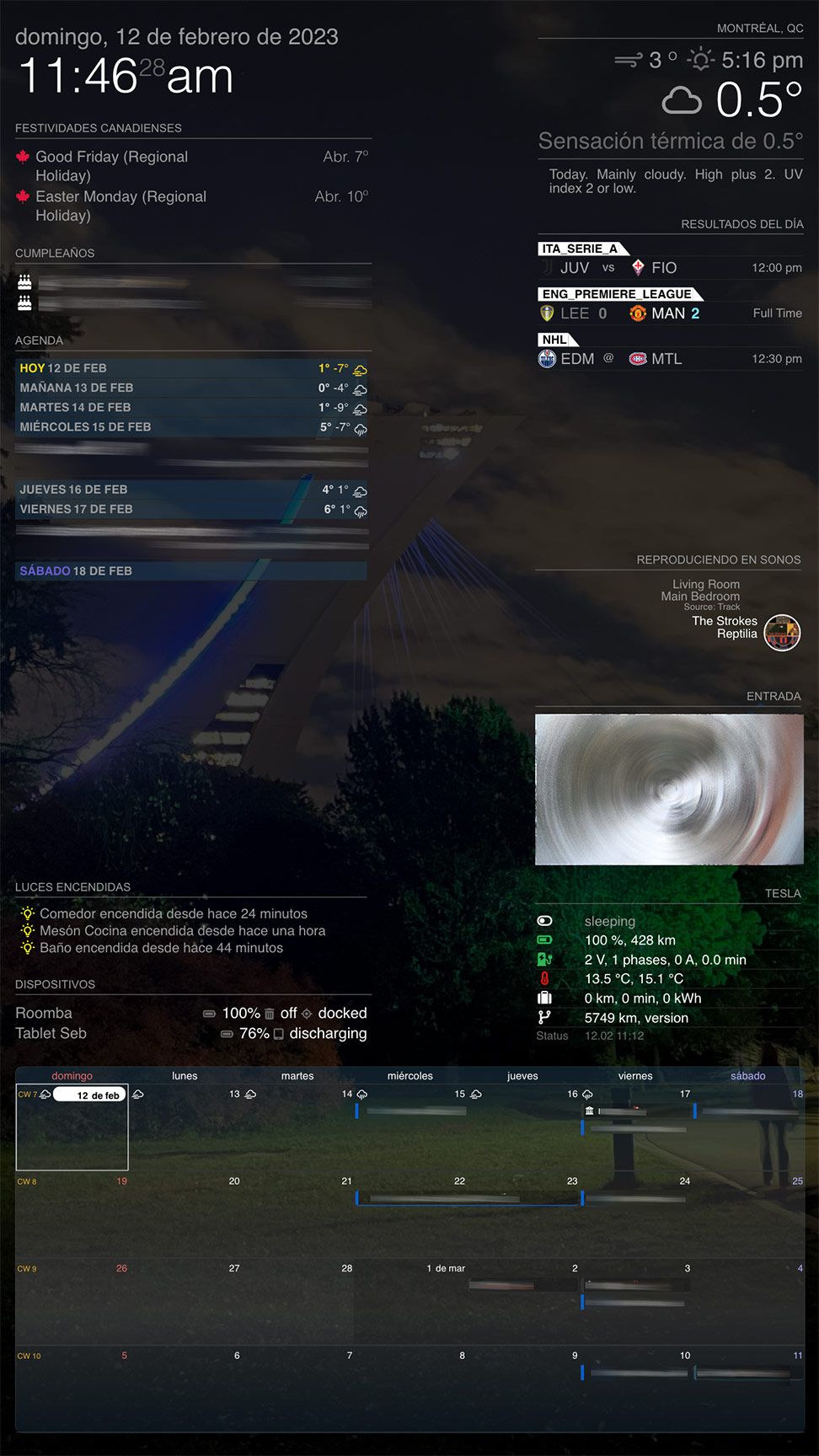
      I also realized the last event (Saturday, Feb 18, in my screenshot) shows in my calendar but not in the agenda, If I take less days it does not show the last event. I did not see the issue when the last day was the 23rd, probably because the event started on the 22nd.

      posted in Utilities
      luisestradaL
      luisestrada
    • RE: MMM-CalendarExt3Agenda

      @MMRIZE I changed the module weatherProvider to “openweathermap”, for the type “forecast” and now it works.

      I kept “envcanada” for the type “current”, though.

      New Screen Shot 2023-02-12 at 11.46.24 AM.jpg

      posted in Utilities
      luisestradaL
      luisestrada
    • RE: MMM-CalendarExt3Agenda

      @BKeyport

      I think it’s this

      Show the days only which has event on the day.
      .CX3A .agenda .cell[data-events-counts="0"] {
        display: none;
      }
      
      posted in Utilities
      luisestradaL
      luisestrada
    • RE: MMM-CalendarExt3Agenda

      @MMRIZE said in MMM-CalendarExt3Agenda:

      @luisestrada
      Hmmm… With my test, it works as expected.

      …

      This is what I used for config;
      …

      Thanks, I made the changes you did and it did not work, I hope it’s not because I updated Electron to the most recent version :downcast_face_with_sweat:

      posted in Utilities
      luisestradaL
      luisestrada
    • RE: MMM-CalendarExt3Agenda

      Hello,

      I noticed when I select envcanada as my forecast provider I just get today’s value, not for the rest of the week. The issue happens in both, MMM-CalendarExt3 & MMM-CalendarExt3Agenda. :crying_face:

      {
      			module: "weather",
      			position: "top_right",
      			header: "Forecast",
      			config: {
      				weatherProvider: "envcanada",
      				type: "forecast",
      				maxNumberOfDays: "7",
      				location: "Montréal, QC",
      				siteCode: "s0000635",
      				provCode: "QC"
      			}
      		},
      
      posted in Utilities
      luisestradaL
      luisestrada
    • RE: Introduce yourself!

      I’ve been here in this forum for some time and I did not see this post.

      I’m Luis, and I was born in Barranquilla, Colombia. I’m currently living Canada for about 11 years. I am 42.

      I studied aeronautical engineering and I have a master in aviation management. I speak 5 languages so far. I work as a Reliability Analyst in the aerospace industry.

      I started using MagicMirror in 2020 as a hobby, to learn a bit of coding. Now with all the support of the community, I have a dashboard for me and my family at home. It works as an agenda, I check my car information, music playing at home, the bus schedule, a camera and even sport results.

      I’ll leave some pictures soon in “Show my mirror”.

      Greetings,
      Luis

      posted in General Discussion
      luisestradaL
      luisestrada
    • RE: MMM-HomeAssistant-Sensors (Development) - Show your HA Sensors on your Mirror

      Hi, this is not an issue but a question. I have a bunch of lights and I’d like to hide them when they are off, just to show them when they are on.

      Is this possible?

      posted in Utilities
      luisestradaL
      luisestrada
    • RE: v2.22.0 & Font Awesome FAB icons

      @sdetweil Fantastic, thank you so much. It worked!

      This is the code I have (in case someone needs it):

              {
      			module: "calendar",
      			header: "Canadian Holidays (QC),
      			position: "top_left",
      			config: {
      				calendars: [
      					{
      						url: "https://www.officeholidays.com/ics-clean/canada/quebec",
      						symbol: "canadian-maple-leaf",
      						color: 'crimson'
                          },
      				],
      				defaultSymbolClassName: "fab fa-",
      				colored: true,
      				coloredSymbolOnly: true,
      				maximumEntries: "2",
      				wrapEvents: true,
      			}
      		},
      

      And happy new year!!!

      posted in Troubleshooting
      luisestradaL
      luisestrada
    • v2.22.0 & Font Awesome FAB icons

      Hello,

      Usually, every time there’s an update I have to edit calendar.js to get the FAB icons from FontAwesome working.

      I noticed this updates is supposed to do the job for me but it seems there’s no tutorial or explanation of how to use it. This is what the update mentions.

      Possibility to change FontAwesome class in calendar, so icons like fab fa-facebook-square works.
      

      However in the documentation this is the only information available.

      defaultSymbol	The default symbol.
      
      Possible values: See Font Awesome website.
      Default value: calendar
      

      I am using one FAS icon for the calendar and another FAB icon for Canadian holidays, but I can’t make it work both at the same time without manipulating the file.

      Please let me know how to set it up, (I believe in config.js), to make it work.

      posted in Troubleshooting
      luisestradaL
      luisestrada
    • RE: kolbyjack / MMM-Wallpaper & Synology

      @sdetweil The idea would be to access a Synology Photos album and read the photos from that album, so there’s no file duplications or avoiding storing pictures in multiple places

      posted in Troubleshooting
      luisestradaL
      luisestrada
    • kolbyjack / MMM-Wallpaper & Synology

      I love this app. I use it in my one board (I did not put a mirror but I use it as a dashboard). I am also owner of Synology, and using my pictures from a Synology album sounds like a very good idea.

      As Synology Moments was replaced with Synology Photos in DSM version 7.2, the code for using Synology Moments does not work anymore. I asked the creator a while ago but he no longer has a Synology.

      With my limited programming knowledge I tried to see if I could make it work, with no luck. I tested this information from the two links below, with no luck.

      https://community.synology.com/enu/forum/7/post/145996
      https://github.com/zeichensatz/SynologyPhotosAPI

      I wanted to post it here in case there’s someone interested in fixing/updating the code

      https://github.com/kolbyjack/MMM-Wallpaper/issues/69

      For now, my only option is to download the pictures in the Rapsberry pi.

      Thank you

      posted in Troubleshooting
      luisestradaL
      luisestrada
    • RE: MMM-MyTraktSeries

      MMM-MyTraktSeries.js:61

      Uncaught (in promise) TypeError: Cannot read properties of undefined (reading ‘nextEp’)
      at Class.getDom (MMM-MyTraktSeries.js:61:45)
      at main.js:113:35
      at new Promise ()
      at updateDom (main.js:111:10)
      at Object.updateDom (main.js:552:4)
      at Class.updateDom (module.js:358:6)
      at Class.socketNotificationReceived (MMM-MyTraktSeries.js:101:18)
      at module.js:245:9
      at Socket. (socketclient.js:38:4)
      at Emitter.emit (index.mjs:136:20)

      Uncaught (in promise) TypeError: Cannot read properties of undefined (reading 'nextEp')
      

      Row 61 says:
      title = this.shorten(aux[i].nextEp, 19);

      posted in Utilities
      luisestradaL
      luisestrada
    • RE: MMM-MyTraktSeries

      @TheVieiraAkA Hello,

      I can’t understand why I use one list and it works but then I select another list and it doesn’t. I made it public, friends, private and nothing works.

      It looks that this module was abandoned, but still works.

      Thank you !!!

      posted in Utilities
      luisestradaL
      luisestrada
    • RE: MMM-CalendarExt3Agenda

      @hogedir

      I edited the max-width value (50% to 100%) in .CX3A .cellBody .fullday .event and solved the issue

      posted in Utilities
      luisestradaL
      luisestrada
    • RE: MMM-CalendarExt3

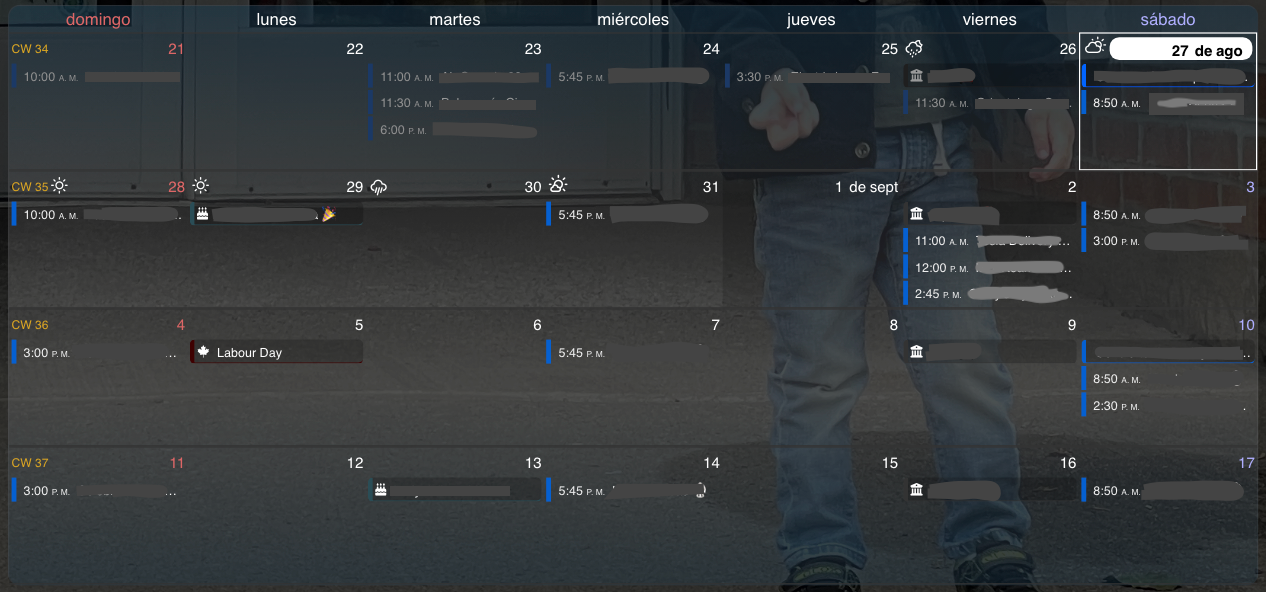
      Screen Shot 2022-08-27 at 12.05.59 AM.png

      Thank you very much.

      It took me some time to figure out that I could use symbol: “blank”, to not to show any icon, I was getting an error because before, I was using symbol: null :beaming_face_with_smiling_eyes:

      It’s working exactly as I wanted :)

      posted in Utilities
      luisestradaL
      luisestrada
    • RE: MMM-CalendarExt3

      @BKeyport It’s a Pro icon, do you pay for it?

      posted in Utilities
      luisestradaL
      luisestrada
    • RE: MMM-CalendarExt3

      Hi @sdetweil @MMRIZE

      This used to be possible before, but after implementing the weather icons, it stopped working. It’s not a big deal but it’s a nice to have feature.

      As you know, MagicMirror uses a very old version of Font Awesome. I updated mine to the most recent version and it now includes the Canadian flag and many other brand icons. Unfortunately, for brands, you have to use “fas” or “fa-solid”, and for brands you have to use “fab” or “fa-brands”. I solved this by tweaking the code in calendar.js and config.js. I also tried to do the same in MMM-CalendarEXT3.js, line 242, but when I try to update config.js calendar module, the calendar shows no data. The reason, because MMM-CalendarEXT3 module does not accept spaces in symbol.

      CalendarEXT3.js, line 242:

      symbol.className = "fa fa-fw fa" + s;
      

      config.js, for birthday calendar

      symbol: "s fa-cake-candles",
      

      config.js, for Canadian holidays

      symbol: "b fa-canadian-maple-leaf",
      

      The space breaks my code, I wanted to choose either “b” or “s” in the symbol field

      How the icons look in the native calendar

      Screen Shot 2022-08-26 at 3.10.57 PM.png

      Unfortunately, not allowing spaces, forces me to decide which one to use or “fas” or “fab”

      Screen Shot 2022-08-26 at 3.11.35 PM.png

      posted in Utilities
      luisestradaL
      luisestrada
    • RE: MMM-CalendarExt3Agenda

      @BKeyport said in MMM-CalendarExt3Agenda:

      @MMRIZE at least you have good taste and follow the bluejays. :P

      I cannot agree more with that :)

      posted in Utilities
      luisestradaL
      luisestrada
    • 1
    • 2
    • 3
    • 4
    • 2 / 4