MagicMirror Forum
    • Recent
    • Tags
    • Unsolved
    • Solved
    • MagicMirror² Repository
    • Documentation
    • 3rd-Party-Modules
    • Donate
    • Discord
    • Register
    • Login
    • Profile
    • Following 2
    • Followers 2
    • Topics 10
    • Posts 287
    • Groups 0
    M Offline
    1. Home
    2. Manu85
    3. Posts
    A New Chapter for MagicMirror: The Community Takes the Lead
    Read the statement by Michael Teeuw here.

    Posts

    Recent Best Controversial
    • RE: Changing icons of the modules Current Weather and Weather Forecast

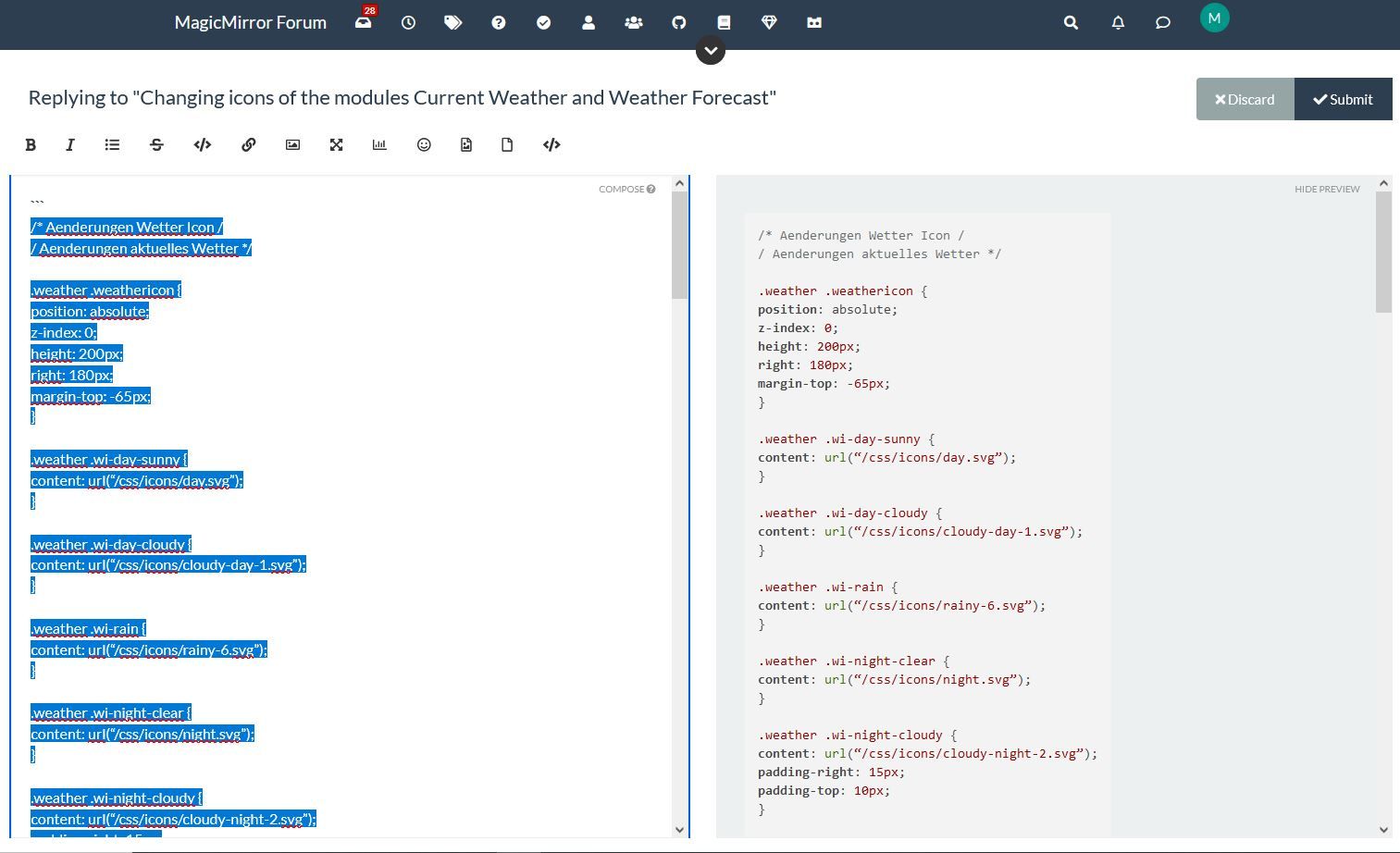
      @sdetweil ah ok here are the entries in my custom css file for the weather, is this what you want?

      .weather .wi-day-sunny {
      content: url(“/css/icons/day.svg”);
      }
      
      .weather .wi-day-cloudy {
      content: url(“/css/icons/cloudy-day-1.svg”);
      }
      
      .weather .wi-rain {
      content: url(“/css/icons/rainy-6.svg”);
      }
      
      .weather .wi-night-clear {
      content: url(“/css/icons/night.svg”);
      }
      
      .weather .wi-night-cloudy {
      content: url(“/css/icons/cloudy-night-2.svg”);
      padding-right: 15px;
      padding-top: 10px;
      }
      
      .weather .wi-cloudy {
      content: url(“/css/icons/cloudy.svg”);
      }
      
      .weather .wi-showers {
      content: url(“/css/icons/rainy-7.svg”);
      }
      
      .weather .wi-thunderstorm {
      content: url(“/css/icons/thunder.svg”);
      }
      
      .weather .wi-snow {
      content: url(“/css/icons/snowy-6.svg”);
      }
      
      .weather .wi-cloudy-windy {
      content: url(“/css/icons/cloudy-day-3.svg”);
      }
      
      .weather .wi-night-rain {
      content: url(“/css/icons/rainy-6.svg”);
      }
      
      .weather .wi-night-snow {
      content: url(“/css/icons/snowy-6.svg”);
      }
      
      .weather .wi-night-thunderstorm {
      content: url(“/css/icons/thunder.svg”);
      }
      
      .weather .wi-night-showers {
      content: url(“/css/icons/rainy-7.svg”);
      }
      
      .weather .wi-fog {
      content: url(“/css/icons/cloudy.svg”);
      }
      
      .weather .wi-night-alt-cloudy-windy {
      content: url(“/css/icons/cloudy-night-1.svg”);
      }
      
      /* Aenderungen Wettervorhersage */
      
      .weather .weathericon {
      position: absolute;
      left: 35px;
      z-index: 1;
      margin-top: -30px;
      height: 60px;
      }
      
      .weather .wi-day-sunny {
      content: url(“/css/icons/day.svg”);
      padding-left: 6px;
      padding-top: 5px;
      height: 50px;
      }
      
      .weather .wi-day-cloudy {
      content: url(“/css/icons/cloudy-day-1.svg”);
      }
      
      .weather .wi-rain {
      content: url(“/css/icons/rainy-6.svg”);
      padding-left: 8px;
      padding-top: 5px;
      height: 45px;
      }
      
      .weather .wi-night-clear {
      content: url(“/css/icons/night.svg”);
      }
      
      .weather .wi-night-cloudy {
      content: url(“/css/icons/cloudy-night-2.svg”);
      height: 50px;
      padding-left: 5px;
      padding-top: 7px;
      }
      
      .weather .wi-cloudy {
      content: url(“/css/icons/cloudy.svg”);
      }
      
      .weather .wi-showers {
      content: url(“/css/icons/rainy-7.svg”);
      }
      
      .weather .wi-thunderstorm {
      content: url(“/css/icons/thunder.svg”);
      }
      
      .weather .wi-snow {
      content: url(“/css/icons/snowy-6.svg”);
      }
      
      .weather .wi-cloudy-windy {
      content: url(“/css/icons/cloudy-day-3.svg”);
      height: 45px;
      padding-left: 8px;
      padding-top: 7px;
      }
      
      .weather .wi-night-rain {
      content: url(“/css/icons/rainy-6.svg”);
      padding-left: 8px;
      padding-top: 5px;
      height: 45px;
      }
      
      .weather .wi-night-snow {
      content: url(“/css/icons/snowy-6.svg”);
      }
      
      .weather .wi-night-thunderstorm {
      content: url(“/css/icons/thunder.svg”);
      }
      
      .weather .wi-night-showers {
      content: url(“/css/icons/rainy-7.svg”);
      }
      
      .weather .wi-fog {
      content: url(“/css/icons/cloudy.svg”);
      }
      
      .weather .wi-night-alt-cloudy-windy {
      content: url(“/css/icons/cloudy-night-1.svg”);
      height: 50px;
      padding-left: 5px;
      padding-top: 7px;
      }
      
      posted in Development
      M
      Manu85
    • RE: Changing icons of the modules Current Weather and Weather Forecast

      @sdetweil dans mon custom css j’ai fait ces entrées par exemple (je ne sais pas si c’est ce que vous voulez…):

      /*
       * SONDE DHT 22 temperature interieur
      */
      #dht_temp {
        font-size: 40px;
      
      /*
       * TEMPERATURE CPU
      */
      }
      #pi_temp {
        font-size: 30px;
      }
      
      /*
       * CALENDRIER ICONES AGENDA
      */
      .fa.fa-male {
        color: #2B60DE; /* Dodger Blue */
      }
      .fa.fa-birthday-cake {
        color: #ff0000; /* Red */
      }
       
      .fa.fa-trash-o {
        color: #00FF00; /* Green */
      }
      
      .fa.fa-calendar {
        color: #F660AB; /* Hot Pink */
      
      posted in Development
      M
      Manu85
    • RE: Changing icons of the modules Current Weather and Weather Forecast

      @sdetweil exactly right, but I no longer have weather icons :beaming_face_with_smiling_eyes:

      posted in Development
      M
      Manu85
    • RE: Changing icons of the modules Current Weather and Weather Forecast

      @sdetweil I did the manipulation on this forum and the text that I copied into my custom css has this form:
      .weather .wi-day-sunny {
      content: url(“/css/icons/day.svg”);
      }

      posted in Development
      M
      Manu85
    • RE: Changing icons of the modules Current Weather and Weather Forecast

      @sdetweil thank you for your patience and for your help, I copied all the lines for the custom css and I pasted it into the “site text editor” sorry for the terms but they are probably not good, then I selected the text, I pressed the </> button and on the other window I had the modified text (see screen copy) then I copied this new text and I copied it into the custom css and the original weather icons have disappeared but I don’t have any new icons, see the other screenshot, I will get there thanks to you :-)

      selection pour css custom1.JPG Copie ecran MM.JPG

      posted in Development
      M
      Manu85
    • RE: Changing icons of the modules Current Weather and Weather Forecast

      @sdetweil hello, I waited this morning to read your response and have clear ideas, but I do not have the level of knowledge required to do what you are asking me :-( , I have never used "code block wrapper " etc. and I have never coded, you are really very nice but this is beyond my skills, I managed to install the MM on my raspberry pi 3b+, I know how to install modules from github, make some adaptations in the custom css file by following tutorials but my skills stop there, initially I just wanted to change the icons of the weather module, the module is very good because the icons are not very pretty but I realize that it is not is not as simple as I thought, I am really sorry to have wasted your time and I thank you again for your patience and your sharing of knowledge, I have the temperament of a winner but in this specific case I reach my limits :-)

      posted in Development
      M
      Manu85
    • RE: electron.js HELP

      @sdetweil Thank you for your answer

      posted in Troubleshooting
      M
      Manu85
    • RE: MMM-SORT out of credits

      @Mykle1 hi, for information, now it’s a trial version with 200 calls and after that you need a paid subscription

      posted in Troubleshooting
      M
      Manu85
    • RE: electron.js HELP

      @sdetweil
      I don’t see this line!

      app.commandLine.appendSwitch(‘autoplay-policy’, ‘no-user-gesture-required’);

      posted in Troubleshooting
      M
      Manu85
    • RE: electron.js HELP

      @sdetweil you know me well :-)

      posted in Troubleshooting
      M
      Manu85
    • RE: electron.js HELP

      @sdetweil ok, the module crashes from time to time and I have a message telling me that I have an update problem (something like that) and I have a photo of the horizon with a sunset

      posted in Troubleshooting
      M
      Manu85
    • RE: electron.js HELP

      @sdetweil thank you very much, it restarted !!!
      I was trying to fix an error on the module of @ mykle1 which recommended the following thing:

      },
      Electron may hinder the use of autoplay. Known issue.
      This will fix it
      Edit MagicMirror/js/electron.js
      Add the line shown below
      let mainWindow;

      function createWindow() {
      app.commandLine.appendSwitch(‘autoplay-policy’, ‘no-user-gesture-required’); //< -------- added
      Save and restart MagicMirror

      posted in Troubleshooting
      M
      Manu85
    • electron.js HELP

      Hello everyone, I did some ******* in js / electron.js, I wanted to copy lines, it didn’t work and I deleted but I did bullshit my MM doesn’t start anymore … I will give you a copy of the electron file, if you can help me please
      “use strict”;

      const electron = require(“electron”);
      const core = require(__dirname + “/app.js”);
      // Config
      var config = process.env.config ? JSON.parse(process.env.config) : {};
      // Module to control application life.
      const app = electron.app;
      // Module to create native browser window.
      const BrowserWindow = electron.BrowserWindow;

      // Keep a global reference of the window object, if you don’t, the window will
      // be closed automatically when the JavaScript object is garbage collected.

      function createWindow() {
      app.commandLine.appendSwitch(“autoplay-policy”, “no-user-gesture-required”);
      var electronOptionsDefaults = {
      width: 800,
      height: 600,
      x: 0,
      y: 0,
      darkTheme: true,
      webPreferences: {
      nodeIntegration: false,
      zoomFactor: config.zoom
      },
      backgroundColor: “#000000”
      }
      };

      // DEPRECATED: "kioskmode" backwards compatibility, to be removed
      // settings these options directly instead provides cleaner interface
      if (config.kioskmode) {
      	electronOptionsDefaults.kiosk = true;
      } else {
      	electronOptionsDefaults.fullscreen = true;
      	electronOptionsDefaults.autoHideMenuBar = true;
      }
      
      var electronOptions = Object.assign({}, electronOptionsDefaults, config.electronOptions);
      
      // Create the browser window.
      mainWindow = new BrowserWindow(electronOptions);
      
      // and load the index.html of the app.
      // If config.address is not defined or is an empty string (listening on all interfaces), connect to localhost
      var address = (config.address === void 0) | (config.address === "") ? (config.address = "localhost") : config.address;
      mainWindow.loadURL(`http://${address}:${config.port}`);
      
      // Open the DevTools if run with "npm start dev"
      if (process.argv.includes("dev")) {
      	mainWindow.webContents.openDevTools();
      }
      
      // Set responders for window events.
      mainWindow.on("closed", function() {
      	mainWindow = null;
      });
      
      if (config.kioskmode) {
      	mainWindow.on("blur", function() {
      		mainWindow.focus();
      	});
      
      	mainWindow.on("leave-full-screen", function() {
      		mainWindow.setFullScreen(true);
      	});
      
      	mainWindow.on("resize", function() {
      		setTimeout(function() {
      			mainWindow.reload();
      		}, 1000);
      	});
      }
      

      }

      // This method will be called when Electron has finished
      // initialization and is ready to create browser windows.
      app.on(“ready”, function() {
      console.log(“Launching application.”);
      createWindow();
      });

      // Quit when all windows are closed.
      app.on(“window-all-closed”, function() {
      createWindow();
      });

      app.on(“activate”, function() {
      // On OS X it’s common to re-create a window in the app when the
      // dock icon is clicked and there are no other windows open.
      if (mainWindow === null) {
      createWindow();
      }
      });

      /* This method will be called when SIGINT is received and will call

      • each node_helper’s stop function if it exists. Added to fix #1056
      • Note: this is only used if running Electron. Otherwise
      • core.stop() is called by process.on(“SIGINT”… in app.js
        */
        app.on(“before-quit”, (event) => {
        console.log(“Shutting down server…”);
        event.preventDefault();
        setTimeout(() => { process.exit(0); }, 3000); // Force-quit after 3 seconds.
        core.stop();
        process.exit(0);
        });

      // Start the core application if server is run on localhost
      // This starts all node helpers and starts the webserver.
      if ([“localhost”, “127.0.0.1”, “::1”, “::ffff:127.0.0.1”, undefined].indexOf(config.address) > -1) {
      core.start(function© {
      config = c;
      });
      }

      posted in Troubleshooting
      M
      Manu85
    • RE: MM css help please

      @Mykle1
      sorry i didn’t see that !!! it’s great now

      height: calc(100% - 20px);
      width: calc(100% - 20px);

      posted in Troubleshooting
      M
      Manu85
    • RE: MM css help please

      @Mykle1 @lavolp3 well done you are champions

      bravo and thank you for your help, I modified the css and my left modules shifted to the left and it’s perfect, but it also shifted the right modules, is it possible that the right modules shift to the right, I know it is not easy to explain by writing, I will try to attach a screenshot … and I have a question to ask you on your MMM-EARTH-Live module, is that 'should I open a new topic?

      posted in Troubleshooting
      M
      Manu85
    • RE: MM css help please

      @Mykle1 bravo and thank you for your help, I modified the css and my left modules shifted to the left and it’s perfect, but it also shifted the right modules, is it possible that the right modules shift to the right, I know it is not easy to explain by writing, I will try to attach a screenshot … and I have a question to ask you on your MMM-EARTH-Live module, is that 'should I open a new topic?Capture.PNG

      posted in Troubleshooting
      M
      Manu85
    • MM css help please

      hello, I am French and I am writing with a translator, is someone could help me, I would like to make the texts of the modules brighter and know how to bring the modules closer to the right side (for the right modules) and the same thing on the left I was told that it was with the css file, but I am lost, thanks for your help

      posted in Troubleshooting
      M
      Manu85
    • RE: MMM-SoccerLiveScore pleas help

      @sdetweil

      html {
      cursor: none;
      overflow: hidden;
      background: #000;
      }

      ::-webkit-scrollbar {
      display: none;
      }

      body {
      margin: 60px;
      position: absolute;
      height: calc(100% - 120px);
      width: calc(100% - 120px);
      background: #000;
      color: #aaa;
      font-family: “Roboto Condensed”, sans-serif;
      font-weight: 400;
      font-size: 2em;
      line-height: 1.5em;
      -webkit-font-smoothing: antialiased;
      }

      /**

      • Default styles.
        */

      .dimmed {
      color: #666;
      }

      .normal {
      color: #999;
      }

      .bright {
      color: #fff;
      }

      .xsmall {
      font-size: 15px;
      line-height: 20px;
      }

      .small {
      font-size: 20px;
      line-height: 25px;
      }

      .medium {
      font-size: 30px;
      line-height: 35px;
      }

      .large {
      font-size: 65px;
      line-height: 65px;
      }

      .xlarge {
      font-size: 75px;
      line-height: 75px;
      letter-spacing: -3px;
      }

      .thin {
      font-family: Roboto, sans-serif;
      font-weight: 100;
      }

      .light {
      font-family: “Roboto Condensed”, sans-serif;
      font-weight: 300;
      }

      .regular {
      font-family: “Roboto Condensed”, sans-serif;
      font-weight: 400;
      }

      .bold {
      font-family: “Roboto Condensed”, sans-serif;
      font-weight: 700;
      }

      .align-right {
      text-align: right;
      }

      .align-left {
      text-align: left;
      }

      header {
      text-transform: uppercase;
      font-size: 15px;
      font-family: “Roboto Condensed”, Arial, Helvetica, sans-serif;
      font-weight: 400;
      border-bottom: 1px solid #666;
      line-height: 15px;
      padding-bottom: 5px;
      margin-bottom: 10px;
      color: #999;
      }

      sup {
      font-size: 50%;
      line-height: 50%;
      }

      /**

      • Module styles.
        */

      .module {
      margin-bottom: 30px;
      }

      .region.bottom .module {
      margin-top: 30px;
      margin-bottom: 0;
      }

      .no-wrap {
      white-space: nowrap;
      overflow: hidden;
      text-overflow: ellipsis;
      }

      .pre-line {
      white-space: pre-line;
      }

      /**

      • Region Definitions.
        */

      .region {
      position: absolute;
      }

      .region.fullscreen {
      position: absolute;
      top: -60px;
      left: -60px;
      right: -60px;
      bottom: -60px;
      pointer-events: none;
      }

      .region.fullscreen * {
      pointer-events: auto;
      }

      .region.right {
      right: 0;
      text-align: right;
      }

      .region.top {
      top: 0;
      }

      .region.top .container {
      margin-bottom: 25px;
      }

      .region.bottom .container {
      margin-top: 25px;
      }

      .region.top .container:empty {
      margin-bottom: 0;
      }

      .region.top.center,
      .region.bottom.center {
      left: 50%;
      -moz-transform: translateX(-50%);
      -o-transform: translateX(-50%);
      -webkit-transform: translateX(-50%);
      -ms-transform: translateX(-50%);
      transform: translateX(-50%);
      }

      .region.top.right,
      .region.top.left,
      .region.top.center {
      top: 100%;
      }

      .region.bottom {
      bottom: 0;
      }

      .region.bottom .container:empty {
      margin-top: 0;
      }

      .region.bottom.right,
      .region.bottom.center,
      .region.bottom.left {
      bottom: 100%;
      }

      .region.bar {
      width: 100%;
      text-align: center;
      }

      .region.third,
      .region.middle.center {
      width: 100%;
      text-align: center;
      -moz-transform: translateY(-50%);
      -o-transform: translateY(-50%);
      -webkit-transform: translateY(-50%);
      -ms-transform: translateY(-50%);
      transform: translateY(-50%);
      }

      .region.upper.third {
      top: 33%;
      }

      .region.middle.center {
      top: 50%;
      }

      .region.lower.third {
      top: 66%;
      }

      .region.left {
      text-align: left;
      }

      .region table {
      width: 100%;
      border-spacing: 0;
      border-collapse: separate;
      }

      posted in Troubleshooting
      M
      Manu85
    • RE: MMM-SoccerLiveScore pleas help

      @sdetweil I have a question to ask, my MM is in front of the sun and certain texts are not white enough in certain modules, do you know if it is possible to make them brighter?

      posted in Troubleshooting
      M
      Manu85
    • RE: MMM-SoccerLiveScore pleas help

      @sdetweil thank you i just made the change, impeccable

      @lavolp3 Bravo for your module, it works very well, just one thing the Champions League is “CL1” on your module and you have to put “CL” it is great

      posted in Troubleshooting
      M
      Manu85
    • 1 / 1