@alborzs Which module caused it? Sure hope it’s not ResRobot as that is my next add-on.
M
Offline
A New Chapter for MagicMirror: The Community Takes the Lead
Read the statement by Michael Teeuw here.
Read the statement by Michael Teeuw here.
Posts
-
RE: Electron and high CPU usage on Raspberry-Pi 3
-
RE: Mirror No°1 - Girlfriends birthday present
@Atheose I asked about the housing just 4 posts above you ;) but yeah… its hard to find a perfect box made for the sensor.
-
RE: Mirror No°1 - Girlfriends birthday present
@Atheose I would guess that he did yes :)
-
RE: Mirror No°1 - Girlfriends birthday present
@Atheose Ahh… I can help you with that! it’s a homebuildt housing made from the backcover of a timelock device… obviously ;)
-
RE: Mirror supplier - Stockholm, Sweden
@broberg thanks! well that looks pretty good for 3%. My supplier has a 8% mirror and I didn’t think it would be enough but perhaps I should give it a try :)
-
RE: Mirror supplier - Stockholm, Sweden
@broberg Any chance you could provide a couple of photos of your mirror? 3% sounds really low… Thanks for the tip
-
RE: MMM-ResRobot - Public transport information for Sweden
did’nt work yesterday at all… now, I get a response but as of right now 16:16 it only shows one departure at 16:30 ?
                {
                        module: "MMM-ResRobot",
                        position: "right",
                        header: "Femman",
                        config: {
                        from: "740015772",   // ResRobot Station ID (or a comma-separated string of IDs)
                        to: "740015577", // ResRobot Station ID of destination (or a comma-separated string of IDs)
                        maximumEntries: 6,  // Number of departures to show on screen
                        truncateAfter: 5,   // A value > 0 will truncate direction name at first space after <value> characters. 0 = no truncation
                        apiKey: "407fe5c8-4621-4a20-a171-xxxxxxxxx"  // Your ResRobot apiKey

                       }
                },
edit:
sometimes only one departure shows up… after a while 5-6 shows… then it’s back to one. Will try different to: ID’s and see if I can get a better response
-
RE: MMM-ResRobot - Public transport information for Sweden
Hi
Anyone got this working with Skånetrafiken bus traffic? so far I only get “fetching departures…” but someone said that I need to use their own API, not Trafiklabs, is that true? -
RE: PIR sensor to cut backlight power
Great! Thank you so much!
option 1 only cuts 12v to the inverter, not the main board so should have the same effect as option 2 but if I can drop the relay it’s one less thing to power so with your help I will go for option 2 for sure :)
thanks again!
-
RE: Weatherunderground - currently - hourly - daily - configurable
Same here, this one I cant see… others I do. My only solution is to go to github and search the module name or author.
-
RE: PIR sensor to cut backlight power
Indeed, but then I get that annoying OSD window telling me what input is selected :) And by keeping power to the main board but cut power to the light inverter gives me a drop from 38w to 6-7w. For me, thats a win if it means I get rid of that OSD input window ;)
-
RE: Czech mirror in IKEA LILLÅNGEN
I just posted a question about PIR connection to a similar board. Feel free to help me out guys :)
https://forum.magicmirror.builders/topic/503/pir-sensor-to-cut-backlight-power
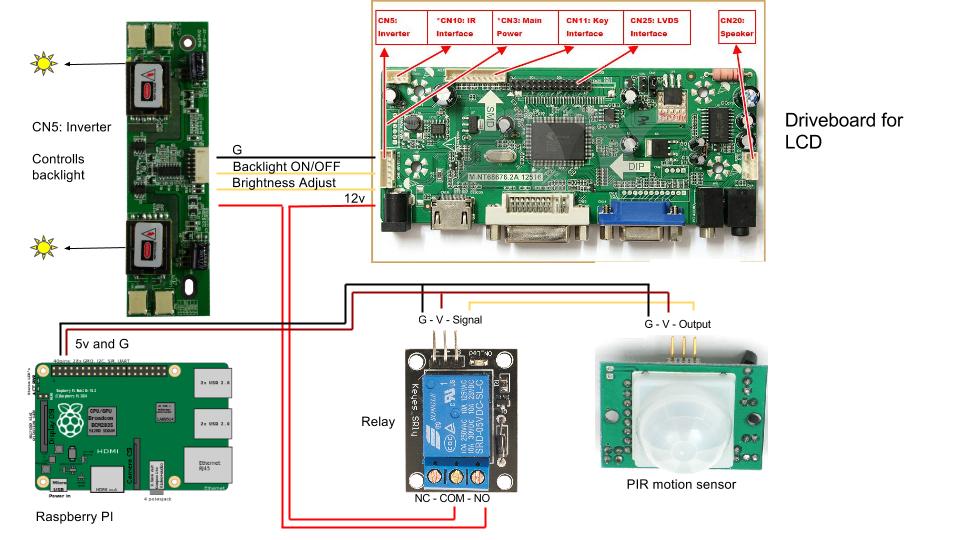
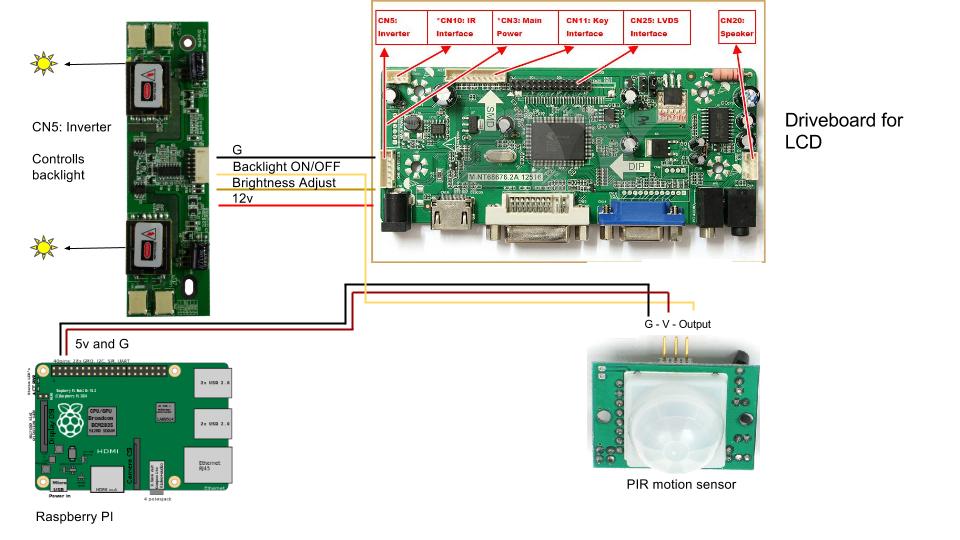
@TomasZmuda if you look at my option 2. do I need to ground inverter and Pi?
thanks!
-
PIR sensor to cut backlight power
Hi, need some help from you guys :)
I’m planing to use a PIR sensor to cut power to the backlight board of my LCD. I dont want to shut down my monitor or the signal to it due to the anoying “no signal” and “Input” screens.
Dont think I need any code for this as I should be able to use the pir without any action from the Pi, I just draw power from it.
As my LCD driver board has an add-on board just for the backlight it should be easy. As I can gather I have two options.
- Use a relay to cut the 12v connection between lcd driverboard and inverter.
- Disregard the relay and connect the PIR directly to inverter as it has a ON/OFF wire connection set as HIGH when ON
As my skills in schematics and power distrubution is rather limited I could use your inputs on my two options and please have a look on my fancy pictures, the only connection that is in place is the one connecting LCD driver board and inverter. Have I missed anyting? should that wiring work?
-
RE: Brightness Issues
since it’s only visible on hdmi connection check if your screen have some sort of auto-contrast/brightness mode activated or something like that. Never experienced this behaviour. Check with another display to make sure?
-
RE: Mirror No°1 - Girlfriends birthday present
That casing you have for the PIR, made it yourself or how do I get one? :)
-
RE: Czech mirror in IKEA LILLÅNGEN
nice!
I’m going for the same thing. Using a PIR to only cut backlightning. Power usage dropped from 38w to 5w. :)
-
RE: The work in progress Mirror
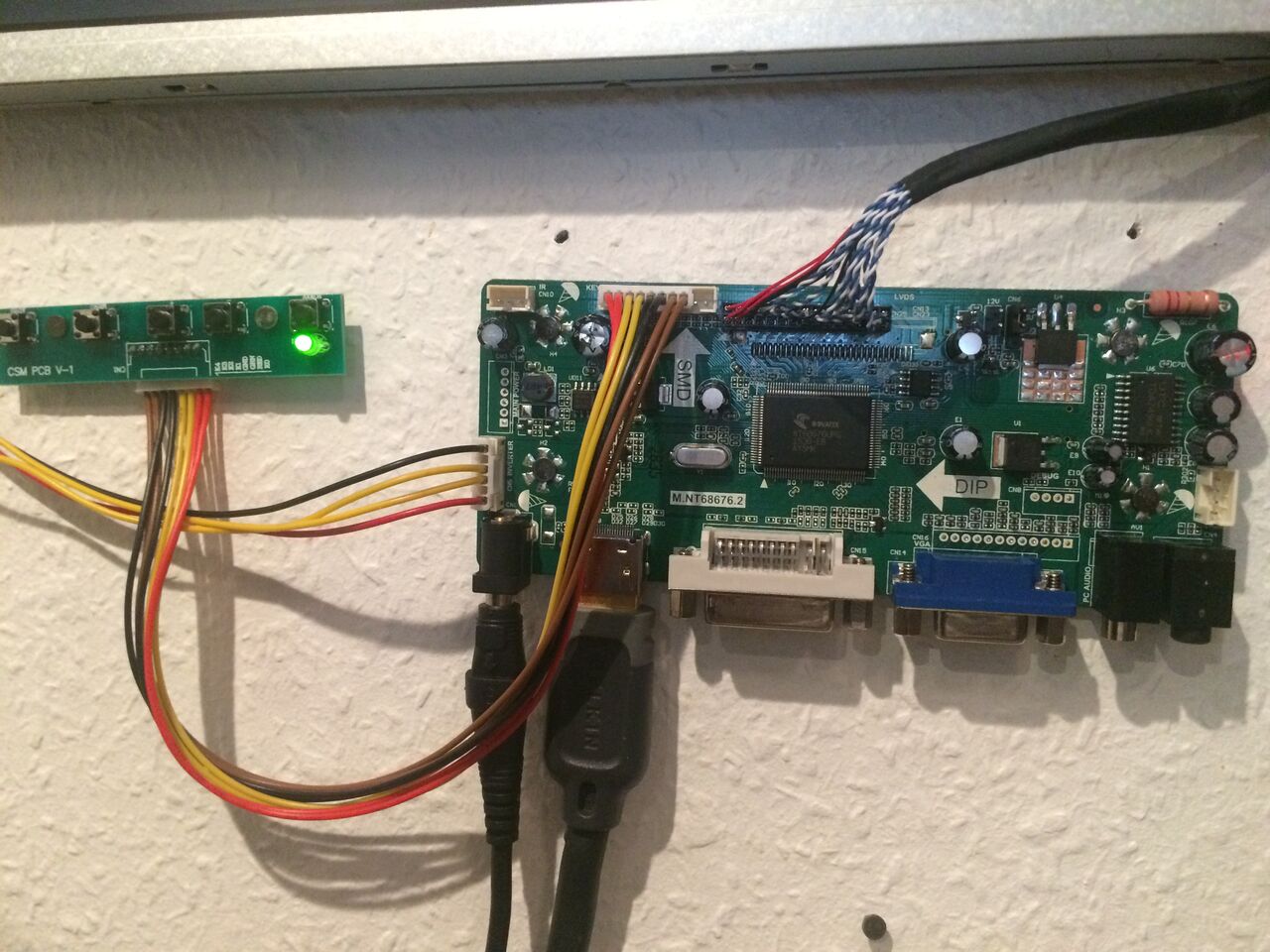
Also note the light inverter to the left on the first image. Size on this depends on how many connections your screen have, in my case 4. But they know what you need based on the serial.
Power adapter NOT included (12v, 4A)
-
RE: The work in progress Mirror
Sure thing!
Really nice customer care as well. Just be sure to mail them the serial that is on the panel, so you need to take it out of the casing.
-
The work in progress Mirror
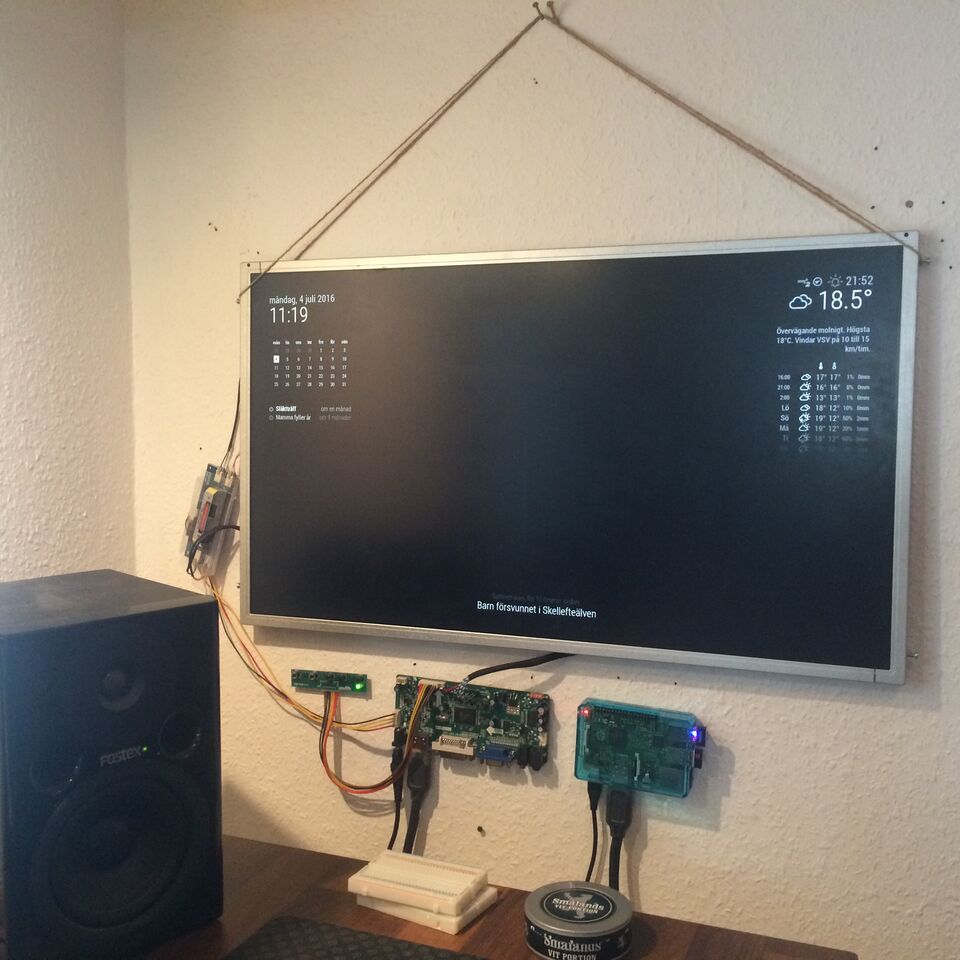
Yeah, when you are out of workspace you have to improvise ;)
A friends monitor broke so I got it for free. Hoping that the LCD-panel was ok so I found really cheap driver boards on ebay. Just supplied Panels serial numer and 4 weeks later I got a tiny little board and it works like a charm!
Big bonus on the size, the original board was 3 times larger and had twice the depth. Also with all connections going sideways (and 12v instead of 110-230v) I can have a slim frame. :)
-
RE: Config for clock not working
Had the same issue. Try removing the ’ marks before and after “true” or “false”
like this
config: {
     displaySeconds: false,
 }
worked for me ;)
Note from admin: Please use Markdown on code snippets!