@karsten13 So I have been tinkering with the MMM-Hue module a bit and have replaced jQuery which seems to invoke XMLHttpRequest, with node-fetch, albeit the older version (2.6.1) of node-fetch, but it now returns data without requiring a certificate and the use of https.
 M
Offline
M
Offline
A New Chapter for MagicMirror: The Community Takes the Lead
Read the statement by Michael Teeuw here.
Read the statement by Michael Teeuw here.
Posts
-
RE: MMM-Hue CORS Policy Issue
-
RE: Error with node fetch for calendar on fresh install
@landaisbenj I have seen this error before. It comes from installing the latest version of node-fetch whereas the module uses an older version of node-fetch. The latest version is an ES module and must be
import’d instead ofrequire’d in the node_helper. -
RE: Help. MM doesn't work Anymore
@extra said in Help. MM doesn't work Anymore:
[23.01.2022 14:55.17.502] [ERROR] Error [ERR_REQUIRE_ESM]: require() of ES Module /home/pi/MagicMirror/node_modules/node-fetch/src/index.js from /home/pi/MagicMirror/modules/default/calendar/calendarfetcher.js not supported.
Instead change the require of index.js in /home/pi/MagicMirror/modules/default/calendar/calendarfetcher.js to a dynamic import() which is available in all CommonJS modules.This is the wrong version of node-fetch that is installed on MM. You need to downgrade node-fetch to v2.6.1 or something earlier than v3 where the module was change to an ES module. I would uninstall node-fetch and check which module uses it and what specific version and install the correct version.
-
RE: Two modules side by side
@mmuser I would suggest that you grab the module_id from the Developer Window|Elements Tab. then use the div id for the module and assign the CSS as per @hango using the div id. If I had 2 instances of
MMM-SweepClockin my config it would be assignedmodule_0_MMM-SweepClockandmodule_1_MMM-SweepClock
-
RE: MMM-NOAA3
@cowboysdude Awesome. I swear I could not find it anywhere ;-)
-
RE: MMM- imagesphotos does not work..
@Stoffbeuteluwe Probably a missing module. Have a look at the below post.
https://forum.magicmirror.builders/topic/15778/fix-for-black-screen-in-2-16-and-later -
RE: MMM-eswordoftheday not showing words
@shurtugal I have forked the module and made some changes and it is working. You can clone my fork until I submit the PR to the module creator and he accepts the changes. Not sure if this will fix the issue of things changing in future but fixes the issue for now.
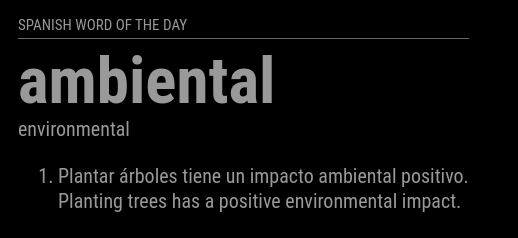
You can find the fork here.
https://github.com/mumblebaj/MMM-eswordoftheday.git -
RE: Eye Candy Reinstall - Config Doesn't Work
@MMNewby Looks like the quotes need to be replaced with the correct ones. When copy and paste from the web the quotes change. Just delete the quotes and add new ones.
-
RE: Default Weather module still not displaying
@Jarhead96097 Rule of thumb is to never run npm audit fix.
-
RE: set the calendar day to a short version
@greedyvegan said in set the calendar day to a short version:
calendar.js
Never modify the module code directly. You override settings in config/config.js. For css you override it in the css/custom.css, but never change the module code. This will cause issues when upgrading to the latest versions.
-
RE: No Web UI with MMM-FastNotes
@rvnbrg Jinja is a dependency of Flask and Flask V1.X.X uses the escape module from Jinja, however recently support for the escape module was dropped in newer versions of Jinja
To fix this issue, simply update to the newer version of Flask V2.X.X in your requirements.txt where Flask no longer uses the escape module from Jinja.
I see there is a requirements.txt where the version of Flask is specified. Maybe updating that to 2.1.1, which is the recommended version that no longer has a dependency on
escapewould resolve this.This is all just guessing. Was trying to figure out how this module hangs together. 🫣
-
RE: Contributing to a GitHub repository - a bit stuck
@evroom Just launch a terminal in VsCode

Make sure it is set to bash.

Then you can run the same commands
git addandgit commit -m "your commit text"andgit pushfrom the terminal. -
RE: MMM-PublicTransportHafas - Error when loading - DeparturFetcher.mjs
@KristjanESPERANTO Not sure if it is advisable to update the modules
requiresVersionto the latest MM version. With the issue of older PI’s not able to run the latest version of MM you run the risk of the modules no longer working even if they can still work on older versions of MM. I prefer to keep my version 2 versions behind as they worked on those. Unless your module has specifically been updated with dependencies of the latest MM. -
RE: MMM-PublicTransportHafas - Error when loading - DeparturFetcher.mjs
I just done a fresh install of the module and it works fine for me.
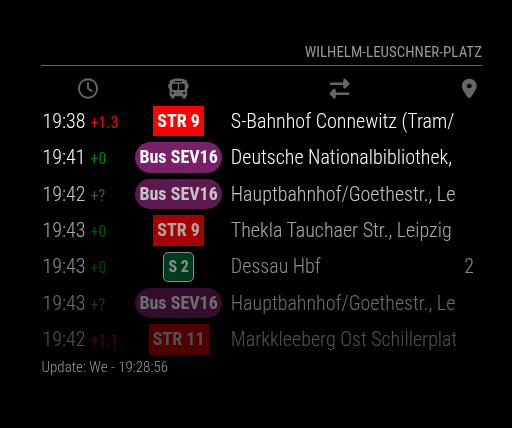
Just out of curiosity, did you do the following steps?
-
cd MMM-PublicTransportHafas -
npm ci --omit=dev
@KristjanESPERANTO ) saw the below in the log, I am assuming it is nothing to be concerned about?
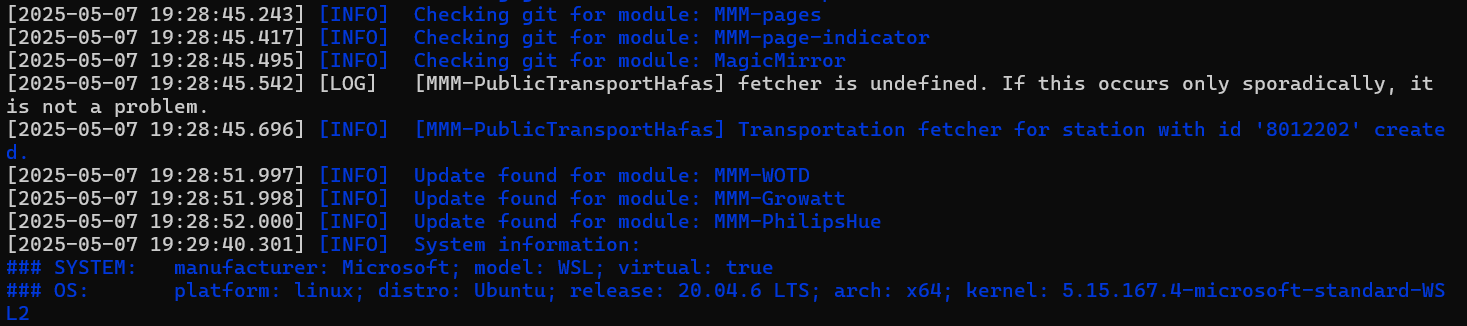
-
-
RE: 2.32.0 Calendar module limitDays and excludedEvents stopped working
@AndyHazz You can do the following from the docker host,
docker compose up -dthis will launch you container. Then you can run the following commanddocker exec -it magicmirror bashreplacingmagicmirrorwith your container name. This essentially puts you into the MagicMirror directory. You can then acces the debug log from there.