Hi @mirko3000 … oooh an update… what’s new? thx…
M
Offline
A New Chapter for MagicMirror: The Community Takes the Lead
Read the statement by Michael Teeuw here.
Read the statement by Michael Teeuw here.
Posts
-
RE: MMM-xiaomi - Temperature and Humidity from your smarthome
-
RE: MMM-DarkSkyForecast - Yet ANOTHER weather module
Hi all, why my day forecast jambs to the hourly forecast? This happens not always just rendemly?
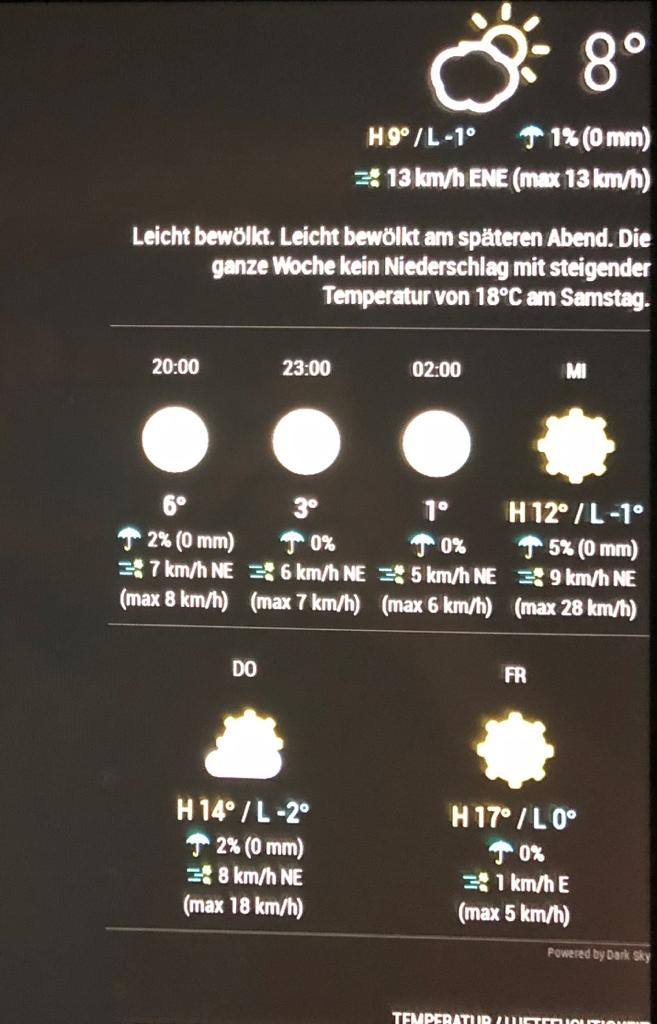 image url)
 -
RE: MMM-WunderGround Icon missing
@thobach Hi, thank you for your information. I tried the module and it works fine. Just some question:
- How can I change the width of the 3 charts?
- Also I had issues with the top Icons of the weather, today is Partly Cloudy at my place and the icon is not shown, but after changing the name of the png from “partlycloudy” -> to “pertly-cloudy-day.png” it works now. Maybe there are more renaming necessary…
- How can I enlarge the icon on the top?
THX!
-
RE: MMM-SwissTransport
Hi @Bangee
Now it stays with connection and shows nothing else. I tried a clean install of the module but it did’t work anymore. -
RE: Countdown Module?
I know this is not really a nice code because I’m a noob… but it works ;o)
-
RE: Countdown Module?
config:
{ module: 'MMM-doomsDay', position: 'bottom_right', // This can be any of the regions, best results in center regions config: { doomsDay: "2018-02-09 12:00:00", // YYYY-MM-DD HH:MM:SS, Do not alter the time, just the date updateInterval: 1000 * 60 * 60 * 4, toWhat: "Your text", singular: '', plural: '', // See 'Configuration options' for more information. } }, -
RE: Countdown Module?
Module.register("MMM-doomsDay", { // Default module config. defaults: { doomsDay: "2018-03-01 24:00:00", // YYYY-MM-DD HH:MM:SS updateInterval: 60 * 60 * 1000, toWhat: "Leaving for Paris!", singular: "Left ", plural: "Left", present: "Let's Fly!", timesUp: "death and despair, your time is up." }, // Define start sequence. start: function() { var self = this; Log.info("Starting module: " + this.name); if (this.config.updateInterval < 10 * 60 * 1000) { // 10 min minimum update interval this.config.updateInterval = 10 * 60 * 1000; } setInterval(function() { self.updateDom(); }, this.config.updateInterval); }, // Define required styles getStyles: function () { return ["MMM-doomsDay.css"]; }, // Override dom generator. getDom: function() { var doomsDay = new Date(this.config.doomsDay); var now = new Date(); var timeparser = Date.parse(doomsDay) - Date.parse(now); var weeks = Math.floor(timeparser / (1000 * 60 * 60 * 24 * 7)); var days = Math.floor((timeparser % (1000 * 60 * 60 * 24 * 7)) / (1000 * 60 * 60 * 24)); var hours = Math.floor((timeparser % (1000 * 60 * 60 * 24)) / (1000 * 60 * 60)); var minutes = Math.floor((timeparser % (1000 * 60 * 60)) / (1000 * 60)); var seconds = Math.floor((timeparser % (1000 * 60)) / 1000); daysLeft = weeks + " Wochen " + days + " Tage " + hours + " Stunden " + minutes + " Minuten " + seconds + " Sekunden ";; //daysLeft = Math.floor(timeparser/(1000*60*60*24)); var wrapper = document.createElement("div"); var headerD = document.createElement("span"); headerD.innerHTML = this.config.toWhat + "<br />"; headerD.className = "doooom"; if (daysLeft == 0) { var daysLeft = document.createElement("span") timeLeft.innerHTML = this.config.present; timeLeft.className = "timeLeft"; } else if (daysLeft == 1) { var timeLeft = document.createElement("span"); timeLeft.innerHTML = daysLeft + " " + this.config.singular; timeLeft.className = "timeLeft"; } else if (daysLeft >= 2) { var timeLeft = document.createElement("span"); timeLeft.innerHTML = daysLeft + " " + this.config.plural; timeLeft.className = "timeLeft"; } else { var timeLeft = document.createElement("span") timeLeft.innerHTML = daysLeft + " " + this.config.plural; timeLeft.className = "timeLeft"; } wrapper.appendChild(headerD); wrapper.appendChild(timeLeft); return wrapper; }} ); -
RE: Countdown Module?
Hi @LittleFirework Take this module doomsday and change a few lines…
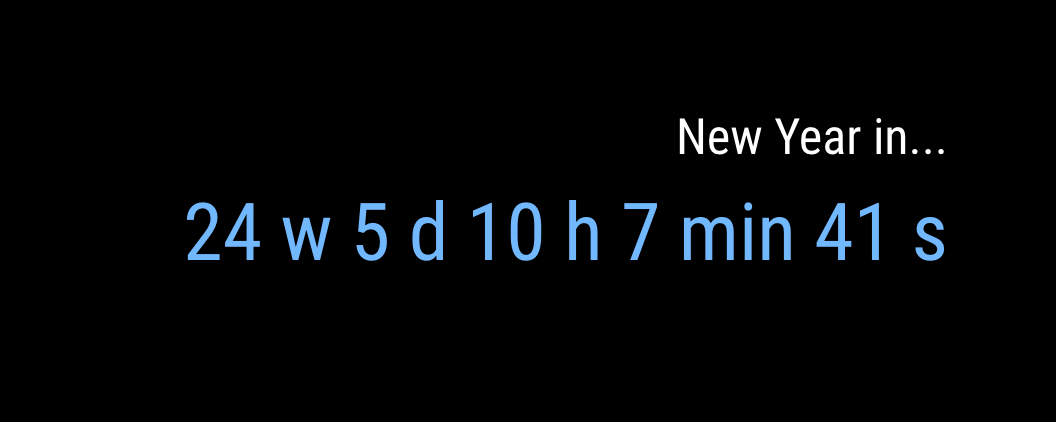
-
RE: MMM-doomsDay - The countdown module,
I did it by myself, thank you anyway for the great module.
-
RE: MMM-doomsDay - The countdown module,
It is possible to make instead of just days, weeks and days left? Thanks guys
-
RE: MMM-awesome-alexa black screen, installation error
@mc_landin read the gitter forum…there are a few solution for problems and common mistakes.
-
RE: MMM-awesome-alexa black screen, installation error
@mc_landin @letsirk in the MMM-awesome-alexa directory, run
npm run electron-rebuildcheck this side:
gitterDoes it works to you guys? I got it to work but it did not recognize my voice… please write your problems at gitter…
-
RE: MMM-awesome-alexa
I have tried to install this module, but it didn’t work. If I disable this module in config everything works fine. If i start with this module i get a black screen. In dev mode, i get an error DevTools was disconnected from the page …
Do someone knows whats going wrong? I followed the instruction during the installation. -
RE: Motion Detector
@in_a_days how did you disabled sys stat module? and what is that? by the way I have the same thing happen like @trividar