@Ismail said in Raspberry Pi 3’s case and fan:
yet no one gave an example of the case I have
Perhaps, because that case was not designed to accept a fan, but that doesn’t mean you can’t modify it. :-)
 M
Offline
M
Offline
@Ismail said in Raspberry Pi 3’s case and fan:
yet no one gave an example of the case I have
Perhaps, because that case was not designed to accept a fan, but that doesn’t mean you can’t modify it. :-)
@johnnyboy said in Fresh Install:
Hopefully, following @sdetweil’s instructions, I will get my MM back to life, and regain my interest?
I can’t speak to your interest but you will get up and running following his directions.
You running npm start in the wrong directory.
First enter cd MagicMirror and enter
Then run npm start
There’s more than one way to skin a cat. :-)
Because I just used his install script for the um-teenth time. I’ve used it on Pi’s, laptops of all kinds, my dev machine, etc… and every time it has worked without a hitch.
So thank you, Sam. :thumbsup:
You cannot use an ordinary mirror. You need 2-way mirror (sometimes called 1-way mirror). Do a search of this forum. There are plenty of suggestions for 2-way mirror glass.
Waves from NYC
Three years after the initial post. Here they are:



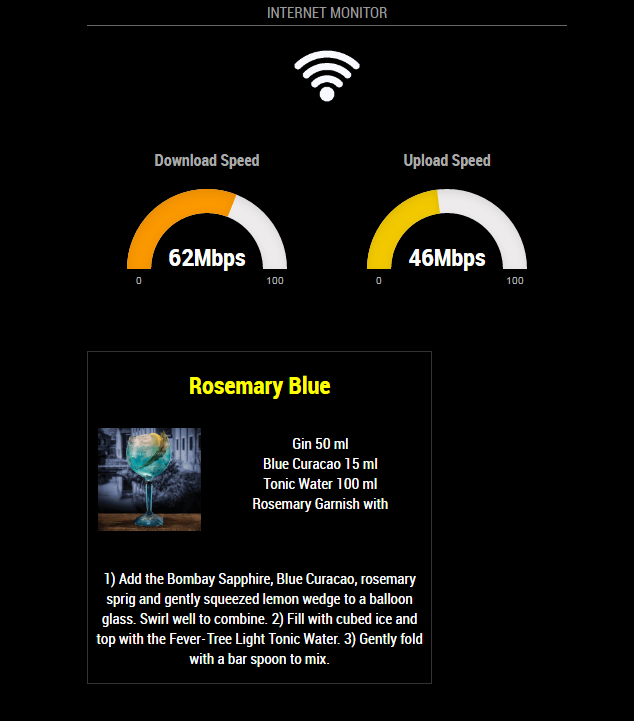
My config entry:
{
	    module: 'internet-monitor',
            position: 'top_center',
            header: 'Internet Monitor',
            config:{
                type: '',
                maxTime: 20000,
                updateInterval: 0,
                verbose: false,
                displayStrength: true,
                displaySpeed: true,
                strengthIconSize: 80,
                maxGaugeScale: 100,
            }
	},
And my result:
I agree with @cowboysdude. Whatever fits for the circumstance. I also have made a few, from the very small up to 24". They each suit their condition and purpose. Alarm clocks, Vanity mirrors, conventional, etc
@luke2102 said in friend of mine has tried to get half the modules working with out success:
my friend has tried to get this to work for keeps with out success their needs to be a easy way for people who do not understand how to edit files etc
There are more than a few people here willing to help you and your friend. You, and/or your friend simply need to ask for help but first you must make some attempt at doing it yourself. After that, you and your friend can create a topic, stating what you’ve already done and ask for help. User @sdetweil has written several installers and maintains them. Run one installer - Boom! MagicMirror is installed and works, making it incredibly easier than it used to be.
According to the MagicMirror creator, this is supposed to be a leaning experience. You are expected to read through the topics and learn how to do things. Make good use of the forum search feature. You can find many of your answers that way. If you get stuck, this is the place to ask for help, as mentioned above.
You’re welcome, mate. Glad it worked out for you. :-)
As I told you, this question has been discussed on the forum. From what I remember (without searching) is that a microphone array is the best for accuracy, including at a distance. Generally speaking, USB microphones don’t perform very well because of latency. However, some work better than others. I think the Playstation Eye was reported as having favorable results. This is what I remember for Pi related use.
Now, if you are using a board (other than the Pi) that uses a 3.5mm audio jack, or an integrated microphone as in the case of laptop boards, USB is not your only option. I’ve had great success with both. Even a cheap, $7 dollar microphone with a 3.5mm performs admirably. Response time is fantastic. Will it work as well as a microphone array? Not from a distance, but in close proximity (within 50 inches) and in a quiet environment, it works amazingly well for MMM-voice/Hello-Lucy.
There is a list of cam/microphones online that lists those that work out of the box with the Pi. Google should be able to find that for you easily enough.
For the record, Hello-Lucy is not a module, per se. It’s an enhancement to MMM-voice which it requires.
I am glad you find it interesting. I look forward to seeing the hummingbirds in my yard every summer. :-)
Indeed, but not all users have the same troubles, and not for the same reasons. Anyway . . .
Have you tried running only the default modules to see if the problem still occurs? If it does not, add them one by one, or in pairs, until you experience a problem so you can isolate the issue.
If you are unfortunate and the problem arises before the addition of 3rd party modules then that is another matter altogether.
@mdhenriksen said in Window foil / plastic film for MagicMirror?:
@Mykle1 is right when he says foil gives it a more cheap look.
I like how you transformed what I said instead of actually quoting me. Not that it matters much, but still, very interesting. :-)
@robmcc83 said in Want to turn off my monitor:
that’s cool as :) what are you using for the voice command I love that its brill.
@sdetweil said in Window foil / plastic film for MagicMirror?:
covering a 50 inch tv ‘mirror’ with real glass is wildly expensive…
Agreed!
My 2 cents:
You’ll likely kill your SD card that way. Killing the power rather than “shutting down” the pi does bad things to the SD card.
Go with a sensor that “wakes up” your display when there is motion and turns it off when there is no motion.
Just one old dude’s opinion