MagicMirror Forum
    • Recent
    • Tags
    • Unsolved
    • Solved
    • MagicMirror² Repository
    • Documentation
    • 3rd-Party-Modules
    • Donate
    • Discord
    • Register
    • Login
    1. Home
    2. Mykle1
    3. Best
    A New Chapter for MagicMirror: The Community Takes the Lead
    Read the statement by Michael Teeuw here.
    Offline
    • Profile
    • Following 5
    • Followers 73
    • Topics 101
    • Posts 4,397
    • Groups 2

    Posts

    Recent Best Controversial
    • RE: Problems With Weather

      @brendan_c23

      I don’t use the default weather modules but I loaded up the weather forecast module and it errors, stating:

      Failed to load resource: the server responded with a status of 401 (Unauthorized)
      weatherforecast.js:261 weatherforecast: Your AppID does not support long term forecasts.
      

      So, it looks like the appKey from open weather is the problem, or, the module is asking for data that is not available to holders of the free api.

      Run your mirror by using npm start dev and see if that is the error you are getting

      posted in Troubleshooting
      Mykle1M
      Mykle1
    • RE: Hello! I’m BEA!!!

      @saljoke

      Personally, I like the moon module. :-)

      Well done! :thumbsup:

      posted in Show your Mirror
      Mykle1M
      Mykle1
    • RE: Problems With Weather

      @brendan_c23

      Correction, the module loads eventually but with only one day of weather, today.

      posted in Troubleshooting
      Mykle1M
      Mykle1
    • RE: First Attempt, Still a work in progress

      @jonspraggins said in First Attempt, Still a work in progress:

      Tweaked the compliments module to display “Good F’in Design Advice”.

      Mine is mostly insults. Funny as all hell. :-)

      Nice work. :thumbsup:

      posted in Show your Mirror
      Mykle1M
      Mykle1
    • RE: Problems With Weather

      @brendan_c23

      I’m done for the night, mate. I would suggest you double check your appid at openweather. copy and paste it into your config entry for weatherforecast and make sure it is in quotes.

      Perhaps someone else will continue to help you tonight.

      Good luck

      posted in Troubleshooting
      Mykle1M
      Mykle1
    • RE: My First Mirror

      @dazza120 said in Nearly there at last,Yes!:

      Good job on the mirror. Feels good, doesn’t it? :thumbsup:

      Resizing pics is killing the pic quality

      Use high resolution/quality images, especially if you are resizing larger. Resizing smaller shouldn’t be a problem.

      posted in Show your Mirror
      Mykle1M
      Mykle1
    • RE: Cached pictures in iFrame

      @bkeyport

      @bkeyport said in Cached pictures in iFrame:

      Is there any way to turn off the caching, or do whatever I need to do to get a fresh image every time?

      Sounds like a similar issue I had a while back. Perhaps this is the same issue. The DOM has to change in order for it to refresh. Sean and Strawberry taught me this. The solution is simple.

      Set up a time stamp var and add it to the end of your img source.

      var getTimeStamp = new Date().getTime();
      img.src = "http://api.usno.navy.mil/imagery/earth.png?view=rise&seed=" + getTimeStamp; 
      

      If yours is the same issue then this will work.

      Hope it helps.

      Peace!

      posted in Troubleshooting
      Mykle1M
      Mykle1
    • RE: My Old Wood Mirror

      @nischi said in My Old Wood Mirror:

      Hope you like it as i like it, let me know what you think about.

      I really like what you’ve done with the frame. It’s not old wood anymore, it’s a work of art. Well done! :thumbsup:

      posted in Show your Mirror
      Mykle1M
      Mykle1
    • RE: Cached pictures in iFrame

      @sdetweil

      I thought I said that. :-)

      posted in Troubleshooting
      Mykle1M
      Mykle1
    • RE: MacMirror

      @trividar said in MacMirror:

      is there a way to disable te Monitor/HDMI output/SleepMode with voice on Mac with ubuntu?

      I think mmm-voice has that ability by default. However, using mmm-voice with the Hello Lucy enhancement you can simply issue the voice commands “Go To Sleep” to put your monitor in standby/sleep and “Please Wake Up” to turn it back on.

      There are other voice modules that may do the same thing.

      posted in Show your Mirror
      Mykle1M
      Mykle1
    • Run two instances of the same module (sometimes) Tutorial

      Not all modules can run two instances by just adding a second config entry with different values. Some modules, NOT ALL, can be “tricked” into running two instances with different values. Here’s how:

      1. Make a copy of the module folder that you want to run twice. (Ex - MMM-Module)

      2. Rename the folder of the copy to MMM-Module2.

      3. Open the MMM-Module2 folder that you just renamed.

      4. Rename the MMM-Module.js file to MMM-Module2.js

      5. Open the MMM-Module2.js file.

      6. Change the Module.register line to Module.register("MMM-Module2", {.

      7. Change the getStyles: function to

      getStyles: function() {
              return ["MMM-Module2.css"]
          },
      
      1. Save the MMM-Module2.js file you just edited and close.

      2. Open the MMM-Module2 folder.

      3. Rename the MMM-Module.css file to MMM-Module2.css.

      4. Open the MMM-Module2.css file.

      5. Rename the module names to reflect the new module name. Your class names will be different. Just change the module names:

      .MMM-Module2 .header {
        color: #50F8F4;
        text-align: center;
        /*  display: none;
      }
       
      .MMM-Module2 .age {
        color: #white;
        text-align: center;
        /*  display: none;
      }
      
      .MMM-Module2 .females {
        color: #ff69b4;
        text-align: center;
      /*  display: none;
      }
      
      
      1. Save the MMM-Module2.css file and close.

      2. Now make another entry into the config.js file using MMM-Module2 as the module name and change your values.

      Remember

      This doesn’t always work but many users have had success this way, including myself.

      About API calls

      If the module you are duplicating uses an API key, you are effectively doubling the calls to that API. This might lead to hitting your call limit. In this case, you should consider raising the updateInterval for both modules to avoid being throttled by the API.

      Peace!

      posted in Troubleshooting
      Mykle1M
      Mykle1
    • RE: MacMirror

      @trividar

      I don’t really know as the MacMirror is the only Mac I’ve dealt with. There are Mac users here. Perhaps they will chime in and provide you with an answer.

      posted in Show your Mirror
      Mykle1M
      Mykle1
    • RE: Problems With Weather

      @brendan_c23 said in Problems With Weather:

      So I emailed Openweathermap for help and he said I should use the “One Call Api” https://openweathermap.org/api/one-call-api but I am having trouble figuring out how to incorporate the API call code into the weather forecast module?

      Uhhh, I’m pretty sure the default weatherforecast module DOES use the One Call API.

      I would try getting another api key using a different email. However, I suspect there might be something else going on there. Would you object to sending me your current openweather api key so I can test it here? If you agree, send it in a private chat message. I’ve sent you a chat. You can send your api key there if you agree.

      posted in Troubleshooting
      Mykle1M
      Mykle1
    • RE: 1 old noob + 1 rPi = I can't believe I did it! (revisited)

      MM 2.8.0, Hello-Lucy, ubuntu 16.04 LTS, all happy together. I don’t know why it took me so long to get current. Yes I do - SUMMER!

      posted in Show your Mirror
      Mykle1M
      Mykle1
    • RE: Problems With Weather

      @brendan_c23

      weatherforecast: Your AppID does not support long term forecasts. Switching to fallback endpoint.
      

      Totally not your fault, just so you know.

      And I guess mine does not either, However, the module does load after a short delay but it only displays tomorrow’s weather. Same as when using my api key.
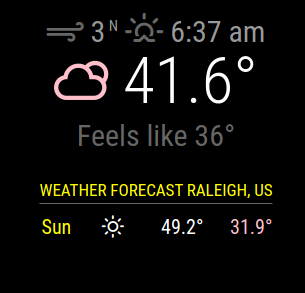
      Screenshot from 2021-03-06 20-12-23.png

      This is very odd as I tested your api key in another weather module that uses open weather and it is giving all the data and NO errors. SO, I’m guessing the weatheforecast module itself has some issues.

      Screenshot from 2021-03-06 20-22-54.png

      Are you dead set on using weatherforecast? There are many weather modules that provide you with forecasts and current weather. I’m fairly sure that some of them were built upon the openweather api and your current api key should work fine with them. Personally, I don’t use the default weather modules. I’ll be happy to give you a hand with them if you are willing to try them.

      Edit:

      I’ve just been informed that in the new MM release (April 1) both of those modules are being replaced by a newer version that does both current and forecast. Sheeesh


      posted in Troubleshooting
      Mykle1M
      Mykle1
    • RE: My fancy 27" Magic Mirror

      @Ganthor said in My fancy 27" Magic Mirror:

      I hope it looks as cool to others as it looks to me.

      It does. I love the frame and I enjoyed your “story”.

      Nicely done! :thumbsup:

      posted in Show your Mirror
      Mykle1M
      Mykle1
    • RE: MMM - NewsFeed Ticker Hangs

      @cowboysdude said in MMM - NewsFeed Ticker Hangs:

      Not sure let me try to load it and see what it does.

      I just installed it. Running for 10 minutes, flawlessly, using the default config entry.

      Nice module, Jim! :-)

      EDIT:

      It is NOT working properly. The 5 or 6 news items keep repeating

      posted in Troubleshooting
      Mykle1M
      Mykle1
    • RE: 1 old noob + 1 rPi = I can't believe I did it! (revisited)

      I guess I never published MMM-EyeCandy because I can’t find it on the forum. Doh! So, rather than publish it now I’ll just announce the update here.

      MMM-EyeCandy has 20 new default animations, bringing the total to 84. I did not take the time to name them. If anyone would like to name them, feel free to do so. I’ll accept any PR’s or I’ll add them myself when presented with a list. In either case, you will get credit in the readMe file on github.

      Or, they will remain a mystery. :-)

      0_1574647751174_Screenshot from 2019-11-24 20-42-57.png

      posted in Show your Mirror
      Mykle1M
      Mykle1
    • RE: Need help installing modules

      @cheapdad

      This will help you to install modules correctly and make config entries correctly.

      https://forum.magicmirror.builders/topic/4231/how-to-add-modules-for-absolute-beginners?_=1618794808624

      I have no experience with the MMPM module you speak of. In fact, I’ve never heard of it.

      The default weather module(s) I don’t use but I’m sure someone will help you out, Maybe post your config entry for it so others can see it

      posted in Troubleshooting
      Mykle1M
      Mykle1
    • RE: My First

      @ELMAGO

      photo

      Uhhhh . . . . MY EYES!

      https://www.theadairgroup.com/specials/1-dollar-t-shirts/

      posted in Show your Mirror
      Mykle1M
      Mykle1
    • 1
    • 2
    • 63
    • 64
    • 65
    • 66
    • 67
    • 66 / 67