@Mykle1 BTW, they can’t keep up with their own API. They skipped 3 days of images, MF’s! :-) And they only made 8 images available from yesterday. Grrr
A New Chapter for MagicMirror: The Community Takes the Lead
Read the statement by Michael Teeuw here.
Read the statement by Michael Teeuw here.
 M
Offline
M
Offline
Posts
-
RE: GPU Memory/Image flicker/blinking
-
RE: GPU Memory/Image flicker/blinking
@cowboysdude
Yes, but the names will change every day -
RE: GPU Memory/Image flicker/blinking
And last, but not least, this example, with some modification.
-
RE: GPU Memory/Image flicker/blinking
@cowboysdude said in GPU Memory/Image flicker/blinking:
I believe you could cache the images so when it loads may take care of that.
Does this look like it might work? With some modification, of course.
function preloadImages(array) {
    if (!preloadImages.list) {
        preloadImages.list = [];
    }
    var list = preloadImages.list;
    for (var i = 0; i < array.length; i++) {
        var img = new Image();
        img.onload = function() {
            var index = list.indexOf(this);
            if (index !== -1) {
                // remove image from the array once it's loaded
                // for memory consumption reasons
                list.splice(index, 1);
            }
        }
        list.push(img);
        img.src = array[i];
    }
}
preloadImages(["url1.jpg", "url2.jpg", "url3.jpg"]);
Or perhaps this? Again, with some modification.
var images = [
'/path/to/image1.png',
'/path/to/image2.png'
];

$(images).each(function() {
var image = $('<img />').attr('src', this);
});
The quote that comes with this second example:
you can preload images using javascript by putting all of the images you want to preload into an array and putting all of the images in that array into hidden img elements, you effectively preload (or cache) the images. <
-
GPU Memory/Image flicker/blinking
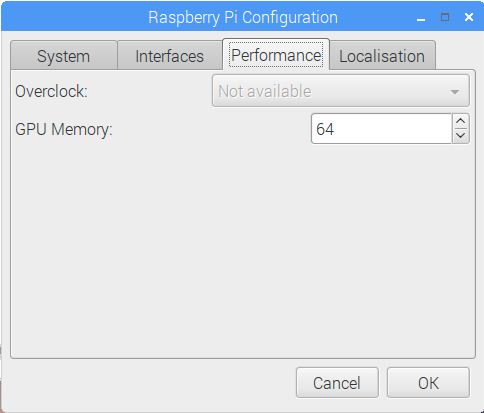
Above is my Pi3 setting. I suppose this is the default as I never changed it. I’m trying to troubleshoot a problem I am having with a module I am working on. I think this may have something to do with it but I am hesitant to change anything because my mirror works flawlessly, except when I introduce this module. I should mention that it does not affect any of the other modules when introduced.
I’m trying to create an animated gif effect with pictures that I am fetching from an API. I started with png files, then moved to jpg files, thinking it was the size of the file that was causing the problem. I even went so far as to fetch only thumbnails ( a dozen at 5kb each) but the problem persists. The problem being this: The images periodically flicker, or blink when displaying, ruining the smooth animated gif effect. I have
fadeSpeedandanimationSpeedboth set to 0. Even when therotateIntervalis set to 3-5 seconds, or more, the problem still arises. Note: When the pictures are cached in the browser after fetching, it seems to happen less often but it still happens. I’m only fetching the images every 30 minutes to avoid the necessity of an API key. Would that make a difference? Would fetching more often improve the performance? That doesn’t seem logical to me.I should also mention that this does not happen on a laptop that I have MM installed on. It works beautifully, even with the largest png files. Smooth as silk. No Flicker, no blink, just a seamless transition to the next image.
So, would increasing the GPU Memory likely help to alleviate this problem? Or is there another way, within the module itself that would help? In case it’s important, my System Load with this module running is 0.45 with 13% Free RAM
I’m reaching out to you all because I don’t want to bombard one single person with all my questions about making a module. I think he may be thinking, “What did I get myself into?” ;-)
-
RE: merging Google calendar with MM calendar?
@pepemujica said in merging Google calendar with MM calendar?:
Hi! How did you get the calendar.google.com/calendar/ical link?
Go to your google calendar. On the LEFT side of the page you’ll see My Calendars, Other Calendars. Hover (don’t click) your mouse over the individual calendar that you want. A down arrow
vappears to the RIGHT of the calendar. Click the down arrowvand choose Calendar settings. Click the greenICALbutton of your choice. -
RE: need help with config file
@dmrowe84 said in need help with config file:
I did a little snooping in the mod folder and found a line in the weather module folder that required an appid as well, I put it in there, not sure if that was useful or not.
It wasn’t. The module defaults are overridden by the config.js settings. Think of it this way. You can change the behavior of the module all you want through the config.js file WITHOUT altering the module itself. Altering the module file itself is not recommended because you will lose any changes there when an update to the module is necessary. So, having your appid in the config.js is all that you need.
-
RE: Pilkington mirror and Silicone
@broberg Why is there a motorcycle in your living room? ;-)
-
RE: MMM-NBA
@cowboysdude MODULE DEVELOPER
I am impressed and I congratulate you on your new title, although I am not surprised in the least! I’ve seen you work your dark magic on my behalf. I would have been first in line to vote for you, if that were the way it was done. You surely deserve the honor. :trophy:
Between you and Straw, my Sports laptop is full!
Thanks for another fantastic module update!
-
RE: need help with config file
@dmrowe84 said in need help with config file:
thank you for your help in advance!
I don’t use those modules but this should help you
location:requires state and country, or city and country, something like that
You have a URL in theappid:option. Just put in the long ID number, not the entire url.
Put yourlocationIDin your currentweather also. I believe this overrideslocationanyway
Make sure your numbers are correct! Sample below:location: "New York,America", locationID: "12345", //Location ID from http://openweathermap.org/help/city_list.txt appid: "abcde12345abcde12345abcde12345ab"You can delete your last post that contains your ID’s. At the very bottom right of the post are three vertical dots. Click on that and choose delete
-
RE: Run MM on Ubuntu 16 VM
Ok, someone will help you at some point. I don’t know if it matters but I’m running uBuntu 16.04 LTS, not as a VM
-
RE: Run MM on Ubuntu 16 VM
@pepemujica said in Run MM on Ubuntu 16 VM:
Any idea why?
This is just a guess but I think I remember hearing that MagicMirror has to be installed in your Home directory. I see that you installed it in /home/christain/.
You can try the process again (if you want to) but install MagicMirror as soon as you open a new terminal. Don’t change directories.I hope this helps
-
RE: Run MM on Ubuntu 16 VM
@pepemujica said in Run MM on Ubuntu 16 VM:
Great! And is there any step by step guide for noobs like me?
Follow the Manual Installation instructions on this page: About half way down the page:
https://github.com/MichMich/MagicMirrorIt worked for me. I installed uBuntu on a laptop and then installed MagicMirror using those directions.
-
RE: need help with config file
@dmrowe84 said in need help with config file:
I’m in the middle of wiping and reflashing it now,
Don’t wipe and reflash every time a module doesn’t work. Most likely you could have gotten help here on the forums. So, ask first before you take that step again. :-)
was wondering if I could contact you with any questions of it still doesn’t work after this reflash, or with you had any advice?
Sure, this is the place to ask your questions and get answers. If I can’t help you, there are many helpful people here that can, and will. :-)
-
RE: [MMM-NetworkScanner] disable logging
@michael24h said in [MMM-NetworkScanner] disable logging:
can’t find airport ext. so wifi might do.
Well, that sounds good. They don’t have EVERY icon but I found some that work perfectly for me
-
RE: MMM-voice
@strawberry-3.141 said in MMM-voice:
Here it is Warning spoiler alert
Is that you speaking the activation phrase, Straw?
-
RE: MMM-NBA
@cowboysdude said in MMM-NBA:
No promises LOL Just trying to make MagicMirror without a doubt THE best mirror!
Dude, you are on a roll! Just keep inventing this stuff so all of us lamers have something to look forward to. You freakin genius! Thanks for this. Awesome piece of work!
-
RE: [MMM-NetworkScanner] disable logging
@michael24h said in [MMM-NetworkScanner] disable logging:
What are material icons?
Dunno, but you can choose any of the icons at this site for use with MMM-NetworkScanner
