@jbeck615 said in Throwing down the gauntlet:
then i repeated wunderground twice in the modules,
You would have to repeat wunderground twice in the config.js file, not the modules, for starters
 M
Offline
M
Offline
@jbeck615 said in Throwing down the gauntlet:
then i repeated wunderground twice in the modules,
You would have to repeat wunderground twice in the config.js file, not the modules, for starters
@jbeck615 said in Throwing down the gauntlet:
thanks for sharing! the width of the monthly calendar was bothering me and i was going to research later anyway!
Cool. I’ve found answers that way too, before I even had the question
@johnnyboy said in Throwing down the gauntlet:
is that why you put the ! important there?
No sir, I do believe that this is the entry that constrains the module to 200 pixels ( and the color)
.calendar_monthly {
  width: 200px;
  color: #6f6;
}
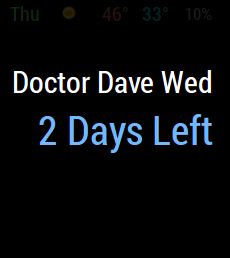
It seems I’m still having some problems with this. It worked on the last test, and displayed the present: string correctly, but now it’s not working again. Below is my config with the doomsDay set for tomorrow and a screenshot of the display still reporting 2 Days Left
    			module: 'MMM-doomsDay',
    			position: 'top_right', // This can be any of the regions, best results in center regions
    			config: {
        			doomsDay: "2017-03-01 24:00:00", // the end day of the countdown
        			toWhat: 'Doctor Dave Wed', // the title of your countdown event
				present: 'Doctor Dave 11:30',
				singular: 'Day Left', // what it should say when it's only one day left, default is `Day Left`
				plural: 'Days Left', // what it should say when it's more days left, default is `Days Left`
				}
		},
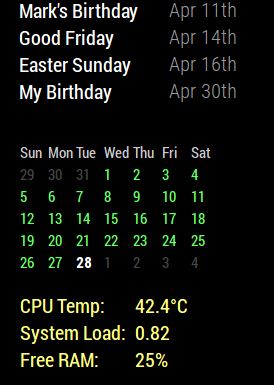
I thought you might like to know that I had some success with the custom.css file without asking for your help. I did do some looking around in the module .js file and the Developers Tools. I was careful not to change anything. I was looking for clues on what changes specific parts of a module. (e.g. table, text, align, padding, margin, etc…)
I wanted to be able to move the calendar_monthly module to the left margin. I also wanted to constrain the module to a specific width so that it wouldn’t expand when another module stretches the region they both occupy. And just for good measure, I threw in some color. So, using the the css information that you’ve already given me for other modules, and the information I got from looking in the module.js file and Developers Tools, I did this.
With this
}

.calendar_monthly table {
  width: initial;
  float: left;
}

.calendar_monthly td {
  text-align: left !important;
}

.calendar_monthly calendar-table {
  text-align: left !important;
}

.calendar_monthly {
  width: 200px;
  color: #6f6;
}
“I’m smart! I can do things!” (Fredo Corleone - The Godfather II)
@cowboysdude said in What magic mirror module blew your mind?:
@strawberry-3-141 's voice module…
I’m thinking, anything Strawberry developed has to be good. I’m sure I’ll need plenty of free time to dedicate to this module, too. I’m sure it comes with built in tech support. :slight_smile:
@FlatPepsi said in What magic mirror module blew your mind?:
MMM-Globe : Live, real time, satellite view of earth. We truly are living in the future!
Globe is sweet, and one of my favorites. However, I wish I could see my side of the planet. Evidently, the centralAmericaDiscNat option is a just a static picture of the Americas.
MMM-PIR-Sensor: this is what makes the mirror magic to me. A dumb mirror knows when it’s owner is nearby, and comes alive.
I’ve got plans to integrate this one. I know I’m gonna need some time to dedicate to it. Even the simple stuff was a challenge for me but I’m just about feeling comfortable with the entire thing, so, hopefully, soon.
@johnnyboy said in Update WunderGround:
I was instructed to change one item when I first installed it… coloricon: true, … so it shows color.
coloricon: true should have been done in your config…js file, along with the other config options for WunderGround. I’m pretty sure I was the one to help you with that, initially. :thumbsup_tone1:
Anywho . . . IKEA owes me a day of my life back. I’ve been putting some of their furniture together since this 8am. :angry:
@yawns said in The oldest to make a Magic Mirror?:
And you are fourth being kicked off of the winner’s rostrum
Yes, and I congratulate the leaders. :clap_tone2:
I started this topic for the fun of it. So far, so good!
@mcm said in The oldest to make a Magic Mirror?:
I’m 61, finished mine today.
I’m getting younger by the minute
@slametps said in MMM-gtasks - Google tasks for your mirror:
a screenshot would be helpful!
Yeah, give us a glimpse
@bobh1950 said in The oldest to make a Magic Mirror?:
66 years old.
That puts me in a solid 3rd.
Greetings bob :thumbsup_tone1:
Shine On You Crazy Diamond - Pink Floyd
Hell yeah! I’m a fan. I gotta set up my signature now. I can’t have you doing something I’ve not already done. :wink:
@broberg said in MMM-doomsDay - The countdown module,:
Finally home, and I believe I have fixed this issue now!
do a new git pull and it should work in the mornings as well
Thanks bro. Gonna do that right now.
Ok, I have my test running for tomorrow. The module is correctly displaying “1 Day Left”
{
    			module: 'MMM-doomsDay',
    			position: 'top_right', // This can be any of the regions, best results in center regions
    			config: {
        			doomsDay: "2017-02-27 24:00:00", // the end day of the countdown
        			toWhat: 'Build Bed!', // the title of your countdown event
				present: 'Get to it!',
				singular: 'Day Left', // what it should say when it's only one day left, default is `Day Left`
				plural: 'Days Left', // what it should say when it's more days left, default is `Days Left`
				}
		},
@johnnyboy said in Pilkington mirror and Silicone:
tell me if it will show through any Silicone used from behind?
Is it clear silicone? Then maybe. Is it colored (white) silicone. Probably not.
My opinion
@strawberry-3.141 said in calendar_monthly header still showing:
everything in single or double quotes is a string, string is a type for text.
Ok, thank you. I do appreciate the information. Some of it is starting to make sense. I’ve learned quite a bit in the short time that I’ve been here.
@strawberry-3.141 said in calendar_monthly header still showing:
@Mykle1 In case you want to know why:
‘false’ is a string and a string always represents the boolean true, so ‘test’, ‘true’ and ‘false’ all become true it doesn’t matter what the content of the string is.
So, the single quotes ' are what make it a string? Meaning, whatever is inside single quotes is considered a string?
And if that is so, then what is the word true or false without the quotes called? A value? A parameter?
Obviously, I’m still confused, but thank you for the lesson.
@Fonfon said in How to put a module under another one:
how is the region of screen ?
For a visual of the regions
https://forum.magicmirror.builders/topic/286/regions