@sdetweil
Everything’s fine – that’s what I thought.
That’s why I’ve set out my changes as clearly as possible.
Thank you very much!
M
Offline
A New Chapter for MagicMirror: The Community Takes the Lead
Read the statement by Michael Teeuw here.
Read the statement by Michael Teeuw here.
Posts
-
RE: Version upgrade from 2.34.0 to 2.36.0 Calendar Probs
-
RE: Version upgrade from 2.34.0 to 2.36.0 Calendar Probs
@sdetweil
Thank you very much for the tip.
But I’ll leave it as it is for now. -
RE: Version upgrade from 2.34.0 to 2.36.0 Calendar Probs
@sdetweil
Hi Sam, at the end i’ve to change a little bit more:
I’ve created following folders under modules:pi@MM30626:~/MagicMirror/modules $ ls -al calendar/ total 28 drwxrwxr-x 3 pi pi 4096 Aug 12 19:34 . drwxrwxr-x 31 pi pi 4096 Aug 12 15:31 .. -rw-rw-r-- 1 pi pi 15565 Jul 26 15:23 abholtermine_gefiltert.ics drwxrwxr-x 2 pi pi 4096 Aug 12 19:34 public pi@MM30626:~/MagicMirror/modules $ ls -al calendar/public/ total 48 drwxrwxr-x 2 pi pi 4096 Aug 12 19:34 . drwxrwxr-x 3 pi pi 4096 Aug 12 19:34 .. -rw-rw-r-- 1 pi pi 7271 Feb 18 2026 BL.png -rw-rw-r-- 1 pi pi 5559 Feb 18 2026 GR.png -rw-rw-r-- 1 pi pi 6886 Feb 18 2026 LA.png -rw-rw-r-- 1 pi pi 6558 Feb 18 2026 SW.png -rw-rw-r-- 1 pi pi 5670 Feb 18 2026 TA.pngAs you can see, there is my ics file and a public folder witth my pictures.
E.g. “BL.png” means blue garbage can for paper, “GR.png” for green waste bin etc.The “abholtermine_gefiltert.ics” is a python output 'cause i have to take out some lines.
This is how my config folder looks like:
pi@MM30626:~/MagicMirror/config $ ls -al
total 40
drwxrwxr-x  2 pi   pi    4096 Aug 27 15:33 .
drwxrwxr-x 17 pi   pi    4096 Aug 23 10:32 ..
-rw-rw-r--  1 pi   pi      30 Aug 27 15:24 basepath.js
-rw-rw-r--  1 pi   pi   18339 Aug 27 15:24 config.js
-rw-rw-r--  1 pi   pi    2220 Aug 18 15:37 custom.css
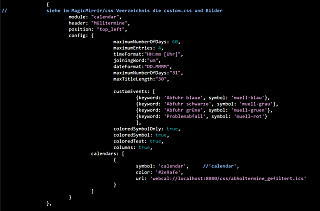
The description for the calendar in the config.js:
		{
//		siehe im MagicMirrir/css Veerzeichnis die custom.css und Bilder
			module: "calendar",
			header: "Mülltermine",
			position: "top_left",
			config: {
					maximumNumberOfDays: 60,
					maximumEntries: 4,
					timeFormat:"HH:mm [Uhr]",
					joiningWord:"um",
					dateFormat:"DD.MMMM",
					maximumNumberOfDays:"31",
					maxTitleLength:"30",
					customEvents: [
    						{
							keyword: 'Abfuhr blaue',
							symbol: '',
							eventClass: 'muell-blau'
						},
						{
							keyword: 'Abfuhr schwarze',
							symbol: '',
							eventClass: 'muell-schwarz'
						},
						{
							keyword: 'Abfuhr grüne',
							symbol: '',
							eventClass: 'muell-gruen'
						},
						{
							keyword: 'Problemabfall',
							symbol: '',
							eventClass: 'muell-rot'
						}
						],
					coloredSymbolOnly: true,
					coloredSymbol: true,
					coloredText: true,
					columns: true,
				calendars: [
					{
						symbol: 'calendar',	//'calendar',
						color: '#2e9afe',
						url: 'webcal://localhost:8080/modules/calendar/abholtermine_gefiltert.ics'
					}
				]
			}
		},
and my custom.css looks like this:
/*****************************************************
 * Magic Mirror                                      *
 * Custom CSS                                        *
 *                                                   *
 * By Michael Teeuw http://michaelteeuw.nl           *
 * MIT Licensed.                                     *
 *                                                   *
 * Add any custom CSS below.                         *
 * Changes to this files will be ignored by GIT. *
 *****************************************************/

 body {


}

/* Gemeinsame Basis für alle Müll-Icons */
/* =========================================================
   Mülltonnen-Symbole für das Standard Calendar-Modul
   ========================================================= */

/* Standard-Font-Awesome-Symbol ausblenden */
.calendar .event-wrapper.muell-blau .symbol span,
.calendar .event-wrapper.muell-schwarz .symbol span,
.calendar .event-wrapper.muell-gruen .symbol span,
.calendar .event-wrapper.muell-laub .symbol span {
    display: none;
}


/* Symbol-Zelle der blauen Tonne */
.calendar .event-wrapper.muell-blau .symbol {
    background-image: url("/modules/calendar/public/BL.png");
    background-repeat: no-repeat;
    background-position: center center;
    background-size: contain;
    width: 40px;
    height: 40px;
}


/* Symbol-Zelle der schwarzen/grauen Tonne */
.calendar .event-wrapper.muell-schwarz .symbol {
    background-image: url("/modules/calendar/public/SW.png");
    background-repeat: no-repeat;
    background-position: center center;
    background-size: contain;
    width: 40px;
    height: 40px;
}


/* Symbol-Zelle der grünen Tonne */
.calendar .event-wrapper.muell-gruen .symbol {
    background-image: url("/modules/calendar/public/GR.png");
    background-repeat: no-repeat;
    background-position: center center;
    background-size: contain;
    width: 40px;
    height: 40px;
}


/* Symbol-Zelle der Laubtonne */
.calendar .event-wrapper.muell-laub .symbol {
    background-image: url("/modules/calendar/public/LA.png");
    background-repeat: no-repeat;
    background-position: center center;
    background-size: contain;
    width: 40px;
    height: 40px;
}
At the end i have my bins on the screen:
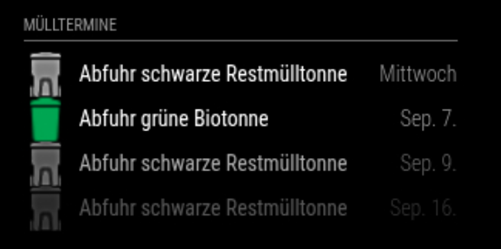
I’m sure there must be a much simpler way, but it took me quite a while to get the result, and that’s what counts in the end. ;-)
BR
Jens -
RE: Upgrade
There might also be a minor error in Sam’s restore script here.
The “MMM-MyWastePickup” directory was the only one that triggered the “folder already exists” error following a fresh installation.restoring MMM-MyWastePickup module MMM-MyWastePickup contains package.json, doing npm install there were files saved for this module , restoring MMM-MyWastePickup folder already exists, skipping restore from https://github.com/jclarke0000/MMM-MyWastePickup.git restoring MMM-NearCompliments module MMM-NearCompliments contains package.json, doing npm install -
RE: Upgrade
Moin (as we say here in Hamburg),
I’ve just reinstalled my MM using Sam’s “Install MagicMirror²” script. The script displayed and verified Node version 22.22.1.
I then ran Sam’s upgrade script, which expected Node version 22.22.2 and installed it.
If that’s how it’s meant to be – everything’s fine.pimaster@MM0626:~/MagicMirror $ bash -c "$(curl -sL https://raw.githubusercontent.com/sdetweil/MagicMirror_scripts/master/upgrade-script.sh)" apply update log will be in /home/pimaster/MagicMirror/installers/upgrade.log doing test run = false Node currently installed. Checking version number. Minimum Node version: v22.22.2 Installed Node version: v22.21.1 installing correct version of node and npm, please wait Check current Node installation ... Node currently installed. Checking version number. Minimum Node version: v22.21.1 Installed Node version: v22.22.2 No Node.js upgrade necessary. Check current NPM installation ... NPM currently installed. Checking version number. Minimum npm version: V10.9.7 Installed npm version: V10.9.7 No npm upgrade necessary. local version 2.37.0 already same as master 2.37.0 moving css contents to config -
RE: Version upgrade from 2.34.0 to 2.36.0 Calendar Probs
@KristjanESPERANTO
Thanks for this answer !
I’ll wait. -
Version upgrade from 2.34.0 to 2.36.0 Calendar Probs
Hello everyone,
Since upgrading to MM version 2.36.x, I’ve been having a problem with the display of my images, which are controlled via the calendar.
I use an ICS file to display the collection times for my various bins on MM.
Up to version 2.34.x, this worked quite smoothly with a little trick.
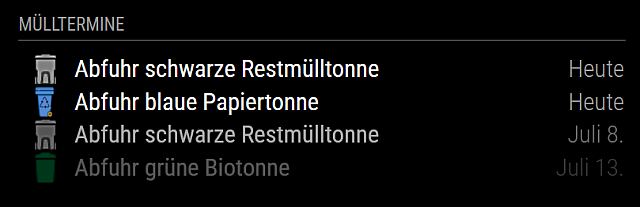
This is what the display looked like in version 2.34.x (grey, blue, green images):
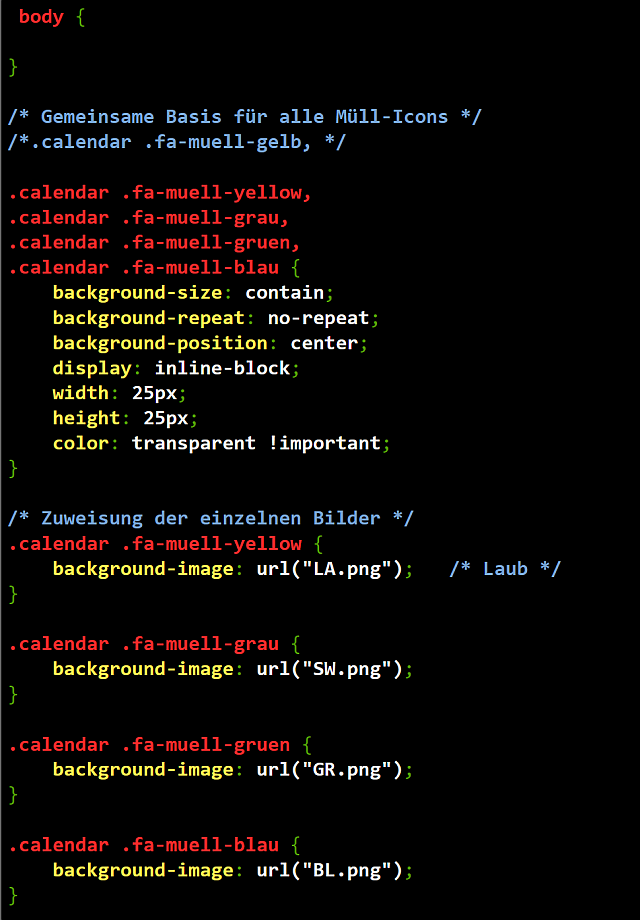
Here is the custom.css file for the calendar:
The names and locations of the pictures:
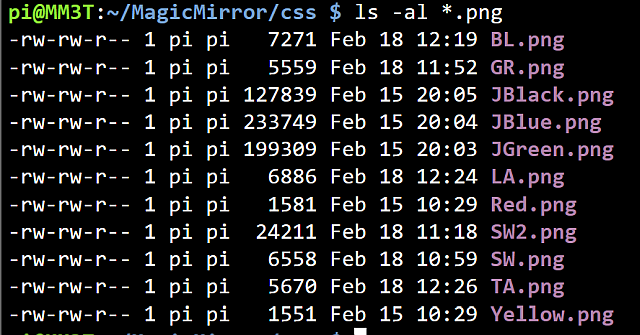
The excerpt from the config.js file for the calendar module:
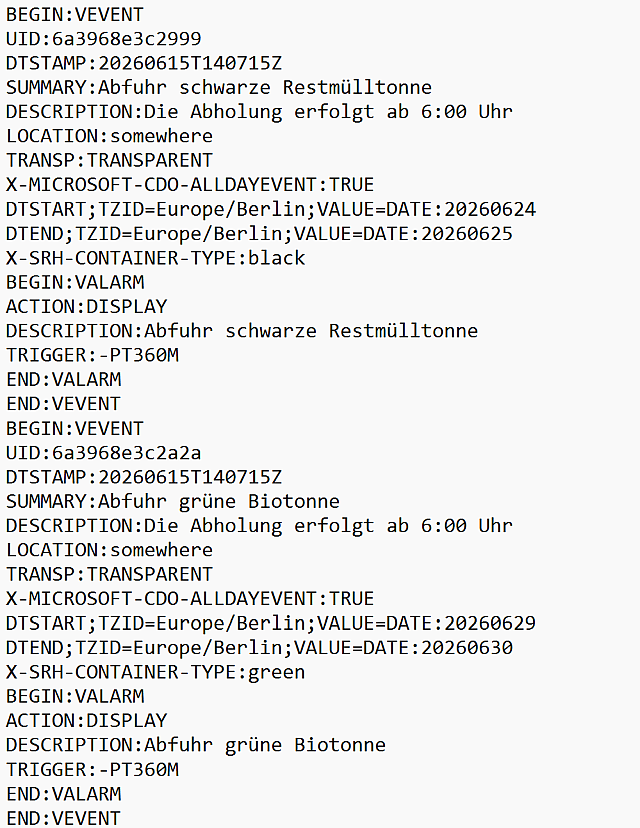
And finally, here’s a short extract from my ics file:
I used Sam’s Backup&Restore script to back up my modules. I then installed the new version 2.36.x on a new SD card and restored the modules using Sam’s script.
Basically, everything is working again – apart from the display of the coloured bins.
A test via a browser on my PC within my network showed me that I can’t display the images in the CSS folder.
Attempts using the “default” or “vendor” directories also failed to produce the desired result.
Does anyone have any idea how I can get the icons to display again?
Many thanks -
RE: MMM-MyTado
@htilburgs
Two more questions:
Is it possible to provide the humidity and the exact open window as well?
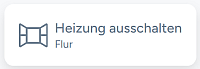
In the app both are visible:Open window:
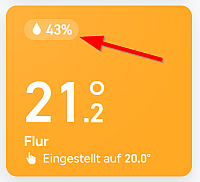
Humidity:
BR -
RE: MMM-MyTado
@htilburgs
@joefranz
That looks good.I also saw this in the README (OpenWindow):
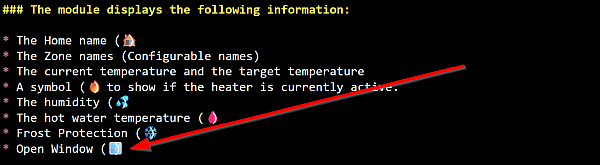
I often see this message in my app, but how can I activate it here too?
-
RE: MMM-MyTado
@JoeFranz
Yes !! - This “Noto Color Emoji” font works!
Now i’ve colors and pictures.The steps:
sudo apt update
sudo apt install fonts-noto-color-emoji
fc-cache -fv- change font in css
and reboot your mirror
Thanks for your help and one more time: Thanks for the module
- change font in css
-
RE: MMM-MyTado
@htilburgs
Crazy …
See this: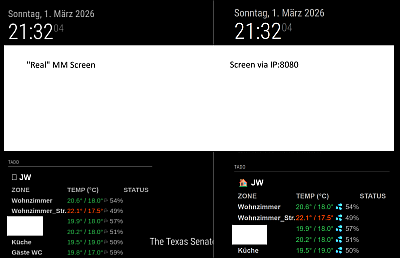
Left on the real MM: no pictures
Right over IP:8080: all needed images -
RE: MMM-MyTado
@htilburgs
Ok, let’s start with the MM Version: 2.34.0
Browser?: I use the default Chronium Browser: V 144.0.7559.109
MMM-MyTado:// https://forum.magicmirror.builders/topic/20128/mmm-mytado { module: "MMM-MyTado", position: "top_left", header: "TADO", disabled: false, config: { updateInterval: 1800000, // 30 min - because of limitation free account showZones: [], // [] = all zones, otherwise use zonename ["zone 1","zone 2"] showHomeName: true, // Show Home Name as defined within the Tado environment showColumnHeaders: true, // true = show Columns Headers, false = Hide Columns Headers useColors: true, //false, // Show colors for the Temperature column zoneColumnName: "ZONE", // Custom Zone Column Name - default = ZONE showLastUpdate: true, // Show last update lastUpdateName: "Last update", // Custom Last update name - default = Last update tempColumnName: "TEMP (°C)", // Custom Temperature Column Name - default = TEMP (°C) humidityColumnName: "", // empty for no title (default) statusColumnName: "STATUS" // Custom Status Column Name - default = STATUS } },Tado on the left side:
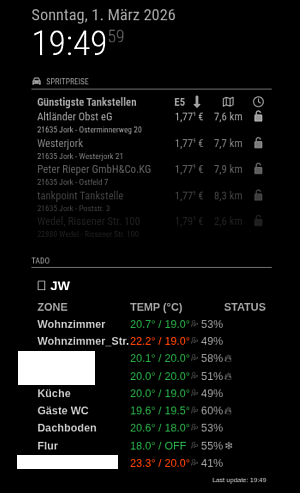
Tado on the right side:
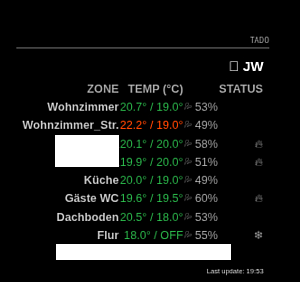
-
RE: MMM-MyTado
@htilburgs
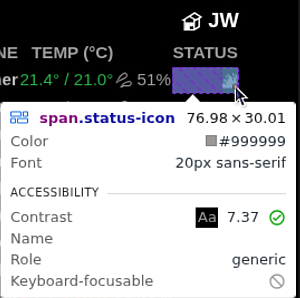
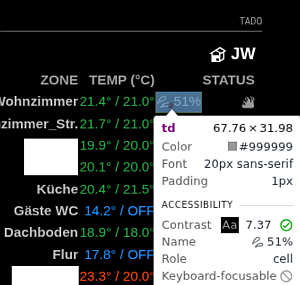
Line 50 is like yours … but no image on my screen.
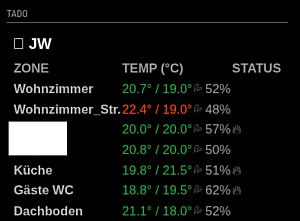
I’ve the module on the left side, is it possible to place the “Status” to the right? -
RE: MMM-MyTado
@htilburgs
Yes, i know. it only needs to be done once.
Is it possible to insert a line: Last update on: <date/time>?
Thanks -
RE: MMM-MyTado
Very good!
The old version did not work any longer, probably due to API issues.
It’s a bit tricky because the code has to be entered with the link in the browser when MM is running.
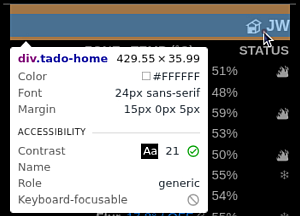
The image of the house on the left of ‘Home’ is missing for me.
What could be the reason for this?
Is it possible to insert a line: Last update on: <date/time>?
Thank you for the module! -
RE: Looking for a module to display logs in realtime
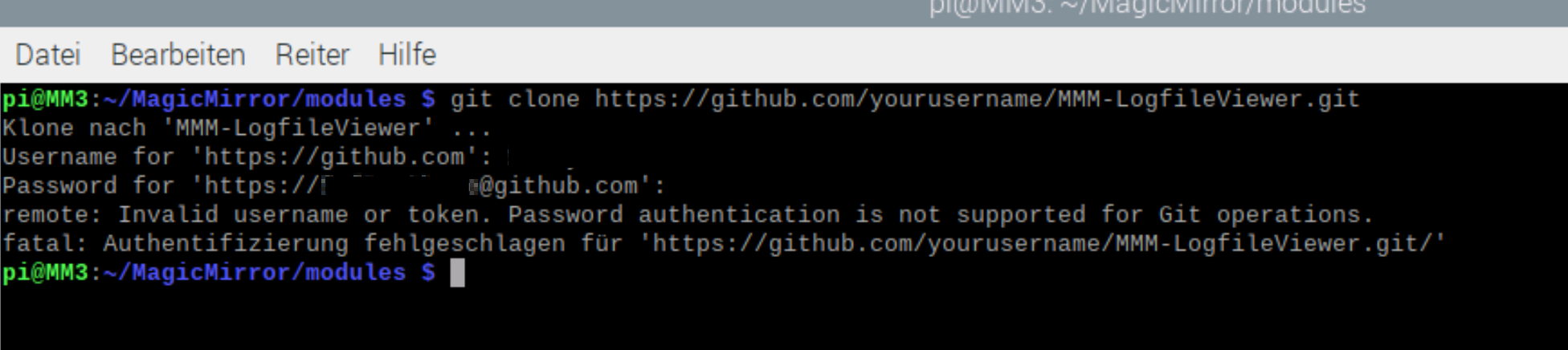
Even with my username and password, I get an error message: