That’s really cool, you’ve inspired me to do something similar in my office as there’s things only I care about (my wife would kill me if she saw my Strava info 🤣).
N
Offline
A New Chapter for MagicMirror: The Community Takes the Lead
Read the statement by Michael Teeuw here.
Read the statement by Michael Teeuw here.
Posts
-
RE: My Magic "Mirror" Desk Display
-
RE: How do you make a folder in Synology NAS for a backup??
@Canguingo first things first, do you have a NAS (doesn’t need to be a Synology brand)?
-
RE: New Bulid
@Bungle68 when I built my mirror I decided that I was never going to turn the monitor off so I removed all unnecessary peripherals from the pi and powered it via the monitors USB port so I have one cable from the power source which is to the monitor.
Alternatively you could get a small extension cord (maybe a 2-way) and then route that to the mirror and plug the monitor and pi into that.
-
RE: No Internet Connection Magic mirror
I had a similar issue whereby my connection kept dropping, my issue was due to poor WiFi connectivity so I created a simple bash script to restart the network connection every so often to bring it back onto the network. Here’s how I did it.
#!/bin/bash

# The IP for the server you wish to ping (8.8.8.8 is a public Google DNS server)
SERVER=192.168.240.254

# Only send two pings, sending output to /dev/null
ping -c2 ${SERVER} > /dev/null

# If the return code from ping ($?) is not 0 (meaning there was an error)
if [ $? != 0 ]
then
    # Restart the wireless interface
    ifconfig wlan0 down
    ifconfig wlan0 up
This was inside a file within my home area, the IP address on line 4 is of my router (I couldn’t see a need to ping an internet endpoint in my scenario). The last two lines may need amending depending on which network interface your MM is using. Once that file is created insert a crontab (crontab -e) and insert the following to restart the network connection every 30 minutes (adjust to your needs)
*/30 * * * * root /home/pi/scripts/wifi_rebooter.sh -
RE: MMPM Guided Setup problem
@andzie82 can you show us a screenshot of the issue?
-
RE: Does my monitor need to touching the two way mirror?
@animeman0 there’s too many variables to give you an answer as it depends on there following: is there an angle difference between the monitor and glass across the whole monitor space? What is the lighting like in the area? Where is the lighting in the area? What about natural light in the area?
The only wait to know for certain is for you to try it, can you try it without removing the protective film?
-
RE: eaddress in use
Can you run the following commands from the CLI to check if anything is using that port
sudo netstat -punta | grep LIST sudo netstat -punta | grep 8080 -
RE: Bathroom Magic Mirror Cabinet "Alibert" - MagicAlibert
@spitzlbergerj that’s is really cool, I might make one of these for home when we change our bathroom suite. What’s the toilet roll etc on the display for?
-
RE: LCD Controller for old TV Display
I’m not sure if that’s going to be cheap or easy to find out.
Did you just remove the screen panel from the TV? What about the other parts that has the connections, eg: vga, hdmi, etc?
It’s easier (and normally cheaper) to take a monitor as they generally have the right connections and also display better than a TV.
-
RE: Internet Monitor
@mattx38 I have just the Wifi icon on my MM, can you paste your config and I’ll take a look to at it. Also I setup a little script to restart my networking in the event of disconnection which I can share if that’ll help?
-
Blank Screen after update/power outage
Hi all,
I recently suffered a power outage uknowingly (happened whilst I was at work) and one morning I updated MagicMirror (using sudo git pull && npm install) and since then my MagicMirror boots up to the raspbian desktop then the screen goes blank. I’ve followed other peoples advice of forcing an update but with no effect. I also tried a “np install” from each of the module folders that contained a package.json file but again - no effect.
Here’s an outout from the pm2 logs
pi@raspberrypi:~ $ pm2 logs
[TAILING] Tailing last 15 lines for [all] processes (change the value with --lines option)
/home/pi/.pm2/pm2.log last 15 lines:
PM2        | 2019-08-11T17:53:12: PM2 log: Time                 : Sun Aug 11 2019 17:53:12 GMT+0100 (BST)
PM2        | 2019-08-11T17:53:12: PM2 log: PM2 version          : 3.2.9
PM2        | 2019-08-11T17:53:12: PM2 log: Node.js version      : 9.11.2
PM2        | 2019-08-11T17:53:12: PM2 log: Current arch         : arm
PM2        | 2019-08-11T17:53:12: PM2 log: PM2 home             : /home/pi/.pm2
PM2        | 2019-08-11T17:53:12: PM2 log: PM2 PID file         : /home/pi/.pm2/pm2.pid
PM2        | 2019-08-11T17:53:12: PM2 log: RPC socket file      : /home/pi/.pm2/rpc.sock
PM2        | 2019-08-11T17:53:12: PM2 log: BUS socket file      : /home/pi/.pm2/pub.sock
PM2        | 2019-08-11T17:53:12: PM2 log: Application log path : /home/pi/.pm2/logs
PM2        | 2019-08-11T17:53:12: PM2 log: Process dump file    : /home/pi/.pm2/dump.pm2
PM2        | 2019-08-11T17:53:12: PM2 log: Concurrent actions   : 2
PM2        | 2019-08-11T17:53:12: PM2 log: SIGTERM timeout      : 1600
PM2        | 2019-08-11T17:53:12: PM2 log: ===============================================================================
PM2        | 2019-08-11T17:53:12: PM2 log: App [mm:0] starting in -fork mode-
PM2        | 2019-08-11T17:53:12: PM2 log: App [mm:0] online

/home/pi/.pm2/logs/mm-out.log last 15 lines:
0|mm       |
0|mm       |
0|mm       | > magicmirror@2.8.0 start /home/pi/MagicMirror
0|mm       | > sh run-start.sh
0|mm       |
0|mm       | Starting MagicMirror: v2.8.0
0|mm       | Loading config ...
0|mm       | Loading module helpers ...
0|mm       | No helper found for module: alert.
0|mm       | Loading module helpers ...
0|mm       | No helper found for module: alert.
0|mm       | Whoops! There was an uncaught exception...
0|mm       | MagicMirror will not quit, but it might be a good idea to check why this happened. Maybe no internet connection?
0|mm       | If you think this really is an issue, please open an issue on GitHub: https://github.com/MichMich/MagicMirror/issues
0|mm       | Launching application.

/home/pi/.pm2/logs/mm-error.log last 15 lines:
0|mm       |     at Module._compile (internal/modules/cjs/loader.js:711:30)
0|mm       |     at Object.Module._extensions..js (internal/modules/cjs/loader.js:722:10)
0|mm       |     at Module.load (internal/modules/cjs/loader.js:620:32)
0|mm       | { Error: Cannot find module 'node_helper'
0|mm       |     at Module._resolveFilename (internal/modules/cjs/loader.js:602:15)
0|mm       |     at Function.Module._resolveFilename (/home/pi/MagicMirror/node_modules/electron/dist/resources/electron.asar/common/reset-search-paths.js:35:12)
0|mm       |     at Function.Module._load (internal/modules/cjs/loader.js:528:25)
0|mm       |     at Module.require (internal/modules/cjs/loader.js:658:17)
0|mm       |     at require (internal/modules/cjs/helpers.js:20:18)
0|mm       |     at Object.<anonymous> (/home/pi/MagicMirror/modules/default/updatenotification/node_helper.js:6:18)
0|mm       |     at Object.<anonymous> (/home/pi/MagicMirror/modules/default/updatenotification/node_helper.js:94:3)
0|mm       |     at Module._compile (internal/modules/cjs/loader.js:711:30)
0|mm       |     at Object.Module._extensions..js (internal/modules/cjs/loader.js:722:10)
0|mm       |     at Module.load (internal/modules/cjs/loader.js:620:32) code: 'MODULE_NOT_FOUND' }
0|mm       | ATTENTION: default value of option force_s3tc_enable overridden by environment.
The error appears to be due to a module issue but I can’t find one, anyone else have the same issue? Is it a case of rebuilding?
TIA
Nick
-
RE: Internet Monitor
@bhepler ok, I’m seriously missing something here…I removed the internet monitor folder and did a git pull from your page (https://github.com/BrianHepler/internet-monitor) and also cleared down my config.js to a simple config but it just doesn’t look right (see attached image) I’m missing the wifi symbol and it defaults to a speedtest server in Norway and not the one specified in the file (12667 in the US).
Please help, it’s slowly driving me insane.
/* Magic Mirror Config Sample
 *
 * By Michael Teeuw http://michaelteeuw.nl
 * MIT Licensed.
 *
 * For more information how you can configurate this file
 * See https://github.com/MichMich/MagicMirror#configuration
 *
 */

var config = {
        address: "localhost", // Address to listen on, can be:
                              // - "localhost", "127.0.0.1", "::1" to listen on loopback interface
                              // - another specific IPv4/6 to listen on a specific interface
                              // - "", "0.0.0.0", "::" to listen on any interface
                              // Default, when address config is left out, is "localhost"
        port: 8080,
        ipWhitelist: ["127.0.0.1", "::ffff:127.0.0.1", "::1"], // Set [] to allow all IP addresses
                                                               // or add a specific IPv4 of 192.168.1.5 :
                                                               // ["127.0.0.1", "::ffff:127.0.0.1", "::1", "::ffff:192.168.1.5"],
                                                               // or IPv4 range of 192.168.3.0 --> 192.168.3.15 use CIDR format :
                                                               // ["127.0.0.1", "::ffff:127.0.0.1", "::1", "::ffff:192.168.3.0/28"],

        language: "en",
        timeFormat: 24,
        units: "metric",

modules: [
        {
            module: 'internet-monitor',
            position: 'top_center',
            header: 'Internet Monitor',
            config:{
                type: '',
                maxTime: '20000',
                updateInterval: '0',
                verbose: 'true',
                serverID: '12667',
                displayStrength: 'true',
                displaySpeed: 'true',
                strengthIconSize: '80',
                maxGaugeScale: '100',
                wifiSymbol:{
                    size: '50',
                    fullColor: '#3afc25',
                    almostColor: '#ffff0c',
                    halfColor: '#ff8c00',
                    noneColor: '#ff1111'
                },
            },
        }
]
};

/*************** DO NOT EDIT THE LINE BELOW ***************/
if (typeof module !== "undefined") {module.exports = config;}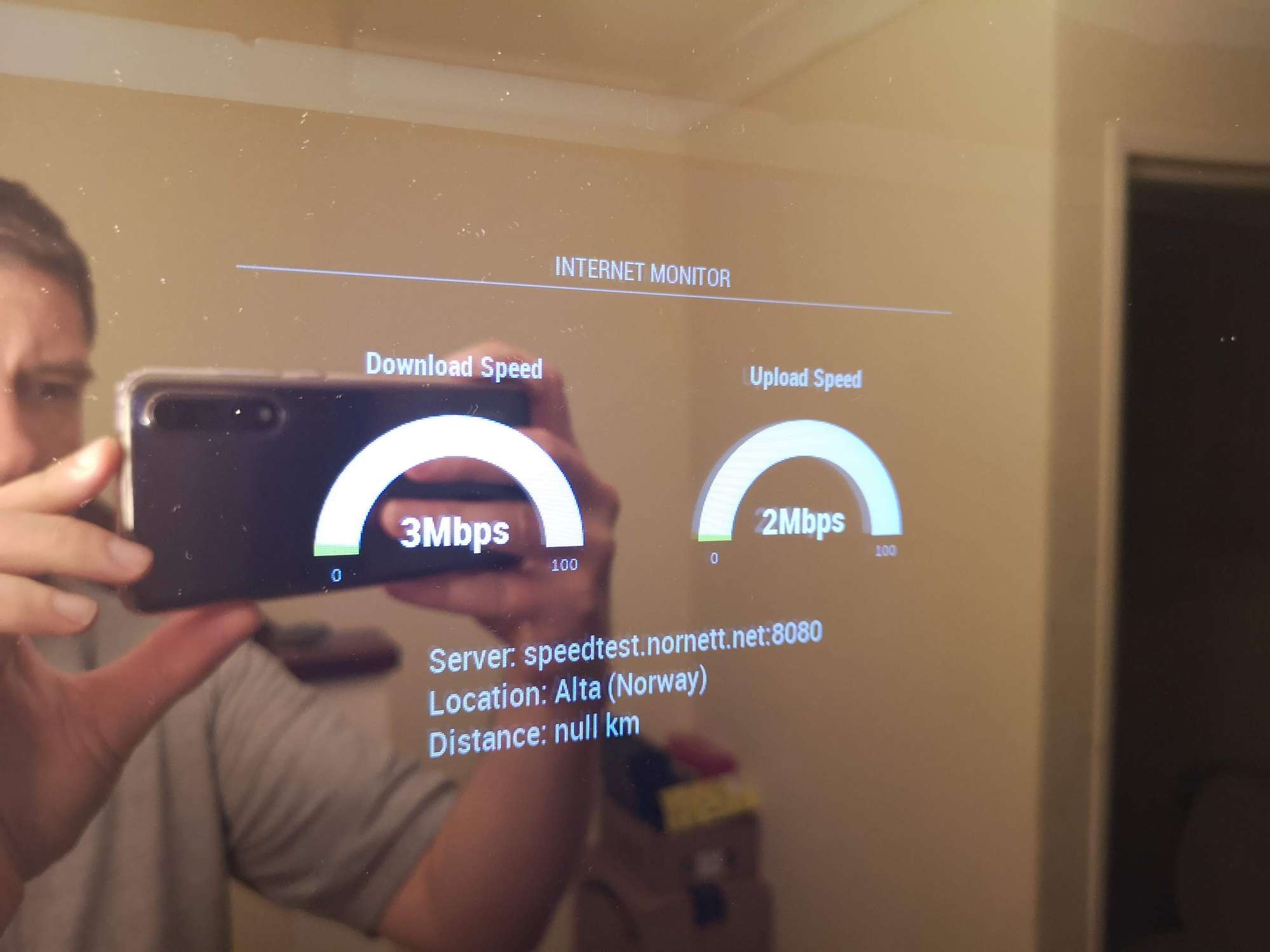
-
RE: Internet Monitor
Hi, only just discovered this module and it seems like a great idea however I cannot get the wifi symbol to appear.
Here’s my config for the module:
module: “internet-monitor”,
position: “bottom_center”,
header: “Internet Monitor”,
config: {
type: " ",
maxTime: “20000”,
updateInterval: “0”,
verbose: “false”,
displayStrength: “true”,
displaySpeed: “false”,
strengthIconSize: “80”,
maxGaugeScale: “100”,
wifiSymbol: {
size: “50”,
fullColor: “3afc25”,
almostColour: “#ffff0c”,
halfColor: “#ff8c00”,
noneColor: “#ff1111”
},
}
}Am I being thick and have missed something?
Additionally is the wifi symbol a measure of internet speed on the pi or wifi strength to my AP?
-
Ongoing events
Hi all, newbie here (only to MM not Linux).
I’m having trouble setting up MM so it shows the current event, once an event starts it removes it from display.
Here’s my current config:
modules: [
{
module: “alert”,
},
{
module: “updatenotification”,
position: “top_bar”
},
{
module: “clock”,
position: “top_left”
},
{
module: “calendar”,
header: “Upcoming Events”,
position: “top_left”,
config: {
maximumEntries: “15”,
maximumNumberOfDays: “14”,
hideOngoing: “false”,
showEnd: “true”,
getRelative: “0”,
fade: “false”,
fadePoint: “1”,
calendars: [
{
symbol: “calendar-check”,
url: “webcal://www.calendarlabs.com/ical-calendar/ics/75/UK_Holidays.ics”
},
{
url: “https://calendar.google.com/calendar/ical/”
}
]
}
},I’d like to keep the current view as it is (showing start and end times of the events but also keep the currently ongoing events displayed too.
I’ve tried different config options but can’t seem to make it work.
Any ideas?
TIA