Easiest way to do this is to define another icontable for nighttime use and switching to it after sunset…
When i have some time, i’ll look into it…
UPDATE: Who am i kidding ;) Nighttime icons now included…
Easiest way to do this is to define another icontable for nighttime use and switching to it after sunset…
When i have some time, i’ll look into it…
UPDATE: Who am i kidding ;) Nighttime icons now included…
@Pauliolio The issue is with the config. try the following change:
pws: 'pws:IBATTLE3',
@KirAsh4 Well, not strictly true ;) https://forum.magicmirror.builders/topic/157/mmm-opentherm
But yes, you’ll need to fix the source!
@Shockwave Well, it would seem WU is rather ‘loose’ with it’s API implementation…
In your payload the full warning is in the message property. The Wunderground module expects is in the description property (only based on my observation of a single payload by my local station :S ). Ties in with your observation, which is always nice :)
Watch this space for a fix…
UPDATE: fix implemented… The module examines description and message lengths and uses the longest one… Have a go! :)
Hi!
Since new comics only come out on monday, wednesday and friday i made a slight modification (ugly hack) to your node_helper.js…
On non comic days, after getting the current comic, the node_helper will examines the num value and generate a random number between 1 and said value. It will then get the random comic and return it in the payload.
	socketNotificationReceived: function(notification, payload) {
		var self = this;
		console.log("Notification: " + notification + " Payload: " + payload);

		if(notification === "GET_COMIC"){

			var comicJsonUri = payload.config.dailyJsonUrl;
			var comic;
			var rndcomic;
			var rndUrl;
			var body;
			var d = new Date();
			var n = d.getDay();

			request(comicJsonUri, function (error, response, body) {
				if (!error && response.statusCode == 200) {
					console.log(body);
					if ( this.n == 1 || this.n == 3 || this.n == 5 ) {
							self.sendSocketNotification("COMIC", JSON.parse(body));
					} else {
						this.comic = JSON.parse(body);
						this.rndcomic = Math.floor((Math.random() * this.comic.num) + 1);
						this.rndUrl = "http://xkcd.com/" + this.rndcomic + "/info.0.json";
						request(this.rndUrl, function (error, response, body) {
							if (!error && response.statusCode == 200) {
								console.log(body);
								self.sendSocketNotification("COMIC", JSON.parse(body));
							}
						});
					}
				}
			});
		}
	},
@Snoevit When you remove /astronomy you just modify the api call. The script still tries to place the (now absent) information on the screen. Leave the api call in tact and modify the refresh_dom function in the script. Also further down there’s a windspeedconversion which you could try to modify.
Your api-url would be this:
http://api.wunderground.com/api//conditions/forecast10day/astronomy/alerts/lang:NL/q/pws:IBATTLE3.json
pws stands for personal weather station.
Did you set your locale correctly in config.js? The sunset time for the wunderground module comes from the weatherunderground api so reflects the time at the weatherstation location.
The loctype thing is a bit of a mystery. I copied it of a wunderground generated url. Not entirely sure what it’s for. You could just leave it out i think.
@Shockwave Sorry for the late reply… missed your post here…
It’s not expected behaviour. The entire message should be displayed in the popup. It may have something to do with the
alerttruncatestring : "english:"
property…
Try changing t to an empty string.
Also, could you post the entire result of your api call?
http://api.wunderground.com/api/<apikey>/conditions/forecast10day/astronomy/alerts/lang:EN/q/<value of your pws property>.json
Should be fixed now… Just git pull to update the module
Hi!
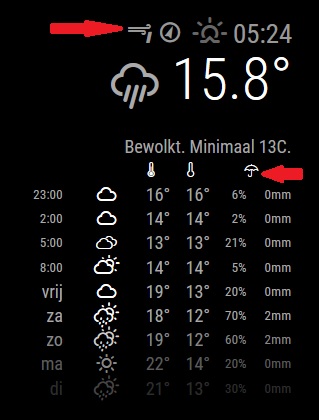
EDIT: It probably has to do with vendor.js… The mm prefers the stock wind icons (older set, lacking some icons) over the ones bundled with the module… looking into a fix for that…
Is that the most recent MMM-Wunderground module? There are a few icons missing from the display…
There should be a wind-force icon at the top and an umbrella over the percipiation chance/amount:
@Shockwave Thanks :) To use the module twice you can just enter multiple wunderground config sections in your config.js. It will then display both. There is no need to install the actual module twice.
@cowboysdude said in Cowboysdude's Mirror:
I’ll update my picture as soon as it’s done… I ordered a real glass mirror but 2" longer so I can hide the PIR and Camera behind it… the new frame will be made out of mahogany… so once the mirror comes in I’ll build the new frame… next week I’m hoping…
Not entirely sure if the PIR will work (well) behind glass… http://forum.arduino.cc/index.php?topic=123750.0
As for the camera, it’ll be getting a lot less light to work with aswell…
That said, lookingforward to the result… :)
I’m using my own script aswell, however that just turns off/on the display. I think the module actually suspends the mirror… Saving power on the pi
I’ve been looking at Jasper, but would ideally like to identify a specific user by voiceprint…
If this is your entire config file, than it’s to be expected it doesn’t work…
Should be something like this (using thhe sample as an …example):
/* Magic Mirror Config Sample
 *
 * By Michael Teeuw http://michaelteeuw.nl
 * MIT Licensed.
 */
var config = {
    port: 8080,

    language: 'en',
    timeFormat: 24,
    units: 'metric',

    modules: [{
        module: 'alert',
    }, {
        module: ‘wuforecast’,
        position: ‘top_right’, // This can be any of the regions.
        // Best results in left or right regions.
        config: {
            // See ‘Configuration options’ for more information.
            location: ‘France / Paris’,
            appid: ‘abcde12345abcde12345abcde12345ab’ //wunderground.com API key.
        }
    }, {
        module: 'clock',
        position: 'top_left'
    }, {
        module: 'calendar',
        header: 'US Holidays',
        position: 'top_left',
        config: {
            calendars: [{
                symbol: 'calendar-check-o ',
                url: 'webcal://www.calendarlabs.com/templates/ical/US-Holidays.ics'
            }]
        }
    }, {
        module: 'compliments',
        position: 'lower_third'
    }, {
        module: 'currentweather',
        position: 'top_right',
        config: {
            location: 'New York',
            locationID: '', //ID from bulk.openweather.org/sample/
            appid: 'YOUR_OPENWEATHER_API_KEY'
        }
    }, {
        module: 'weatherforecast',
        position: 'top_right',
        header: 'Weather Forecast',
        config: {
            location: 'New York',
            locationID: '5128581', //ID from bulk.openweather.org/sample/
            appid: 'YOUR_OPENWEATHER_API_KEY'
        }
    }, {
        module: 'newsfeed',
        position: 'bottom_bar',
        config: {
            feeds: [{
                title: "New York Times",
                url: "http://www.nytimes.com/services/xml/rss/nyt/HomePage.xml"
            }],
            showSourceTitle: true,
            showPublishDate: true
        }
    }, ]

};

/*************** DO NOT EDIT THE LINE BELOW ***************/
if (typeof module !== 'undefined') {
    module.exports = config;
}Any errors in the console or the web inspector?
https://forum.magicmirror.builders/topic/86/how-to-troubleshoot
@cowboysdude :D Glad it’s working, enjoy!
@MagicCrumps1 On the other hand, you api key seems to be invalid. (if the key in your post is indeed your key):
{
  "response": {
  "version":"0.1",
  "termsofService":"http://www.wunderground.com/weather/api/d/terms.html",
  "features": {
  }
		,
	"error": {
		"type": "keynotfound"
		,"description": "this key does not exist"
	}
	}
Config looks good, could you have a look at your logs?
See here for some troubleshootign info: https://forum.magicmirror.builders/topic/86/how-to-troubleshoot