@cowboysdude Ok, looks good! :) I like it.
 S
Offline
S
Offline
A New Chapter for MagicMirror: The Community Takes the Lead
Read the statement by Michael Teeuw here.
Read the statement by Michael Teeuw here.
Posts
-
RE: Asus Tinker Board
Ah, just figured out how to rotate the screen. When logged in as “linaro”.
Open a terminal and do:cd ~ nano .xsessionrcPaste the following in the file and remove the # in front of the row (left or right) you want to rotate the screen. I am using left myself. :)
#!/bin/sh

## To rotate left enable below line.
xrandr --output HDMI-1 --rotate left

## To rotate right enable below line.
#xrandr --output HDMI-1 --rotate right
Reboot to test. :)
-
RE: Where are you from?
Live in the city of Åstorp, in the county Skåne that is the most south region of Sweden. :)
-
RE: Input...What do you think?
Looking great! :) How does the forecast work? Do you set a day/days for the forecast? On the preview you are on “Wednesday” and the forecast is for Friday… Where is Thursday? :)
Another question, can you switch between Celsius and Farsighted?.. -
RE: Asus Tinker Board
All the same modules installed and here is the “nmon” result…
To the left is the “Tinker Board” and to the right is the “Raspberry Pi 3”. :)
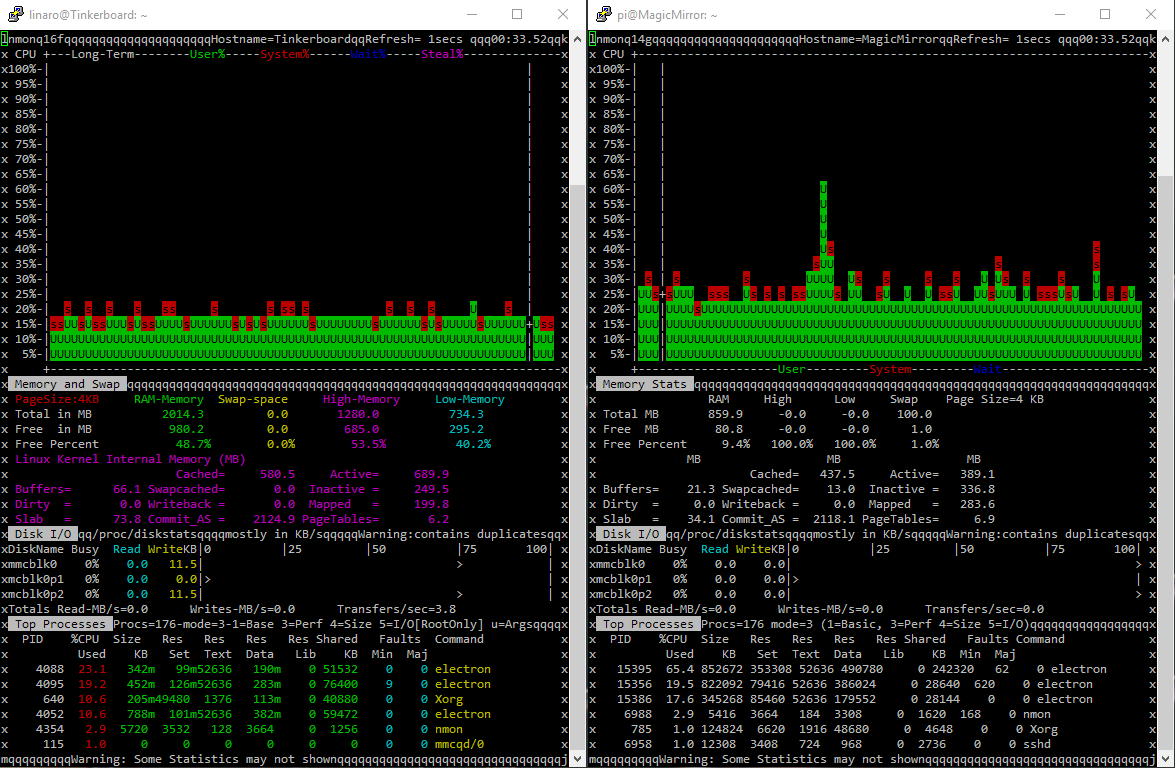
And here is the module list:
MMM-Chart MMM-Globe MMM-JSONStatusChecker MMM-Memo MMM-ModuleScheduler MMM-Modulebar MMM-MotionEye MMM-MyCommute MMM-ProfileSwitcher MMM-Profilepicture MMM-Remote-Control MMM-Sonos MMM-SystemStats MMM-TextClock MMM-TouchNavigation MMM-WunderGround MMM-cryptocurrency MMM-newsfeedtouch MMM-plex-recently-added calendar_monthly mm-hide-all mmm-suncalc -
RE: Snilles Magic Mirror Project
Update: 2026-08-10: Below code and functions are all retierd. I’m using WLED now for controlling the leds (from HA as well). :)
@cowboysdude Thank you!! :) The LEDs you say. :) Ok, for the moment, the mirror is not “aware” of the leds. This is something I’m planing to implement. But as it works now I’m using PixelWeb with Bibliopixel 2.x as a back end. Then I’m using the below sh script to trigger different (predefined so far) animations.
#!/bin/bash
#-----------------------------------------------------------------------------
#
# Snilles MagicMirror Led Conrol Script.
# Use in conjunction with PixelWEB.
#
#-----------------------------------------------------------------------------
# Connfigure here!
# URL to PixelWEB API On the MM.
apiurl="http://x.x.x.x:8081/api";
# Default program if no argument is set.
defprog="back";
# Default red amount if non is set.
defred="45";
# Default green amount if non is set.
defgreen="30";
# Default blue amount if non is set.
defblue="0";
# Default brightness amount.
defamount="50";

## -------------------------- Dont edit below!! --------------------------- ##

while [[ $# -gt 0 ]] ; do
	case $1 in
		-h|-\?|--help)
			echo "Usage: mirrorleds.sh -p or --program [back, running, alarm, rainbow or thunder (rainbow and thunder needs no colors)] -r or -red [0-255] -g or --green [0-255] -b or --blue [0-255] -a or --amount [0-255]";
			exit;
			;;
		-p|--program)
			if [ -n "$2" ]; then
				program="$2"
				shift
			else
				program="$defprog"
			fi
			;;
		-r|--red)
			if [ -n "$2" ]; then
				if [[ "$2" == ?(-)+([0-9]) ]]; then
					if [ "$2" -gt "255" ]; then
						red="255"
					elif [ "$2" -lt "0" ]; then
						red="0"
					else
						red="$2"
					fi
					shift
				else
					red="$defred"
				fi
			fi
			;;
		-g|--green)
			if [ -n "$2" ]; then
				if [[ "$2" == ?(-)+([0-9]) ]]; then
					if [ "$2" -gt "255" ]; then
						green="255"
					elif [ "$2" -lt "0" ]; then
						green="0"
					else
						green="$2"
					fi
					shift
				else
					green="$defgreen"
				fi
			fi
			;;
		-b|--blue)
			if [ -n "$2" ]; then
				if [[ "$2" == ?(-)+([0-9]) ]]; then
					if [ "$2" -gt "255" ]; then
						blue="255"
					elif [ "$2" -lt "0" ]; then
						blue="0"
					else
						blue="$2"
					fi
					shift
				else
					blue="$defblue"
				fi
			fi
			;;
		-a|--amount)
			if [ -n "$2" ]; then
				if [[ "$2" == ?(-)+([0-9]) ]]; then
					if [ "$2" -gt "255" ]; then
						amount="255"
					elif [ "$2" -lt "0" ]; then
						amount="0"
					else
						amount="$2"
					fi
					shift
				else
					amount="$defamount"
				fi
			fi
			;;
	esac
	shift
done

# Default program if non was given.
if [ -z "$program" ]; then
	program="$defprog"
fi

# Default red amount if non was given.
if [ -z "$red" ]; then
	red="$defred"
fi

# Default green amount if non was given.
if [ -z "$green" ]; then
	green="$defgreen"
fi

# Default blue amount if non was given.
if [ -z "$blue" ]; then
	blue="$defblue"
fi

# Default amount if non was given.
if [ -z "$amount" ]; then
	amount="$defamount"
fi


# Compose the colors
colors="$red,$green,$blue";

# 22 Pixel Alarm
if [ "$program" == "alarm" ]; then
	curl -H "Content-Type: application/json" -X POST --data '{"action":"startAnim","config":{"id":"ColorChase","config":{"end":-1,"start":0,"width":22,"color":['$colors']},"run":{"amt":1,"fps":300,"seconds":null,"max_steps":0,"untilComplete":false,"max_cycles":1}}}' $apiurl;
fi

# Rainbowalarm (multi color spinning)
if [ "$program" == "rainbow" ]; then
	curl -H "Content-Type: application/json" -X POST --data '{"action":"startAnim","config":{"id":"ColorPattern","config":{"colors":[[255,0,0],[255,165,0],[255,255,0],[0,255,0],[0,0,255],[128,0,128]],"width":20},"run":{"amt":1,"fps":300,"seconds":null,"max_steps":0,"untilComplete":false,"max_cycles":1}}}' $apiurl;
fi

# 1 Running Pixel
if [ "$program" == "running" ]; then
	curl -H "Content-Type: application/json" -X POST --data '{"action":"startAnim","config":{"id":"ColorChase","config":{"end":-1,"start":0,"width":1,"color":['$colors']},"run":{"amt":1,"fps":40,"seconds":null,"max_steps":0,"untilComplete":false,"max_cycles":1}}}' $apiurl;
fi
# Backlight
if [ "$program" == "back" ]; then
	curl -H "Content-Type: application/json" -X POST --data '{"action":"startAnim","config":{"id":"ColorPattern","config":{"colors":[['$colors']],"width":1},"run":{"amt":1,"fps":1,"seconds":null,"max_steps":0,"untilComplete":false,"max_cycles":1}}}' $apiurl;
fi

# Thunder
if [ "$program" == "thunder" ]; then
	curl -H "Content-Type: application/json" -X POST --data '{"action":"startAnim","config":{"id":"WhiteTwinkle","config":{"max_led":null,"speed":2,"density":1,"max_bright":'$amount'},"run":{"amt":1,"fps":300,"seconds":null,"max_steps":0,"untilComplete":false,"max_cycles":1}}}' $apiurl;
fi

# Stop everything
if [ "$program" == "stop" ]; then
	curl -H "Content-Type: application/json" -X POST --data '{"action":"stopAnim"}' $apiurl;
fi

# Add a new line...
echo $"";
Then I’m using Alexa (for now) to trigger different animations (via the HA-Bridge server). But later on this will be triggered by a module that “picks up” other modules communication so I can animate the leds depending on for example weather events, calendar events, memo events or whatever I can figure out. :) I just have to convince my wife that animating the leds IS a good thing… :)
-
RE: Running Magic Mirror remotely from source on a pi
@devtech8 Hmm… It’s two different things. Either you run the mirror as a “local” mirror = The picture come out via the HDMI port on the RPi using Electron. Or you can run the mirror on “any” server (computer in your network) then start is as a “server” = The you can open the mirror on any machine on your network. Even if you run the fist way, you can also open the mirror on any other machine in you network (depending on the access rules in your config of course). However, a RPi is not a powerful machine, so it will be fairly slow if you want it both on your “local” screen and on a networked machine at the same time.
To start as a “server” you runnode serveronlyinstead ofnpm start.
Then I recommend you to use pm2 as the “manager” for your mirror. It’s easier to troubleshoot then. :)Not sure if I answered your question. :)
I myself is running 3 different mirrors. One on a RPi (local display), one on a server with the same config as the RPi and one more on the same server on another port for development. :)
-
RE: Input...What do you think?
@cowboysdude Hmm… I forgot a “comma” on the
en: "translations/en.json"line… Sorry…
should be:en: "translations/en.json",And then it seems to be missing something else…
I get this error…Uncaught TypeError: Cannot read property 'simpleforecast' of undefined at Class.processNoaa (MMM-NOAA.js:58) at Class.socketNotificationReceived (MMM-NOAA.js:88)...But I have to go to bed… REALLY now… :)
-
RE: stronger Raspberry Pi 3 Alternatives
All, I have got the Libre Computer now. Trying my best to get the mirror up. Ran in to a small hitch. There is no chromedriver for arm64 yet. They are working on it and there is a PR but it has not yet gone completely through it seems. I’ll see if I can figure it out some how anyway. :)
I’ll come back to this thread as soon as I gotten MM up and running.
-
RE: Snilles Magic Mirror Project
I just added a quick comment on all the pictures in the gallery so you know what you are looking at. :)
-
RE: LED Backlight for mirror - PIR to control them
Just to add some depth to this… If you really want to go “crazy” with animations, I’m recommending Bibliopixel and PixelWeb. Then you can “animate” lot’s and trigger them with a curl “command”. Plus you get a nice Web-interface to test the animations in. :)
-
RE: Input...What do you think?
@cowboysdude Ah, Thank you! Looking good. I’ll pull when I have some time. :)
-
RE: Magic Mirror with touchscreen Display/Monitor
@core I also used a IR-Frame in my build. Works very well if you just want “simple” point and click and/or point and drag (even with two fingers)… I have not tested it with more advanced stuff. :) But for the MM it’s great. You can read about my build here and underneath the picture, you can find a link to a full photo album with pictures and text to all pictures about what you see. :)
-
RE: Snilles Magic Mirror Project
@yawns Thank you! :) I know the post is way to long, but when I see others builds, I always want to know how they did things. So I just included all the information at the top. So people don’t have to ask for it. :)
-
RE: Totally off topic :^')
@Mykle1 I just love how the hummingbird is flying, the hoovering is so cool! :)
-
RE: Input...What do you think?
@planet4 “Prognås” is my bad… :) Sorry… You are correct. I thought it looked strange. :)
-
RE: Snilles Magic Mirror Project
@yawns Hehe, yes. If you are about to buy a 3D-Printer, I can recommend a PRUSA 3D-Printer. It’s my third printer and it’s by far the best one I have had (I built the first one myself). I’ve been 3D-Printing stuff for about 6 years and it’s great if you really want to get things done your “own” way. :) You can find some of the stuff I’ve done here.
-
RE: Basic Text on Magic Mirror
Hi!
Try one of these:
https://github.com/SaltyRiver/MMM-SimpleText
https://github.com/martinmeinke/MMM-display-text-file
https://github.com/SkogDev/MMM-TextDepending on how you want it… :)
-
RE: [Remote-Control] Shutdown, Configure and Update your MagicMirror
Hi!
Thank you for this great module!
I’m thinking it would be good to have menu entry for the “logs”.
Basically just “display” the logs (maybe last 100 lines) of the ~/.pm2/logs/mm* files.
What do you say? :)Best regards Snille