Hi there, got the same problem… It’s time for bed anyway. :)
 S
Offline
S
Offline
A New Chapter for MagicMirror: The Community Takes the Lead
Read the statement by Michael Teeuw here.
Read the statement by Michael Teeuw here.
Posts
-
RE: Looking for Beta-testers!
-
MMM-Sonos - To show what your SONOS is playing.
Description:
This is an modification of of @Vaggan MagicMirror-SonosModule and @CFenner MagicMirror-SonosModule. It was modified to get some enhancements in visualisation and configuration. Also the module hides itself when not playing now.
Note from me: I’m new to the MagicMirror world and Node.js, this is my first attempt to modify a module. There are probably lot’s of things that could have been done better. :)
Screenshots:
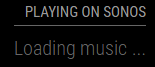
When starting the Mirror:
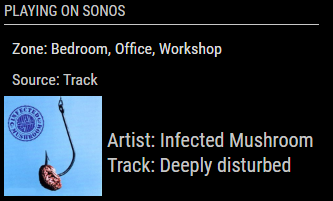
Module on the Left side of the Mirror:
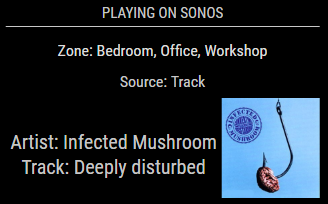
Module in the Center of the Mirror:
Module in the Center of the Mirror playing in 3 different zones:
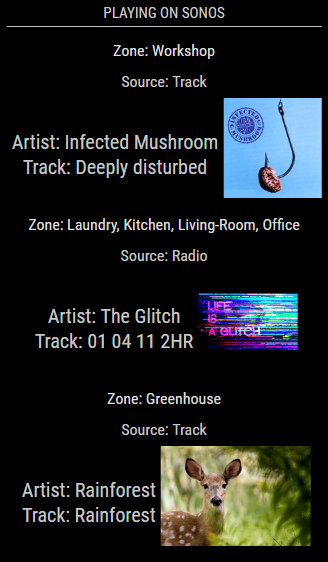
Module on the Right side of the Mirror:
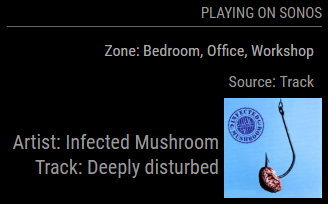
And, this is my own look on my mirrors (@ top center) using some addition in the custom.css…
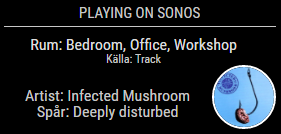
If you want my look on it, use this CSS code in your custom.css.
/* Sonos --------------------------------------------*/
.sonos ul .type {
    font-size: 12px;
    padding: 0px 0px;
    line-height: 12px;
    width: 260px;
}
.sonos ul .room {
    font-size: 16px;
    padding: 0px 0px;
    line-height: 16px;
    width: 260px;
}
.sonos ul .song {
    padding: 0px 0px;
    position: relative;
}
.sonos ul .art img {
    height: 60px;
    width: 60px;
    border-radius: 50%;
    margin: 0px 0px;
    border: 2px solid #FFF;
}
.sonos ul .name {
    width: 200px;
    font-size: 16px;
    padding: 0px 4px;
    line-height: 16px;
}
/*****************************************************/
Download:
[card:Snille/MMM-Sonos]
Version 0.1
- I’m guessing that’s Vaggans version…
Version 0.2
- Has to be CFenners version…
Version 0.3
- My version… :)
-
RE: Limit Sonos module to only show a specific speaker
Hi all,
I don’t know if this is the right place, but here it goes.
I forked and made some changes to the Sonos module.
Can be found here: https://github.com/Snille/MMM-Sonos
Let me know is I should present it in some other thread. :)Best regards Snille
-
RE: Help configuring the Magic Mirror
@PhilsterM9 Hi again, maybe I’m missing something…
If you followed the install guide when you installed…
When you SSH in to your Pi (or open a terminal on the desktop of the pi) you should end up in a prompt looking like this:pi@MagicMirror:~ $Now, type as follows:
pi@MagicMirror:~ $ cd MagicMirror/config/You should now be in MagicMirror/config/ looking like this:
pi@MagicMirror:~/MagicMirror/config $To copy a file enter:
pi@MagicMirror:~/MagicMirror/config $ cp config.js.sample config.jsCheck if the files where copied with ls both file should be there now:
pi@MagicMirror:~/MagicMirror/config $ lsListed like this:
config.js config.js.sampleNow, if you want you can edit your config file:
pi@MagicMirror:~/MagicMirror/config $ nano config.jsChange whatever you need to change…
But you actually don’t have to change anything just for testing it.
Now restart the MagicMirror with pm2 like this:pi@MagicMirror:~/MagicMirror/config $ pm2 restart mmYou should se something like this:
Restarts are now immutable, to update environment or conf use --update-env
[PM2] Applying action restartProcessId on app [mm](ids: 0)
[PM2] [mm](0) ✓
┌──────────┬────┬──────┬───────┬────────┬─────────┬────────┬─────┬──────────┬──────────┐
│ App name │ id │ mode │ pid   │ status │ restart │ uptime │ cpu │ mem      │ watching │
├──────────┼────┼──────┼───────┼────────┼─────────┼────────┼─────┼──────────┼──────────┤
│ mm       │ 0  │ fork │ 26361 │ online │ 32      │ 0s     │ 22% │ 2.3 MB   │ disabled │
└──────────┴────┴──────┴───────┴────────┴─────────┴────────┴─────┴──────────┴──────────┘
 Use `pm2 show ` to get more details about an app
pi@MagicMirror:~/MagicMirror/config $
And your Magic should have started. :)
-
RE: Help configuring the Magic Mirror
@PhilsterM9 Hi again, no the config.js.sample should still be left in there.
How does your config.js look now? -
RE: Help configuring the Magic Mirror
@PhilsterM9 Hi!
Put simply, the config.js.sample is a “preconfigured” version of config.js (sort of default settings).
Just do:cd MagicMirror/config cp config.js.sample config.jsNow when you copied the sample config you can customize your mirror with:
nano config.jsMake the changes you want…
When done restart the magic mirror with pm2 or basically restart the Pi (computer).
If you followed the guide you can use pm2 like this to restart the MagicMirror (only):pm2 restart mmBest regards Snille
-
RE: MMM-TouchNavigation, A Touch Activated Profile/Layout Changer
@shashank Hi! You should not need to delete the TouchNavigation.css file at all. It shall remain, you just have to add the css things in the MagicMirror/css/custom.css nothing else. The module itself shall remain “untouched”, then later on you will not have update problems. :) Also, I did only change what’s needed to be changed in the custom.css there are still settings in the TouchNavigation.css file that may be needed. Regarding the pictures, I’m not sure, as someone else mentioned I think you may need to create a sub-folder for them. But I never tested to have the pictures “locally”. Sorry.
-
RE: MMM-TouchNavigation, A Touch Activated Profile/Layout Changer
@tosti007 Thank you! Now it fits perfectly with the MM-Hide-All module. :)
-
RE: MMM-TouchNavigation, A Touch Activated Profile/Layout Changer
Different look for this module, just wanted to share :)…
Grayscale:

Or in color:

It’s only the pictures that differ from the gray or color ones.
You have to use your own pictures of course. :)In the config.js:
{
	module: 'MMM-TouchNavigation',
	position: 'bottom_left',
	classes: "default everyone",
	config: {
		picturePlacement: "right",
		minWidth: "40px",
		direction: "column",
		buttons: {
			"Name1": {
				img: "http://www.your-picture.com/name1-Gray.png",
				width: 60,
				height: 60
			},
			"Name2": {
				img: "http://www.your-picture.com/name2-Gray.png",
				width: 60,
				height: 60
			},
			"Name3": {
				img: "http://www.your-picture.com/name3-Gray.png",
				width: 60,
				height: 60
			}
		}
	}
},
In my custom.css:
/* Touch Buttons */
.navigation-button {
    margin: 5px;
    padding: 0px 0px;
    border: 2px solid #FFF;
    border-radius: 0px;
    border-radius: 50%;
}
.navigation-picture {
    margin: 0px 0px;
    border-radius: 50%;
}
.navigation-menu {
    align-items: flex-start;
}
/* ----- End ----- */
Update: Just noticed that the buttons got “stretched” if something else was displayed in the same region. So I added the “.navigation-menu” part in the css.
If you have the buttons on the right side, use: “flex-end” instead of “flex-start”.Enjoy! :)
-
RE: Problems restarting MagicMirror (Port 8080 in use ...)
Hi! Yes, restarting works. This usually happens when a module has failed to work (have some error in it). Even though you fix the problem, as long as you have not restarted it seems the port still is “in use”.
By the way, thank you for this GREAT project! :)
Best regards Snille
-
RE: remoteFile in compliments module
@strawberry-3.141 I had not, now I did and it works! :)
Thank you! -
RE: remoteFile in compliments module
Hi! I’m using a separate compliments file (for each user). I’ve noticed that when I use non english characters they are not shown correctly.
The complement in the picture should say: “Tänk positivt”.
Now it says:
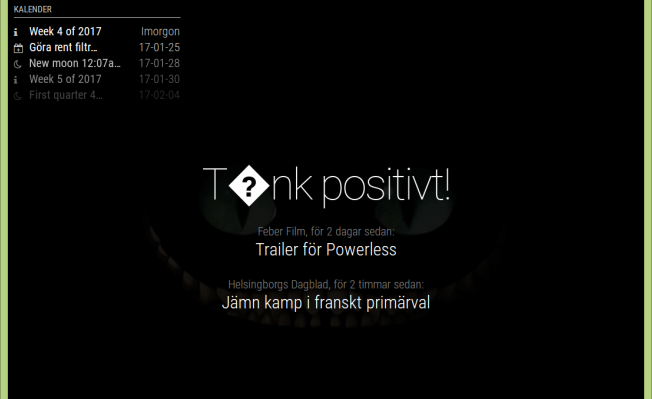
If I don’t use a compliments file and put the compliments directly in the config, it works fine.
What to do? :)
Best regards Snille
-
RE: MMM-ProfileSwitcher, A Profile/User/Layout Switching Module
@tosti007 Here you go:
sv.json{ "leave": "Ses snart %profile%!", "enter": "Hej %profile%, trevligt att ses igen!", "title": "Användarprofil" }:)
-
RE: MMM-ProfileSwitcher, A Profile/User/Layout Switching Module
@tosti007 Hehe, I just edited my post when you replied. Found the title thing… Sorry for not reading… :)
I have my language like so:ipWhitelist: [ "127.0.0.1", "::ffff:127.0.0.1", "::1", "::ffff:10.0.0.1/120" ], language: "sv", modules: [Seems to work with the clock at least (get the swedish names of the days. :)…
I just saw a “leave message” in german… I have to try to grab a screenshot… -
RE: MMM-ProfileSwitcher, A Profile/User/Layout Switching Module
Hi again, have the face recognition module and yours been “integrated” yet? I saw your pull request on there, but now it looks like it’s a conflict? I have modified per your instructions so that it works now, but I keep getting notifications about the face recognition module update… But i don’t dare to update. :)
Another matter… I sometimes get greetings and leave messages in german (I think?) even though I have defined my own.
And, is there a way to disable the title “Benutzer Profile” showing up above the message in the “popup” when you are greeted?Found it… :)My module conf:
		{
			module: "MMM-ProfileSwitcher",
			header: "Profile",
			config: {
				enterMessages: {
					"Snille Louise Martin": "Hej %profile%!",
					"Snille": ["Hoppas dagen varit bra!", "Ser man på, välkommen!"],
					"Louise": ["Kul i skolan idag?", "Kul att ses!"],
					"Martin": ["Kul att ses!", "Allt bra?"]
				},
				leaveMessages: {
					"everyone": "Ses snart %person%!",
					"Snille": ["Hej då, jag kommer sakna dig...", true]
				}
			}
		},
Thank you for the great module!
Best regards Snille
-
RE: MMM-Swipe - Hand gestures
@mochman No worries, thank you for letting me know. :)
-
RE: MMM-Swipe - Hand gestures
Hi, I’m trying out your module.
I’m not running the Mirror with sudo, is there no other way to get your module to work?
I’m getting this:{ Error: EACCES, Permission denied at Error (native) at /home/pi/MagicMirror/modules/MMM-Swipe/node_modules/mmm-gpio/lib/gpio.js:32:18 at ChildProcess.exithandler (child_process.js:209:7) at emitTwo (events.js:106:13) at ChildProcess.emit (events.js:191:7) at maybeClose (internal/child_process.js:877:16) at Socket. (internal/child_process.js:334:11) at emitOne (events.js:96:13) at Socket.emit (events.js:188:7) at Pipe._handle.close [as _onclose] (net.js:493:12) errno: 13, code: 'EACCES', syscall: 'init' }I’m guessing it have to do with the mirror not running as root…
the pi user is a member of the gpio group at least. :)Thank you.
Best regards Snille
-
RE: MMM-MotionEye - surveillance video stream on your mirror!
@Cato There is not a specific “mjpeg” option as I can find. However on the “?” on the “Streaming URL” it says: “A URL that provides MJPEG stream of the camera” and that’s the URL I used…
-
RE: MMM-MotionEye - surveillance video stream on your mirror!
@Cato Nope, same thing. The header shows up, but no picture…
-
RE: MMM-MotionEye - surveillance video stream on your mirror!
Hi, thank you for this module! :)
I’m currently trying to add my Bird Nest Camera(s) to my Mirror. But I can’t get the picture to show up.
Running MM v2.1.1 (development)
And Node.js v7.4.0My in my config:
		{
			module: 'MMM-MotionEye',
			position: 'middle_center',
			classes: "default everyone",
			header: "Holk 1",
			config: {
				url: "http://10.0.0.136:8081",
				width: "640px",
				debug: true
			}
		},
My mirror is on: 10.0.0.112
IP Whitelist is (although that should not matter in this case):ipWhitelist: [ "127.0.0.1", "::ffff:127.0.0.1", "::1", "::ffff:10.0.0.1/120" ],The picture do show up if I “browse” to it in Midori on the local Consol:
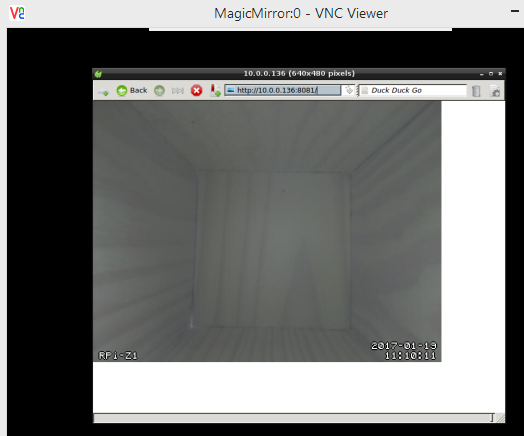
The pm2 log shows no errors:... 0|mm | Connecting socket for: calendar 0|mm | Starting node helper for: calendar 0|mm | Connecting socket for: newsfeed 0|mm | Starting module: newsfeed 0|mm | Connecting socket for: email 0|mm | email helper started ... 0|mm | Connecting socket for: MMM-NetworkScanner 0|mm | Starting module: MMM-NetworkScanner 0|mm | Connecting socket for: MMM-MotionEye 0|mm | Starting module: MMM-MotionEye 0|mm | Connecting socket for: MMM-Remote-Control 0|mm | Starting node helper for: MMM-Remote-Control ...What Have I forgotten?
Thank you.
Best regards Snille