Hi @youse, Thank you! Adding your module now. :)
A New Chapter for MagicMirror: The Community Takes the Lead
Read the statement by Michael Teeuw here.
Read the statement by Michael Teeuw here.
 Offline
Posts
-
RE: [MMM-PlexNowPlaying] - Display current song played by PlexMediaServer
-
RE: How to make updateDom actually refresh <img src...>?
Hi @matthewj
You can use javascript to make the image URL unique all the time thought adding a “number” (in this case just a simple timecode). :)OBS: I had to add spaces after the " < " before the end " > ".
Just remove them when you use it. :)Otherwise it would not show.
< img id="graph" alt="" src="https://plot.ly/~myPlotlyAccount/myGraph.png" />

< script language="javascript" type="text/javascript" >
  var d = new Date();
  document.getElementById("graph").src = "https://plot.ly/~myPlotlyAccount/myGraph.png=" + d.getTime();
< /script >
Good luck. :)
-
RE: MMM-MotionEye - surveillance video stream on your mirror!
@Cato Great! Thanks for fixing my mistakes. :)
-
Splitting zone...
Hi all, I’m trying to save space on my mirror to be.
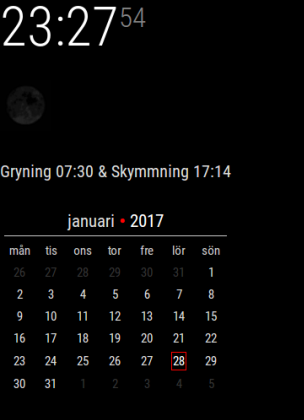
I’m thinking if it would be possible to make a module where you can “split” a zone. Or rather arrange other modules in another way in a zone. As it is now you can basically only decide what module is on top and the order the modules are added under each other in config. I would like to be able to put modules beside each other as well. Here is an example:
This is my current left top corner:
This is how I would like it to be:
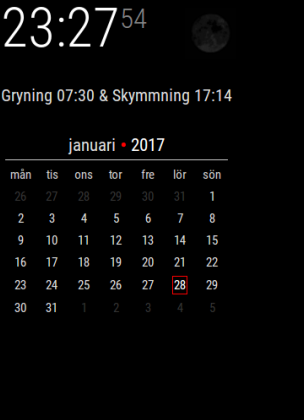
So, I want to move the “moon” to beside the clock, but still be in the top_left.
Is this possible?Thank you all for this great project! :)
-
RE: MMM-MotionEye - surveillance video stream on your mirror!
Fixed. Just sent you a PR. :)
Check it, I’m fairly new to Node.js so it may not be the best solution. :) -
RE: MMM-MotionEye - surveillance video stream on your mirror!
Hi again, It would be cool to be able to hide the camera manually… For example visit another link… Say http://MagicMirror:8080/motioneye/1/hide
Right? :) -
RE: Looking for Beta-testers!
Hi there, got the same problem… It’s time for bed anyway. :)
-
MMM-Sonos - To show what your SONOS is playing.
Description:
This is an modification of of @Vaggan MagicMirror-SonosModule and @CFenner MagicMirror-SonosModule. It was modified to get some enhancements in visualisation and configuration. Also the module hides itself when not playing now.
Note from me: I’m new to the MagicMirror world and Node.js, this is my first attempt to modify a module. There are probably lot’s of things that could have been done better. :)
Screenshots:
When starting the Mirror:
Module on the Left side of the Mirror:
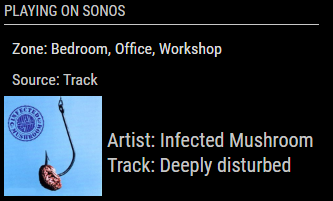
Module in the Center of the Mirror:
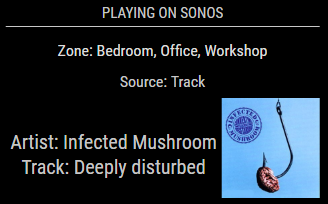
Module in the Center of the Mirror playing in 3 different zones:
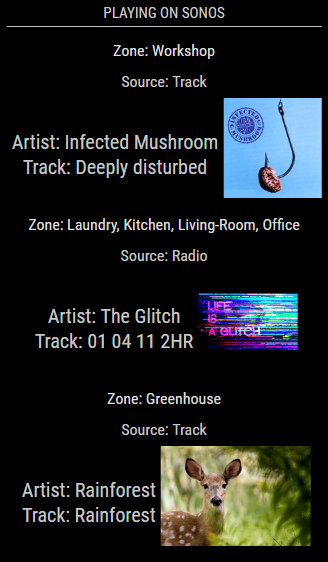
Module on the Right side of the Mirror:
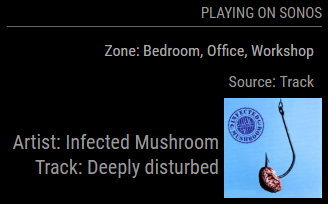
And, this is my own look on my mirrors (@ top center) using some addition in the custom.css…
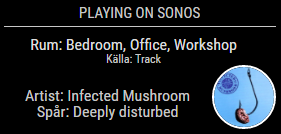
If you want my look on it, use this CSS code in your custom.css.
/* Sonos --------------------------------------------*/
.sonos ul .type {
    font-size: 12px;
    padding: 0px 0px;
    line-height: 12px;
    width: 260px;
}
.sonos ul .room {
    font-size: 16px;
    padding: 0px 0px;
    line-height: 16px;
    width: 260px;
}
.sonos ul .song {
    padding: 0px 0px;
    position: relative;
}
.sonos ul .art img {
    height: 60px;
    width: 60px;
    border-radius: 50%;
    margin: 0px 0px;
    border: 2px solid #FFF;
}
.sonos ul .name {
    width: 200px;
    font-size: 16px;
    padding: 0px 4px;
    line-height: 16px;
}
/*****************************************************/
Download:
[card:Snille/MMM-Sonos]
Version 0.1
- I’m guessing that’s Vaggans version…
Version 0.2
- Has to be CFenners version…
Version 0.3
- My version… :)
-
RE: Limit Sonos module to only show a specific speaker
Hi all,
I don’t know if this is the right place, but here it goes.
I forked and made some changes to the Sonos module.
Can be found here: https://github.com/Snille/MMM-Sonos
Let me know is I should present it in some other thread. :)Best regards Snille