MagicMirror Forum
    • Recent
    • Tags
    • Unsolved
    • Solved
    • MagicMirror² Repository
    • Documentation
    • 3rd-Party-Modules
    • Donate
    • Discord
    • Register
    • Login
    1. Home
    2. Snille
    3. Posts
    A New Chapter for MagicMirror: The Community Takes the Lead
    Read the statement by Michael Teeuw here.
    SnilleS Offline
    • Profile
    • Following 0
    • Followers 5
    • Topics 18
    • Posts 268
    • Groups 1

    Posts

    Recent Best Controversial
    • RE: Electron CPU usage

      @Mykle1 Here is my full “list”. :)

      processor       : 0
      model name      : ARMv7 Processor rev 4 (v7l)
      BogoMIPS        : 76.80
      Features        : half thumb fastmult vfp edsp neon vfpv3 tls vfpv4 idiva idivt vfpd32 lpae evtstrm crc32
      CPU implementer : 0x41
      CPU architecture: 7
      CPU variant     : 0x0
      CPU part        : 0xd03
      CPU revision    : 4
      
      processor       : 1
      model name      : ARMv7 Processor rev 4 (v7l)
      BogoMIPS        : 76.80
      Features        : half thumb fastmult vfp edsp neon vfpv3 tls vfpv4 idiva idivt vfpd32 lpae evtstrm crc32
      CPU implementer : 0x41
      CPU architecture: 7
      CPU variant     : 0x0
      CPU part        : 0xd03
      CPU revision    : 4
      
      processor       : 2
      model name      : ARMv7 Processor rev 4 (v7l)
      BogoMIPS        : 76.80
      Features        : half thumb fastmult vfp edsp neon vfpv3 tls vfpv4 idiva idivt vfpd32 lpae evtstrm crc32
      CPU implementer : 0x41
      CPU architecture: 7
      CPU variant     : 0x0
      CPU part        : 0xd03
      CPU revision    : 4
      
      processor       : 3
      model name      : ARMv7 Processor rev 4 (v7l)
      BogoMIPS        : 76.80
      Features        : half thumb fastmult vfp edsp neon vfpv3 tls vfpv4 idiva idivt vfpd32 lpae evtstrm crc32
      CPU implementer : 0x41
      CPU architecture: 7
      CPU variant     : 0x0
      CPU part        : 0xd03
      CPU revision    : 4
      
      Hardware        : BCM2835
      Revision        : a02082
      Serial          : x
      
      posted in Troubleshooting
      SnilleS
      Snille
    • RE: Snilles Magic Mirror Project

      @ceddirr I saw your questions about the project… Answers below. :)

      First, I forgot to say thank you for your kind words!

      Question: “Which order is it? At first the IR frame, then the one way mirror, and finally the screen, is it correct?”

      Answer: Correct, from the “front” the IR-Frame is first, placed directly on to the mirror and behind the mirror sits the screen. :)

      Question: “I can see that the custom css of the MMM-Memo is already written in css file from the module’s folder. But, how do you manage to use it, and have this look with your memos? Mine are just white and simple… Thank you =)”

      Answer: Well, I’m actually not doing so much in the CSS file. The only thing I set in the custom.css is the size of the Memo. The rest is “built in”.

      This is the CSS part (in my custom.css file):

      /* MMM-Memo -----------------------------------------*/
      .MMM-Memo .small {
      	font-family: "Roboto Condensed", sans-serif;
      }
      .note {
        width: 500px;
        height: 200px;
      }
      /*****************************************************/
      

      And this is in my config.js:

      {
      	module: "MMM-Memo",
      	position: "upper_third",
      	classes: "default everyone",
      	config: {
      		memoTitle: "Flyginformation",
      		memoDisplayIfEmpty: false,
      		memoRotation: -4,
      		format: "YYYY-MM-DD - HH:mm",
      		memoWidth: 500,
      		memoDisplayHeader: true,
      		memoDisplayDuration: true,
      		memoDisplayId: true,
      		memoColorBackground: "LightGoldenrod",
      		memoDisplayNotification: true,
      	}
      },
      

      You can see all the options for the config on the MMM-Memo’s git.
      There are lot’s and lot’s of options for colors and themes. :)

      posted in Show your Mirror
      SnilleS
      Snille
    • RE: Electron CPU usage

      @Mykle1 Lets see…
      Do (in SSH): cat /proc/cpuinfo

      Paste the result from hardware and revision… :)

      Hardware        : BCM2835
      Revision        : a02082
      

      I think it’s the “last” revision that is important.

      Pi 3 Model B	1GB	a02082 (Sony, UK)
      Pi 3 Model B	1GB	a22082 (Embest, China)
      

      More info about revisions…

      Mine is from UK it seams. :)

      posted in Troubleshooting
      SnilleS
      Snille
    • RE: Electron CPU usage

      @Mykle1 Don’t worry about it. You provided the information. :) But if you want to do it anyway, do it via SSH instead, you need to have more “screen-space” to fit all the information at the same time. Check my screenshot. The number of columns and rows are much higher. :)

      posted in Troubleshooting
      SnilleS
      Snille
    • RE: Electron CPU usage

      @wtidwell Nope, I don’t think so. I have not had any keyboard nor mouse connected since I installed it. :)

      posted in Troubleshooting
      SnilleS
      Snille
    • RE: Electron CPU usage

      @wtidwell Nah, I’m running the “lite” version of Jessie… So it’s not that… I did not do a separate install of electron actually. I used the “install-script” from MM at the beginning… It’s goning to be interesting to see if you get any better results with another SD card…

      posted in Troubleshooting
      SnilleS
      Snille
    • RE: Electron CPU usage

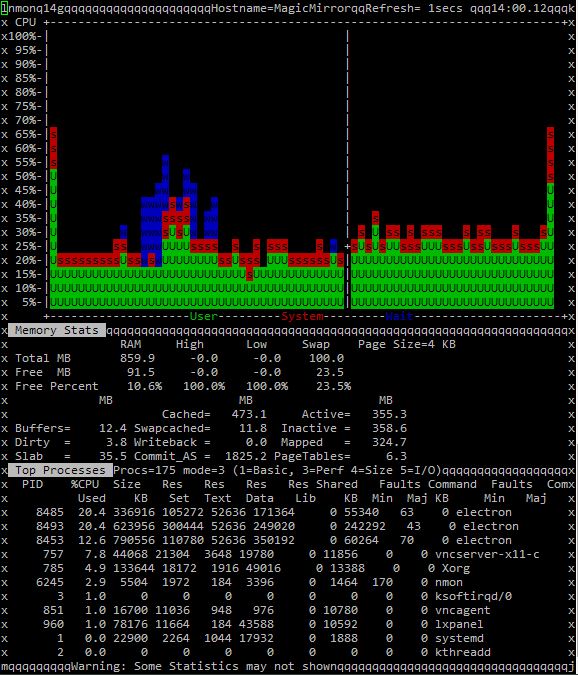
      @Mykle1 Thank you! :) You can actually get all three on the same “screen”. :) But what matters is that your CPU is hovering around 5% and mine (ours) are hovering around 20%x2… That is strange.

      @wtidwell Are you rinnung a “lite” version or a full version of the OS?

      posted in Troubleshooting
      SnilleS
      Snille
    • RE: Electron CPU usage

      @Mykle1 Can you do a screenshot from a terminal running nmon?
      If you are ok with that… Here is how to do it.

      1. Open a terminal (or log in via SSH).
      2. Install nmon (sudo apt-get install nmon).
      3. Open nmon by just typing “nmon”. :)
      4. Press “t”, “l” and “m” to get “task list”, “longer term CPU averages” and “Memory & Swap stats”.
      5. Press + to increase the update rate.
      6. Let nmon fill the “CPU” meter and take a screenshot. :)
        Press “q” to quit nmon.
        Good thing about nmon is that you can use it from ssh (via putty). :)

      Thank you!

      posted in Troubleshooting
      SnilleS
      Snille
    • RE: Electron CPU usage

      Hmm… I always thought this was a normal behavior? Electron always runs pretty high on my RPI Mirror. This is my “task-list” using nmon on the RPi (via SSH) with basically nothing on the Mirror Screen but as you can see Electron is pretty active. :)
      0_1503316867133_Busy-Electron.jpg
      I do have quite a lot of active plugins of course…

      posted in Troubleshooting
      SnilleS
      Snille
    • RE: LED Backlight for mirror - PIR to control them

      Just to add some depth to this… If you really want to go “crazy” with animations, I’m recommending Bibliopixel and PixelWeb. Then you can “animate” lot’s and trigger them with a curl “command”. Plus you get a nice Web-interface to test the animations in. :)

      posted in General Discussion
      SnilleS
      Snille
    • RE: Running Magic Mirror remotely from source on a pi

      @devtech8 Ok…
      So, first I have a normal RPi with a Jessie Lite installation (just to keep everything to a minimal).
      Then I followed this guide to get it running. When that guide is done. You have a fully working MM on the RPi (local installation). The config and all other information of my build you can find here.

      Then after that I’m running a normal Ubuntu server 16.04 (in a container (a sort of VM)) with two instances of MM running om two different ports, I followed this guide (manual installation) and in server mode two times and just put them in different folders.
      Here you can find my dev and server config. The server config is basically the same as my RPi config. I’m just using it for testing before adding stuff to the RPi.

      To display a page in Electron that resides on another server (not the RPi) I’m not sure how to do. I have not done that. When I displayed my MM from the server on the RPi, I used Chromium in “Kiosk-mode” (as mentioned before).

      This forum is full of GREAT people you can ask anything! I scavenged the forum (and tested stuff on a dev mirror) for moths before I actually built my mirror. :)

      pm2 is used in this case to start and stop and troubleshoot the mirror. Otherwise it’s an extremely powerful tool in a “node” environment. I will go so far as to say that it is almost mandatory to use if you want to have control of you node apps. :)

      posted in General Discussion
      SnilleS
      Snille
    • RE: Running Magic Mirror remotely from source on a pi

      @devtech8 Hmm… It’s two different things. Either you run the mirror as a “local” mirror = The picture come out via the HDMI port on the RPi using Electron. Or you can run the mirror on “any” server (computer in your network) then start is as a “server” = The you can open the mirror on any machine on your network. Even if you run the fist way, you can also open the mirror on any other machine in you network (depending on the access rules in your config of course). However, a RPi is not a powerful machine, so it will be fairly slow if you want it both on your “local” screen and on a networked machine at the same time.
      To start as a “server” you run node serveronly instead of npm start.
      Then I recommend you to use pm2 as the “manager” for your mirror. It’s easier to troubleshoot then. :)

      Not sure if I answered your question. :)

      I myself is running 3 different mirrors. One on a RPi (local display), one on a server with the same config as the RPi and one more on the same server on another port for development. :)

      posted in General Discussion
      SnilleS
      Snille
    • RE: Running Magic Mirror remotely from source on a pi

      Hi @devtech8 Yes, its definitely possible. I had mine running like that for a while.
      Take a look at this thread: https://raspberrypi.stackexchange.com/questions/38515/auto-start-chromium-on-raspbian-jessie-11-2015
      I don’t remember what script I used in the end. But that’s the way to do it. :)
      You will have to “kill” chromium from time to time. It tends to “hang”. Don’t know why…

      posted in General Discussion
      SnilleS
      Snille
    • RE: Full length mounted mirror | Single monitor, 38 x 130cm (15 x 51") frame

      Nice build!

      posted in Show your Mirror
      SnilleS
      Snille
    • RE: [Remote-Control] Shutdown, Configure and Update your MagicMirror

      Hi again! I’ve been using your excellent module since I started my build. And all along I had it in an “IFrame” on the mirror (the IFrame is shown via a touch on a button MMM-ModuleBar). However, about 2 moths ago, your module no longer shows up in the IFrame (it’s just black on the Mirror). However if I use another browser (not Electron) the IFrame shows the Remote Control. Also it shows up “remotely” both if I go directly to the Remote Control address and if I open the full Mirror in another browser.
      I’m not sure where the problem is. If it’s on your module or in Electron.
      I have another “web-interface” (SONOS Web Interface) in another IFrame showed the same way and that still works.
      I’m on the dev branch of MM.

      Let me know if you have any ideas… :)

      posted in System
      SnilleS
      Snille
    • RE: Snilles Magic Mirror Project

      @Mykle1 Thank you! :) And I have not yet published all the drawings and files for this this sculpture. :)

      posted in Show your Mirror
      SnilleS
      Snille
    • RE: Snilles Magic Mirror Project

      @yawns Hehe, yes. If you are about to buy a 3D-Printer, I can recommend a PRUSA 3D-Printer. It’s my third printer and it’s by far the best one I have had (I built the first one myself). I’ve been 3D-Printing stuff for about 6 years and it’s great if you really want to get things done your “own” way. :) You can find some of the stuff I’ve done here.

      posted in Show your Mirror
      SnilleS
      Snille
    • RE: Snilles Magic Mirror Project

      @yawns Thank you! :) I know the post is way to long, but when I see others builds, I always want to know how they did things. So I just included all the information at the top. So people don’t have to ask for it. :)

      posted in Show your Mirror
      SnilleS
      Snille
    • RE: Snilles Magic Mirror Project

      I just added a quick comment on all the pictures in the gallery so you know what you are looking at. :)

      posted in Show your Mirror
      SnilleS
      Snille
    • 1
    • 2
    • 3
    • 4
    • 5
    • 6
    • 7
    • 8
    • 13
    • 14
    • 6 / 14