@d3r Hi! Thank you. Not directly, but if you build a script (maybe in node or in PHP) that parse the file and present the data in the form of JSON, it is possible.
 S
Offline
S
Offline
A New Chapter for MagicMirror: The Community Takes the Lead
Read the statement by Michael Teeuw here.
Read the statement by Michael Teeuw here.
Posts
-
RE: MMM-Chart - View your graphs on your Mirror
-
MMM-Chart - View your graphs on your Mirror
Description:
This Module adds graphs to your MagicMirror 2.1 using your JSON source(s) from a URL.
It’s built upon the chartjs “ecosystem”.I’m currently using small PHP scripts to pull information from my own “house-database” and then let PHP create the JSON string form the data. :) You have to provide your own “data-source” of course. :)
There are A LOT of configuration options in this module. I will update the README on git later on. But if you want to know more, just read the MMM-Chart.js. I have tried to document it fairly well.
The source can be either a table of values for like this (updating the whole graph on every update):
[["2017-04-21 15:58:00",8.3,95.5],["2017-04-21 14:55:00",9.3,90.5],["2017-04-21 12:56:00",10.7,87.7],["2017-04-21 11:53:00",10.5,87.7],["2017-04-21 11:01:00",10.6,88.8]]...That will give something like this:
Screenshot:
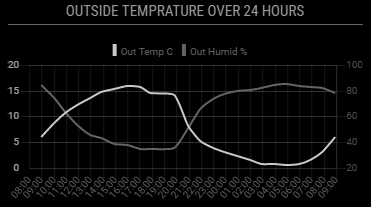
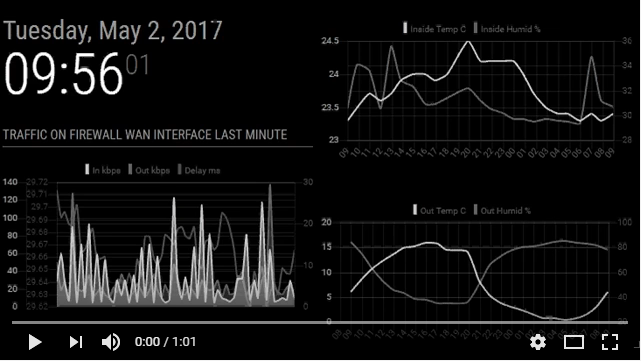
Or you can use a “real time” source looking something like this (adding values to the graph on every update):[["2017-04-21 15:58:00",48.3,95.5,31]]Screenshot:
Both together looks like this (video):
Download:
[card:Snille/MMM-Chart]
Version 1.0
- Initial release.
This is a work in progress…
OBS: I have not yet tested this module on my RPI!!
Please come with feedback/PR:s Let me know how it works.The idea was triggered from the “dynchart module” by Chris van Marl. Thank you!
-
RE: MMM-TouchNavigation, A Touch Activated Profile/Layout Changer
@tosti007 Darn you! :) Now I have to start using this instead!! Thank you, need to get my mirror up and running again so I can reconfigure it (building frame for the moment). :)
-
Plexpy Module...
Hi all!
I know there is a Plex module out there. But it’s a bit limited.
I’m currently using Plexpy (and frankly anyone who runs a Plex-server and loves statistics should).
There a very nice API for plexpy
All in nice JSON format…
So, If someone feels up to it please, give it a try. :)Thank you.
-
RE: MMM-Sonos - To show what your SONOS is playing.
@cohron So it’s working now? Congrats! Great work! :)
-
RE: MMM-Sonos - To show what your SONOS is playing.
@cohron First you need to “install” the node-sonos-http-api. You can put the node-sonos-http-api on the RPi I think. I have not tried that. I have mine installed on another server. But just try it, do the following (obs I have not tried this):
cd ~
git clone git@github.com:jishi/node-sonos-http-api.git
cd node-sonos-http-api
npm install --production
npm start
Now, see if you can get your zones via the link: http://yourmagicmirrorip:5005/zones
If you do, you should be able to point your config to http://localhost
And you should see something playing, if it is playing. :)Now you need to make sure the http-api is running all the time.
Use the same procedure as for the MagicMirror.
When you have the MagicMirror and http-api running typepm2 save(if you are using pm2).
Otherwise you have to add it to your startup manually.I hope this helps a bit at least. :)
-
RE: Best Modules for TouchScreen?
@lucallmon I will when it’s all finished. I’m currently working on the frame. :)
-
RE: Best Modules for TouchScreen?
@lucallmon Here are the ones I use on my Mirror…
MMM-Remote-Control in combination with an iFrame
MMM-newsfeedtouch
MMM-TouchNavigation
node-sonos-web-controller is not really a “module” but I use it also in combination with an iFrame
MMM-Modulebar
mm-hide-all -
RE: How to switch users without Facial Recognition? (Alexa instead?)
Hi @rchase, Yes, I’m doing it with a little help from other stuff… :) Using Alexa (Echo Dot) that communicate with a HA-Bridge that then activate profiles (and other stuff) using the module MMM-Remote-Control. Works well. :)
-
RE: All of a sudden SSH is really lagging/slow.
Just got myself a “core”-file again in the MM root. :) I’m now sure it’s because Electron is crashing. So, it’s probably a memory dump. Still don’t really know why Electron is crashing. It’s not crashing all the time. Just sometimes. But then, I do have lot’s of modules going… :)
-
RE: Sonos Module
@Dicous Do you get the “zones” when you check the sonos-web-api? If you have it on the mirror: http://the-ip-to-your-mirror:5005/zones
You should get a list of all the zones and lot’s of data from the sonos-web-api. -
RE: MMM-Memo - Add some memos on your page and manage them through HTTP request
@schnibel Hi! Thank you for this module! I’m currently using it in a quiet different way. :) I’m a frequent flyer (fly 4 times a week) so, from time to time I have to message my wife to tell that a flight is late (or canceled). So, to get around this problem I set up a new gmail-account for my Mirror, then I joined “Flight Aware” with that account. On the site, you can set to be sent information mails for specific flight-numbers. I set up to get mails on start, land and changes for my “flights”. These mails then are picked up with a python-script that parse them and send a “refined” version of the information to a “memo” on the mirror, that then “popup” automatically. So, now my wife only have to glance at the mirror to know when I will land and if there are any changes in the schedule. All automatically. :)
Thank you for making it possible. :)
-
RE: All of a sudden SSH is really lagging/slow.
@strawberry-3-141 Hmm… It does not seam to be any module doing it… I’m thinking it’s a “core-dump”, I noticed when restarting that it took a long time before it actually restarted. I’m guessing something did not close down properly, then the memory (or something) is dumped down to a file… Now it’s not happening any longer… Reboots normally. Only thing is that I lost my pm2 autostart of the mirror for some reason (had to do a
pm2 startupand run the “setup” commandsudo env PATH=$PATH:/usr/bin /usr/lib/node_modules/pm2/bin/pm2 startup systemd -u pi --hp /home/piagain… And now it starts normally again… No core file after reboots, all modules back again… Darn! :) -
RE: All of a sudden SSH is really lagging/slow.
@strawberry-3.141 That’s what I’m doing right now… :)
-
RE: All of a sudden SSH is really lagging/slow.
@strawberry-3.141 I don’t know yet. I just rebooted my mirror now and got it back again. I’m trying to figuring it out.
Here is my MagicMirror dir after this reboot…
The file is there again… :/drwxr-xr-x 16 pi pi 4096 Mar 22 11:06 . drwxr-xr-x 21 pi pi 4096 Mar 22 11:08 .. -rw-r--r-- 1 pi pi 11172 Mar 21 13:37 CHANGELOG.md drwxr-xr-x 2 pi pi 4096 Mar 21 13:52 config -rw------- 1 pi pi 574697472 Mar 22 11:07 core drwxr-xr-x 2 pi pi 4096 Mar 21 13:37 css -rw-r--r-- 1 pi pi 266 Mar 21 13:37 docker-entrypoint.sh -rw-r--r-- 1 pi pi 378 Mar 21 13:37 Dockerfile -rw-r--r-- 1 pi pi 964 Mar 21 13:37 .dockerignore -rw-r--r-- 1 pi pi 132 Mar 21 13:37 .eslintignore -rw-r--r-- 1 pi pi 319 Mar 21 13:37 .eslintrc.json drwxr-xr-x 20 pi pi 4096 Mar 21 13:37 fonts drwxr-xr-x 8 pi pi 4096 Mar 22 11:09 .git drwxr-xr-x 2 pi pi 4096 Mar 21 13:37 .github -rw-r--r-- 1 pi pi 915 Mar 21 13:37 .gitignore -rw-r--r-- 1 pi pi 2173 Mar 21 13:37 Gruntfile.js -rw-r--r-- 1 pi pi 2337 Mar 21 13:37 index.html drwxr-xr-x 3 pi pi 4096 Mar 21 13:37 installers drwxr-xr-x 2 pi pi 4096 Mar 21 13:37 js -rw-r--r-- 1 pi pi 271 Mar 21 13:37 jsconfig.json -rw-r--r-- 1 pi pi 1118 Mar 21 13:37 LICENSE.md drwxr-xr-x 27 pi pi 4096 Mar 22 08:40 modules drwxr-xr-x 561 pi pi 20480 Mar 22 10:55 node_modules -rw-r--r-- 1 pi pi 1789 Mar 21 13:37 package.json -rw-r--r-- 1 pi pi 11431 Mar 21 13:37 README.md -rw-r--r-- 1 pi pi 141 Mar 21 13:37 run-start.sh drwxr-xr-x 2 pi pi 4096 Mar 21 13:37 serveronly -rw-r--r-- 1 pi pi 478 Mar 21 13:37 .snyk drwxr-xr-x 2 pi pi 4096 Mar 21 13:37 splashscreen -rw-r--r-- 1 pi pi 126 Mar 21 13:37 .stylelintrc drwxr-xr-x 6 pi pi 4096 Mar 21 13:37 tests drwxr-xr-x 2 pi pi 4096 Mar 21 13:37 translations -rw-r--r-- 1 pi pi 229 Mar 21 13:37 .travis.yml drwxr-xr-x 3 pi pi 4096 Mar 21 23:24 vendor -
RE: All of a sudden SSH is really lagging/slow.
@Mar If you get in to SSH, check if you have a HUGE file called “core” in your MagicMirror directory. If you do, delete it. I have had the same issue, EVERYTHING get’s slow and eventually you cant do anything. I noticed the file on my second install (again) and deleted it before it died. Now I’m trying to find how this file get’s created. It should not be there.
-
RE: [Remote-Control] Shutdown, Configure and Update your MagicMirror
@strawberry-3.141 Oh! :) That’s why… Thank you.
-
RE: [Remote-Control] Shutdown, Configure and Update your MagicMirror
@strawberry-3.141 Hmm… Can’t get it to work… Even deleted the “node_modules” before doing npm install in the mm dir, then also went in to the “vendor” dir and did the same… Still no pictures in the remote… However, I do get the “fontawesome” icons on other modules (my own included) so the pictures are there. :)
-
RE: [Remote-Control] Shutdown, Configure and Update your MagicMirror
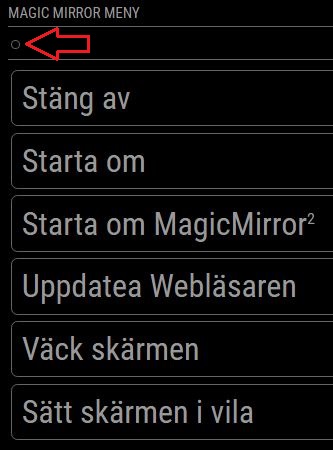
@Jopyth I have lost the “Back” button on my remote see pic…
Update: Just realized I have actually lost all the “icons”… :)
I’m on the “development” branch (both on the mirror and on your module).I have recently reinstalled my mirror (today actually) but before that it worked…
Have I missed something?