MagicMirror Forum
    • Recent
    • Tags
    • Unsolved
    • Solved
    • MagicMirror² Repository
    • Documentation
    • 3rd-Party-Modules
    • Donate
    • Discord
    • Register
    • Login
    1. Home
    2. sunnykeerthi
    3. Posts
    A New Chapter for MagicMirror: The Community Takes the Lead
    Read the statement by Michael Teeuw here.
    S
    Offline
    • Profile
    • Following 0
    • Followers 0
    • Topics 7
    • Posts 17
    • Groups 0

    Posts

    Recent Best Controversial
    • Unable to create two clocks that looks alike

      Hi,

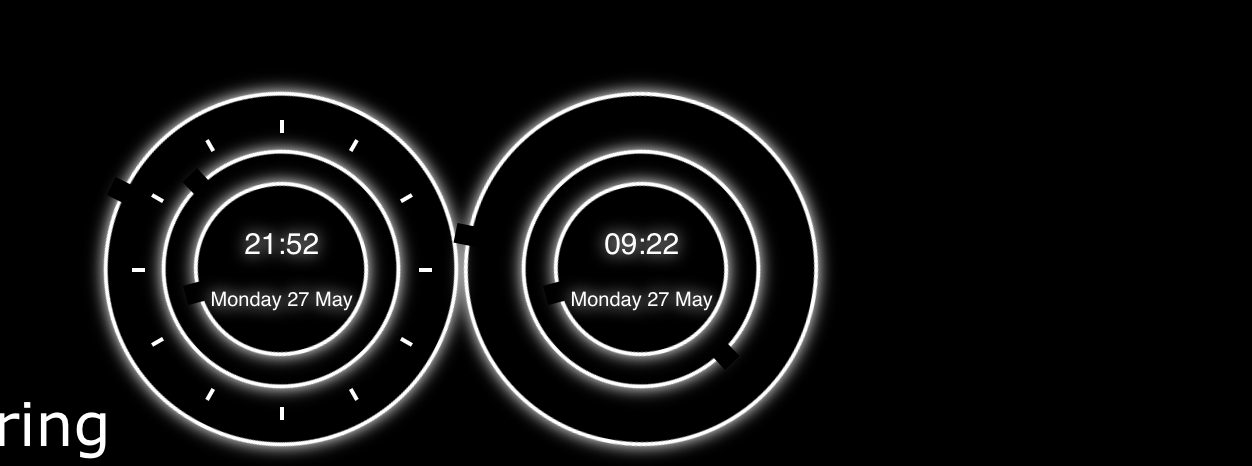
      I’m using the MMM-iClock module to display clock. Initially this was working fine, but here as per my requirement, I am trying to display 2 clocks side by side in top_right section. Here I’ve 2 questions.

      • Here the functionality is working fine, but the UI(of the 2nd clock) seems messed up(the number bars doesn’t show up).

      • As soon as the mirror starts, the clocks goes to the right corner and then automatically comes to place.

      Here is my code.

      var iClock;
      Module.register("MMM-iClock", {
          defaults: {
              seconds: true,
              size: "350px",
              color: "#FFFFFF",
              digital: 2,				//	0 (no display), 1 (permanent display) or 2 (show for 5 seconds on every miniute)
              analogue: true,		//	false (no display), true (permanent display)
              glow: true,			//	false (no display), true (permanent display)
      
          },
          getStyles: function () {
              return ["MMM-iClock.css"];
          },
      
          days: ["Sunday", "Monday", "Tuesday", "Wednesday", "Thursday", "Friday", "Saturday"],
          months: ["January", "February", "March", "April", "May", "June", "July",
              "August", "September", "October", "November", "December"],
      
          start: function () {
              iClock = this;
              Log.info("Starting module: " + iClock.name);
              var style = document.querySelector('html');
              style.style.setProperty('--fore', iClock.config.color);
              style.style.setProperty('--size', iClock.config.size);
              if (!iClock.config.glow)
                  style.style.setProperty('--glow', "none");
              setTimeout(iClock.updateClock, 1000)
          },
      
          getDom: function () {
              var wrapper = document.createElement("div");
              wrapper.className = "iClock";
              if (iClock.config.analogue === true) {
                  var x = document.createElement("div");
                  x.className = "x";
                  var y = document.createElement("div");
                  y.className = "y";
                  var z = document.createElement("div");
                  z.className = "z";
      
                  overlay = document.createElement("div");
                  overlay.className = "overlay";
                  var hour = document.createElement("div");
                  hour.className = "hour";
                  hour.id = "sHour";
                  overlay.appendChild(hour);
                  var minute = document.createElement("div");
                  minute.className = "minute";
                  minute.id = "sMinute";
                  overlay.appendChild(minute);
                  if (iClock.config.seconds === true) {
                      var second = document.createElement("div");
                      second.className = "second";
                      second.id = "sSecond";
                      overlay.appendChild(second);
                  }
      
                  //SFO
      
                  sfoTimeoverlay = document.createElement("div");
                  sfoTimeoverlay.className = "sfoTimeoverlay";
                  var sfoTimehour = document.createElement("div");
                  sfoTimehour.className = "hour";
                  sfoTimehour.id = "sfoTimesHour";
                  sfoTimeoverlay.appendChild(sfoTimehour);
                  var sfoTimeminute = document.createElement("div");
                  sfoTimeminute.className = "minute";
                  sfoTimeminute.id = "sfoTimesMinute";
                  sfoTimeoverlay.appendChild(sfoTimeminute);
                  if (iClock.config.seconds === true) {
                      var sfoTimesecond = document.createElement("div");
                      sfoTimesecond.className = "second";
                      sfoTimesecond.id = "sfoTimesSecond";
                      sfoTimeoverlay.appendChild(sfoTimesecond);
                  }


                  z.appendChild(overlay);
                  z.appendChild(sfoTimeoverlay);
                  y.appendChild(z);
                  x.appendChild(y);
                  wrapper.append(x);
              }
              if (iClock.config.digital !== 0) {
                  var time = document.createElement("div");
                  time.className = "time";
                  time.id = "sTime";
                  if (iClock.config.digital === 2)
                      time.style.opacity = 0;
                  if (iClock.config.analogue === true)
                      overlay.appendChild(time);
                  else wrapper.appendChild(time);
              }
              if (iClock.config.digital !== 0) {
                  console.log('##########' + iClock.config.digital);
                  var sfoTimetime = document.createElement("div");
                  sfoTimetime.className = "time";
                  sfoTimetime.id = "sfoTimesTime";
                  if (iClock.config.digital === 2)
                      sfoTimetime.style.opacity = 0;
                  if (iClock.config.analogue === true)
                      sfoTimeoverlay.appendChild(sfoTimetime);
                  else
                      wrapper.appendChild(sfoTimetime);
              }
              return wrapper;
          },
          updateClock: function () {
              var wait = 60;
              now = new Date();
              console.log(now);
      
              wait -= now.getSeconds();
              var sec = now.getSeconds() + (60 * now.getMinutes()) + (60 * 60 * now.getHours());
              if (iClock.config.seconds === true) {
                  wait = 1;
                  sec += 1
              }
              s = (360 / 60) * sec;
              m = s / 60;
              h = m / 12
              sHour = hour = now.getHours();
              sMinute = minute = now.getMinutes();
              if (sHour < 10) sHour = "0" + sHour;
              if (sMinute < 10) sMinute = "0" + sMinute;
              var sDate = document.createElement("div");
              sDate.className = "date";
              sDate.innerHTML = iClock.days[now.getDay()] + " " + now.getDate() + " " + iClock.months[now.getMonth()];
              document.getElementById('sTime').innerHTML = sHour + ":" + sMinute;
              document.getElementById('sTime').appendChild(sDate);
              if (iClock.config.digital == 2) {
                  if ((iClock.config.seconds === true && (sec + 2) % 60 == 0) || iClock.config.seconds === false)
                      document.getElementById('sTime').style.opacity = 1;
                  setTimeout(function () {
                      document.getElementById('sTime').style.opacity = 0;
                  }, 5000);
              }
              if (iClock.config.analogue === true) {
                  if (iClock.config.seconds === true)
                      document.getElementById('sSecond').style.transform = "translate(-50%, -50%) rotate(" + s + "deg)";
                  document.getElementById('sMinute').style.transform = "translate(-50%, -50%) rotate(" + m + "deg)";
                  document.getElementById('sHour').style.transform = "translate(-50%, -50%) rotate(" + h + "deg)";
              }
      
      
              var estTime = new Date();
              estTime.setHours(now.getHours() - 12);
              estTime.setMinutes(now.getMinutes() - 30);
              console.log(estTime);
      
              sfoTime = estTime;
              wait = 60;
      
      
              wait -= sfoTime.getSeconds();
              var sfoTimesec = sfoTime.getSeconds() + (60 * sfoTime.getMinutes()) + (60 * 60 * sfoTime.getHours());
              if (iClock.config.seconds === true) {
                  wait = 1;
                  sfoTimesec += 1
              }
              sfoTimes = (360 / 60) * sfoTimesec;
              sfoTimem = sfoTimes / 60;
              sfoTimeh = sfoTimem / 12
              sfoTimesHour = sfoTimehour = sfoTime.getHours();
              sfoTimesMinute = sfoTimeminute = sfoTime.getMinutes();
              if (sfoTimesHour < 10) sfoTimesHour = "0" + sfoTimesHour;
              if (sfoTimesMinute < 10) sfoTimesMinute = "0" + sfoTimesMinute;
              var sfoTimesDate = document.createElement("div");
              sfoTimesDate.className = "date";
              sfoTimesDate.innerHTML = iClock.days[sfoTime.getDay()] + " " + sfoTime.getDate() + " " + iClock.months[sfoTime.getMonth()];
              console.log(document.getElementById('sfoTimesTime'));
              document.getElementById('sfoTimesTime').innerHTML = sfoTimesHour + ":" + sfoTimesMinute;
              document.getElementById('sfoTimesTime').appendChild(sfoTimesDate);
              if (iClock.config.digital == 2) {
                  if ((iClock.config.seconds === true && (sfoTimesec + 2) % 60 == 0) || iClock.config.seconds === false)
                      document.getElementById('sfoTimesTime').style.opacity = 1;
                  setTimeout(function () {
                      document.getElementById('sfoTimesTime').style.opacity = 0;
                  }, 5000);
              }
              if (iClock.config.analogue === true) {
                  if (iClock.config.seconds === true)
                      document.getElementById('sfoTimesSecond').style.transform = "translate(-50%, -50%) rotate(" + sfoTimes + "deg)";
                  document.getElementById('sfoTimesMinute').style.transform = "translate(-50%, -50%) rotate(" + sfoTimem + "deg)";
                  document.getElementById('sfoTimesHour').style.transform = "translate(-50%, -50%) rotate(" + sfoTimeh + "deg)";
              }
              setTimeout(iClock.updateClock, wait * 1000);
          }
      });
      

      and here is the CSS.

      :root {
          --back: #000;
          --fore: #00D6FF;
          --size: 350px;
          --glow: 0 0 8px var(--fore);
      }
      
      .iClock {
          position: relative;
          display: block;
          width: var(--size);
          height: var(--size);
          border-radius: 350px;
      }
      
      .iClock .x:after, .iClock .x:before, .iClock .x .y:after, .iClock .x .y:before, .iClock .x .y .z:after, .iClock .x .y .z:before {
          content: "";
          position: absolute;
          top: 50%;
          left: 50%;
          transform: translate(-50%, -50%);
          width: 2px;
          height: 100%;
          background: var(--fore);
      }
      
      .iClock:after {
          transform: translate(-50%, -50%) rotate(90deg);
          z-index: 1;
      }
      
      .iClock .x:before {
          transform: translate(-50%, -50%) rotate(30deg);
      }
      
      .iClock .x:after {
          transform: translate(-50%, -50%) rotate(60deg);
      }
      
      .iClock .x .y:before {
          transform: translate(-50%, -50%) rotate(120deg);
      }
      
      .iClock .x .y:after {
          transform: translate(-50%, -50%) rotate(150deg);
      }
      
      .iClock .x .y .z:before {
          transform: translate(-50%, -50%) rotate(0deg);
      }
      
      .iClock .x .y .z:after {
          transform: translate(-50%, -50%) rotate(90deg);
      }
      
      .overlay {
          float: left;
      }
      
      .sfoTimeoverlay {
          float: right;
          margin-left: 120%
      }
      
      .iClock .x .y .overlay, .iClock .x .y .sfoTimeoverlay {
          position: absolute;
          width: 91%;
          height: 91%;
          top: 50%;
          left: 50%;
          transform: translate(-50%, -50%);
          background: var(--back);
          border-radius: 300px;
          z-index: 2;
      }
      
      .iClock .x .y .overlay .hour, .iClock .x .y .overlay .minute, .iClock .x .y .overlay .second, 
      .iClock .x .y .sfoTimeoverlay .hour, .iClock .x .y .sfoTimeoverlay .minute, .iClock .x .y .sfoTimeoverlay .second {
          position: absolute;
          top: 50%;
          left: 50%;
          width: calc(100% + 40px);
          height: calc(100% + 40px);
          border-radius: 350px;
          transform: translate(-50%, -50%);
          border: 2px solid var(--fore);
          box-shadow: var(--glow);
      }
      
      .iClock .x .y .overlay .hour:after, .iClock .x .y .overlay .minute:after, .iClock .x .y .overlay .second:after, .iClock .x .y .sfoTimeoverlay .hour:after, .iClock .x .y .sfoTimeoverlay .minute:after, .iClock .x .y .sfoTimeoverlay .second:after {
          content: "";
          position: absolute;
          width: 10px;
          height: 15px;
          top: -8px;
          left: 50%;
          transform: translate(-50%);
          background: var(--back);
      }
      
      .iClock .x .y .overlay .minute, .iClock .x .y .sfoTimeoverlay .minute {
          width: calc(100% - 18px);
          height: calc(100% - 18px);
      }
      
      .iClock .x .y .overlay .second, .iClock .x .y .sfoTimeoverlay .second {
          width: calc(100% - 50px);
          height: calc(100% - 50px);
      }
      
      .iClock .time {
          position: absolute;
          top: 50%;
          left: 50%;
          transform: translate(-50%, -50%);
          text-align: center;
          font-family: 'Titillium Web', sans-serif;
          text-align: center;
          font-size: 15px;
          white-space: nowrap;
          font-weight: 500;
          line-height: 30px;
          text-shadow: var(--glow);
          color: var(--fore);
      }
      
      .iClock .x .y .overlay .hour, .iClock .x .y .overlay .minute, .iClock .x .y .overlay .second, .iClock .time, .iClock .x .y .sfoTimeoverlay .hour, .iClock .x .y .sfoTimeoverlay .minute, .iClock .x .y .sfoTimeoverlay .second, .iClock .time {
          transition: 1s cubic-bezier(.4, 0, .2, 1);
          -o-transition: 1s cubic-bezier(.4, 0, .2, 1);
          -ms-transition: 1s cubic-bezier(.4, 0, .2, 1);
          -moz-transition: 1s cubic-bezier(.4, 0, .2, 1);
          -webkit-transition: 1s cubic-bezier(.4, 0, .2, 1);
      }
      
      .iClock .time .date {
          font-size: 10px;
          line-height: 25px;
          text-align: center;
      }
      

      I didn’t do much of coding here, I copy pasted the existing clock and did modifications on top of it.

      Here is how it looks while I start my mirror.
      0_1558974204182_Screen Shot 2019-05-27 at 9.52.37 PM.png

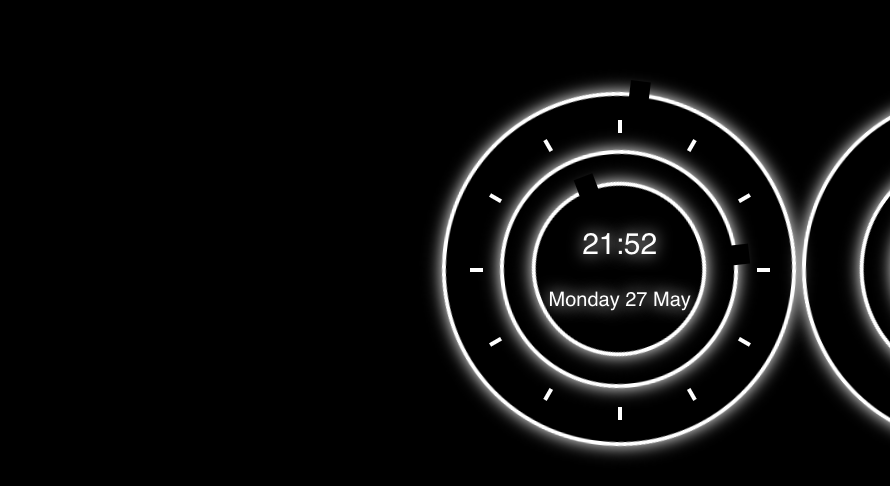
      And here it is after 2-3 seconds.

      0_1558974231410_Screen Shot 2019-05-27 at 9.52.43 PM.png

      please let me know on where am I going wrong and how can I fix this.

      Thanks,
      Sunny
      posted in Troubleshooting
      S
      sunnykeerthi
    • RE: Compliments module is killing my other module.

      Thanks very much @Sean :slightly_smiling_face:

      posted in Troubleshooting
      S
      sunnykeerthi
    • RE: Compliments module is killing my other module.

      Hi @sdetweil ,

      Here is my update config.js.

      {
      			module: "compliments",
      			position: "top_right"
      		},
      
      		{
      			module: "MMM-Widget",
      			config: {
      				widgets: [
      
      					{
      						html: "<a class=\"twitter-timeline\" href=\"https://twitter.com/adidas?ref_src=twsrc%5Etfw\" data-aria-polite=\"assertive\">Tweets by Adidas</a> <script async src=\"https://platform.twitter.com/widgets.js\" charset=\"utf-8\"></script>",
      						position: "top_left",
      						width: "400px",
      						height: "500px",
      					},
      
      
      				]
      			}
      		},
      

      But still no luck :frowning_face:

      @Module-Developers , @Sean any help please.

      Thanks

      posted in Troubleshooting
      S
      sunnykeerthi
    • RE: Compliments module is killing my other module.

      Ah!!! Ohk @sdetweil , Thanks… I’ll update and post you back.

      Thanks!!!

      posted in Troubleshooting
      S
      sunnykeerthi
    • RE: Compliments module is killing my other module.

      Hey @sdetweil,

      Is that the real reason of this?

      Thanks

      posted in Troubleshooting
      S
      sunnykeerthi
    • Compliments module is killing my other module.

      Hi,

      I am using compliments module and Widget module(MMM-Widget) together on the same screen. Compliments module basically refreshes every 30 sec. once 30 sec cycle ends(updateInterval), my module widget gets blank :frowning_face:

      Here is the widget module that I’m using. (this is the out of the box one that’s provided, I didn’t modify anything here. I changed the references in config.js file only).

      /* Magic Mirror
      * Module: MMM-Widget
      *
      * By eouia
      */
      
      const DefaultWidgetFormat = {
        url: "",
        position: "top_left",
        width: "200px",
        height: "200px",
        backgroundColor: "#000"
      }
      
      
      Module.register("MMM-Widget",{
        defaults: {
          widgets: []
        },
      
        start: function() {
          this.sendSocketNotification("INIT", this.config)
        },
      
        notificationReceived: function(noti, payload, sender) {
          if (noti == "DOM_OBJECTS_CREATED") {
            this.sendSocketNotification("START")
          }
        },
      
        socketNotificationReceived: function(noti, payload) {
          if (noti == "READY") {
            this.loadWidgets()
          }
        },
      
      
        loadWidgets: function() {
          var widgets = this.config.widgets
          for (i in widgets){
            var widget = Object.assign({}, DefaultWidgetFormat, widgets[i])
      
            var iFrame = document.createElement("iframe")
            iFrame.id = "WIDGET_" + i
            iFrame.className = "widget_item"
            iFrame.style.width = widget.width
            iFrame.style.height = widget.height
            iFrame.style.border = "none"
            iFrame.style.display = "block"
            iFrame.style.overflow = "hidden"
            iFrame.style.backgroundColor = widget.backgroundColor
            iFrame.scrolling = "no"
            iFrame.src = "/widget/" + i
            var position = "." + widget.position.replace("_", ".") + " > .container"
            var regionContainer = document.querySelector(position)
            regionContainer.appendChild(iFrame)
            if (regionContainer.style.display == "none") {
              regionContainer.style.display = "block"
            }
          }
        },
      
        suspend: function() {
          var doms = document.getElementsByClassName("widget_item")
          if (doms.length > 0) {
            for (let dom of doms) {
              dom.style.display = "none"
            }
          }
        },
      
        resume: function() {
          var doms = document.getElementsByClassName("widget_item")
          if (doms.length > 0) {
            for (let dom of doms) {
              dom.style.display = "block"
            }
          }
        }
      })
      

      the compliments module that I’m using is also one that is provided out of the box.

      Here is my config file.

      modules: [
      
      		{
      			module: "compliments",
      			position: "top_center"
      		},
      
      		{
      			module: "MMM-Widget",
      			config: {
      				widgets: [
      
      					{
      						html: `
      								<a class="twitter-timeline" href="https://twitter.com/adidas?ref_src=twsrc%5Etfw" data-aria-polite="assertive">Tweets by Salesforce</a> 
      								<script async src="https://platform.twitter.com/widgets.js" charset="utf-8"></script> 
      				`,
      						position: "top_left",
      						width: "400px",
      						height: "500px",
      					},
      
      					{
      						html: `
      								<!-- TradingView Widget BEGIN -->
      		<div class="tradingview-widget-container" >
      		  <script type="text/javascript" src="https://s3.tradingview.com/external-embedding/embed-widget-single-quote.js" async>
      		  {
      		  "symbol": "NYSE:CRM",
      		  "width": "100%",
      		  "colorTheme": "light",
      		  "isTransparent": false,
      		  "locale": "en"
      		}
      		  </script>
      		</div>
      		<!-- TradingView Widget END -->
      								`,
      						position: "bottom_left",
      						width: "400px",
      						height: "111px",
      						backgroundColor: "#FFF"
      					},
      				]
      			}
      		},
      

      please let me know on how can I fix this, this is very confusing.

      Also need some help on auto refreshing this MMM-Widget module for every 30 seconds to show latest feed.

      Thanks,
      Sunny

      posted in Troubleshooting
      S
      sunnykeerthi
    • RE: Magic Mirror Alexa

      Hey @sdetweil ,

      I’m referring t o the module MMM-awesome-alexa. event this has got rasberry pi as a mandate thing 😞 . I was going through the read me and saw this article https://github.com/dolanmiu/MMM-awesome-alexa/blob/master/docs/AudioSetup.md. Can you please point out me to an existing module or a link for my reference where I can use Alexa with MM on my mac.

      Thanks,
      Sunny

      posted in General Discussion
      S
      sunnykeerthi
    • RE: Magic Mirror Alexa

      Hi @sdetweil,

      Thanks for the quick reply. I’ve seen the snowboy project on github. I’ll check it out and keep you posted. Thanks again mate!!!

      Sunny

      posted in General Discussion
      S
      sunnykeerthi
    • Magic Mirror Alexa

      Hi All,

      I’m soo addicted to Magic Mirror stuff that I want to look at all the possible things that I can integrate with it.

      I have good amount of experience in developing Alexa skills using ASK but never did it using AVS. Here is my question.

      There are a lot of modules developed around Alexa(I’ve seen 3 if I’m not wrong). But everywhere I see, I’ve seen that it’s linked to Pi(someway or the other as MM is primarily Pi focused thing). I was wondering if there is a way(/possibility) of implementing the same Alexa services without using Pi (I initially wanted to test in my local machine before putting it out onto my Pi). The microphone used would be of my machine’s(MacBook Pro).

      Please let me know on how can I do this.

      Thanks,
      Sunny.

      posted in General Discussion alexa alexa voice service help
      S
      sunnykeerthi
    • RE: multiple carousals not rendering as expected

      Hi @sdetweil ,

      thanks very much for the quick reply. I added this.updateDom(1000), but I get the error as below.

      Uncaught TypeError: this.updateDom is not a function

      I did the below to both my files.

      this.slideIndex++;
      slides[this.slideIndex - 1].style.display = "block";
      if (this.slideIndex > (slides.length - 1)) { 
        this.slideIndex = 0 
      }
      setInterval(this.showSlides1, 2000);
      this.updateDom(1000);


      please let me know where am I going wrong.

      Thanks

      posted in Troubleshooting
      S
      sunnykeerthi
    • multiple carousals not rendering as expected

      Hi,

      I’m creating 2 carousals one on top_center and another in bottom_bar. Both of them are working perfectly when I run them separately(by commenting out either top or bottom part in config.js). when I run them together they seem to show up in random times, though the interval set is the same. Here is my code.

      my first slide page

      Module.register("deImages", {
      	// Default module config.
      	defaults: {
      		width: 200,
      		height: 200,
      		text: "Hello World!",
      		slideIndex: -1,
      		rotateInterval: 30 * 1000,
      		animationSpeed: 3000, // fade in and out speed
      		initialLoadDelay: 4250,
      		retryDelay: 2500,
      		updateInterval: 60 * 60 * 1000,
      	},
      	total_info: "Hello World!",
      
      
      	getStyles: function () {
      		return [
      			'deImagesStyle.css'
      		]
      	},
      
      
      	getDom: function () {
      		var wrapperEl = document.createElement("div");
      		var container = document.createElement("div");
      		container.className = "slideshow-container";
      
      		var div1 = document.createElement("div");
      		div1.className = "mySlides fade";
      
      		var img1 = document.createElement("img");
      		img1.src = "https://www.w3schools.com/howto/img_nature_wide.jpg";
      		div1.appendChild(img1);
      		container.appendChild(div1);
      
      		var div2 = document.createElement("div");
      		div2.className = "mySlides fade";
      
      		var img2 = document.createElement("img");
      		img2.src = "https://www.w3schools.com/howto/img_mountains_wide.jpg";
      		div2.appendChild(img2);
      		container.appendChild(div2);
      
      		var div3 = document.createElement("div");
      		div3.className = "mySlides fade";
      
      		var img3 = document.createElement("img");
      		img3.src = "https://www.w3schools.com/howto/img_snow_wide.jpg";
      		div3.appendChild(img3);
      		container.appendChild(div3);
      		wrapperEl.appendChild(container);
      
      		Log.log("slide payload >> ");
      
      		return wrapperEl;
      	},


      	showSlides1: function () {
      		if (!this.slideIndex) {
      			this.slideIndex = 0;
      		}
      		var i;
      		var slides = document.getElementsByClassName("mySlides");
      		for (i = 0; i < slides.length; i++) {
      			console.log(slides[i]);
      			slides[i].style.display = "none";
      		}
      
      		this.slideIndex++;
      		slides[this.slideIndex - 1].style.display = "block";
      		if (this.slideIndex > (slides.length - 1)) { this.slideIndex = 0 }
      
      		setInterval(this.showSlides1, 2000);
      	},
      
      	start: function () {
      		this.sendSocketNotification('duDash_initConnection');
      	},
      
      	socketNotificationReceived: function (notification, payload) {
      		if (notification === "duDash_updateNumbers") {
      			Log.log("payload >> " + payload);
      			this.total_info = payload;
      			this.updateDom();
      			setInterval(this.showSlides1, 2000);
      		}
      	}
      });
      

      and here is my 2nd file

      Module.register("deImages_2", {
      	// Default module config.
      	defaults: {
      		width: 200,
      		height: 200,
      		text: "Hello World!",
      		slideIndex: -1,
      		rotateInterval: 30 * 1000,
      		animationSpeed: 3000, // fade in and out speed
      		initialLoadDelay: 4250,
      		retryDelay: 2500,
      		updateInterval: 60 * 60 * 1000,
      	},
      	total_info: "Hello World!",
      
      
      	getStyles: function () {
      		return [
      			'deImagesStyle2.css'
      		]
      	},


      	getDom: function () {
      		var wrapperEl = document.createElement("div");
      		var container = document.createElement("div");
      		container.className = "slideshow-container";
      
      		var div1 = document.createElement("div");
      		div1.className = "mySlides fade";
      
      		var img1 = document.createElement("img");
      		img1.src = "https://www.w3schools.com/howto/img_nature_wide.jpg";
      		div1.appendChild(img1);
      		container.appendChild(div1);
      
      		var div2 = document.createElement("div");
      		div2.className = "mySlides fade";
      
      		var img2 = document.createElement("img");
      		img2.src = "https://www.w3schools.com/howto/img_mountains_wide.jpg";
      		div2.appendChild(img2);
      		container.appendChild(div2);
      
      		var div3 = document.createElement("div");
      		div3.className = "mySlides fade";
      
      		var img3 = document.createElement("img");
      		img3.src = "https://www.w3schools.com/howto/img_snow_wide.jpg";
      		div3.appendChild(img3);
      		container.appendChild(div3);
      		wrapperEl.appendChild(container);
      		Log.log("slide payload >> ");
      
      		return wrapperEl;
      	},


      	showSlides2: function () {
      		if (!this.slideIndex) {
      			this.slideIndex = 0;
      		}
      		var i;
      		var slides = document.getElementsByClassName("mySlides");
      		for (i = 0; i < slides.length; i++) {
      			console.log(slides[i]);
      			slides[i].style.display = "none";
      		}
      
      		this.slideIndex++;
      		slides[this.slideIndex - 1].style.display = "block";
      		if (this.slideIndex > (slides.length - 1)) { this.slideIndex = 0 }
      
      		setInterval(this.showSlides2, 2000);
      	},
      
      	start: function () {
      		this.sendSocketNotification('duDash_initConnection2');
      	},


      	socketNotificationReceived: function (notification, payload) {
      		if (notification === "duDash_updateNumbers2") {
      			Log.log("payload >> " + payload);
      			this.total_info = payload;
      			this.updateDom();
      			setInterval(this.showSlides2, 2000);
      		}
      	}
      });
      

      when I run this, Here is a small gif that I’ve recorded to show the output.

      https://giphy.com/gifs/XbD0g7cAz8zVdwtQLj/fullscreen

      please let me know where am I going wrong and how Can I run the two files parallel instead of simultaneously.

      Thanks,
      Sunny

      posted in Troubleshooting magic mirror slide troubleshoot help fix
      S
      sunnykeerthi
    • RE: Create divs dynamically and add it to carousal

      Hey @sdetweil ,

      Tried it. But it doesn’t seem working.

      Thanks!!!

      posted in Troubleshooting
      S
      sunnykeerthi
    • Create divs dynamically and add it to carousal

      I’m trying to create a bunch of divs for magic mirror and then add them to another dynamic div created. Currently I’m able to create all the divs.

      Next I want to run a carousal/slideshow on these created divs.

      Below is my code.

      	// Override dom generator.
      	getDom: function () {
      		console.log('get dom');
      		var wrapperEl = document.createElement("div");
      		var container = document.createElement("div");
      		container.className = "slideshow-container";
      		wrapperEl.appendChild(container);
      
      		var div1 = document.createElement("div");
      		div1.className = "mySlides fade";
      		container.appendChild(div1);
      
      		var img1 = document.createElement("img");
      		img1.src = "https://www.w3schools.com/howto/img_nature_wide.jpg";
      		div1.appendChild(img1);
      
      		var div2 = document.createElement("div");
      		div2.className = "mySlides fade";
      		container.appendChild(div2);
      
      		var img2 = document.createElement("img");
      		img2.src = "https://www.w3schools.com/howto/img_mountains_wide.jpg";
      		div2.appendChild(img2);
      		var div3 = document.createElement("div");
      		div3.className = "mySlides fade";
      		container.appendChild(div3);
      
      		var img3 = document.createElement("img");
      		img3.src = "https://www.w3schools.com/howto/img_snow_wide.jpg";
      		div3.appendChild(img3);
      
      		this.showSlides(container, 5);
      
      		Log.log("slide payload >> ");
      		return wrapperEl;
      	},


      	showSlides: function (container, counter) {
      		var i;
      		console.log(counter);
      		slideIndex = 0;
      		var slides = container.childNodes;
      		console.log("ClassName " + slides.length);
      		var dots = document.getElementsByClassName("dot");
      		for (i = 0; i < slides.length; i++) {
      			slides[i].style.display = "none";  
      		}
      		slideIndex++;
      		if (slideIndex > slides.length) { slideIndex = 1 }
      
      		slides[slideIndex - 1].style.display = "block";
      		counter = counter - 1;
      		if (counter != 0)
      			setTimeout(this.showSlides(container, counter), 2000); // Change image every 2 seconds
      
      	},
      

      Here only one image shows up and the carousal doesn’t roll.

      please let me know on where am I going wrong and how Can I fix this.

      Thanks

      posted in Troubleshooting
      S
      sunnykeerthi
    • Confused displaying a simple graph with Chart.js

      Hi,

      I’m pretty new to Magic Mirror development. I am trying to develop a module using chart.js. I’m using the module provided at MMM-Chart.

      Here is my code.

      
      Module.register("MMM-Chart", {
          defaults: {
              width: 200,
              height: 200,
              chartConfig: {
                  type: 'bar',
                  data: {
                      labels: ["Red", "Blue", "Yellow", "Green", "Purple", "Orange"],
                      datasets: [{
                          label: '# of Votes',
                          data: [12, 19, 3, 5, 2, 3],
                          backgroundColor: [
                              'rgba(255, 99, 132, 0.2)',
                              'rgba(54, 162, 235, 0.2)',
                              'rgba(255, 206, 86, 0.2)',
                              'rgba(75, 192, 192, 0.2)',
                              'rgba(153, 102, 255, 0.2)',
                              'rgba(255, 159, 64, 0.2)'
                          ],
                          borderColor: [
                              'rgba(255,99,132,1)',
                              'rgba(54, 162, 235, 1)',
                              'rgba(255, 206, 86, 1)',
                              'rgba(75, 192, 192, 1)',
                              'rgba(153, 102, 255, 1)',
                              'rgba(255, 159, 64, 1)'
                          ],
                          borderWidth: 1
                      }]
                  },
                  options: {
                      scales: {
                          yAxes: [{
                              ticks: {
                                  beginAtZero: true
                              }
                          }]
                      }
                  }
              }
          },
      
          getScripts: function () {
              return ["modules/" + this.name + "/node_modules/chart.js/dist/Chart.bundle.min.js"];
          },
      
          start: function () {
              this.config = Object.assign({}, this.defaults, this.config);
              Log.info("Starting module: " + this.name);
          },
      
          getDom: function () {
              console.log("*****" + JSON.stringify(this.config.chartConfig));
              // Create wrapper element
              const wrapperEl = document.createElement("div");
              wrapperEl.setAttribute("style", "position: relative; display: inline-block;");
      
              // Create chart canvas
              const chartEl = document.createElement("canvas");
              chartEl.width = this.config.width;
              chartEl.height = this.config.height;
      
              // Init chart.js
              this.chart = new Chart(chartEl.getContext("2d"), this.config.chartConfig);
      
              // Append chart
              wrapperEl.appendChild(chartEl);
      
              return wrapperEl;
          }
      });
      

      When I run this code, there is no error popped in the console, also there is no chart displayed on my screen.

      Here is what I’ve added to my config file.

      {
      module: "MMM-Chart",
      position: "top_left"
      }
      

      please let me know on where am I going wrong and how can I fix this.

      Thanks!!!

      posted in Troubleshooting
      S
      sunnykeerthi
    • RE: Unable to Run the Head first developing MM module for extreme beginners :(

      Sorry for my dumbest question guys :frowning_face:. I got it working, changed Module.register("MMM-Timetable", to Module.register("MMM-Test", and its working fine.

      Thanks,
      Sunny

      posted in Troubleshooting
      S
      sunnykeerthi
    • Unable to Run the Head first developing MM module for extreme beginners :(

      Hi,

      I’m absolute beginner to developing Magic Mirror Modules, but I’m ver keen and eager to learn and develop them. I started to follow the tutorial available at https://forum.magicmirror.builders/topic/8534/head-first-developing-mm-module-for-extreme-beginners. but the problem here I’m facing is as below. I did a git pull and installed the dependencies. when I did a node serveronly and firing up my chrome browser and heading to the localhost:8080, I’m able to see the clock, compliments, etc… (defaults provided). And as per the tutorial, I went till the getDom() step, and I tried running it, And when I went to my browser and refreshed the window, to my surprise, nothing is shown up, not even Hello, World!, I went to the developer console and searched for myContent , there is no such div created with such class name. :frowning_face:

      Config.js

      /* Magic Mirror Config Sample
       *
       * By Michael Teeuw http://michaelteeuw.nl
       * MIT Licensed.
       *
       * For more information how you can configurate this file
       * See https://github.com/MichMich/MagicMirror#configuration
       *
       */
      
      var config = {
      	address: "localhost", // Address to listen on, can be:
      	// - "localhost", "127.0.0.1", "::1" to listen on loopback interface
      	// - another specific IPv4/6 to listen on a specific interface
      	// - "", "0.0.0.0", "::" to listen on any interface
      	// Default, when address config is left out, is "localhost"
      	port: 8080,
      	ipWhitelist: ["127.0.0.1", "::ffff:127.0.0.1", "::1"], // Set [] to allow all IP addresses
      	// or add a specific IPv4 of 192.168.1.5 :
      	// ["127.0.0.1", "::ffff:127.0.0.1", "::1", "::ffff:192.168.1.5"],
      	// or IPv4 range of 192.168.3.0 --> 192.168.3.15 use CIDR format :
      	// ["127.0.0.1", "::ffff:127.0.0.1", "::1", "::ffff:192.168.3.0/28"],
      
      	language: "en",
      	timeFormat: 24,
      	units: "metric",
      
      	modules: [
      		{
      			module: "MMM-Test",
      			position: "top_left"
      		},
      	]
      
      };
      
      /*************** DO NOT EDIT THE LINE BELOW ***************/
      if (typeof module !== "undefined") { module.exports = config; }


      MMM-Test.js

      Module.register("MMM-Timetable", {
        defaults: {},
        start: function () {},
      getDom: function() {
        var element = document.createElement("div")
        element.className = "myContent"
        element.innerHTML = "Hello, World!"
        return element
      },
      notificationReceived: function() {},
        socketNotificationReceived: function() {},
      })
      

      and my developer console output is as below.

      Initializing MagicMirror.
      Loading core translation file: translations/en.json
      Loading core translation fallback file: translations/en.json
      Load script: modules/MMM-Test//MMM-Test.js
      Module registered: MMM-Timetable
      Load stylesheet: css/custom.css
      All modules started!
      

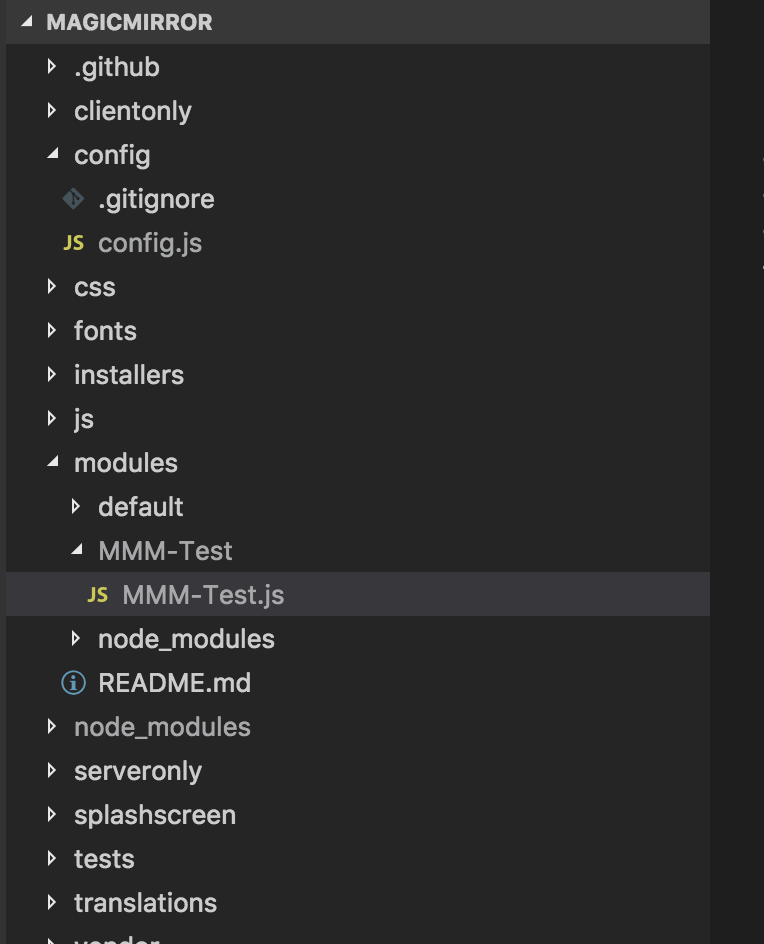
      and below is my folder structure

      0_1539021630852_MagicMirror.png

      Please let me know where am I going wrong guys and please let me know on how can I fix this. Here are my codes.

      Thanks,
      Sunny

      posted in Troubleshooting
      S
      sunnykeerthi
    • 1 / 1