A New Chapter for MagicMirror: The Community Takes the Lead
Read the statement by Michael Teeuw here.
Read the statement by Michael Teeuw here.
Y
Offline
Posts
-
RE: News feed not loading and how not to translate them
use
url: 'http://www.ara.cat/rss'instead
You linked to http://www.ara.cat/rss.html which is a landing page, the real rss feed (xml based) is http://www.ara.cat/rss -
RE: Need help for MMM-Carousel
The way you put it overrides ignoreModules everytime. You need to define it as an array:
{ module: 'MMM-Carousel', config: { ignoreModules: [ 'alert', 'MMM-iCloud-Client', 'MMM-DWD-WarnWeather', 'calendar', 'compliments', 'MMM-swisstransport', 'clock' ], } }, -
RE: [ORDER CLOSED] Two way mirror order in Germany
I just started a new post to collect interested users. Of course without any promise from Goldjunge_Chriz to really do a second order.
-
RE: Image Galery
@Jeff said in Image Galery:
I trying to get shadows around the picture to get a smooth overlay from the picture to the mirrors backround.
I’m not sure how to do this. The only way I know, i to change the original picture e.g. on instagram and put a black shadow overlay around. But I’m not really happy with this solution.
Maybe someone knows better…Some options I could think of, by just modifying your css file.
- adds a small drop shadow to the image on the right side and at the bottom
#MMM-Instagram-image { box-shadow: 5px 5px 5px #aaa; }- adds a “glowing” shadow all around the image
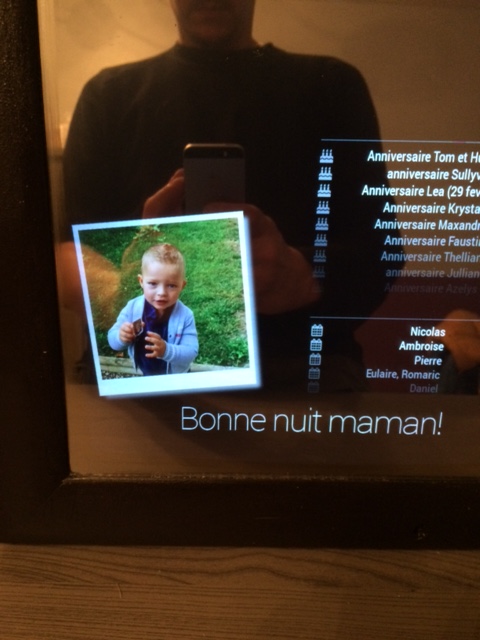
#MMM-Instagram-image { box-shadow: 2px 2px 15px #aaa, -2px 2px 15px #aaa, 2px -2px 15px #aaa, -2px -2px 15px #aaa; }- make it look like a polaroid thrown on the mirror
#MMM-Instagram-image {
    box-shadow: 10px 10px 15px #aaa;
	padding: 10px 10px 30px 10px;
	border: 1px solid #bfbfbf;
	background-color: #fff;
	transform: rotate(-6deg);
	-ms-transform: rotate(-6deg);
	-webkit-transform: rotate(-6deg);
}
Not sure if this is what you are looking for. If you go for the polaroid look (which I really like) you could add several “versions” with different rotation values and change the class when loading the next image to have some randomness.
-
RE: Multipages
The core MagicMirror does not support this. However you can follow this approach, I guess it is what you are after:
https://forum.magicmirror.builders/topic/2530/multiple-pages-of-modules-using-css
-
RE: Mistake in the config.js and i dont no
Please remove this
{ module: 'calendar', -
RE: remoteFile in compliments module
@jcorraliza
Hi, I just tried on my computer …snippit from my config.js
{
	module: 'compliments',
	position: 'lower_third',
	config: {
		remoteFile: 'compliments.json'
	}
},
my compliments.json
{
    "morning" : [
        "heyho"
    ],
    "afternoon" : [
        "home early?"
    ],
    "evening" : [
        "finally home"
    ],
	"fog" : [
		"fog, oh no :("
	]
}
The compliments.json file is located in ~/MagicMirror/modules/default/compliments
Three things to mention:- Of course you need to use the default “currentweather” module
- You need to run the new updated MagicMirror version. Otherwise compliments and currentweather are not interacting
- There is a delay loading the compliments file. I added some debug output to track that and as you see MagicMirror starts with default values and takes 30 seconds to load and verify your remote file.
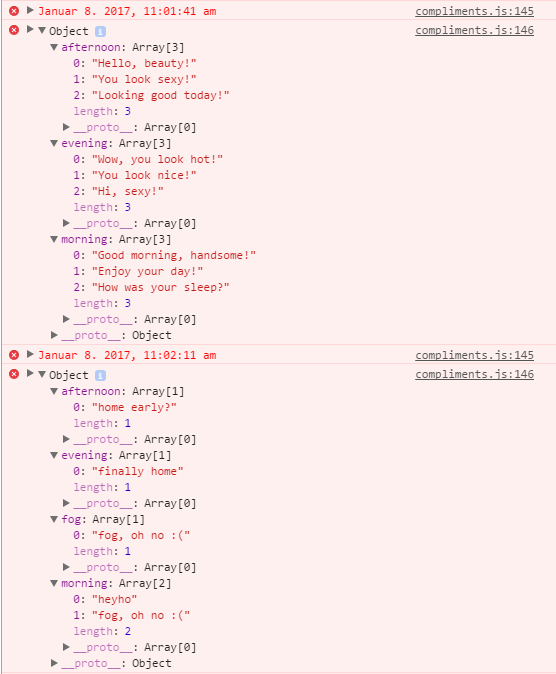
-
RE: [ORDER CLOSED] Two way mirror order in Germany
@tomster said in [ORDER CLOSED] Two way mirror order in Germany:
Thank you again for getting that order together. Still have to come up with something to return the favour though…
yeah, me too!
-
RE: Currency Exchange Rates?
all right everyone, I did some progress on the module. Please take a look at it and let me know your thoughts.
Features:
- ticker mode - displays all selected currencies in a marquee ticker, main use in my opinion is in bottom_bar or top_bar
- table mode - display all selected currencies in a table. Up to 8 currencies are split into 2 columns, anything above is split into 3 columns
- you can hide/show the curreny flag and the currency code/abbreviation
- you can display a custom header above the output to show your selected base currency and the date of the data
Question: Does anyone know if and how I could manipulate the original header to avoid the custom header thing and still display base currency and date?
One notice: data is provided by fixer.io which is updating their data once a day. There are other apis for currency rates but you cannot select your own base currency if you are on a free plan. Means you would have to pay for it
[card:yawnsde/MMM-CurrencyExchange]
-
RE: Update Font Awesome to version 5?
@zwirbel move it above the
body {line -
RE: Default Module: Weather Forecast
Edit:
Oh, the developer branch has this option. If you are on the developer branch, then maybe there is no rain at that day/days?if (this.config.showRainAmount) { var rainCell = document.createElement("td"); if (isNaN(forecast.rain)) { rainCell.innerHTML = ""; } else { rainCell.innerHTML = forecast.rain + " mm"; } rainCell.className = "align-right bright rain"; row.appendChild(rainCell); } -
RE: remoteFile in compliments module
@schlachtkreuzer6
you are in your home directory, not in your MagicMirror folder.
Runcd MagicMirrorfirst -
RE: List Good Monitors To Build With
@Timeeee said in List Good Monitors To Build With:
HDMI CEC
using https://github.com/Pulse-Eight/libcec indeed works fine, I use the same thing on my pi. It is not yet connected to the PIR sensor, so I cannot provide a out-of-the-box solution for you.
One thing you should keep in mind is the “boot delay” the screen needs when you resume out of standby. -
RE: Image Galery
@fragator said in Image Galery:
Works perfectly, thanks for the info.
I also just want to enlarge the image, what and the code for that.Looks really cool. I did not anticipate that.
-
RE: MagicMirror is voted number 1 in the MagPi Top 50!
whoop whoop
Congratulations -
RE: Mistake in the config.js and i dont no
Okay, dann eben auf deutsch.
Ich habe deine config Datei komplett kopiert und bei mir eingefügt. Das funktioniert, also kopiere bitte das hier drunter komplett und ersetze deine config Datei dadurch.var config = { port: 8080, language: 'de', timeFormat: 24, units: 'metric', modules: [ { module: 'alert', }, { module: 'clock', position: 'top_left' }, { module: 'compliments', position: 'lower_third' }, { module: 'currentweather', position: 'top_right', config: { location: 'New York', locationID: '', //ID from http://www.openweathermap.org appid: 'YOUR_OPENWEATHER_API_KEY' } }, { module: 'weatherforecast', position: 'top_right', header: 'Weather Forecast', config: { location: 'New York', locationID: '5128581', //ID from http://www.openweathermap.org appid: 'YOUR_OPENWEATHER_API_KEY' } }, { module: 'newsfeed', position: 'bottom_bar', config: { feeds: [ { title: "New York Times", url: "http://www.nytimes.com/services/xml/rss/nyt/HomePage.xml" } ], showSourceTitle: true, showPublishDate: true } }, { module: "MMM-Fuel", position: "top_left", config: { api_key: "xxxxxxxxxxxxxxxxxxxxxxxxxxxxxxxxxxxx", lat: 52.518611, lng: 13.408333, types: ["diesel"], } }, ] }; /*************** DO NOT EDIT THE LINE BELOW ***************/ if (typeof module !== 'undefined') {module.exports = config;}Hier fehlen natürlich die Keys für Currentweather/Forecast und MMM-Fuel, aber ich sehe Ausgaben auf dem Bildschirm.
Hast du MMM-Fuel auch als Modul bei dir installiert? Oder hast du nur die Einträge in der config Datei gesetzt? Wenn ich nur die Einträge setze, sehe ich einen schwarzen Bildschirm. Wenn ich aber das Modul installiere, dann funktioniert es. Öffne eine Konsole auf dem Raspberry oder nutze eine SSH shell, um auf dem Raspberry zu arbeiten:cd ~/MagicMirror/modules git clone https://github.com/fewieden/MMM-Fuel.git cd MMM-Fuel npm installDanach den MagicMirror neu starten und testen.
Grüße aus Solingen, Stefan -
RE: remoteFile in compliments module
@DvdEnde
no, this information is wrong. And you should avoid modifying module files.
Try what I have written above, it is working fine -
RE: [ORDER CLOSED] Two way mirror order in Germany
@lolobyte said in [ORDER CLOSED] Two way mirror order in Germany:
That’s all for Heilbronn Team?
Haha, I can smell your fear :)
-
RE: Looking for an image carousel
Where would you like to store these pictures? There already is an instagram module which collects pictures and displays them in a random order, one by one. In addition there is one for Flickr, and one for independant servers.