
MagicMirror Forum
    • Recent
    • Tags
    • Unsolved
    • Solved
    • MagicMirror² Repository
    • Documentation
    • 3rd-Party-Modules
    • Donate
    • Discord
    • Register
    • Login
    1. Home
    2. yawns
    3. Posts
    A New Chapter for MagicMirror: The Community Takes the Lead
    Read the statement by Michael Teeuw here.
    Offline
    • Profile
    • Following 0
    • Followers 7
    • Topics 10
    • Posts 967
    • Groups 2

    Posts

    Recent Best Controversial
    • RE: Creating a module to display daily horoscopes

      @pflnpi0305 said in Creating a module to display daily horoscopes:

      thats the issue it doesnt exsist in there… how do i clone the git via ssh

      Mh, you are right. The readme on github doesn’t state how to do this. Maybe @morozgrafix could add this, even though the process is always the same.

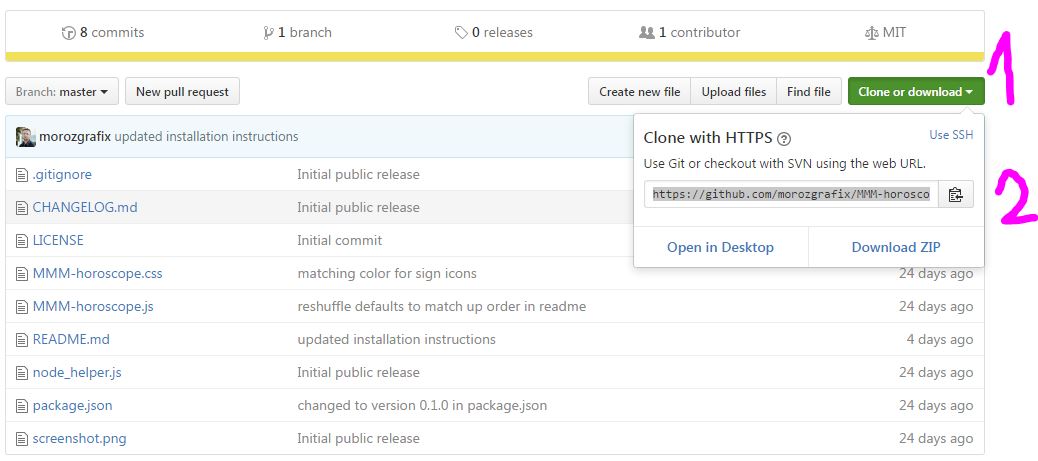
      If you go to github, you see this:
      0_1485765365171_github.JPG

      1. click on “clone or download”
      2. copy the url or click on the icon next to it
      cd ~/MagicMirror/modules
      git clone https://github.com/morozgrafix/MMM-horoscope.git
      cd MMM-horoscope
      npm install
      

      After that you update your config.js file, restart your magic mirror and should be fine

      edit: oh, morozgrafix was faster

      posted in Development
      yawnsY
      yawns
    • RE: Adding 3rd party modules help please

      @Mykle1 said in Adding 3rd party modules help please:

      If there is a rating system here, I will find it and give you highest of praise.

      Bottom right on every post you see :arrow_up_small: and :arrow_down_small: , just without the blue…
      Press/tap the up button and the author of this post gets +1

      posted in Troubleshooting
      yawnsY
      yawns
    • RE: MMM-WorldTides

      Hi, I’m short on time recently but I’ll try to take a look into this in the next days

      posted in Troubleshooting
      yawnsY
      yawns
    • RE: Defaults always read, not config values
      {
      	module: 'MMM-matrixeffect',
      	position: 'lower_third',
      	config: {
      		canvasWidth:400,
      		canvasHeight:400,
      		textPoints:10,
      		fontName:"Courier New",
      		textColor:"#F00",
      		updateSpeed:400
      	}
      },
      
      posted in Troubleshooting
      yawnsY
      yawns
    • RE: Calendar config

      Please post your entire config
      btw … I don’t know for google calendars, but I replaced https with webcal for my outlook.com calendar.

      posted in Troubleshooting
      yawnsY
      yawns
    • RE: How to Change Header MMM-Syslog

      Please try this

      {
          module: 'MMM-syslog',
          position: 'top_right',
          header: 'MY OWN HEADER',
          config: {
              title: false
          }
      }
      
      posted in Troubleshooting
      yawnsY
      yawns
    • RE: How to Change Header MMM-Syslog

      Did you try to add your own header?

      {
          module: 'MMM-syslog',
          position: 'top_right',
          header: 'MY OWN HEADER',
          config: {
              ...
          }
      }
      
      posted in Troubleshooting
      yawnsY
      yawns
    • RE: MMM-Button white screen

      @FlorianRD
      you are in the wrong directory.

      cd MagicMirror
      npm start dev
      
      posted in Troubleshooting
      yawnsY
      yawns
    • RE: Physical button

      @PointPubMedia said in Physical button:

      Hey guys…

      Anyone use physical button on a Raspberry Pi … if yes… which one you buy?

      Try searching for “push button” on ebay or other online shops. Just make sure it is a momentary push putton which does not latch

      posted in Hardware
      yawnsY
      yawns
    • RE: Default Module: Weather Forecast

      @jakubc
      You are right, the comma is redundant, but it doesn’t do any harm in this environment. In this case it did not work because lolobyte was running a MagicMirror version which did not have this feature. :)

      posted in Troubleshooting
      yawnsY
      yawns
    • RE: Camera intigration in your Mirror

      Cool, thank you

      posted in General Discussion
      yawnsY
      yawns
    • RE: Camera intigration in your Mirror

      @lolobyte
      So are you happy with your NoIR camera behind the mirror glass?
      I am still unsure if I should buy one or if I skip this. On the other hand I am tempted to do so and integrate it into my mirror design right at the beginning.

      posted in General Discussion
      yawnsY
      yawns
    • RE: Paul's frameless MM- finally done :)

      Nice, I like the frameless design. I am up to something similar.

      posted in Show your Mirror
      yawnsY
      yawns
    • RE: Camera intigration in your Mirror

      Hi, I did not test but some users report the NoIR camera works behind the mirror

      posted in General Discussion
      yawnsY
      yawns
    • RE: Config.js issues

      @strawberry-3.141 said in Config.js issues:

      @ShizukaNaHaji you should remove your appid from your post above

      I just removed the appid

      posted in Troubleshooting
      yawnsY
      yawns
    • RE: Bluetooth connections with noble

      Great. That’s what I was aiming for.

      posted in Development
      yawnsY
      yawns
    • RE: Looking for an image carousel

      Neatest way in my opinion would be your regular storage, a nas for example. Then you don’t have to copy files to your raspberry and all files are stored in one place.

      posted in Requests
      yawnsY
      yawns
    • RE: Bluetooth connections with noble

      How did you rebuild? Which command did toy use?

      posted in Development
      yawnsY
      yawns
    • RE: Looking for an image carousel

      Where would you like to store these pictures? There already is an instagram module which collects pictures and displays them in a random order, one by one. In addition there is one for Flickr, and one for independant servers.

      MMM-Instagram
      MMM-Instagram Fork
      MMM-Flickr
      MMM-RandomPhoto

      posted in Requests
      yawnsY
      yawns
    • RE: The screen doesn't have the right size

      Please check the content of ~/MagicMirror/css/main.css

      The body part should look like this:

      body {
        margin: 60px;
        position: absolute;
        height: calc(100% - 120px);
        width: calc(100% - 120px);
        background: #000;
        color: #aaa;
        font-family: "Roboto Condensed", sans-serif;
        font-weight: 400;
        font-size: 2em;
        line-height: 1.5em;
        -webkit-font-smoothing: antialiased;
      }
      

      To change background-color change background: #000; to background: #FF0000; and refresh your mirror

      posted in Troubleshooting
      yawnsY
      yawns
    • 1 / 1