Y
Offline
A New Chapter for MagicMirror: The Community Takes the Lead
Read the statement by Michael Teeuw here.
Read the statement by Michael Teeuw here.
Posts
-
RE: PIR sensor behind glass?
@cowboysdude I’m just not comfortable with the idea of a camera in my bathroom (or any other room, for that matter). Raspbian is a pretty open platform and I don’t want others to take control of any cameras I might have installed in my home. And it’s not like all sorts of people wouldn’t be interested in spying on other people.
Have started experimenting with the PIR sensor, it’s looking good so far, will let you guys know about my progress.
-
RE: Changing moment.js behavior
@MichMich Well, I sort of assumed that a change that somehow breaks the calendar for any other language than German would probably not be merged into the develop branch ^^. But I can have it depend on an if-condition and we can take a look at whether it makes sense to include it in the calendar, will submit a pull request and we’ll take it from there.
-
RE: Changing moment.js behavior
As the calender.js file takes over the days “TODAY” and “TOMORROW” it was actually quite easy to add another definition to take over the “DAYAFTERTOMORROW”.
I’ve changed the ‘calender.js’ code to look like this:
...
if (event.fullDayEvent) {
	if (event.today) {
		timeWrapper.innerHTML = this.translate("TODAY");
	} else if (event.startDate - now < one_day && event.startDate - now > 0) {
		timeWrapper.innerHTML = this.translate("TOMORROW");
	} else if (event.startDate - now < 2*one_day && event.startDate - now > 0) {
		timeWrapper.innerHTML = this.translate("DAYAFTERTOMORROW");
	} else {
...
And I’ve adjusted /MagicMirror/translations/de.json to look like this
...
	"TOMORROW": "Morgen",
	"DAYAFTERTOMORROW": "Übermorgen",
	"RUNNING": "noch",
...
Which led to this:
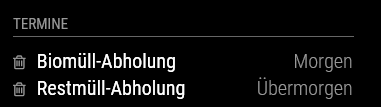
Great, just what I needed… :)
I’m aware that this will be overwritten by any update I might perform, but I can’t think of any other way to implement this feature.
-
RE: Changing moment.js behavior
I’ve just realized that both “today” and “tomorrow” are taken over by the MagicMirror translation engine, this would explain why no change to moments.js locale files made any difference :).
So if anyone is ever thinking about adjusting the calendar phrase for “today” or “tomorrow”, take a look at your MagicMirror/translations/ folder.
-
RE: Changing moment.js behavior
If I can figure out a way to change it locally in my MagicMirror, it’s easier for me to suggest changes to the moment.js crew, however as of now, I can’t change anything, no matter what I do, my calendar keeps reporting the same old information, especially for “tomorrow”. I have figured out a way to change some of the information, such as “in two days” to something like “inn two days” just to see where adjustments have to be made, but no matter what I do, it always says “morgen” for “tomorrow”.
I was actually trying to change what the folks at moment.js suggested, but it seemed like my modifications had no impact whatsoever :)
-
RE: Changing moment.js behavior
@KirAsh4 Thanks for the helpful clarification. Wouldn’t it be easy to change that behavior so that it would start calculating based on the current point of time?
Regardless of that, I would still like to change the “in a day” notice to “the day after tomorrow”, do you know how I could accomplish that? It seems that /vendor/moment/moment-with-locales.js has role to play there.
-
Changing moment.js behavior
I guess this question would be directed at @MichMich, but anyone who can help me with this, your ideas would be much appreciated.
The calendar currently shows “tomorrow” for events that are scheduled to occur tomorrow. Events that are scheduled to occur a day after tomorrow are shown as “in a day”. Now “tomorrow” and “in a day” are pretty much the same thing in German, so I wanted to include “the day after tomorrow” and was pointed in a good direction by the moment.js people.
However, I’m not able to change the ‘de’ locale file so that it reflects that on my mirror, it just keeps showing the default day definitions, no matter what I do. And I was wondering where I could make the ‘diff < 3’ adjustment for the day after tomorrow so I could include a new moment definition?
-
RE: PIR sensor behind glass?
@yawns I’ve got the HC-SR501 / D-SUN RCW-0506 and it’s working as it should.
I paid €8 for two sensors and shipping to Germany. The one in use even survived my failed attempts at connecting it to the correct pins :). -
Adjusting monitor brigthtness level via software
Now that I’ve got my mirror running software-wise and I’m about to make an actual mirror out of it, I was wondering about how to make sure the screen background isn’t visible at night. My monitor supports DDC/CI but from the little information I could gather online, it seems the Pi doesn’t support controlling an external monitor via DDC/CI (yet?).
There’s ddccontrol, but at least on my Pi 1 it didn’t work when I tried to use it, but I also have no idea what I’m doing, as I’ve only recently started experimenting with my Pi and I’m lacking the background on how a computer communicates with the monitor. It seems that most linux distributions allow for a change of the brightness level via /sys/class/backlight, but the Pi’s backlight folder is empty.
Ideally I would like to attach a light sensor to my Pi that could automatically reduce screen brightness as soon as it gets dark inside a room, but to have that happen, I would have to find a way to adjust screen brightness using the Pi rather than my monitor’s OSD.
Any help is appreciated :)
-
RE: PIR sensor behind glass?
@cowboysdude We might just drill a tiny hole into the frame of the mirror and put the PIR behind it without its Fresnel cover. Will experiment with that idea some more.
-
RE: PIR sensor behind glass?
@cowboysdude Thanks for the link. Does f.lux have access to the monitor’s brightness settings? As this has nothing to do with my original question I will start a new topic concerning the brightness issue at night.
-
RE: custom.css
@ianperrin Thanks for the clarification. I could swear I tried using “.compliments .xlarge” before posting as my own module css files use the same syntax and it looked like it didn’t work, but I’ve just tried it again and it’s working as it should :). Great to know.
-
RE: PIR sensor behind glass?
@RedNax Apparently some monitors seem to allow for external commands to change the light levels:
http://lifehacker.com/5985364/change-your-monitors-brightness-without-fiddling-with-its-buttonsThey seem to have to support DDC/CI and if there is a tool for Windows PCs there should be some way to get the same thing done on a Pi?
-
RE: PIR sensor behind glass?
@RedNax Alright, is that the case with all types of glasses? I guess it would be?
-
RE: custom.css
@Pierre Take a look at the following code in the compliments.js file:
wrapper.className = "thin xlarge bright";Among other things, it tells the mirror to print the message in extra large letters.
You have two options:
- You can change the extra large letter size for all modules
- You can redefine the letter size for the compliments module
To change the extra large letter size for all modules, add the following code to your custom.css file:
.xlarge {
  font-size:  YOURFONTSIZE px;
}
Instead of YOURFONTSIZE, you pick something you like. This is a good option if it doesn’t break any of your other existing modules because they become harder to read or start changing their layout, because this way, even when you update your mirror, the CSS file info will remain the same.
The other option would be to change the code of the compliments.js file to, say:
wrapper.className = "thin myXlarge bright";Next, you would have to define this new style myXlarge in your custom.css file:
.myXlarge {
  font-size:  YOURFONTSIZE px;
}
This way, you wouldn’t affect any of the other modules but you would have to change the compliments.js file after every update of the mirror.
I’m not aware of any way to change global css styles (such as: “xlarge”) for only a specific module using the custom.css file. Does anyone else have any idea whether that can be done?
-
RE: PIR sensor behind glass?
@RedNax Your mirror looks really cool.
Our mirror will be mounted pretty much at eye level so having the sensor at the bottom of the frame won’t be an option for me, but I’m already experimenting with covering the sensor with plastic stuff ^^.
Is there an xkcd module I’m not aware of?
And may I ask where you got your glass? Some of the pictures I’ve seen look like you can still see the monitor behind the glass but with your mirror that doesn’t seem to be the case.
-
RE: Screen Font is too big
I’m assuming you changed the font-size attribute somewhere else than in the body section of the main css file. Using the body section, you’re hypothetically telling it to change it everywhere, but most of the time you’re changing nothing at all, that is because most modules don’t use the general font size as far as I can tell (someone correct me if I’m wrong here).
The modules I’m using specifically tell the mirror to print their information in “small”, “medium”, “large”, … letters. This is what those section in the css file are for.
So, let’s say you don’t like that the “small” letters have a font size of 20px and you want them to be half as big, then you add the following lines to your custom.css:
.small {
	font-size: 10px;
}
I suggest you try to find out in which section you changed the font-size in the main.css file. Add that section to the custom.css file and change your font size there. Otherwise all your font changes will be lost the next time you update your mirror.
-
RE: PIR sensor behind glass?
Sure, I guess I’d have to play around with its sensitivity, will keep you updated on the outcome of my tests