@Knox Yeah, thanks, my Fresnel lens isn’t even fixed to the PIR sensor and comes off right away if you don’t find some way of keeping it there ;-). But you’re right, didn’t think of that, it’s actually covered by this plastic dome. Maybe if I install the PIR sensor in the frame of the mirror and cover that section of the frame with acrylic glass, such as Plexiglas, it might work and look alright. Will try and test if my sensor detects IR behind a sheet of acrylic glass.
Y
Offline
A New Chapter for MagicMirror: The Community Takes the Lead
Read the statement by Michael Teeuw here.
Read the statement by Michael Teeuw here.
Posts
-
RE: PIR sensor behind glass?
-
RE: Weatherunderground - currently - hourly - daily - configurable
@RedNax That was quick :D. Nice!
I’m still toying around with my fork of your module but I’ve made so many minor and bigger adjustments that it will be hard to simply merge the two module versions, as I would have to make every adjustment customizable in the config file to submit a pull request you could easily merge, but I will keep you updated on my progress. -
RE: PIR sensor behind glass?
@strawberry-3.141 As of now, that would probably be the best option. I’m curious as to what other mirror builders may have done to hide the sensor.
I’ve tried to find other sensors, such as radar motion detectors, but haven’t yet found one that I could easily attach to my Pi.If someone has a radar motion detector or a different way of detecting motion (other than using a webcam) already implemented into their Pi setup, I’d be very interested in finding out more about it.
Can a PIR sensor be covered by anything at all or does any kind of material automatically block motion detection?
-
RE: PIR sensor behind glass?
Thanks man, I am aware of that module, but I’m reluctant to install a webcam in my home that is connected to the internet.
-
RE: Weatherunderground - currently - hourly - daily - configurable
@RedNax Excellent idea, I really like the new layout option. As soon as you have more than 4 days in the forecast table, though, you end up with a module that takes up a lot of your screen, I’d suggest adding a new table row every four days.
-
PIR sensor behind glass?
Hey everyone, as I’d like my mirror to look as mirror-like and non-electronic as possible, I would like to hide the PIR sensor but after some initial tests it seems like putting it behind the mirror glass is not going to be an option. If you have managed to hide your PIR sensor, how did you go about it?
-
RE: Screen Font is too big
@Menn80 What did you want to change specifically?
Just let us know and I can provide you with instructions. -
RE: Weatherunderground - currently - hourly - daily - configurable
@plumcraft said in Weatherunderground - currently - hourly - daily - configurable:
Good job ! I’m also interested by your changes, let us know where we can find it.
Could be nice to add a module parameters like : “light_display : true/false” or something like that ?
Alright, I’ve forked the main repository and will try to submit a pull request after merging the two versions.
I like your light_display idea, let’s see how much time and energy I can muster :) -
RE: Building mirror without programing
Glad to see I could help you :). The community spirit is what I love about this place…
If you want to automate your setup so that the laptop boots to the mirror on startup, you would probably have to run a batch file at startup which both runs the “node serveronly” command as well as starts up a browser in fullscreen mode. Haven’t looked into it, but do share your setup, should you get that to work as well.
And make sure to showcase your mirror once it’s done ;)
https://forum.magicmirror.builders/category/12/show-your-mirrorHave fun piecing it together ^^
-
RE: Building mirror without programing
Hi man. You can run the magic mirror on a Windows system if you install node.js, which is at the heart of the mirror:
https://nodejs.org/en/download/I’m running a version of the MM on my desktop PC to build my modules, as it is much faster than my Raspberry Pi 1.
What takes forever to load on my Pi is instantly shown on my desktop PC.I’m not sure if I can still remember how to set up the environment correctly, but try this:
- Download node.js - https://nodejs.org/en/download/
- Install it on your Windows 10 PC
- Go to https://github.com/MichMich/MagicMirror, click on “Clone or download”, then “Download ZIP”
- Extract the ZIP into a folder, e.g. D:\MagicMirror
- Go to the config folder on your PC and configure your mirror via the config.js file
- Open a Windows command prompt (Press WIN+R, type in “cmd”, hit ENTER)
- Navigate to your MagicMirror folder (In my example: cd “D:\MagicMirror”)
- Type “npm install” and hit ENTER
- Type “node serveronly” and hit ENTER
- Go to a browser of your choice (in W10 Edge is preinstalled and works) and in the address bar type in “localhost:8080” and hit ENTER
If you want to stop the mirror from running, either close the command prompt window (where you entered “node serveronly”) or press CTRL+C if the command prompt is your active window.
-
RE: MMM-KVV - Local Karlsruhe transport (KVV) departure times
Does this mean you carry your MagicMirror with you, wherever you go? :D
Thanks for your pointing it out :). Yeah, in the beginning I wildly added and deleted code lines from existing modules to try and understand how the whole thing worked, in the end you end up with a nice compilation of code lines.
-
RE: Weatherunderground - currently - hourly - daily - configurable
@alihallo Sure, just contact me and I can provide you with my modifications.
-
MMM-nextbike - Are any bikes available at your local nextbike station?
[card:yo-less/MMM-nextbike]
If, like me, you love the idea of using a bike-sharing service, you might appreciate this module :).
It shows the amount of available bikes at any given “nextbike” station and lists the bike numbers of up to five available bikes.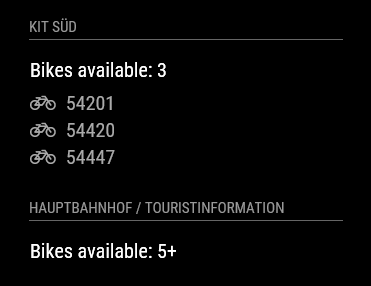
-
MMM-KVV - Local Karlsruhe transport (KVV) departure times
First of all, a big shout out to @ronny3050 for his impressive helpfulness in getting me started. I came across a really weird problem when I started developing this module and his willingness to help a newbie right away, made me feel very welcome here :).
Secondly, I want to thank @MichMich for his willingness to share his work and ideas. Trying to find a nice bathroom mirror and quite unhappy with the mirrors that are available on the market, I came across your project by chance and immediately fell in love with your invention. You could have easily used your idea to make a lot of money with your mirror, but instead you chose to share the fruits of your labor with the world. I hope that many, many others will follow your lead in the years to come :).
I only code in my spare time and have so far mostly worked on some simple web pages, but this project has pushed me to try and acquire a lot of new skills in a very short span of time. Github, npm, node.js, … . For the first few days I felt like I was drowning in a sea of information I couldn’t, for the life of me, get a grasp on, but now my first JavaScript modules are done, and I couldn’t be prouder :). So thanks to all of you for your great attitude and help.
Anyway, here’s my first module:
[card:yo-less/MMM-KVV]
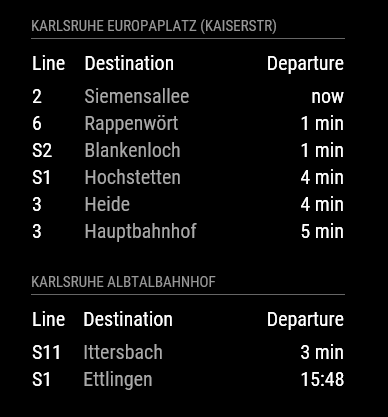
MMM-KVV shows departures times for any given stop of the Karlruhe local transport network on your mirror.
It is pretty customizable and I have tried to explain its installation and configuration on the Github page. Even though there may not be that many users here from the Karlsruhe area (if any), I look forward to hearing from you, should you come across any bugs or problems or should you find this module useful.
-
RE: Weatherunderground - currently - hourly - daily - configurable
@RedNax I went to my home/pi/MagicMirror folder and typed in “git pull”, which is when it updated. If there is an additional step to update the main framework, please let me know.
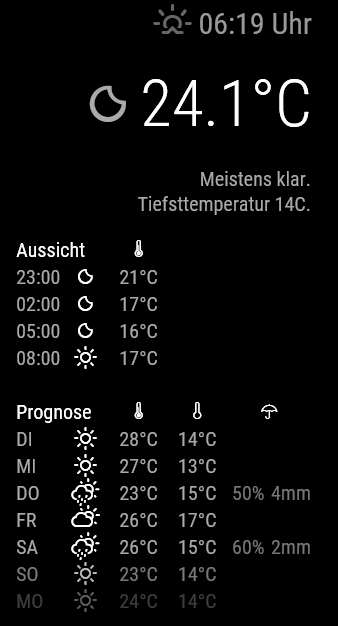
Sure, the adjustments I have made so far are mostly based around the idea that information should only be presented if it is relevant (or actually existent at all)
- Only show precipitation if the probability for rain and the expected precipitation is above 0 % / mm
- Only show the umbrella icon if there is a day with precipitation in the forecast table
- Only show windspeed if it is above 0 kph.
- I’ve removed the windspeed icon and changed it to a text line like this: 12 km/h + wind direction icon
- In the forecast table the forecast temperature for any given day is shown until sunrise of that day (As I have the hourly forecasts I don’t really need the forecast for the day after sunrise, so generally I have my forecast table start the day after today - In the time between midnight and sunrise, this isn’t all that great though as it means that I only see the forecast until, say 10am, shortly after midnight)
- I’ve added some spaces to unclutter the layout
- I’ve changed the short version of the days to all caps
Here’s a screenshot of my layout:
What I’m planning to add:
- 7am temperature in the forecast table
Here’s why: Where I live it can sometimes get pretty cold in the morning, but within hours it’s humid and hot and sometimes it gets cold later in the evening so a simple quote of the daily high and low doesn’t really represent the days all that well. And if you know that it’s mild in the morning and hot in the afternoon you can dress differently than when it’s cold in the morning and then hot for the rest of the day. Not sure if that is all too helpful for others out there ^^.
-
RE: Weatherunderground - currently - hourly - daily - configurable
@RedNax No, it seems they don’t, sorry. I just rechecked and the wi-umbrella definition is there. Strangely, though, when I performed a “git pull” in the MM main folder, my umbrellas in the Weather Underground module disappeared and I had to manually overwrite the css file in the vendor folder with the older version. I must have made some other changes to the folder prior to that, because in the github repository everything seems to be fine.
-
RE: Weatherunderground - currently - hourly - daily - configurable
@RedNax Alright, thanks for the information. I have meddled so much with your code that a fresh pull would reverse all my customizations. But I’ll have a look at the development branch to get the weather module to pull the icons from its own folder.
Could you explain to me why the new weather fonts include fewer icon definitions?
-
RE: Auto-disable module
@KirAsh4 - It’s amazing for me to see how helpful and how full of good advice people on this forum are. Thank your for that!
I’ve got my module up and running now and will go through troubleshooting it. As soon as I feel that it’s working as it should, I will try to implement the feature to automatically disable it if necessary, I will study your code then as well. Thanks for pointing me in a good direction!
-
RE: Weatherunderground - currently - hourly - daily - configurable
Quick question. Today I updated my mirror to version 2.0.4 via git pull. Afterwards the umbrella weather icon didn’t work any more as @MichMich has updated the weather font. Is this expected behavior or am I simply not getting another step I should take after updating? I have now manually copied the old files into the vendor/weather-icons folder and now it’s working again, but I suspect this is not what I should be doing ^^.