A New Chapter for MagicMirror: The Community Takes the Lead
Read the statement by Michael Teeuw here.
  • MMM-ImagesPhotos issue

    Solved
    14
    0 Votes
    14 Posts
    6k Views
    N
    @sdetweil Got it! Solved! Sam, I can’t thank you enough for your time and patience. I appreciate all of your help. Over the years even! I dont mean to be an annoyance. I find these issues daunting and beyond understanding at times.
  • Calendar and Font Awesome - no icons

    Unsolved
    22
    1
    0 Votes
    22 Posts
    7k Views
    S
    @RGN01 I reviewed on my system, used the same symbol [image: 1686745852282-screenshot-at-2023-06-14-07-29-15.png] same content… mine shows the icon edit: one question… do you have any font definitions in your custom.css? SO, this tells me the fonts didn’t get installed, so do edit… note I am adding on the vendor folder … as that is where the fontawesome css comes from cd ~/MagicMirror/fonts rm -rf node_modules rm package-lock.json npm install cd ../vendor rm -rf node_modules rm package-lock.json ls npm install then check the folder contents this is what mine looks like (base) sam@sams:~/MagicMirror/fonts$ ls node_modules package.json package-lock.json roboto.css (base) sam@sams:~/MagicMirror/fonts$ ls node_modules/ @fontsource (base) sam@sams:~/MagicMirror/fonts$ ls node_modules/@fontsource/ roboto roboto-condensed (base) sam@sams:~/MagicMirror/fonts$ my MagicMirror/vendor folder looks like this (base) sam@sams:~/MagicMirror/vendor$ ls css node_modules package.json package-lock.json vendor.js (base) sam@sams:~/MagicMirror/vendor$ ls css font-awesome.css (base) sam@sams:~/MagicMirror/vendor$ and my calendar config { module: "calendar", header: "US Holidays", position: "top_left", config: { coloredSymbol:true, calendars: [ { symbol: 'calendar', color: 'pink', url: "webcal://www.calendarlabs.com/ical-calendar/ics/76/US_Holidays.ics", name:"holidays" } ] } } the top of the MM web page shows the includes for font and css this is what the default looks like [image: 1686747152565-screenshot-at-2023-06-14-07-50-43.png]
  • 0 Votes
    11 Posts
    5k Views
    S
    @butchkemper awesome… the demons are everywhere! lol
  • UnhandledPromiseRejectionWarning: Error: Cannot find module 'request'

    Solved
    3
    0 Votes
    3 Posts
    1k Views
    M
    @sdetweil You made my day / night! Thanks!
  • Bullseye Display timeout

    Solved
    6
    0 Votes
    6 Posts
    3k Views
    A
    After a few other reboots, this does seem to be working now.
  • MMM-homeassistant-sensors- attributes ?

    2
    1
    0 Votes
    2 Posts
    581 Views
    E
    @emailuser It looks like the very last line of your code has { instead of } See if that resolves it?
  • The correct way to update a module

    Unsolved
    8
    0 Votes
    8 Posts
    8k Views
    S
    @JMac not /modules / at the front means root you want ~/MagicMirror/modules/MMM-CalendarExt3 ~ at the front means current users home folder if you are in the MagicMirror folder, then cd modules will move the current folder the the ~/MagicMirror/modules folder
  • Calendar Stuck at Loading...

    Unsolved
    11
    0 Votes
    11 Posts
    3k Views
    B
    @sdetweil Well, I actually put it down for a while and when I came back to it it seems to be working. Think it was the number of events and it trying to receive / refresh them before it was done parsing. It’s showing things now - just not everything - so going to play a bit more with and hopefully I’m on the right track. Keep you updated Thanks a ton for your help!
  • MMM-AQI display help

    Unsolved
    1
    0 Votes
    1 Posts
    247 Views
    R
    I am trying to get MMM-AQI running, but it’s not displaying correctly. It’s showing the wrong location, not matter what I try. The most recent thread on this module is a few years old, so I am starting a new one.
  • MMM-PublicTransportHafas from KristjanESPERANTO

    Unsolved
    7
    1
    0 Votes
    7 Posts
    3k Views
    O
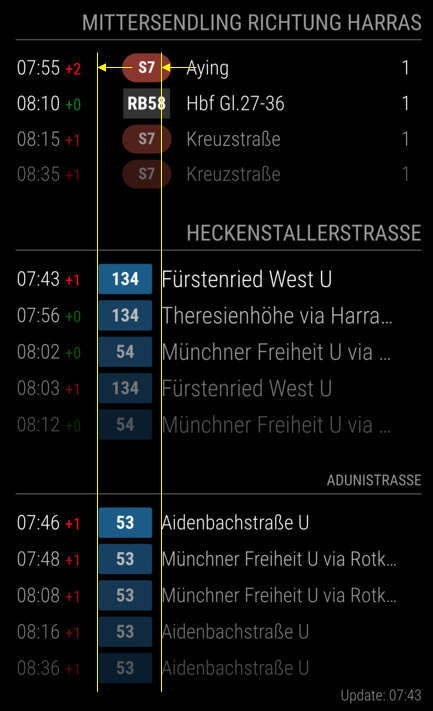
    @KristjanESPERANTO thanks again but unfortunately this did not help. It increases the space between the platform number and the right edge but does not move the platform number to the right. Even if I add .mmm-pth-platform-cell { width: 3ch; text-align: right; } it will stay same. the question marks indeed traced back to the API. they disappeared the next day.
  • Region, module, and module content alignment

    Unsolved
    2
    1
    0 Votes
    2 Posts
    1k Views
    S
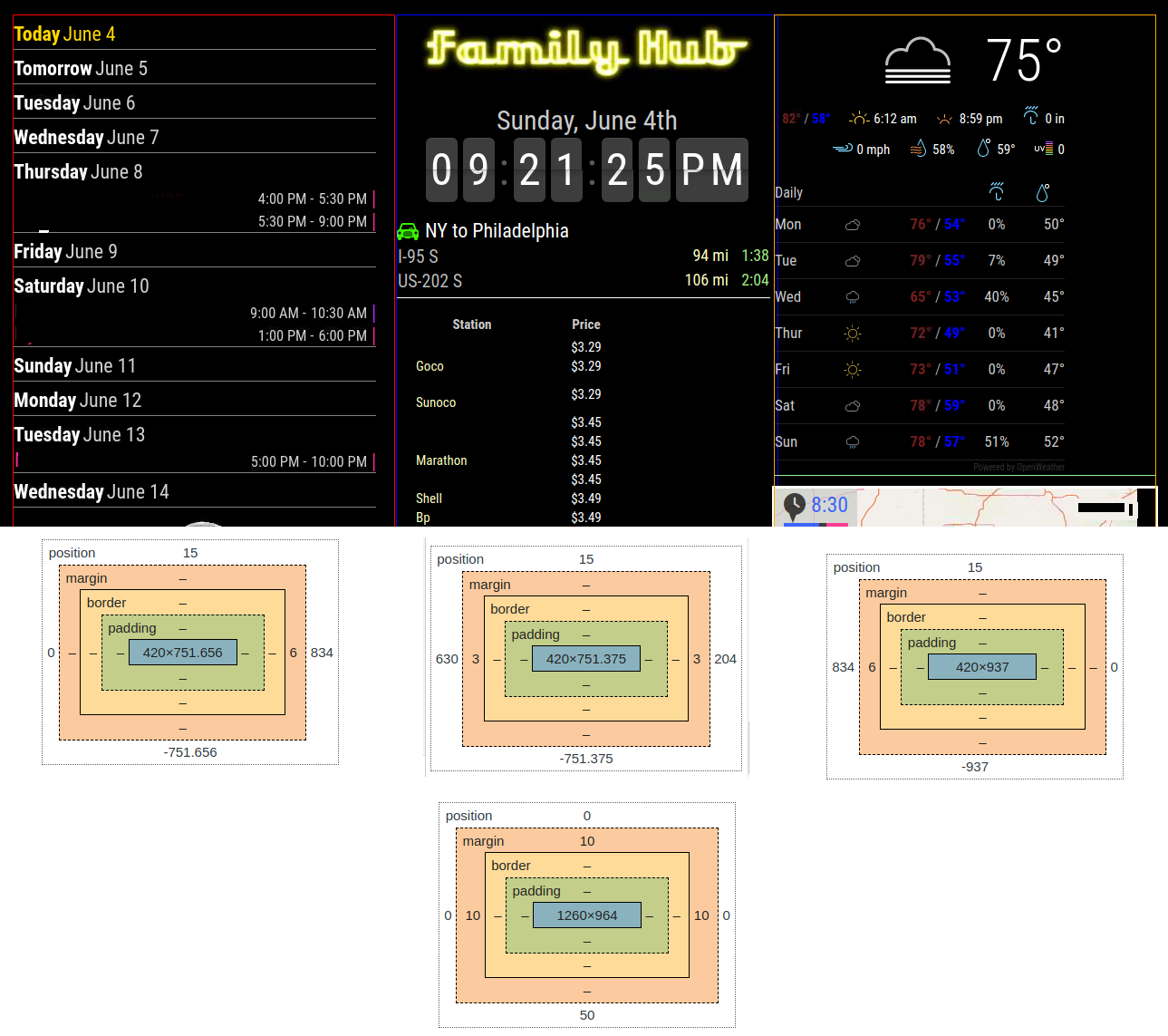
    @DDE12 as you look at the locations in the bottom region is position:absolute, so these are the ACTUAL positions you see the left is pixel 0 (left edge) to pixel 834 right is pixel 834 to 0 (right edge) the middle is 630 from left and 204 from right left and middle are approx 751 (of the 834) pixels in the center of their space for data (not margin or padding) right is wider
  • Ical calender no longer works - randomly just stopped.

    Unsolved
    5
    0 Votes
    5 Posts
    934 Views
    T
    This randomly started working again. So not sure what’s going on with it. I can only think that it was the amount of entries or something it didn’t like when reading.
  • What does this mean?

    Unsolved
    8
    0 Votes
    8 Posts
    791 Views
    S
    @DehJango show me your config… you can send as a private message, please don’t change anything…
  • MM screen doesn't start but can access through web browser

    Unsolved
    6
    0 Votes
    6 Posts
    1k Views
    S
    @DDE12 try this edit js/electron.js and change this , approx line 70 in the develop branch let address = (config.address === void 0) | (config.address === "") ? (config.address = "localhost") : config.address; to this let address = (config.address === void 0) | (config.address === "") | (config.address === "0.0.0.0") ? (config.address = "localhost") : config.address; previous issue, reopened https://github.com/MichMich/MagicMirror/issues/2550
  • pm2 no longer launching MM

    Unsolved
    38
    0 Votes
    38 Posts
    15k Views
    T
    i followed this to get my starting again https://forum.magicmirror.builders/topic/10840/problems-with-starting-pm2-start-mm-sh/7
  • Config template file not exists, no ensubst

    Solved
    8
    0 Votes
    8 Posts
    2k Views
    D
    @sdetweil The temp fix worked. Thank you!
  • MagicMirror doesn't start after updating to 2.23

    Solved
    2
    0 Votes
    2 Posts
    424 Views
    F
    @fribse Ok, that is weird, after doing the force, and waiting for quite a while, it works again??? So I’m changing it to solved, running the update once more, with “force”, made it work
  • Mirror fails to start upon update

    Solved
    5
    0 Votes
    5 Posts
    729 Views
    S
    @nakulbende on the createRequire see https://github.com/MichMich/MagicMirror/issues/2772
  • MESA Loader with fresh install

    Unsolved
    10
    0 Votes
    10 Posts
    1k Views
    S
    @calcio if you used my install script, I create that script ~/MagicMirror/installers/mm.sh
  • MMM-NetworkScanner - ShowDeviceColumns doesn't work

    Unsolved
    1
    0 Votes
    1 Posts
    468 Views
    zdenekZ
    Dears Even I’ve showDeviceColums: true, in config.js, each device is on own row, means no columns. Just in one config I’ve showInNewRow: true, so, I shoudl see only 2 rows any idea, what I did wrong? thanks Zdeněk