A New Chapter for MagicMirror: The Community Takes the Lead
Read the statement by Michael Teeuw here.
  • MM standard Newsfeed

    Unsolved
    3
    0 Votes
    3 Posts
    712 Views
    AssassinsA
    @m_m Look here, and write : https://github.com/MichMich/MagicMirror/issues/2671
  • MMM-MQTTBridge not working

    Unsolved
    5
    0 Votes
    5 Posts
    1k Views
    M
    @gkchimz Have you set the last line of dictionary? module.exports = { mqttHook, mqttNotiCommands};
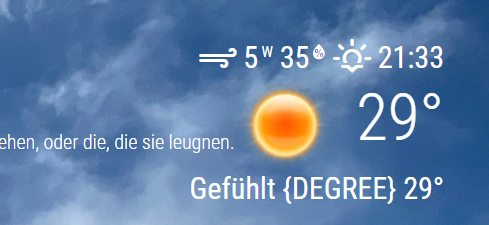
  • MMM-OpenmapWeather Error since MM v2.15.0, Gefühlt {DEGREE}

    4
    1
    0 Votes
    4 Posts
    3k Views
    M
    The issue now is fixed in the last version.
  • Calendar module: Facebook events without time

    Unsolved
    3
    0 Votes
    3 Posts
    627 Views
    S
    @nkb88 show me some of the iCal events ics is just a text file
  • Weather Module Help -- Using weathergov

    Solved
    12
    0 Votes
    12 Posts
    4k Views
    ankonaskiff17A
    @harmzj that 32F threw me for several days before I made assumption that module was fine, it was somehow connected to data refresh (imo). I generally try to stick to “official” sites like NWS/NOAA to avoid things like when Wunderground pulled plug on their data. I have NWS national radar coverage in MMM-SmartWebDisplay and on big TV project that image covers bottom half of US and display not crowded. Similar deal with MMM-Jast using Yahoo data. Unlikely they pull plug on that data feed any time soon .
  • Vnc and Remote stopped working overnight

    Solved
    4
    0 Votes
    4 Posts
    668 Views
    N
    @sdetweil and Sam for the win. again. Thanks.
  • MMM_Spotify

    Solved
    5
    0 Votes
    5 Posts
    1k Views
    N
    @sdetweil Thanks Sam. I reinstalled, reset the Client Secret and now is working beautifully.
  • How do I highlight all text on the screen?

    Unsolved
    3
    0 Votes
    3 Posts
    606 Views
    M
    I use the gradient function of MMM-BackgroundSlideshow and have made many adjustments in custom.css. First of all, I made the dimmed text colors a bit lighter: :root { --color-text: #e6e6e6; --color-text-dimmed: #f5f5f5; --color-text-bright: #ffffff; } They can also all three be given the same bright color, e.g. #ffffff for white. Then I checked each module to see if it used the default fonts, font-weight, and text colors. If not this was changed. For the default calendar, the times were a little darker than the event title. Here are my adjustments: .calendar .time { color: var(--color-text-bright); font-weight: 400; }
  • MMM-Videoplayer choppy playback

    Unsolved mmm-videoplayer video playback choppy
    2
    0 Votes
    2 Posts
    807 Views
    M
    @krynn72 I have similar problems with live streams from Youtube and MMM-SmartWebDisplay. A starting point would probably be the graphics card (GPU) hardware acceleration at the browser. Without this, everything is calculated via the CPU. However, I have not yet addressed the problem. The keywords for finding a solution are: chromium hardware acceleration raspberry pi
  • help with MMM-Mirror on the wall

    Unsolved
    4
    0 Votes
    4 Posts
    471 Views
    S
    @rmetellus79 the only one that works that I am aware of is MMM-Awesome-Alexa, but there is not much MagicMirror control. so not very interactive it’s install is tricky. I couldn’t get it right after a few tries. too many commands. so I copied the commands to a script that seems to work https://www.dropbox.com/s/omrx3vztjp738hf/do-install.sh?dl=0
  • [MMM-LocalTemperature] - No display

    Moved Solved
    10
    0 Votes
    10 Posts
    3k Views
    mariosgourosM
    I am leaving this comment here for those who have built a magic mirror using raspberry pi zero hoping that it will help someone. After trying to get the sensor (DHT22) to work with various modules I confirm that I managed to make it run with this module. The only difference was that in step 3 of the instructions I installed wiringPi library as described in here: http://wiringpi.com/download-and-install/ , which is simple a sudo apt-get install wiringpi command in the main directory of the project ( /MagicMirror ). Other than that, just make sure to enter the correct GPIO pin in the config.js file and you are ready to get some measurements. Two words only… Thank you!
  • Calendar shows hours left at holidays

    Solved
    3
    1
    0 Votes
    3 Posts
    832 Views
    M
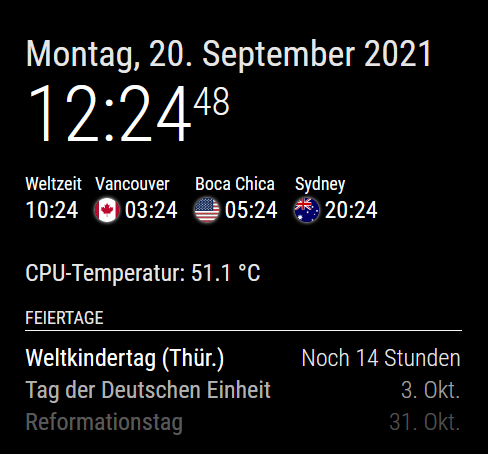
    @sdetweil The timeFormat is relative by default. I used getRelative: 0 without changes at the display. Also with timeFormat: “absolute” only the display changed since hours instead of remaining hours. But with an additional urgency: 0 it works. Thank you, Sam! Oh yes, an adjustment of the format was also necessary. The dateFormat was no longer applied. Before: { module: "calendar", header: "Feiertage", position: "top_left", config: { dateFormat: "D. MMM", displaySymbol: false, broadcastEvents: false, hideTime: true, fadePoint: 0.05, fetchInterval: 24 * 60 * 60 * 1000, // 1 day calendars: [ { maximumEntries: 3, url: "webcal://localhost:8080/modules/calendar/feiertage.ics" } ] } }, After changes: { module: "calendar", header: "Feiertage", position: "top_left", config: { dateFormat: "D. MMM", displaySymbol: false, broadcastEvents: false, hideTime: true, timeFormat: "absolute", getRelative: 0, urgency: 0, fullDayEventDateFormat: "D. MMM", nextDaysRelative: true, // shows Tomorrow and Today fadePoint: 0.05, fetchInterval: 24 * 60 * 60 * 1000, // 1 day calendars: [ { maximumEntries: 3, url: "webcal://localhost:8080/modules/calendar/feiertage.ics" } ] } }, I can well do without the “today”. [image: 1632138117446-mmm-default-calendar_2.png] Edit: The “Today” comes with the setting: nextDaysRelative: true.

  • smart home using MMM-TuyaSL

    Unsolved
    10
    0 Votes
    10 Posts
    2k Views
    arora1mayankA
    @raf smart_life is default but no data showing in both apps i tried both
  • MMM-ImageSlideshow not loading images

    Unsolved mmm-imageslideshow
    3
    0 Votes
    3 Posts
    965 Views
    B
    @sdetweil I have the one from the docs indeed. { module: 'MMM-ImageSlideshow', position: 'bottom_center', config: { imagePaths: ['modules/MMM-ImageSlideshow/exampleImages'], } }, or I also tried this to have two elements { module: 'MMM-ImageSlideshow', position: 'bottom_center', config: { imagePaths: ['modules/MMM-ImageSlideshow/exampleImages','modules/words/'], } },
  • Display start time and end time on meetings

    Unsolved
    7
    2
    0 Votes
    7 Posts
    1k Views
    S
    @pastormingle what calendar tool? appt and event are the same thing for me. what day is the 12am event ( that is midnight, right, as noon is 12pm) the others appear to be full day events… so time is not useful… (midnight to midnight)
  • Help! - Adding and Changing Modules - Newbe

    Unsolved
    14
    0 Votes
    14 Posts
    5k Views
    BKeyportB
    @sdetweil True. :)
  • Newsfeed Module Speed Help

    Unsolved
    5
    0 Votes
    5 Posts
    1k Views
    S
    @nealffischer there is a bug. fixed for next release October 1, published in the develop branch cd ~/MagicMirror rm package-lock.json git checkout develop npm install
  • MMM-AlexaControl Configuration Issue

    Solved
    6
    0 Votes
    6 Posts
    891 Views
    J
    @sdetweil The comma fixed it! Thanks! I figured that it had to be something simple that I was overlooking.
  • MagicMirror isn't publishing 'user_presence' on start up?

    Unsolved
    17
    0 Votes
    17 Posts
    5k Views
    S
    @fribse notifications don’t have to have a payload I think the source could be null too
  • Change Pages with NumPad

    Unsolved
    22
    0 Votes
    22 Posts
    5k Views
    DrKineticPieD
    @sdetweil I have now also decided to do it differently, unfortunately it does not work :D I have a python script: import requests import keyboard keyboard.add_hotkey("shift+t", lambda: requests.get('http://127.0.0.1:9000/some/endpoint')) keyboard.wait() Then magicmirror is started via nohup… However, the script does not work