MagicMirror Forum
    • Recent
    • Tags
    • Unsolved
    • Solved
    • MagicMirror² Repository
    • Documentation
    • 3rd-Party-Modules
    • Donate
    • Discord
    • Register
    • Login
    A New Chapter for MagicMirror: The Community Takes the Lead
    Read the statement by Michael Teeuw here.

    MM startup problem after update

    Scheduled Pinned Locked Moved Unsolved Requests
    42 Posts 3 Posters 7.0k Views 4 Watching
    Loading More Posts
    • Oldest to Newest
    • Newest to Oldest
    • Most Votes
    Reply
    • Reply as topic
    Log in to reply
    This topic has been deleted. Only users with topic management privileges can see it.
    • M Offline
      manu85340 @BKeyport
      last edited by

      @BKeyport No I didn’t have a black screen, I ran the script I didn’t get an error message I updated about 2 hours ago, I updated again the update an hour ago but MM still does not want to start I don’t understand why thank you for your help

      S 1 Reply Last reply Reply Quote 0
      • S Offline
        sdetweil @manu85340
        last edited by sdetweil

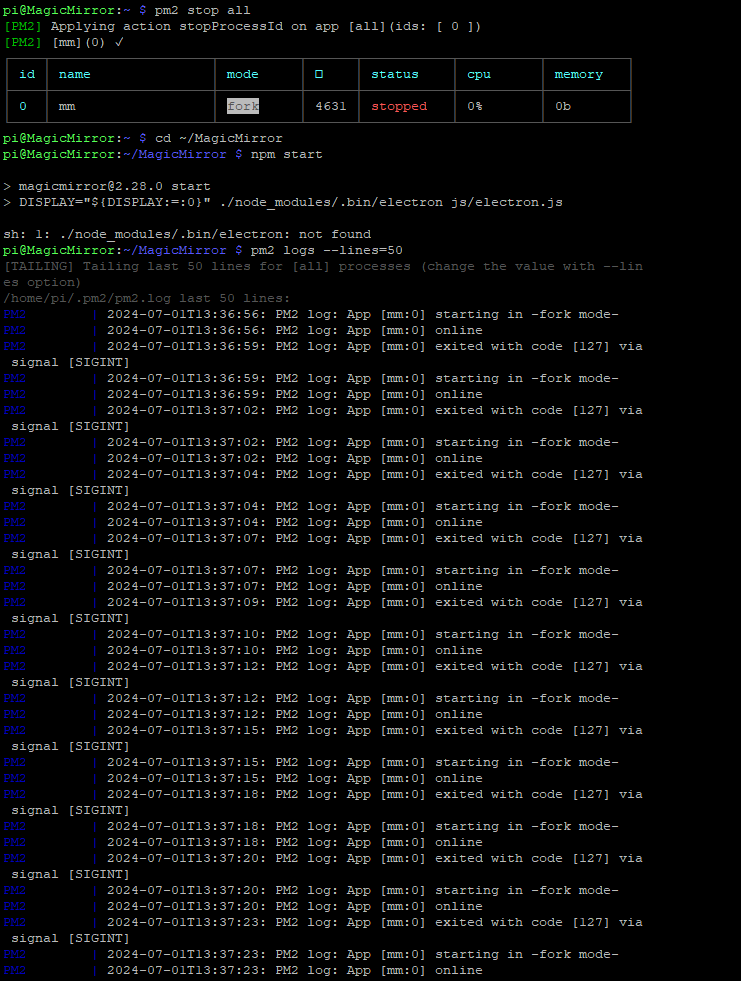
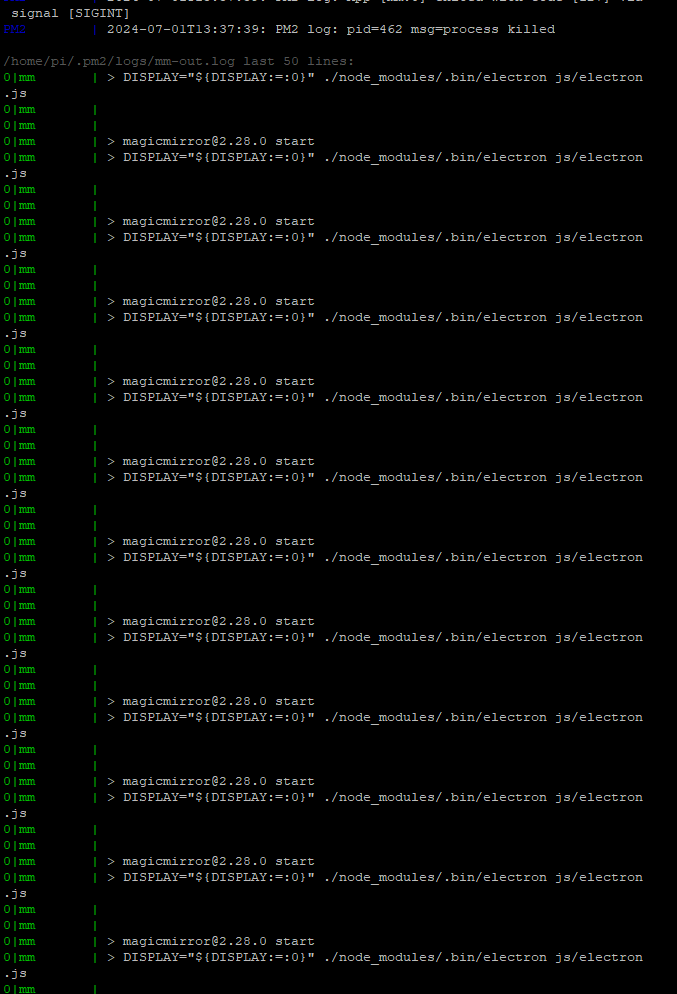
        @manu85340 logs

        pm2 stop all
        cd ~/MagicMirror
        npm start

        pm2 logs --lines=50
        also might tell us

        I’ve seen some troubles w pm2 lately not on pi os, but maybe here too now

        Sam

        How to add modules

        learning how to use browser developers window for css changes

        S M 2 Replies Last reply Reply Quote 0
        • S Offline
          sdetweil @sdetweil
          last edited by

          @manu85340 also try this

          sudo npm install -g pm2@latest
          pm2 update
          sudo reboot
          

          Sam

          How to add modules

          learning how to use browser developers window for css changes

          M 1 Reply Last reply Reply Quote 0
          • M Offline
            manu85340 @sdetweil
            last edited by

            @sdetweil Hi Stan, I’m happy to read you (every time I have problems :-)) here are the screenshots of what you asked me to do
            feefc355-6708-4a00-9e09-fb6a8193190f-image.png

            d39f2b3a-d1d6-48a9-9799-c0f056ab2c90-image.png

            a6c5aac9-49a6-4070-b2b2-203f145196b3-image.png

            S 1 Reply Last reply Reply Quote 0
            • S Offline
              sdetweil @manu85340
              last edited by

              @manu85340 fun

              try this

              pm2 stop all
              cd ~/MagicMirror 
              npm install electron@31.1.0
              

              then npm start

              Sam

              How to add modules

              learning how to use browser developers window for css changes

              M 1 Reply Last reply Reply Quote 0
              • M Offline
                manu85340 @sdetweil
                last edited by

                @sdetweil I’m stuck at this level

                ede37768-d1b5-40d2-81b2-660908f6d972-image.png

                1 Reply Last reply Reply Quote 0
                • M Offline
                  manu85340 @sdetweil
                  last edited by

                  @sdetweil
                  e4257226-bac9-4485-b1b7-79792b44285f-image.png

                  S 1 Reply Last reply Reply Quote 0
                  • S Offline
                    sdetweil @manu85340
                    last edited by

                    @manu85340 but what about npm start??

                    Sam

                    How to add modules

                    learning how to use browser developers window for css changes

                    M 1 Reply Last reply Reply Quote 0
                    • M Offline
                      manu85340 @sdetweil
                      last edited by

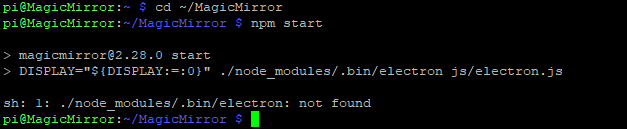
                      @sdetweil I get this message when I run npm start
                      e28d7653-56ef-4876-b09f-c23b82b0a2dc-image.png

                      S 1 Reply Last reply Reply Quote 0
                      • S Offline
                        sdetweil @manu85340
                        last edited by

                        @manu85340 ok, show output of
                        uname -a

                        Sam

                        How to add modules

                        learning how to use browser developers window for css changes

                        M 1 Reply Last reply Reply Quote 0
                        • M Offline
                          manu85340 @sdetweil
                          last edited by

                          @sdetweil
                          f6825249-f06e-41ca-985e-90ab6123a47b-image.png

                          S 1 Reply Last reply Reply Quote 0
                          • S Offline
                            sdetweil @manu85340
                            last edited by sdetweil

                            @manu85340 did you do the electron install I provided?

                            if so can you do it again and show me the output?

                            if you do all this over ssh, then you have text you can copy/paste instead of pics. which are hard to read

                            Sam

                            How to add modules

                            learning how to use browser developers window for css changes

                            M 1 Reply Last reply Reply Quote 0
                            • M Offline
                              manu85340 @sdetweil
                              last edited by

                              @sdetweil ok sorry for the screenshots

                              pi@MagicMirror:~ $ pm2 stop all
                              [PM2] Applying action stopProcessId on app [all](ids: [ 0 ])
                              [PM2] [mm](0) ✓
                              ┌────┬────────────────────┬──────────┬──────┬───────────┬──────────┬──────────┐
                              │ id │ name               │ mode     │ ↺    │ status    │ cpu      │ memory   │
                              ├────┼────────────────────┼──────────┼──────┼───────────┼──────────┼──────────┤
                              │ 0  │ mm                 │ fork     │ 685  │ stopped   │ 0%       │ 0b       │
                              └────┴────────────────────┴──────────┴──────┴───────────┴──────────┴──────────┘
                              pi@MagicMirror:~ $ cd ~/MagicMirror
                              pi@MagicMirror:~/MagicMirror $ npm install electron@31.1.0
                              npm ERR! code EBADENGINE
                              npm ERR! engine Unsupported engine
                              npm ERR! engine Not compatible with your version of node/npm: magicmirror@2.28.0
                              npm ERR! notsup Not compatible with your version of node/npm: magicmirror@2.28.0
                              npm ERR! notsup Required: {"node":">=20"}
                              npm ERR! notsup Actual:   {"npm":"9.8.1","node":"v18.18.0"}
                              
                              npm ERR! A complete log of this run can be found in: /home/pi/.npm/_logs/2024-07                                                                                                                                                             -01T13_05_28_653Z-debug-0.log
                              pi@MagicMirror:~/MagicMirror $
                              
                              S 1 Reply Last reply Reply Quote 0
                              • S Offline
                                sdetweil @manu85340
                                last edited by sdetweil

                                @manu85340 ok, upgrade didn’t upgrade nodejs…

                                Sam

                                How to add modules

                                learning how to use browser developers window for css changes

                                S 1 Reply Last reply Reply Quote 0
                                • S Offline
                                  sdetweil @sdetweil
                                  last edited by

                                  @manu85340 also show output of

                                  lsb_release -a

                                  bet it shows buster

                                  Sam

                                  How to add modules

                                  learning how to use browser developers window for css changes

                                  M 2 Replies Last reply Reply Quote 0
                                  • M Offline
                                    manu85340 @sdetweil
                                    last edited by

                                    @sdetweil

                                    pi@MagicMirror:~ $ lsb_release -a
                                    No LSB modules are available.
                                    Distributor ID: Raspbian
                                    Description:    Raspbian GNU/Linux 10 (buster)
                                    Release:        10
                                    Codename:       buster
                                    pi@MagicMirror:~ $
                                    
                                    S 1 Reply Last reply Reply Quote 1
                                    • M Offline
                                      manu85340 @sdetweil
                                      last edited by

                                      @sdetweil do you need installers/update.log by email?

                                      1 Reply Last reply Reply Quote 0
                                      • S Offline
                                        sdetweil @manu85340
                                        last edited by

                                        @manu85340 ok. script forces node 18 on buster. hang on. I’ll debug

                                        could u give me output of command n
                                        it might say unknown
                                        or give a list

                                        Sam

                                        How to add modules

                                        learning how to use browser developers window for css changes

                                        M 1 Reply Last reply Reply Quote 0
                                        • M Offline
                                          manu85340 @sdetweil
                                          last edited by

                                          @sdetweil I typed “n” and there is nothing

                                          S 1 Reply Last reply Reply Quote 0
                                          • S Offline
                                            sdetweil @manu85340
                                            last edited by

                                            @manu85340 ok,
                                            do

                                            sudo npm I-g n
                                            sudo n 20
                                            

                                            then node -v

                                            Sam

                                            How to add modules

                                            learning how to use browser developers window for css changes

                                            M 1 Reply Last reply Reply Quote 0

                                            Hello! It looks like you're interested in this conversation, but you don't have an account yet.

                                            Getting fed up of having to scroll through the same posts each visit? When you register for an account, you'll always come back to exactly where you were before, and choose to be notified of new replies (either via email, or push notification). You'll also be able to save bookmarks and upvote posts to show your appreciation to other community members.

                                            With your input, this post could be even better 💗

                                            Register Login

                                            • 1
                                            • 2
                                            • 3
                                            • 1 / 3
                                            • First post
                                              Last post
                                            Enjoying MagicMirror? Please consider a donation!
                                            MagicMirror created by Michael Teeuw.
                                            Forum managed by Sam, technical setup by Karsten.
                                            This forum is using NodeBB as its core | Contributors
                                            Contact | Privacy Policy