MagicMirror Forum
    • Recent
    • Tags
    • Unsolved
    • Solved
    • MagicMirror² Repository
    • Documentation
    • 3rd-Party-Modules
    • Donate
    • Discord
    • Register
    • Login
    A New Chapter for MagicMirror: The Community Takes the Lead
    Read the statement by Michael Teeuw here.

    PIR sensor behind glass?

    Scheduled Pinned Locked Moved Hardware
    65 Posts 16 Posters 107.8k Views 19 Watching
    Loading More Posts
    • Oldest to Newest
    • Newest to Oldest
    • Most Votes
    Reply
    • Reply as topic
    Log in to reply
    This topic has been deleted. Only users with topic management privileges can see it.
    • ? Offline
      A Former User
      last edited by

      hmm… some questions if you would not mind.

      Ive just ordered 2 sensors .

      I need to know what plugs in to what to feed in to the chips (im guessing the sensors i need? please explain what i am missing… and what connects in to the Raspberry PI.

      Also note the second i want to have outside the home and set up to a facial recog module, and comand it to open the door via face and voice confirm if possibl.

      And how this connects to the a

      D 1 Reply Last reply Reply Quote 0
      • A Offline
        amcolash
        last edited by

        If you want a very simple solution (independent of MM completely), check out this script. This is what I am using, it is a very simple python script that reads the value of a PIR and then selectively turns on / off the monitor. You will need to change things up a bit as I wrote it for a C.H.I.P. but the GPIO library is the same.

        cowboysdudeC 1 Reply Last reply Reply Quote 1
        • D Offline
          dmcinnes Module Developer @Guest
          last edited by

          @wjdw87 cool! The connection is basicly the same as a PIR sensor. It has three wires, ground, vcc, and data which goes high when it senses motion. I plugged it into the PI’s 3.3v, ground and I believe gpio 22 (whichever is the default for the module).
          Since the wire comes out as a three pin JST I split it into individual header connectors because all the pins are not next to one another on the PI.

          Hope that helps!

          1 Reply Last reply Reply Quote 0
          • R Offline
            rvdgeer
            last edited by

            Can anyone of you please share a picture of how you’ve connected the microwave sensor to the Pi pins?
            I know this sounds dumb, but I can’t seem to find out what pin connects to what, as I don’t know what pin is ground and what pins is (data) out…

            Thanks!

            cowboysdudeC 1 Reply Last reply Reply Quote 0
            • cowboysdudeC Offline
              cowboysdude Module Developer @amcolash
              last edited by cowboysdude

              @amcolash said in PIR sensor behind glass?:

              If you want a very simple solution (independent of MM completely), check out this script. This is what I am using, it is a very simple python script that reads the value of a PIR and then selectively turns on / off the monitor. You will need to change things up a bit as I wrote it for a C.H.I.P. but the GPIO library is the same.

              VERY good choice! Mine also works independent… but I really like your idea!

              1 Reply Last reply Reply Quote 0
              • N Offline
                Nususu @cowboysdude
                last edited by

                @cowboysdude I recently picked up these microwave sensor modules to use in conjunction with the code you posted for PIR Sensor. I’m pretty new to all this, and I can’t get any function out of the sensor. Do you have some advice on how to troubleshoot this? It could be an error on my part in implementing the code, wiring it incorrectly, or something else, but I’m just not sure how to figure out what the issue is.

                cowboysdudeC 1 Reply Last reply Reply Quote 0
                • cowboysdudeC Offline
                  cowboysdude Module Developer @Nususu
                  last edited by

                  @Nususu I would go online and lookup ‘wiring pir sensor raspberry pi’ there are TONS of things out there. Your issue could be one of any or a combination of things… I did that using a PIR sensor so I have no idea how it would act with microwave sensors… good I’m hoping because I want to get some… BUT let me know if you need anymore help, not that I helped you now but I will do what I can!

                  N 1 Reply Last reply Reply Quote 0
                  • cowboysdudeC Offline
                    cowboysdude Module Developer @rvdgeer
                    last edited by

                    @rvdgeer and @Nususu

                    Try here!

                    https://www.pubnub.com/blog/2015-06-16-building-a-raspberry-pi-motion-sensor-with-realtime-alerts/

                    N 1 Reply Last reply Reply Quote 0
                    • N Offline
                      Nususu @cowboysdude
                      last edited by

                      @cowboysdude thanks, I’ll check that out and let you know how it goes!

                      1 Reply Last reply Reply Quote 1
                      • N Offline
                        Nususu @cowboysdude
                        last edited by

                        @cowboysdude I got it working using this code:

                        https://github.com/paviro/MMM-PIR-Sensor

                        With this code, I’ve got a problem where the screen only stays on for about 1 second after motion detection. Now I need to modify the code somehow to allow me to tell the mirror to stay on for a set amount of time after detecting motion, i.e. only go dark once no motion has been detected for x seconds. Problem is I don’t know where to start with that. Will let you know if I figure anything out. Any ideas?

                        cowboysdudeC 1 Reply Last reply Reply Quote 1
                        • cowboysdudeC Offline
                          cowboysdude Module Developer @Nususu
                          last edited by yawns

                          @Nususu try adding the powerSaving to your config…

                          {
                                  module: 'MMM-PIR-Sensor',
                                  config: {
                                      powerSaving: false
                                  }
                              }
                          

                          See what that does :) PLUS there’s also an adjustment on your PIR sensor itself… which one and I don’t know … do a google search for adjustments :)

                          1 Reply Last reply Reply Quote 0
                          • A Offline
                            Aly
                            last edited by

                            @Nususu - same here

                            Perhaps, with a resistor?

                            N 1 Reply Last reply Reply Quote 0
                            • N Offline
                              Nususu @Aly
                              last edited by

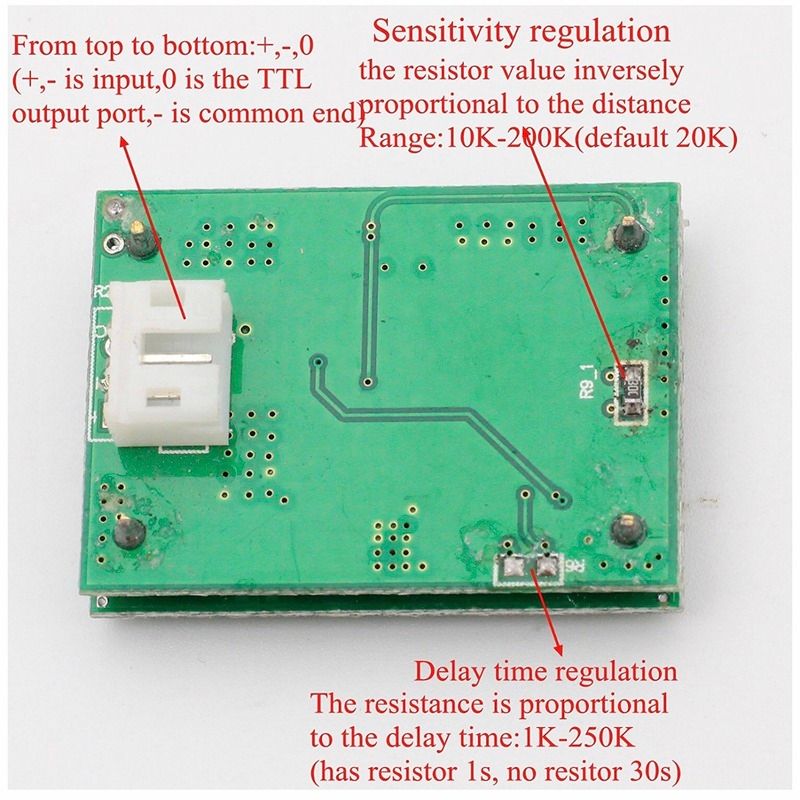
                              @Aly I found documentation for the sensor that a resistor would indeed solve the issue here. I can set the delay up to 200 seconds with a 250k resistor, so I ordered one and will report back how it went.

                              1 Reply Last reply Reply Quote 0
                              • A Offline
                                Aly
                                last edited by

                                @Nususu - great !!

                                Can you post the doc. ?

                                N 1 Reply Last reply Reply Quote 0
                                • N Offline
                                  Nususu @Aly
                                  last edited by Nususu

                                  @Aly I misspoke, shouldn’t have called it documentation. Rather, it was this picture:alt text

                                  Which appears to be a translation from the Chinese original picture.

                                  A 1 Reply Last reply Reply Quote 1
                                  • A Offline
                                    Aly @Nususu
                                    last edited by

                                    @Nususu

                                    so if we remove the R6 resistor the delay would be 30s ?

                                    N 1 Reply Last reply Reply Quote 0
                                    • N Offline
                                      Nususu @Aly
                                      last edited by Nususu

                                      @Aly yes, it would appear so. I just bought a soldering iron and resistors which arrive tomorrow so I’ll perform a couple tests: 1. Remove r6 and verify that it’s 30s. 2. Add 250k resistor and test duration.

                                      A 1 Reply Last reply Reply Quote 0
                                      • A Offline
                                        Aly @Nususu
                                        last edited by

                                        @Nususu

                                        Ok - thanks for your help! :)

                                        I can/will test it on coming monday.

                                        N 1 Reply Last reply Reply Quote 0
                                        • N Offline
                                          Nususu @Aly
                                          last edited by

                                          @Aly I tested this today - I put a 250k resistor on R6 and it increased the timer to approximately 25 seconds. I forgot to test without a resistor. Let me know if you end up testing that.

                                          1 Reply Last reply Reply Quote 0
                                          • P Offline
                                            PaulB
                                            last edited by

                                            @Comunnity

                                            If it comes to the thickness of the mirror: Would you either recommend webcams, etc, behind the mirror or as I thought create a CAD-print plan for a 3 D-printer to hide the camera behind a… actually I have no clue how to call it … a “string” of maybe a lamp?

                                            Do you guys have recommendations or Best Practices?

                                            I saw some awesome bathroom project in this forum but no one 3D printed his lamp or LED. My roommate has a 3D printer so I am thinking about to integrated a camera in one part of an LED lamp which is on top of the mirror.

                                            Maybe someone tried this idea before me. Hope there are some Best Practices on how to do it.

                                            As always I would like to thank you for your awesome feedback guys.

                                            Kind regard from Hamburg, Germany,

                                            Paul

                                            yawnsY 1 Reply Last reply Reply Quote 0

                                            Hello! It looks like you're interested in this conversation, but you don't have an account yet.

                                            Getting fed up of having to scroll through the same posts each visit? When you register for an account, you'll always come back to exactly where you were before, and choose to be notified of new replies (either via email, or push notification). You'll also be able to save bookmarks and upvote posts to show your appreciation to other community members.

                                            With your input, this post could be even better 💗

                                            Register Login

                                            • 1
                                            • 2
                                            • 3
                                            • 4
                                            • 3 / 4
                                            • First post
                                              Last post
                                            Enjoying MagicMirror? Please consider a donation!
                                            MagicMirror created by Michael Teeuw.
                                            Forum managed by Sam, technical setup by Karsten.
                                            This forum is using NodeBB as its core | Contributors
                                            Contact | Privacy Policy