MagicMirror Forum
    • Recent
    • Tags
    • Unsolved
    • Solved
    • MagicMirror² Repository
    • Documentation
    • 3rd-Party-Modules
    • Donate
    • Discord
    • Register
    • Login
    A New Chapter for MagicMirror: The Community Takes the Lead
    Read the statement by Michael Teeuw here.

    MMM-Chores - Manage and keep track of your household Chores

    Scheduled Pinned Locked Moved Utilities
    104 Posts 19 Posters 28.5k Views 20 Watching
    Loading More Posts
    • Oldest to Newest
    • Newest to Oldest
    • Most Votes
    Reply
    • Reply as topic
    Log in to reply
    This topic has been deleted. Only users with topic management privileges can see it.
    • KristjanESPERANTOK Offline
      KristjanESPERANTO Module Developer @PierreGode
      last edited by

      @PierreGode said in MMM-Chores - Manage and keep track of your household Chores:

      What i found hard is that the mouse is invisible on magic mirror

      MMM-Cursor can solve that 🙂

      1 Reply Last reply Reply Quote 1
      • S Offline
        sdetweil @PierreGode
        last edited by sdetweil

        @PierreGode just change it to not hidden using custom.css

        html {
        cursor:default;
        }
        

        or use unclutter (have apt install it) will only be visible when you move it

        it is hidden on purpose(in msin.css), an output only panel couldn’t use it

        Sam

        How to add modules

        learning how to use browser developers window for css changes

        KristjanESPERANTOK 1 Reply Last reply Reply Quote 0
        • KristjanESPERANTOK Offline
          KristjanESPERANTO Module Developer @sdetweil
          last edited by

          @sdetweil said in MMM-Chores - Manage and keep track of your household Chores:

          or use unclutter (have apt install it) will only be visible when you move it

          I think unclutter doesn’t work on modern systems (Wayland).

          S 1 Reply Last reply Reply Quote 0
          • S Offline
            sdetweil @KristjanESPERANTO
            last edited by

            @KristjanESPERANTO true
            similar options
            https://bist.be/posts/unclutterwayland/

            Sam

            How to add modules

            learning how to use browser developers window for css changes

            1 Reply Last reply Reply Quote 0
            • R Offline
              redbeardedninja @PierreGode
              last edited by

              @PierreGode thanks so much! The new update works like a charm. Now for me to work on the custom css to make the module a bit larger…

              PierreGodeP 2 Replies Last reply Reply Quote 1
              • J Offline
                JohnGalt @PierreGode
                last edited by

                @PierreGode – Thanks for the update on the data being available to AI. Since I don’t want my data available, I will just delete the module folder and remove it from the config file.

                Can you confirm that data is NOT stored anywhere outside the module folder? Thanks in advance.

                PierreGodeP 1 Reply Last reply Reply Quote 0
                • PierreGodeP Offline
                  PierreGode Module Developer @redbeardedninja
                  last edited by

                  @redbeardedninja
                  I will add that a little bit later so sizes an be modified from config.js

                  1 Reply Last reply Reply Quote 0
                  • PierreGodeP Offline
                    PierreGode Module Developer @JohnGalt
                    last edited by

                    @JohnGalt

                    No need to set your device on fire.
                    The data is only stored in the module folder /MMM-Chores/ in data.json and will NOT be shared with anything unless you add the openapi token.

                    No openai api token = no data leaving your device.

                    If you want to use ai with api token

                    1. ONLY content of modules/MMM-Chores/data.json is shared.

                    2. data.json is my file were I store the content of admin page, for security I convert users to ID’s

                    3. NOTHING gets sent unless YOU press the AI genrste button.

                    J 1 Reply Last reply Reply Quote 0
                    • J Offline
                      JohnGalt @PierreGode
                      last edited by

                      @PierreGode – OK, good to know. Thanks for the quick response.

                      PierreGodeP 2 Replies Last reply Reply Quote 0
                      • PierreGodeP Offline
                        PierreGode Module Developer @JohnGalt
                        last edited by PierreGode

                        @JohnGalt
                        I will add an option in config.js to disable AI from being configurable and hide the AI button

                        1 Reply Last reply Reply Quote 0
                        • PierreGodeP Offline
                          PierreGode Module Developer @redbeardedninja
                          last edited by

                          @redbeardedninja
                          Hi! You can now use in config.js
                          textMirrorSize: “small”, // small, medium or large

                          1 Reply Last reply Reply Quote 1
                          • PierreGodeP Offline
                            PierreGode Module Developer @JohnGalt
                            last edited by

                            @JohnGalt
                            Hi, you can now disable AI in config.js
                            useAI: false, // hide AI features when false

                            1 Reply Last reply Reply Quote 0
                            • S Offline
                              sarote
                              last edited by

                              Hi @PierreGode ! Thank for your job, one of the best modules for MagicMirror. Is it possible to show analtitycs graphs on the mirror screen?if not, are you planning to implement it?
                              Thanks

                              PierreGodeP 2 Replies Last reply Reply Quote 0
                              • PierreGodeP Offline
                                PierreGode Module Developer @sarote
                                last edited by

                                @sarote
                                Hi! No it it’s not possible…
                                But I will plan to implement it upon your request.

                                I will let you now. If you wish to track the progress please create a ticket ”issue” in GitHub with the request.
                                //Pierre

                                S 1 Reply Last reply Reply Quote 0
                                • S Offline
                                  sarote @PierreGode
                                  last edited by

                                  @PierreGode Great! i will do,thanks for your job

                                  1 Reply Last reply Reply Quote 0
                                  • M Offline
                                    mischag @PierreGode
                                    last edited by

                                    @PierreGode
                                    Hi there,
                                    I’m loving the idea behind this module.
                                    But, I can’t work out how to open the admin interface??
                                    I’ve tried the ip address that I’m using to remote into the raspberry pi, but it’s not working? I’m trying using tigervnc on a mac, do I need to physically do it on the raspberry pi? I thought I could do it whilst on the same network?
                                    Any ideas at all?
                                    Just keeps saying can’t connect to the server…
                                    Thanks heaps,

                                    Mischa

                                    J PierreGodeP 2 Replies Last reply Reply Quote 0
                                    • J Offline
                                      JohnGalt @mischag
                                      last edited by

                                      @mischag – Are you using the port described in the documentation [5003]?

                                      See:

                                      Admin Interface
                                      
                                      Go to http://yourmirrorIP:5003/ #page will be reachable within same network.
                                      
                                      Caution
                                      
                                      DO NOT expose application with portforward
                                      
                                      M 1 Reply Last reply Reply Quote 0
                                      • M Offline
                                        mischag @JohnGalt
                                        last edited by

                                        @JohnGalt
                                        Hi,
                                        Yeah, I am. But I’m wondering if it’s because I am remoting in on a different port, that I can’t then access that port? I’ve checked the documentation heaps and can’t work it out. I even tried opening the html admin file within the ‘public’ folder, and I can open it but I can’t edit it. I can write the names and click on dates and everything, but when I press ‘add’ nothing happens. I’ve updated and it says it’s all up to date.
                                        Thanks

                                        plainbrokeP 1 Reply Last reply Reply Quote 0
                                        • plainbrokeP Offline
                                          plainbroke @mischag
                                          last edited by plainbroke

                                          @mischag
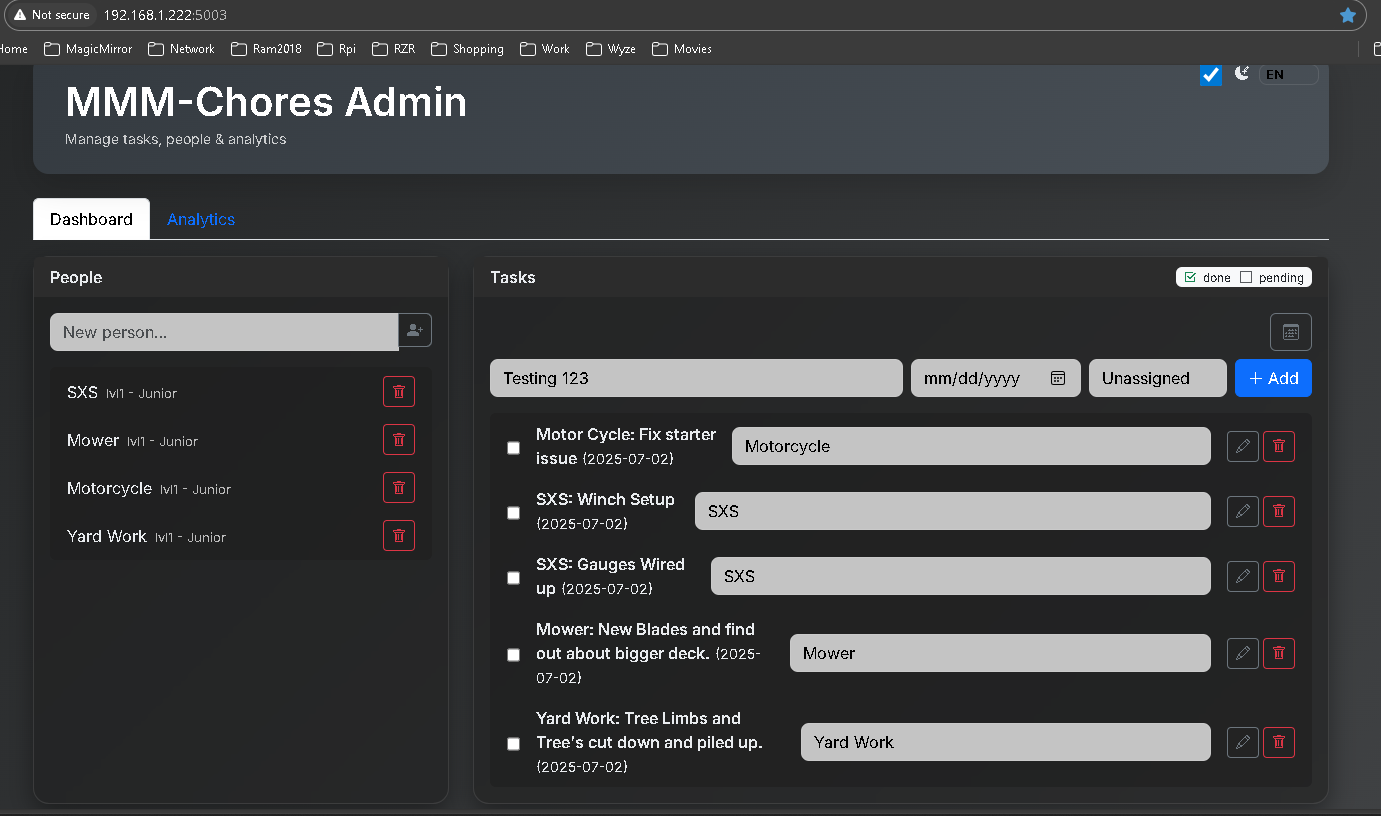
                                          This is what I get when I login to MMMChores admin
                                          http://192.168.1.223:5003
                                          https doesn’t work for me. I don’t have it setup to work in my config.js.
                                          Are you trying to reach it from work or from home and it is in another building???
                                          MMM_Chores.png

                                          Slow learner. But trying anyways.
                                          MM is on Raspberry Pi 4B w/8gb ram loaded on a 128gb nvme drive.
                                          Running Trixie and the latest MM version.

                                          M 1 Reply Last reply Reply Quote 0
                                          • M Offline
                                            mischag @plainbroke
                                            last edited by

                                            @plainbroke
                                            Yeah ok. I might have to try another way… but it’s definitely not working at the moment for me…
                                            The port doesn’t bring anything up for me other than the page saying it does not exist.
                                            I was hoping not to have it setup through the config folder but it was the only way I could find the admin interface. But then I couldn’t add people or tasks to it…


                                            plainbrokeP S 2 Replies Last reply Reply Quote 0

                                            Hello! It looks like you're interested in this conversation, but you don't have an account yet.

                                            Getting fed up of having to scroll through the same posts each visit? When you register for an account, you'll always come back to exactly where you were before, and choose to be notified of new replies (either via email, or push notification). You'll also be able to save bookmarks and upvote posts to show your appreciation to other community members.

                                            With your input, this post could be even better 💗

                                            Register Login

                                            • 1
                                            • 2
                                            • 3
                                            • 4
                                            • 5
                                            • 6
                                            • 2 / 6
                                            • First post
                                              Last post
                                            Enjoying MagicMirror? Please consider a donation!
                                            MagicMirror created by Michael Teeuw.
                                            Forum managed by Sam, technical setup by Karsten.
                                            This forum is using NodeBB as its core | Contributors
                                            Contact | Privacy Policy
