Read the statement by Michael Teeuw here.
Weatherunderground - currently - hourly - daily - configurable
-
@ostfilinchen Better now?
-
@RedNax yeah. Now it’s perfect. Great job!
-
-
@lolobyte He changed the size of the color icon. So the Module now looks good on the mirror. If the size isn’t good for your mirror, you can change it in your custom.css
-
-
@lolobyte yes. Just Do it. I’m happy now
-
@ostfilinchen Niiiiice!
@RedNax : Thank you. Good job. It looks now very good again.
-
I think I found a little bug… using coloricon: true, the main icon is in color, but not the small ones… and the first 3 row got no icons…
-
@PointPubMedia said in Weatherunderground - currently - hourly - daily - configurable:
I think I found a little bug… using coloricon: true, the main icon is in color, but not the small ones… and the first 3 row got no icons…
Oddly enough I’m here for the same reason LOL I was trying to figure out …
The main ‘icon’ is an actual img… the smaller ones are actual icons… so when you updated you got the actual images… the icons are standard and have to be ‘colorized’… soo…
Add this to your custom.css file and enjoy :).wi-sunrise { color: #ffd700; } .wi-sunset { color: #ffa500; } .wi-day-sunny { color: #ffff00; } .wi-night-showers { color: #55acee; } .wi-degrees { color: #415; } .wi-rain { color: #55acee; } .wi-showers { color: #55acee; } .wi-night-showers { color: #55acee; } .wi-night-alt-cloudy-windy { color: #aaa; } .wi-night-cloudy { color: #aaa; } .wi-cloudy { color: #aaa; } .wi-day-cloudy { color: #aaa; } .wi-cloudy { color: #aaa; } .wi-cloudy-windy { color: #aaa; } .wi-showers { color: #55acee; } .wi-thunderstorm { color: #ff00ff; } .wi-snow { color: #fff; } .wi-fog { color: #999; } .wi-night-clear { color: #fff; } .wi-night-rain { color: #55acee; } .wi-night-thunderstorm { color: #ff00ff; } .wi-night-snow { color: #fff; } .wi-sunrise { color: #ffd700; } .wi-sunset { color: #ffa500; } .wi-day-sunny { color: #ffff00; } .wi-night-showers { color: #55acee; } .wi-degrees { color: #415; } .wi-rain { color: #55acee; } .wi-showers { color: #55acee; } .wi-night-showers { color: #55acee; } .wi-night-alt-cloudy-windy { color: #aaa; } .wi-night-cloudy { color: #aaa; } .wi-cloudy { color: #aaa; } .wi-day-cloudy { color: #aaa; } .wi-cloudy { color: #aaa; } .wi-cloudy-windy { color: #aaa; } .wi-showers { color: #55acee; } .wi-thunderstorm { color: #ff00ff; } .wi-snow { color: #fff; } .wi-fog { color: #999; } .wi-night-clear { color: #fff; } .wi-night-rain { color: #55acee; } .wi-night-thunderstorm { color: #ff00ff; } .wi-night-snow { color: #fff; } -
Got the same issue…
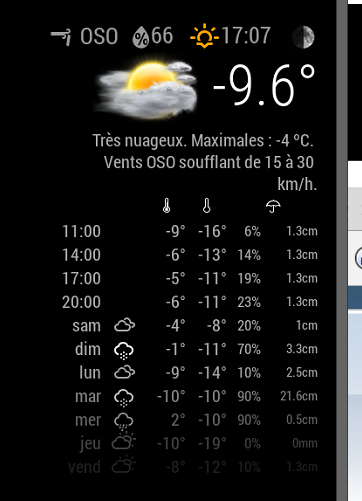
The first 4 got no icons…
-
Make a git pull and it will work
-
@ostfilinchen Already did my git pull this morning…
-
@ostfilinchen All that will do is download the upper image files… not the icons.
You have to add that your custom.css like in the example above.
The icons are pretty standard and used in, I think, every weather module here… they are icons outside the module and are not included…so you have to colorize them yourself. -
@cowboysdude no. If you Set the Parameter coloricon to true, all weather Icons shown colored. I have nothing Set in my custom.css. all colorsets Come from weatherunderground.css
-
-
Just pushed a new version which fixes all this. Give it a try!
-
All looks good. Thank you for your fast reaction.
-
@RedNax Thanks for the awesome module. I do have one question however…
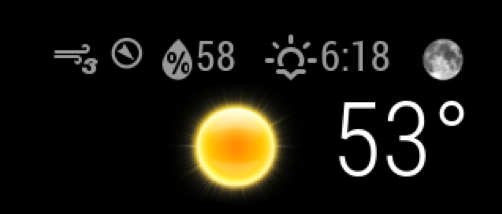
Is there a way to change the current Beaufort wind speed to mph?
-
-
This is a stunningly beautiful and informative module and the many config options must make it a favorite of anyone that uses it. I tip my hat to you.
With that, may I make a humble request regarding fctext? I love this option but it can change from 3 lines to as many as 7 lines. Would it be possible to limit, or set, the amount of lines displayed. Or, could the text decrease in size as more information needs to be displayed, taking up the same amount of space?





Hello! It looks like you're interested in this conversation, but you don't have an account yet.
Getting fed up of having to scroll through the same posts each visit? When you register for an account, you'll always come back to exactly where you were before, and choose to be notified of new replies (either via email, or push notification). You'll also be able to save bookmarks and upvote posts to show your appreciation to other community members.
With your input, this post could be even better 💗
Register Login