Read the statement by Michael Teeuw here.
MMM-NetworkScanner
-
@slametps Yes, at first the same thing happened to me.
This might seem obvious but did you change your config.js to ipAddress instead of macAddress?
-
@Mykle1 said in MMM-NetworkScanner:
@slametps Yes, at first the same thing happened to me.
This might seem obvious but did you change your config.js to ipAddress instead of macAddress?
I add new entries with ipAddress, but did not recognized. All displayed MAC (with showUnknown: true) already defined as entries with macAddress, but it said as Unknown devices.
-
Hi all
The updates last week seem to have introduced a few issues - sorry folks!
I’ve quashed one bug with MAC Address scans which you can
git pullfrom the repo to see if that helps, but there still appear to be a few others which need resolving.I am looking at it but please bear with me ;)
“Live as if you were to die tomorrow. Learn as if you were to live forever.” - Mahatma Gandhi
-
@ianperrin said in MMM-NetworkScanner:
I am looking at it but please bear with me
Shhhhh! Quiet! Genius at work!
I am completely serious. I think you are a brilliant young man.
Much success to you. :thumbsup_tone1:
-
@ianperrin
Yup good work on getting the updates…MAC is working again, but the entries are all duplicated. ;)
-
@pugsly same here -.-
-
@Speedy-one said in MMM-NetworkScanner:
@pugsly same here -.-
I freshly install rather than update the module, and working flawlessly.
-
@slametps Deleted the module and did a fresh install, still showing duplicate entries.
-
@pugsly said in MMM-NetworkScanner:
@slametps Deleted the module and did a fresh install, still showing duplicate entries.
Lucky me. Btw, had you installed v0.0.1?
-
@slametps Yes i did, and that one worked fine using MAC. I have actually reverted back to that one, so I don’t get the ‘last seen’ message anymore.
-
Any chance of an enhancement to scan outside the local network mask? i’m not sure if that is a config option in arp-scan that isn’t surfaced?
I have my MM on ethernet in one subnet, but want to scan for MAC addresses in another subnet (my Wifi). or at least a broader CIDR range
-
Does anyone have issues with the “occupied” and “vacant” part working? I tried to set it up and test it but i have had no luck. I want the mirror to turn off when i leave and turn back on when i return. I love this idea but need a little help configuring it to work.
My config is below:
{ module: 'MMM-NetworkScanner', position: 'top_right', header: "Network Scanner", config: { devices: [ { macAddress: "lower case", name: "B Phone", icon: "mobile"}, { macAddress: "lower case", name: "B Work Phone", icon: "mobile"}, { macAddress: "lower case", name: "B Work Laptop", icon: "laptop"}, ], showUnknown: false, showOffline: true, keepAlive: 300, updateInterval: 10, showLastSeen: true, residents: "B Phone", occupiedCMD: {notification: 'REMOTE_ACTION', payload: {action: 'MONITORON'}}, vacantCMD : {notification: 'REMOTE_ACTION', payload: {action: 'MONITOROFF'}}, } }, -
I am also getting duplicates as well. Any help on this?
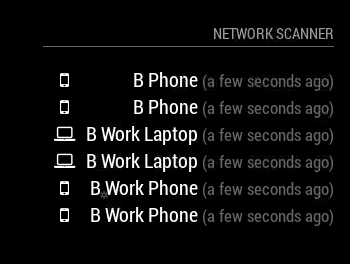
-
@bluedoors modify the js file to scan your subnets? If your subnets were 192.168.1.0/24 and 192.168.2.0/24 you could scan 192.168.1.0/23 to scan both subnets, right? Same gateway for both subnets?
-
@bminer1 said in MMM-NetworkScanner:
Does anyone have issues with the “occupied” and “vacant” part working?
Ah, nice: Is this doing, what I suspect it’s doing? ;)
occupiedCMD: Notification to be sent when a resident returnes home e.g. {notification: ‘REMOTE_ACTION’, payload: {action: ‘MONITORON’}} would turn the mirror on when a resedent returnes home.What does “returnes home” mean: Changing from “offline” to “online”: trigger the action (vice versa for vacantCMD). It does only trigger once? Would it be possible to call an external URL with this? - and then: does it trigger if any resident leaves or can I specify which resident leaves?
-
@binderth I tried testing it by turning my WiFi off on my phone, waiting a few minutes to see if it turns off and it doesn’t turn off. I even physically left the house for dinner and came home to it still on. I love the feature and would do almost anything to get it to work. I’m new to all this stuff so i don’t have the skill to debug on my own.
-
@bminer1 yes, this is nice! would be killer, if it were to be configured per device! ;) it seems from the way in the config, it was intended to fire regardless of which device leaves or comes up again…
-
@binderth When i read through the Read ME, it says that the Residence determines when to turn on and off. I want this to work for me so then i can put my wifes phone in there as a resident and that way, when both of us leave, it shuts off. when one of us is home, it stays on.
-
@bminer1 ah. ok, I get it (didn’t have “residents” in my config either). So, this one is realy “every resident is offline”: i do something. “At least one resident is online again”: i do something. So this would then be a generic presence detection.
Would be cool, if it could also be bound to specific residents. So I can have Actions regarding on them also.
-
@binderth I think you are on a right track. We just need to debug the “simple” task of turning on and off and then the fun can begin with other stuff.





Hello! It looks like you're interested in this conversation, but you don't have an account yet.
Getting fed up of having to scroll through the same posts each visit? When you register for an account, you'll always come back to exactly where you were before, and choose to be notified of new replies (either via email, or push notification). You'll also be able to save bookmarks and upvote posts to show your appreciation to other community members.
With your input, this post could be even better 💗
Register Login